

Configuration
Open Add-ons → Manage add-ons → Serial Numbers & Warranty Tracker → Settings. On CS-Cart Ultimate the settings can differ per storefront.
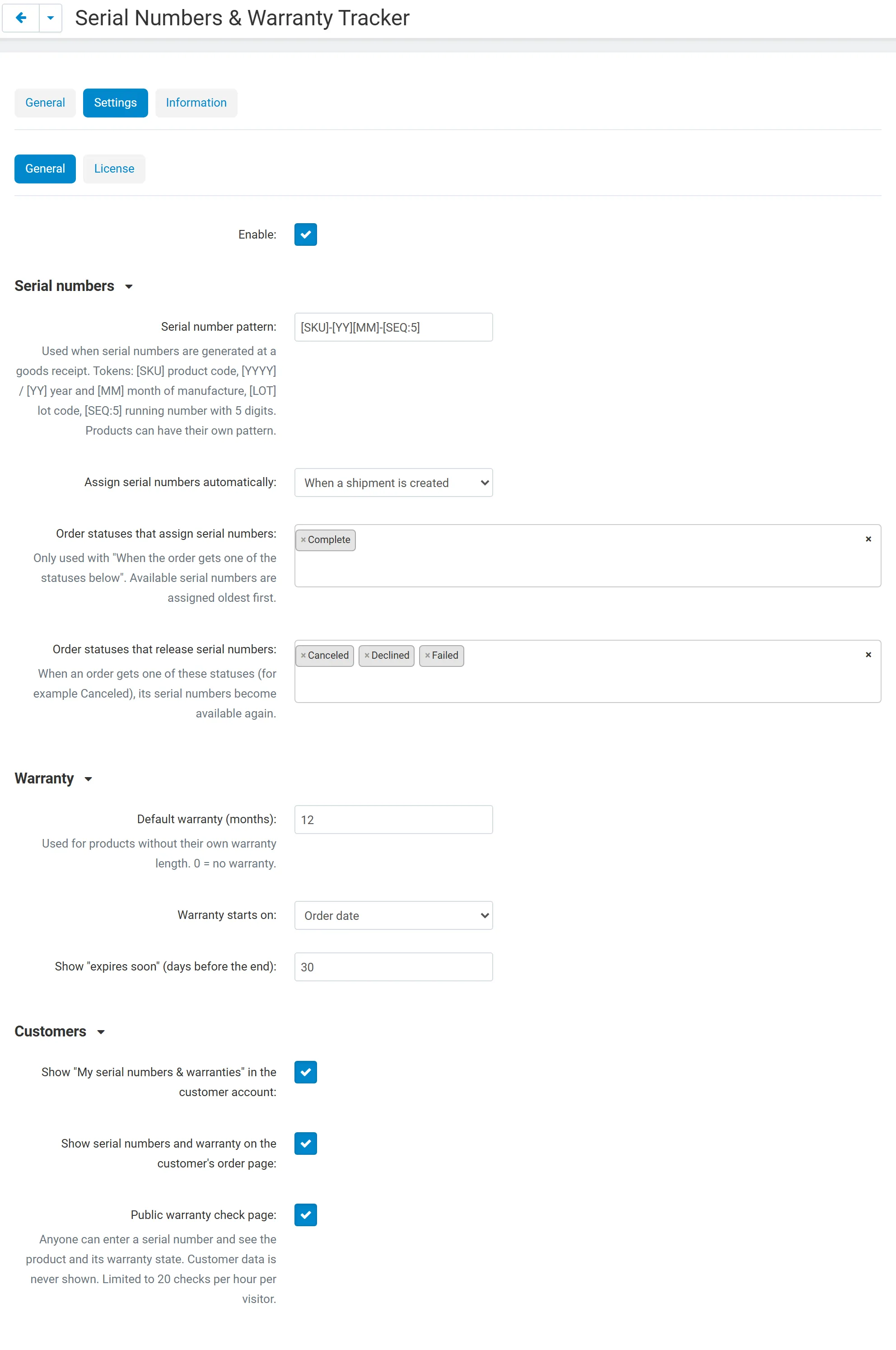
General
Section titled “General”| Setting | Default | What it does |
|---|---|---|
| Enable | On | Switches the add-on on and off without uninstalling it. |
Serial numbers
Section titled “Serial numbers”| Setting | Default | What it does |
|---|---|---|
| Serial number pattern | [SKU]-[YY][MM]-[SEQ:5] |
Pattern for generated serial numbers. Tokens: [SKU] product code, [YYYY] / [YY] year and [MM] month of manufacture (of the receipt date when no manufacture month is entered), [LOT] lot code, [SEQ:n] running number with n digits (1–12). Exactly one [SEQ] is required. Each product can have its own pattern. |
| Assign serial numbers automatically | When a shipment is created | When a shipment is created: the shipped units of each tracked line get serial numbers in stock, oldest first. When the order gets one of the statuses below: all units of the order get serial numbers when the order reaches a chosen status. No: only by hand or by scanning on the order page. |
| Order statuses that assign serial numbers | Complete | Used with the status option above. |
| Order statuses that release serial numbers | Canceled, Declined, Failed | When an order gets one of these statuses, its serial numbers go back to stock. Deleted orders always release their serial numbers. |
The running number continues per pattern: after UV27-4K-2609-00006 the next receipt of the same month starts at 00007. Numbers that already exist (for example scanned ones) are skipped.
Warranty
Section titled “Warranty”| Setting | Default | What it does |
|---|---|---|
| Default warranty (months) | 12 | For products without their own warranty length. 0 = no warranty. |
| Warranty starts on | Order date | Order date, Date the serial number is assigned (dispatch) or Manufacture month (the first day of the month of the goods receipt). Each product can override it. |
| Show “expires soon” (days before the end) | 30 | Units whose warranty ends within this many days are flagged “ends soon” in the register and in the customer’s account. |
The warranty is calculated when a serial number is linked to an order and stored with the unit. 12 months from 15 January end on 14 January of the next year. You can correct the start and end of any unit on its page.
Customers
Section titled “Customers”| Setting | Default | What it does |
|---|---|---|
| Show “My serial numbers & warranties” in the customer account | On | Adds the page and a link in the account menu. |
| Show serial numbers and warranty on the customer’s order page | On | Lists the serial numbers and warranty under each order line. |
| Public warranty check page | On | Page index.php?dispatch=kv_serial_warranty.check: enter a serial number, see the product and its warranty state. Never shows customer data. Limited to 20 checks per hour per visitor. Add it to a menu or the footer with Design → Menus. |
Vendors
Section titled “Vendors”Multi-Vendor only. Vendors manage the serial numbers of their products (on by default) gives vendors the serial number pages in the vendor panel. Vendors see and change only the serial numbers, receipts and claims of their own products and orders; serial numbers are unique per vendor.
Product settings
Section titled “Product settings”Open a product and the Serial numbers & warranty tab:
| Field | What it does |
|---|---|
| Serial numbers | Track a serial number for every unit of this product. |
| Warranty (months) | Empty = the default. 0 = no warranty. |
| Warranty starts on | Default, order date, dispatch date or manufacture month. |
| Pattern | Own pattern for this product (empty = the default). The tab shows how the next serial number looks. |
The tab also shows the units in stock, sold and ending soon, with a Receive stock button.
License
Section titled “License”The add-on checks its license key for your store’s domain once a day from the admin panel (never from the storefront). Development hosts such as localhost always work.
| Key | Enter it in Settings → License, or use the CS-Cart Marketplace license number in Add-ons → Manage add-ons. |
| Check now | The Check now button on the License tab repeats the check at once. |
| Server not reachable | The add-on keeps working during a grace period. |
Without a valid license: customers no longer see serial numbers and warranties in their account, on order pages or on the warranty check page, serial numbers are no longer assigned automatically and labels cannot be printed; your serial numbers, goods receipts, claims and order assignments stay in the admin panel, where you can still search, edit, assign and export them.