

Orders Admin Pro
Add-on ID: kv_order_admin_pro · Edition: CS-Cart & Multi-Vendor · Latest version: 1.0.0 · Compatible with: CS-Cart & Multi-Vendor 4.17.2 – 4.21.x, PHP 7.4 – 8.3 · Changelog: view
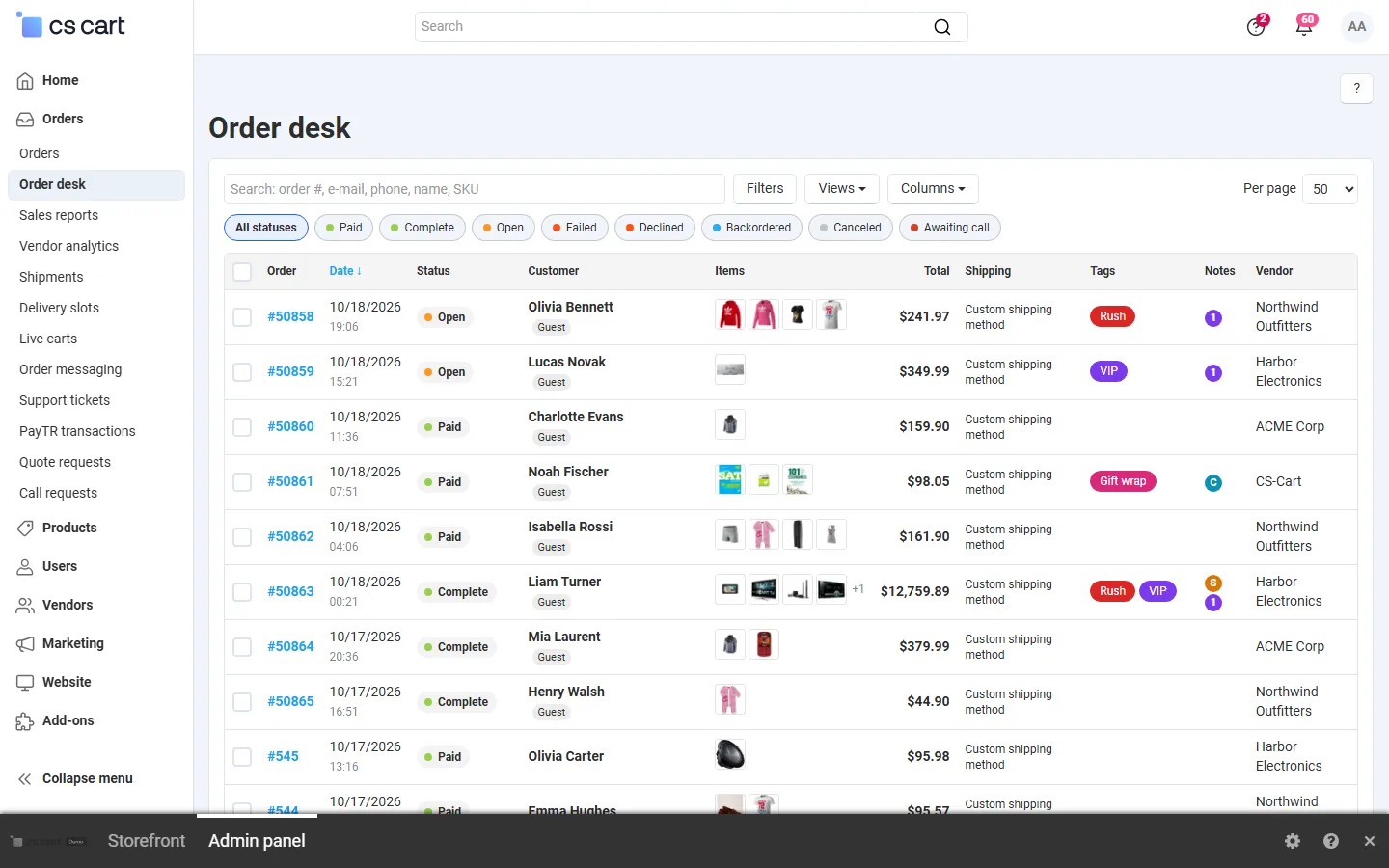
Orders Admin Pro adds an order desk to the admin panel (and to the vendor panel on Multi-Vendor): a fast order list with the columns you choose, saved views, a quick search that finds orders by number, e-mail, phone, name or SKU, colour-coded statuses, order tags, internal notes with a timeline of who did what, a quick view drawer, and bulk actions with a preview. CS-Cart’s own orders list has fixed columns and a few bulk actions; the desk covers the daily work of an order team on one page.
- Order list with your columns: order, date, colour-coded status, customer (with the number of their orders), e-mail, phone, item thumbnails, quantity, total, shipping method, payment method, tags, notes indicator, vendor, manager, invoice number and ship-to city. Choose the columns, sort, page through 50,000+ orders on the server.
- Quick search and filters: one box finds an order number, an e-mail, a phone number (in any format), a customer name or company, or an SKU of an ordered product. Filters: status chips, date range, total range, tags, payment method, shipping method, vendor, orders with notes.
- Saved views: save filters, columns and sorting as named views; administrators can share a view with the team.
- Quick view drawer: open an order without leaving the list: items with images, totals, addresses, shipping and payment, customer and staff notes, tags, timeline; change the status (with or without notifications), add a note, print the invoice or packing slip, edit or duplicate the order.
- Tags and internal notes: your own coloured tags (Rush, Gift, Fraud check, …), internal notes that customers never see, and a timeline per order: status changes from any source, tags, notes, e-mails, prints and exports, with who and when. Also on every order page in the Tags & timeline tab.
- Bulk actions with preview: change the status (notify the customer, the orders department and the vendor, or nobody), add or remove a tag, send a templated e-mail, export a CSV with the columns you choose, print invoices or packing slips in one print view, and a pick list that adds up the SKUs of the selected orders. Every action shows a preview with before and after first, and runs in short steps with a progress bar.
- Keyboard shortcuts:
j/kto move,Enterto open,xto select,/to search,s,t,n,ein the quick view,?for help. - Safe by design: status changes go through the standard CS-Cart function, so stock, e-mails, invoices, hooks and other add-ons behave exactly as on the core orders page. Every request is checked against the core order privileges and the orders the user may see.
- Multi-Vendor: vendors work only with their own orders, tags, notes and message templates (can be switched off). CS-Cart Ultimate: the desk follows the selected storefront.
Documentation
Section titled “Documentation”| Page | Contents |
|---|---|
| Installation | Requirements, installing, upgrading, uninstalling |
| Configuration | Settings, privileges, vendor access, e-mail template, license |
| Usage | The desk, search and filters, views, quick view, tags and notes, bulk actions, shortcuts |
| Developer notes | Queries and scope, data model, endpoints, hooks, file map |
| FAQ | Common questions |
Compatibility
Section titled “Compatibility”| CS-Cart / Multi-Vendor | 4.17.2 – 4.21.x (Ultimate and Multi-Vendor editions) |
| PHP | 7.2.5 – 8.3 (whatever your CS-Cart version supports) |
| Admin panel | 4.17 back office and the 4.18+ light and dark schemes |
| Order volume | Tested with 50,000+ orders (server-side paging and counting, indexed queries, bulk actions in steps) |
| Full page cache (4.21) | Supported: the add-on has no storefront output |