

Auctions & Bidding
Add-on ID: kv_auction_bidding · Edition: CS-Cart & Multi-Vendor · Latest version: 1.0.0 · Compatible with: CS-Cart & Multi-Vendor 4.17.2 – 4.21.x, PHP 7.4 – 8.3 · Changelog: view
Auctions & Bidding lets you sell single items by timed auction. Customers bid on the product page, the store bids automatically for customers up to their maximum (proxy bidding), late bids extend the auction so nobody can snipe it in the last second, and the winner pays through your normal checkout at the winning bid, enforced on the server. On a marketplace, vendors run auctions for their own products.
Auctions suit one-of-a-kind items, collectibles, returns and refurbished stock, end-of-line products and charity sales. CS-Cart has no auction feature: this add-on adds the whole flow without changing your checkout, payment methods or shipping.
- Auction settings per product: start and end time in the store time zone (daylight saving time handled), starting price, bid increment (fixed amount or price tiers), optional hidden reserve price, optional Buy Now price. Each auction sells one item.
- Proxy (maximum) bids with correct second-price logic: the leader pays one increment above the second-highest maximum, never more than needed. Manual bids for an exact amount too.
- Anti-sniping: a bid in the last minutes extends the end, up to a maximum number of extensions.
- Safe under load: every bid is placed inside a database lock, so two bids at the same moment never produce two leaders or a lower winning bid; the closer can never miss or duplicate a winner.
- Live auction panel on the product page and in quick view: current bid, countdown, reserve status, bid history with masked bidder names, bid form, Buy Now, watch. Full page cache ready (4.21): the page is the same for everybody; the live state is loaded on demand.
- Category badges “Auction · ends in …” and the current bid in product lists.
- Registered bidders only, with optional bidder terms (acceptance time, IP address and version stored) and optional manual approval of new bidders.
- Winner payment: a Pay now button puts the item into the cart at the winning bid for one order within your payment deadline. If the winner does not pay, a second-chance offer goes to the next bidder, or the auction is relisted.
- My auctions for customers: bidding (leading / outbid), won, lost, watching.
- E-mails for outbid, won, lost, canceled, payment time passed and second-chance offers; “auction ended” and “winner did not pay” for staff and vendors.
- Admin: auctions list with status tabs, filters, statistics and CSV export; auction page with the bid log (cancel a bid with a reason), winner and claims, cancel / relist; bidder accounts page.
- Multi-Vendor: vendors create and manage auctions for their own products and see only their own auctions, bids and winners.
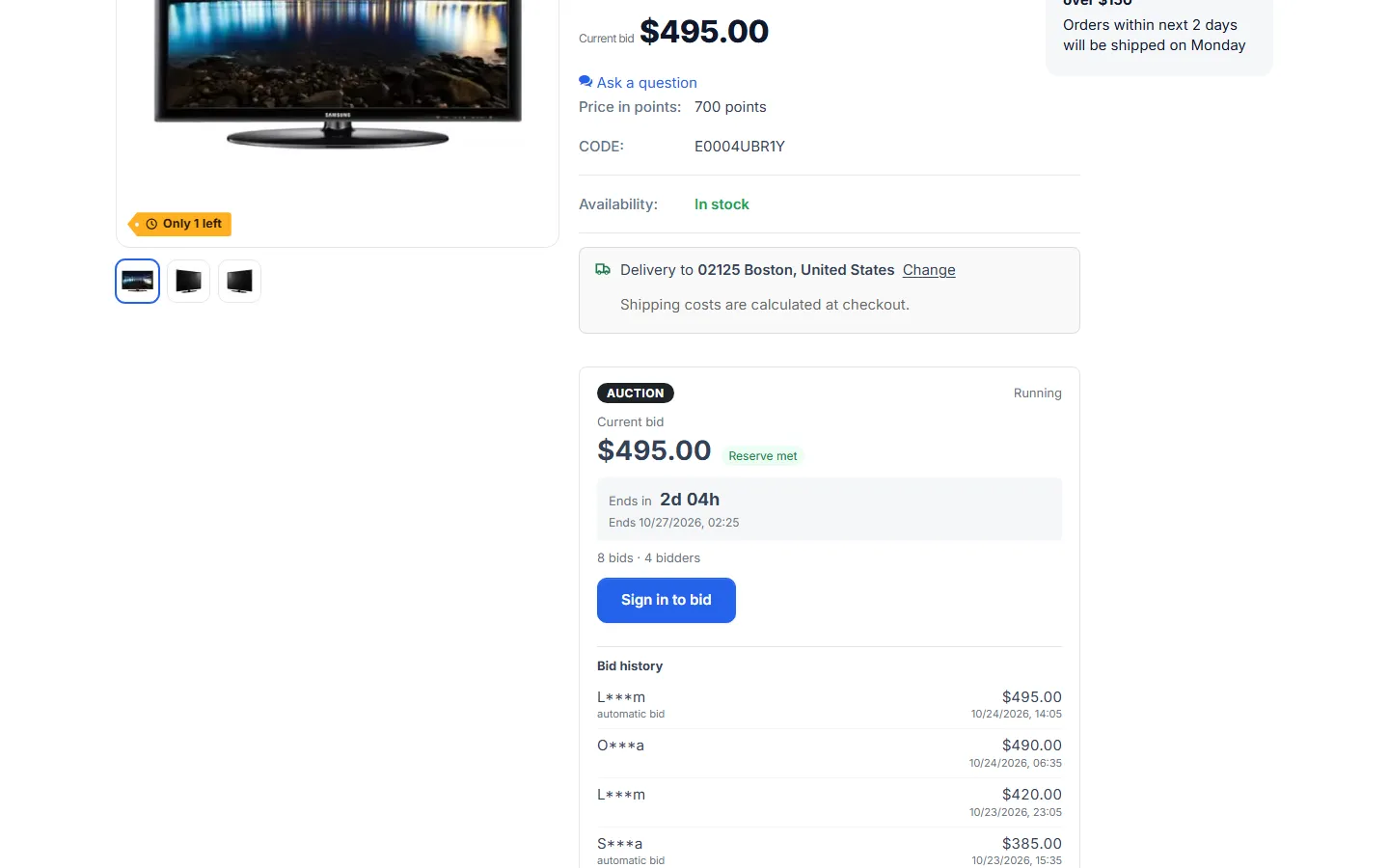
Auctions are a sales format with legal rules that differ between countries. Publish your own auction terms (the bidder terms text of the add-on and your store terms). The add-on gives you the tools; it does not provide legal terms.
Documentation
Section titled “Documentation”| Page | Contents |
|---|---|
| Installation | Requirements, installing, cron, privileges, upgrading, uninstalling |
| Configuration | Settings, bidder terms, increments, anti-sniping, payment, notifications, license |
| Usage | Creating auctions, the bidder flow, closing, winner payment, managing bids, vendors |
| Developer notes | Data model, bid engine, locking, closer, price enforcement, hooks, file map |
| FAQ | Common questions, security, license |
Compatibility
Section titled “Compatibility”| CS-Cart / Multi-Vendor | 4.17.2 – 4.21.x |
| PHP | 7.2.5 – 8.3 (whatever your CS-Cart version supports) |
| Themes | Responsive, Bright, Nova (4.21) and themes based on them, including the Kavio Labs themes |
| Products | Simple products and variations without required options; physical and downloadable |
| Full page cache (4.21) | Supported |
| Ultimate | Settings and auctions per storefront |
License
Section titled “License”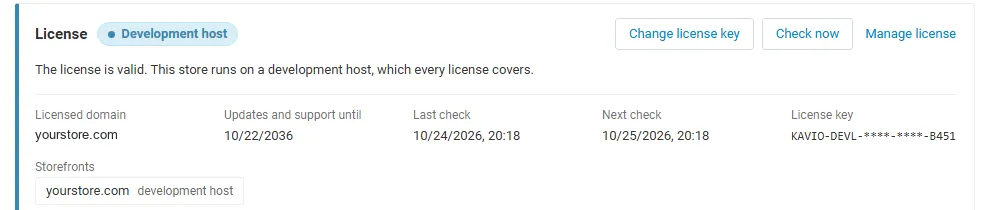
The add-on needs a valid license for new bids and new auctions. See License for what happens without one.