

Configuration
Overview · Installation · Usage · Developer notes · FAQ
Open Add-ons → Manage add-ons → Product Questions & Answers → Settings. On CS-Cart Ultimate each storefront can have its own values.
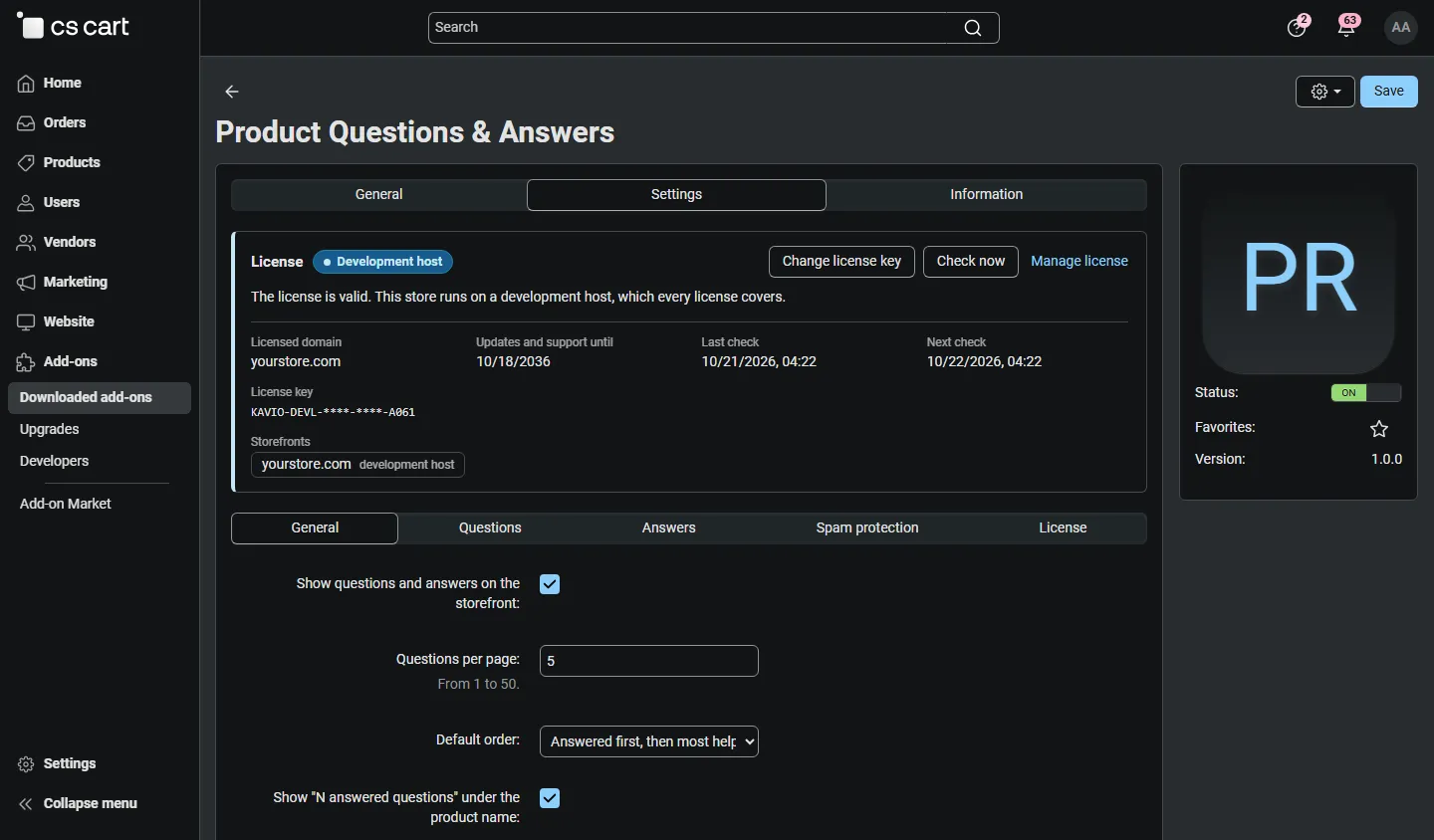
General
Section titled “General”| Setting | Default | What it does |
|---|---|---|
| Show questions and answers on the storefront | On | Off hides the tab, the block, the “answered questions” link and the structured data; nothing is deleted. |
| Questions per page | 5 | Questions shown per page of the tab (1–50). More load with the page links. |
| Default order | Answered first | Answered first (then most helpful), Most helpful, or Newest. Shoppers can change the order. |
| Show “N answered questions” under the product name | On | A small link under the product title that opens the tab. |
| Name shown for customers | First name and initial | “Anna K.”, the full name, or “Customer”. Applies to askers and customer answers. |
| Structured data for search engines | FAQPage | Adds up to 10 published questions with a published answer as FAQPage markup. |
| E-mail for new questions | empty | Empty uses the support department e-mail of the store (Settings → Company). |
Questions
Section titled “Questions”| Setting | Default | What it does |
|---|---|---|
| Guests can ask questions | On | Guests enter their name and e-mail. Off: customers sign in to ask. |
| Publish new questions without moderation | No | No (moderate everything), from signed-in customers, from verified buyers of the product, or from everyone. Entries held by the spam guard always wait. |
| Longest question (characters) | 500 | 50–2000. |
Answers
Section titled “Answers”| Setting | Default | What it does |
|---|---|---|
| Customers can answer questions | Verified buyers | No (only the store and sellers), verified buyers of the product, or all signed-in customers. |
| Publish customer answers without moderation | No | No, from verified buyers, or from everyone who may answer. |
| Vendors moderate questions about their products (Multi-Vendor) | On | Vendors can publish, decline and delete questions and answers of their own products. |
| Vendor answers need administrator approval (Multi-Vendor) | Off | On: vendor answers wait in Answers to check. |
| E-mail vendors about new questions (Multi-Vendor) | On | The vendor of the product gets the new-question e-mail. |
A verified buyer is a signed-in customer with an order of the product in a status that counts as paid (statuses with “payment received”, by default Processed and Complete).
Spam protection
Section titled “Spam protection”| Setting | Default | What it does |
|---|---|---|
| Minimum time to fill in a form (seconds) | 3 | Forms sent faster are refused. 0 turns the check off. |
| Questions and answers per IP address and hour | 5 | Also per e-mail address for guests. 0 = no limit. |
| Links allowed before an entry is held for moderation | 0 | Entries with more links wait for moderation with the flag “Links”. |
| Blocked words | empty | One word or phrase per line. Entries containing one go to the Spam tab. |
| Captcha | Shows whether a captcha checks the forms (see below). |
The hidden honeypot field and duplicate detection (the same question about the same product within 24 hours) are always on.
Captcha
Section titled “Captcha”The question and answer forms use the CS-Cart captcha service (scenario Product questions and answers):
- Kavio Captcha Pro installed: click Check this form with Captcha Pro on the Product questions page (or set the form to “Spam check” on Captcha Pro’s forms page).
- CS-Cart image verification (Google reCAPTCHA): tick Product questions and answers in Settings → Image verification → Use for.
- No captcha: the spam guard above still protects the forms.
Design → Layouts → Add block → Product questions & answers with two templates:
- Latest answered questions: the newest or most helpful answered questions of the store with the first answer and a link to the product. Settings: number of questions, order, and “On product pages, only questions about that product”.
- Questions & answers of the product: the full Q&A for product page layouts (instead of the tab). Use either the tab or this block on a product page, not both.
License
Section titled “License”The license status is shown in a License card at the top of the add-on page, above the tabs, so you see it on every tab. The License tab holds the key itself. The key is stored once for the whole installation.
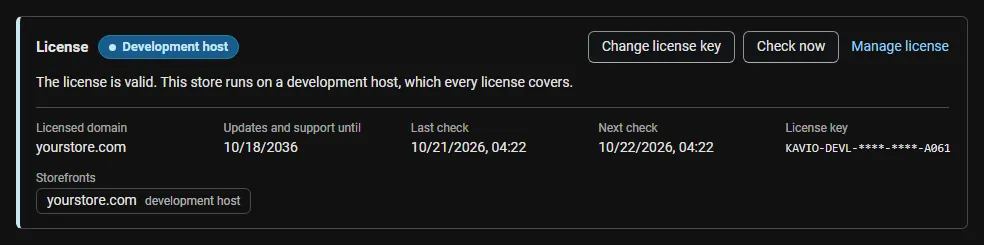
The License card shows:
- the status in color: green when valid, blue for a development host or the 14-day period before a key is required (with the days left), amber when the license server could not be reached (with the days left) or a Marketplace number is still being verified, red when the add-on is switched off;
- in plain words what the status means and, when the add-on is (or will be) switched off, what stops: the Q&A tab, block and structured data and the ask, answer and vote forms are switched off on the storefront; existing questions and answers are kept and can still be answered and moderated in the admin panel;
- the licensed domain, every storefront with its result (covered, development host, not covered), the end of the updates and support period, the last and the next check, and the key in use (masked);
- the actions Enter license key / Change license key, Check now, Manage license and, without a valid license, Buy a license.
In Add-ons → Manage add-ons the add-on’s row shows a small license badge next to its name. The Product questions page shows the license status in a bar at the top.