

Usage
Overview · Installation · Configuration · Developer notes · FAQ
What is sent when
Section titled “What is sent when”| Event | When | Data |
|---|---|---|
| Page view | Every storefront page | — |
| Product view | Product page, quick view | Product ID, name, category, price, currency |
| Search | First page of search results | Search words, IDs of the first 10 results |
| Add to cart | Whenever products are added: product page, product lists, quick view, AJAX cart | Products added (ID, name, price, quantity), value, currency |
| Checkout started | Checkout page, once per cart content (a reload or a step change does not repeat it) | Cart products, value, currency, number of items |
| Purchase | Order confirmation page, the first time it is shown | Ordered products, order total (or subtotal), order currency, order ID |
| Sign-up | Customer account created on the storefront (sent with the next page) | — |
In Multi-Vendor, a checkout with products of several vendors is one purchase with the total of the whole checkout.
Names on each platform.
| Event | TikTok | Snapchat | Microsoft (UET) | X | |||
|---|---|---|---|---|---|---|---|
| Page view | page() |
page |
PAGE_VIEW |
page load (automatic) | page view (automatic) | PageVisit |
page view (automatic) |
| Product view | ViewContent |
pagevisit |
VIEW_CONTENT |
view_item |
your event ID | ViewContent |
— |
| Search | Search |
search |
SEARCH |
search |
your event ID | Search |
— |
| Add to cart | AddToCart |
addtocart |
ADD_CART |
add_to_cart |
your event ID | AddToCart |
your conversion ID |
| Checkout started | InitiateCheckout |
— | START_CHECKOUT |
begin_checkout |
your event ID | — | your conversion ID |
| Purchase | CompletePayment |
checkout |
PURCHASE |
purchase |
your event ID | Purchase |
your conversion ID |
| Sign-up | CompleteRegistration |
signup |
SIGN_UP |
sign_up |
your event ID | SignUp |
your conversion ID |
One event ID. Each event gets one ID, and every platform receives the same ID in its deduplication field (TikTok event_id, Pinterest event_id, Snapchat client_dedup_id, Reddit conversionId, X conversion_id, LinkedIn event_id). A purchase uses an ID derived from the order, for example order.1042.3f9c0a7e5b, so a server-side copy of the same purchase (from a later version or another tool) can be matched.
Purchase once. The order confirmation page reports the purchase only the first time it is shown. Reloading the page, opening it again from an e-mail or from the order history does not send it again. Orders with the status Failed, Declined or Incomplete (for example a payment that did not go through) are not reported.
Consent
Section titled “Consent”When a consent banner is active (and Wait for marketing consent is Automatic or Always), no tag is loaded and no request goes to any ad platform before the visitor allows marketing cookies:
- Cookie Consent Manager by Kavio Labs: the tags follow the Marketing category. Accepting loads them on the same page (the events of that page are sent then), withdrawing stops them at once and the consent add-on deletes their cookies. Advertising pixels is listed in its preference center.
- CS-Cart cookie dialog (GDPR add-on): the service Advertising pixels appears in the dialog under Marketing. The tags load after the visitor accepts it.
- Your own banner: call
kvMarketingPixels.consent(true)when the visitor accepts marketing cookies andkvMarketingPixels.consent(false)when they decline. The choice is remembered in thekv_mpx_consentcookie.
Events of a page that are waiting for consent are sent when consent arrives on that page; events of earlier pages are not sent later.
Test mode and debug view
Section titled “Test mode and debug view”- Switch Test mode and Debug view on (General tab).
- Open the storefront with
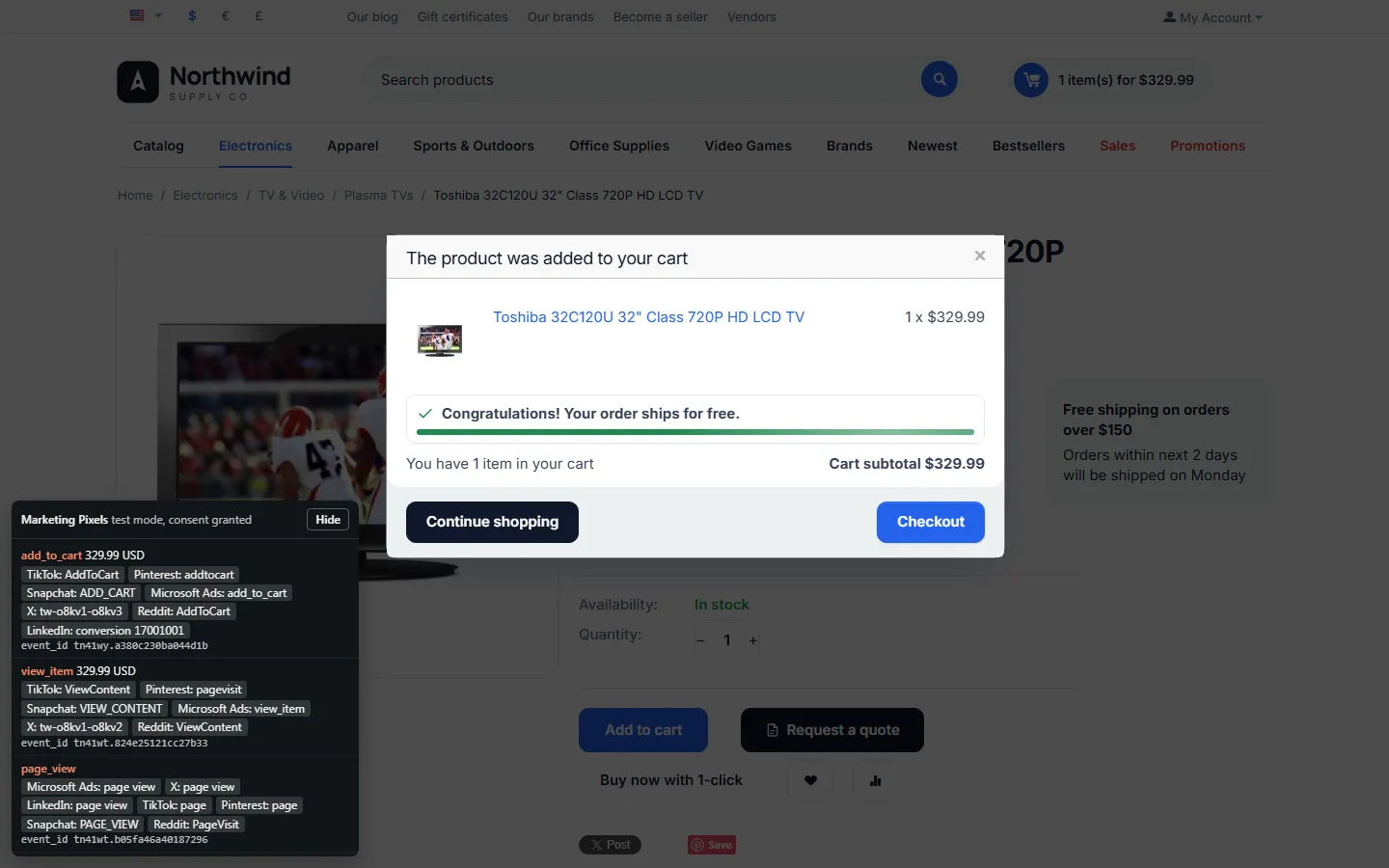
?kv_mpx_test=1at the end of the address, for examplehttps://yourstore.com/?kv_mpx_test=1. From now on (24 hours) this browser loads the tags; your visitors still get none. - Browse, search, add products to the cart, check out. The debug panel in the lower left corner lists every event, the platforms it went to with their event names, the value and the event ID. Hide folds the panel.
- When everything looks right, switch Test mode off. Leave Debug view off on a live store.
?kv_mpx_test=0ends the test session in your browser.
Checking the events in the ad platforms
Section titled “Checking the events in the ad platforms”| Platform | Where |
|---|---|
| TikTok | Events Manager → your pixel → Test events, or the TikTok Pixel Helper browser extension |
| Pinterest Tag Helper browser extension; Ads Manager → Conversions → Event history | |
| Snapchat | Snap Pixel Helper browser extension; Events Manager → Event activity |
| Microsoft Advertising | UET Tag Helper browser extension; Tools → UET tag → tag status |
| X | X Pixel Helper browser extension; Events manager → event Activity |
| Reddit Pixel Helper browser extension; Events Manager → Test events | |
| Campaign Manager → Analyze → Insight Tag (status) and Conversions (Recent activity) |
New events can take from a few minutes to a few hours to appear in the platform reports.
Multi-Vendor and Ultimate
Section titled “Multi-Vendor and Ultimate”- Multi-Vendor: the tags and events belong to the marketplace (the store owner’s ad accounts). Vendors have no settings and see nothing of this add-on. Purchases with products of several vendors are reported once with the checkout total.
- Ultimate and several storefronts: each storefront can have its own IDs and options (choose the storefront at the top of the settings page); values of All storefronts apply where a storefront has none.
Full page cache (CS-Cart 4.21)
Section titled “Full page cache (CS-Cart 4.21)”With the full page cache, guests can get a page that was rendered for another guest. The add-on is built for this: a cached page carries only the settings and the events of the page itself (page view, product view), the browser gives each of them its own event ID, and consent, test mode and the debug view are decided in the browser. Add-to-cart events come with the AJAX response; checkout and the order confirmation page are never cached.