

Configuration
USPS account
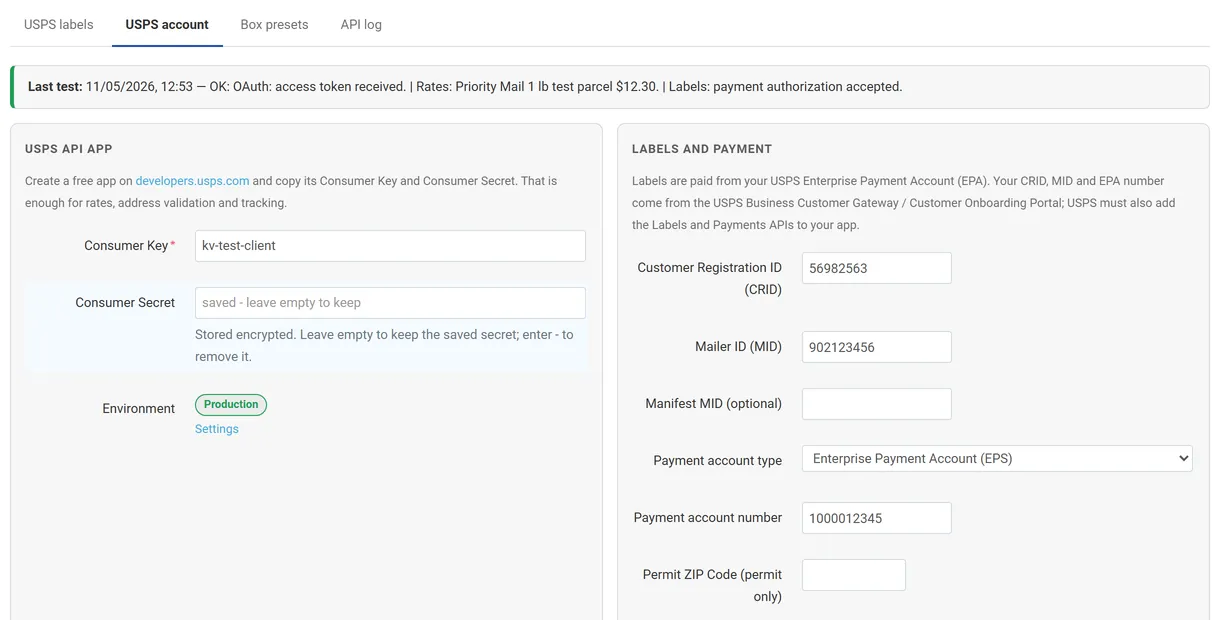
Section titled “USPS account”Open Orders → USPS labels → USPS account.
| Field | What to enter |
|---|---|
| Consumer Key / Consumer Secret | From your app on developers.usps.com. The secret is stored encrypted; leave the field empty to keep it, enter - to remove it. |
| CRID, MID, Manifest MID | From the USPS Business Customer Gateway (labels only). Manifest MID is optional. |
| Payment account type / number | Enterprise Payment Account (EPS) or a permit; the number pays label postage and enables commercial and contract prices. |
| Permit ZIP Code | Only for permit accounts. |
| Ship from | Sender name, company, street, city, state, ZIP Code, phone, email. The ZIP Code is also the origin of rates. |
| Label defaults | Format (PDF, ZPL 203/300 dpi, PNG) and size (4x6, 4x5, 4x4, 6x4 in). |
Click Save and test connection: the add-on requests an OAuth token, prices a 1 lb Priority Mail test parcel and, when the label fields are filled, asks USPS for a payment authorization. The result stays on the page.
Settings
Section titled “Settings”Add-ons → Manage add-ons → USPS Rates & Labels → Settings
| Setting | Effect |
|---|---|
| Enable | Switches rates, labels and address validation on or off. |
| USPS environment | Production (apis.usps.com) or the USPS Testing Environment for Mailers (apis-tem.usps.com). Test labels are not charged and cannot be mailed. |
| Who buys labels (Multi-Vendor) | Marketplace owner: all labels are paid from the marketplace account. Vendors: each vendor enters its own USPS account and buys labels for its orders. |
| Address validation | Off, Admin only (button on the order), or Suggest at checkout and admin. |
| Rate cache (minutes) | How long USPS prices are reused for the same package and destination (default 15). |
| Order status when delivered | When tracking reports every label of an order delivered, the order moves to this status. |
| Show USPS tracking on the customer’s order page | Tracking card in the customer account. |
| Debug log | Records every USPS request and response in the API log (secrets and account numbers masked). Errors are always logged. |
Shipping methods
Section titled “Shipping methods”- Open Administration → Shipping & taxes → Shipping methods and create a method (or edit one that used the old USPS module).
- Rate calculation: Real-time. Carrier: USPS (new APIs). Service: for example USPS Priority Mail or USPS Priority Mail Small Flat Rate Box.
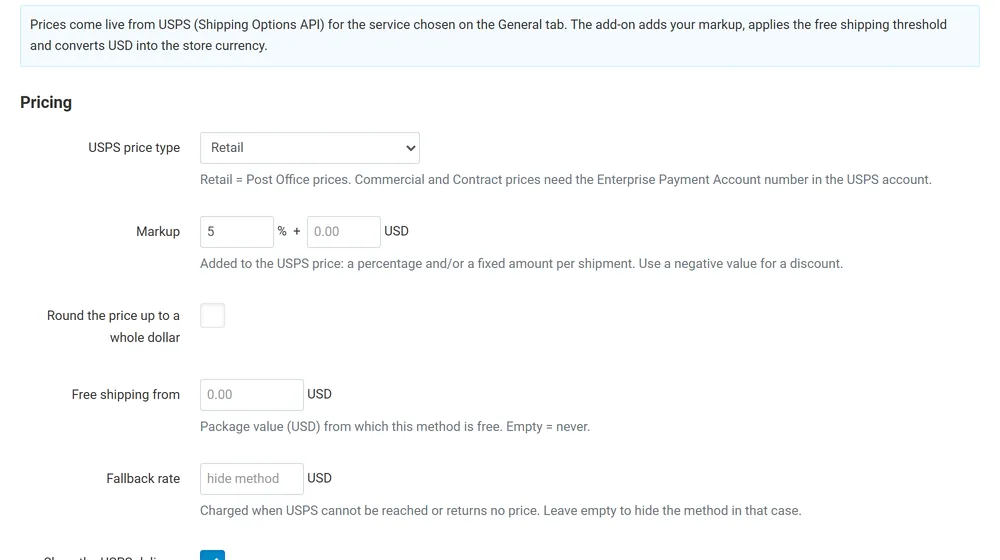
- Open the Configure tab:
| Option | Effect |
|---|---|
| USPS price type | Retail (Post Office prices), Commercial or Contract (need the payment account number). |
| Markup | Percent and/or fixed USD amount added per shipment; negative values give a discount. |
| Round the price up | To a whole dollar. |
| Free shipping from | Package value (USD) from which the method costs nothing. |
| Fallback rate | Charged when USPS cannot be reached or returns no price; empty hides the method in that case. |
| Show the USPS delivery estimate | Shows “2 Days” style commitments next to the method. |
| Price with Signature Confirmation | Adds the USPS fee to domestic rates. |
| Box | Auto (smallest preset that carries the weight), a fixed preset, or the default size below. Products with their own box size in Shipping properties keep it; flat rate services always use the USPS box size. |
| Default package size / Extra packaging weight | Used when no preset applies. |
CS-Cart’s own rate settings (rate areas, surcharges per weight or subtotal) are added on top of the USPS price, as with every real-time carrier.
Replacing the built-in USPS module
Section titled “Replacing the built-in USPS module”On CS-Cart 4.17 and 4.18 the built-in USPS carrier still calls the retired Web Tools API and returns no rates. The settings page shows how many active methods still use it: switch each to USPS (new APIs) and pick the matching service. On 4.21 the built-in USPS v2 module can stay; both work side by side.
Box presets
Section titled “Box presets”Orders → USPS labels → Box presets: name, inside length × width × height (inches), packaging weight (oz), maximum load (lb), position and status. Presets are used by the Auto box option and appear in the label form.
Multi-Vendor
Section titled “Multi-Vendor”- Marketplace owner mode (default): the marketplace USPS account prices and buys all labels. Vendors’ products are priced from the vendor’s own ZIP Code (company profile). Vendors see their labels and tracking but cannot buy.
- Vendors mode: each vendor opens USPS labels → USPS account in the vendor panel and enters its own app and label account. Its products are priced with its account, and it buys labels for its orders, paid from its own EPA. Vendors without an account fall back to the marketplace account for rates.
- Box presets and the API log stay with the marketplace administrator.
License
Section titled “License”The add-on checks its license for the store’s domain once a day from the admin panel. Without a valid license, live rates at checkout, label purchase and address validation are switched off; existing labels stay downloadable and their tracking keeps updating.