

Configuration
Overview · Installation · Usage · Developer notes · FAQ
Open Add-ons → Manage add-ons → EU VAT Number Validation & Reverse Charge → Settings.
General
Section titled “General”| Setting | Default | What it does |
|---|---|---|
| Validate VAT numbers at checkout | On | The main switch. Off: VAT is charged as usual and numbers are not checked; saved numbers, past orders and the log are kept. |
| Apply reverse charge (0% VAT) to valid EU business buyers | On | Off: numbers are still checked, stored and printed, but VAT is always charged. |
| Store country (seller) | Company country | Your country for the reverse charge rule. By default the country from Settings → Company. Reverse charge needs a store in the EU. |
| Your VAT number | empty | Your own number, for example DE123456789. VIES then returns a consultation number for each check, which is stored with the order as proof. It is also printed under the store address on invoices. |
| VAT number field | VAT number (created by this add-on) | Choose another text field of the customer profile if you already collect VAT numbers in one. |
| Buyer country is taken from | Billing address | The address that decides the buyer’s country. With the standard checkout the billing address equals the shipping address unless the customer enters a different one. |
| The VAT number must belong to the buyer country | On | A German number with a French billing address is not accepted for the reverse charge. |
| Print the VAT numbers and the reverse charge note on invoices | On | Adds the lines to invoices and the order summary. |
| Check the number while the customer types | On | Shows the result under the field. Limited to 30 checks per visitor and hour. Off: the result is shown as a notice at checkout instead. |
| Check vendors’ own VAT numbers | On | Multi-Vendor only: checks the vendor’s Tax number when the vendor profile is saved. |
VIES and fallback
Section titled “VIES and fallback”| Setting | Default | What it does |
|---|---|---|
| If VIES cannot be reached | Accept the number and flag the order for review | VIES or a national register is down from time to time. Accept and flag: the reverse charge is applied when the number has the right format and its check digit is correct (where the country has one); the order gets a “Needs review” flag. Refuse: VAT is charged and the customer sees why. |
| VIES timeout (seconds) | 8 | How long one check may take. |
| Keep a valid answer for (hours) | 24 | Valid answers are reused for this long. Invalid answers are kept 1 hour, outages 10 minutes. |
| Keep the validation log for (days) | 180 | Older log entries are deleted with Delete old entries on the log page. |
UK VAT numbers (HMRC)
Section titled “UK VAT numbers (HMRC)”GB numbers are checked with HMRC’s “Check a UK VAT number” API (version 2.0). Without these settings, GB numbers get a format check only. GB numbers are only validated and printed: the reverse charge rule of this add-on is the EU one.
- Create an application on the HMRC Developer Hub and subscribe it to Check a UK VAT number (version 2.0).
- Copy the client ID and client secret into the settings and tick Check GB VAT numbers with HMRC.
- Optional: enter Your UK VAT number to get HMRC consultation numbers.
- Use the HMRC sandbox is for testing with the sandbox credentials of your application.
Northern Ireland numbers (XI) are checked in VIES, not with HMRC.
The add-on does not compute VAT itself. It uses your CS-Cart taxes:
- Price includes tax taxes: for reverse charge orders the tax is taken out of the price, so business buyers pay the net amount. The included tax is calculated with the rate of the buyer’s destination, as CS-Cart does for tax-exempt customers.
- Taxes added to the price: they are not added for reverse charge orders.
- Both tax calculation methods (Settings → Checkout → Tax calculation method: unit price and subtotal) are supported, as are taxes on shipping and payment surcharges.
License
Section titled “License”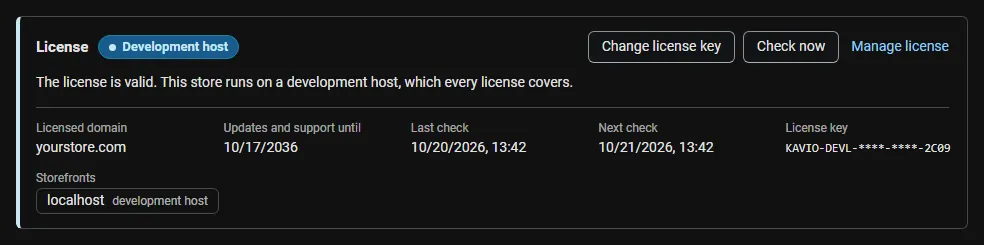
Enter the license key on the License tab and click Check now. Without an active license, VAT numbers are not checked at checkout and the reverse charge is not applied, so VAT is charged as usual; the field, saved numbers, past orders, invoices and the log are kept.