

Mobile App Builder
Add-on ID: kv_mobile_app · Edition: CS-Cart & Multi-Vendor · Latest version: 1.0.0 · Compatible with: CS-Cart & Multi-Vendor 4.17.2 – 4.21.x, PHP 7.4 – 8.3 · Changelog: view
Mobile App Builder turns your store into an Android and iOS app. The app shows your real storefront, so every theme, add-on, promotion and payment method works in the app from day one, and wraps it in native parts: a tab bar with a live cart badge, splash screen, offline screen, pull to refresh, native share sheet, rating prompt and a notification inbox. You manage the app in the CS-Cart admin panel and download a ready Android Studio and Xcode project built from your settings.
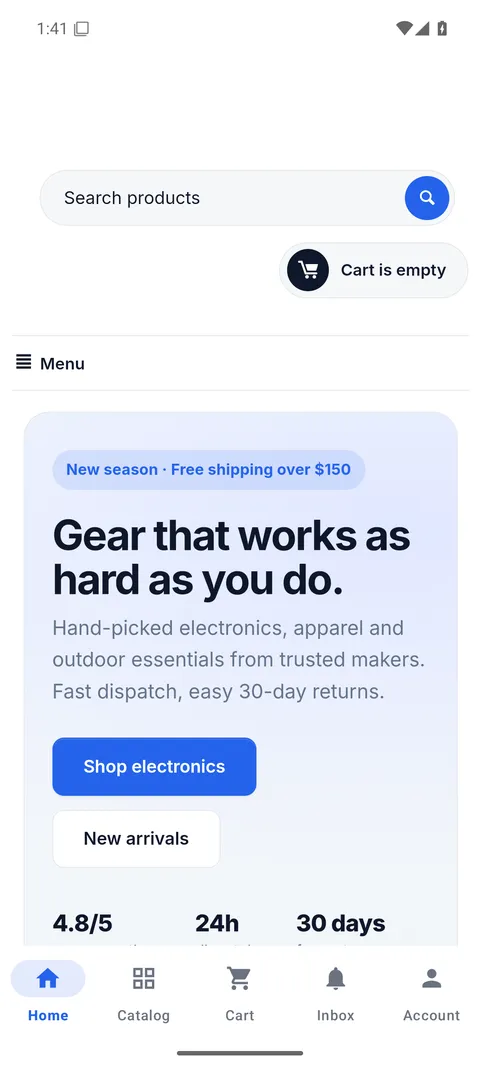
- Design in the admin panel: app name, package name, colours, icon, splash logo, tabs, with a live phone preview.
- Inside the app only: hide the header top panel, footer or any other part of your theme with CSS selectors. Browsers see the store unchanged.
- Push campaigns: Firebase Cloud Messaging HTTP v1 with your own free Firebase project. Title, text, image and a link into the store; all users, Android, iOS, signed-in customers, guests, user groups or one customer; send now or schedule.
- Order status pushes: a push and an inbox message when an order reaches the statuses you choose, for signed-in customers and for guests who ordered in the app.
- Notification inbox: every message is also listed in a native inbox, even when the shopper did not allow notifications.
- Deep links: Android App Links and iOS Universal Links (the add-on serves
/.well-known/assetlinks.jsonand/.well-known/apple-app-site-association), plus a custom URL scheme for QR codes and e-mails. - Live configuration: tabs, colours, hidden parts, link rules and the required app version are read from your store at every start, no new build needed.
- Statistics: installed apps per platform, push opt-in, campaign sends and opens.
- Multi-Vendor: one marketplace app; vendor storefronts and microstores work as on the website. Only marketplace administrators manage the app.
Documentation
Section titled “Documentation”| Page | Contents |
|---|---|
| Installation | Requirements, install, cron, uninstall |
| Configuration | App design, navigation, push, deep links |
| Usage | Campaigns, order pushes, inbox, devices, building and publishing |
| Developer notes | Architecture, endpoints, JavaScript bridge, hooks |
| FAQ | Common questions |
What you need
Section titled “What you need”- A Google Play developer account to publish on Android, and an Apple Developer Program membership plus a Mac with Xcode to publish on iOS. The accounts are yours; Google and Apple charge their own fees.
- Optional: a free Firebase project for push notifications.
- An https store address for App Links, Universal Links and App Store review.