

Usage
Paying with store credit (customers)
Section titled “Paying with store credit (customers)”Registered customers with a balance see a Store credit block in the order summary at checkout:
- Use store credit applies the whole balance (up to the order total and the share you allow).
- Or use an amount applies an own amount, entered in the currency the customer sees; it is converted to the store currency.
- Remove takes the credit off again.
The summary shows “Store credit −$X”, the expected cashback and the new order total. The payment method pays the rest; a payment surcharge is calculated on that rest. When store credit covers the whole order, no payment method is needed (CS-Cart saves the order as paid; in Multi-Vendor 4.17 a single-vendor order is saved as Open, as with gift certificates).
Store credit is taken from the wallet when the order is placed. If the balance changed in the meantime (for example in another tab), the order is not placed and the customer sees a notice to check the total.
Guests have no wallet. A frozen wallet cannot pay (the customer sees a note). Orders that contain a top-up product cannot be paid with store credit.
The account page
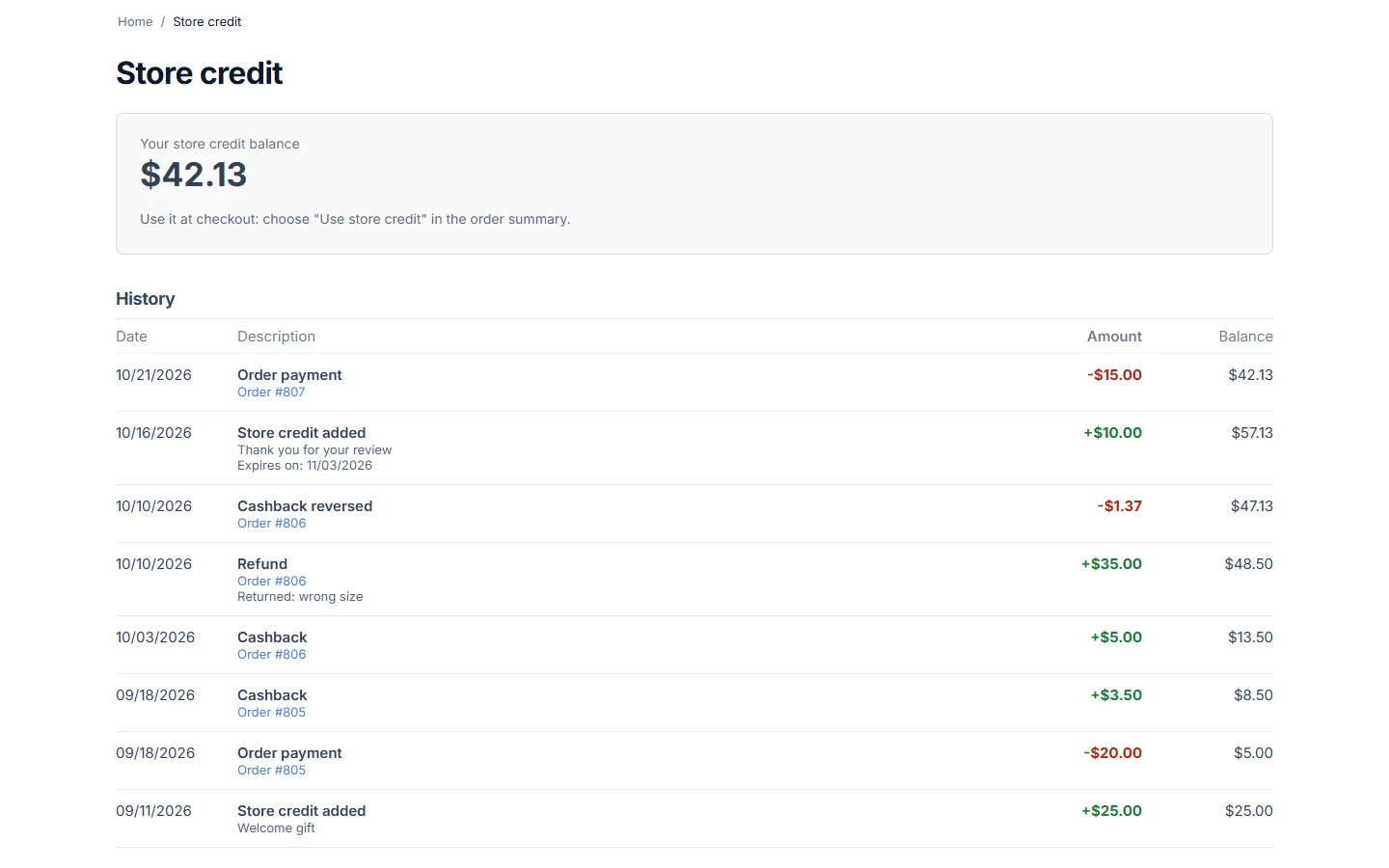
Section titled “The account page”My account → Store credit (index.php?dispatch=kv_customer_wallet.view) shows the balance, credit that expires within 30 days and the full history: date, reason, the order, your note for the customer and the balance after each line.
What happens to an order’s store credit
Section titled “What happens to an order’s store credit”| Event | Store credit |
|---|---|
| Order placed | Taken from the wallet. |
| Order reaches a “return” status (default Canceled, Declined, Failed) | Returned to the wallet, into the same credit (expiry dates are kept). Credited cashback and top-ups of the order are reversed. |
| Order reopened (for example Canceled → Open) | Taken again (the balance may go below zero; you get a warning). |
| Order left “Incomplete” (payment page never completed) | Returned after the time set in the settings; taken again if the order is paid later. |
| Order deleted | Returned when the order was not paid. Paid orders keep their payment. |
| Order edited in the admin panel | The difference is taken or returned. |
Refunds to store credit
Section titled “Refunds to store credit”On the order page (Orders → View orders → order), the Store credit panel shows what the order paid with store credit, cashback, refunds and the customer’s balance. Refund to store credit opens a form:
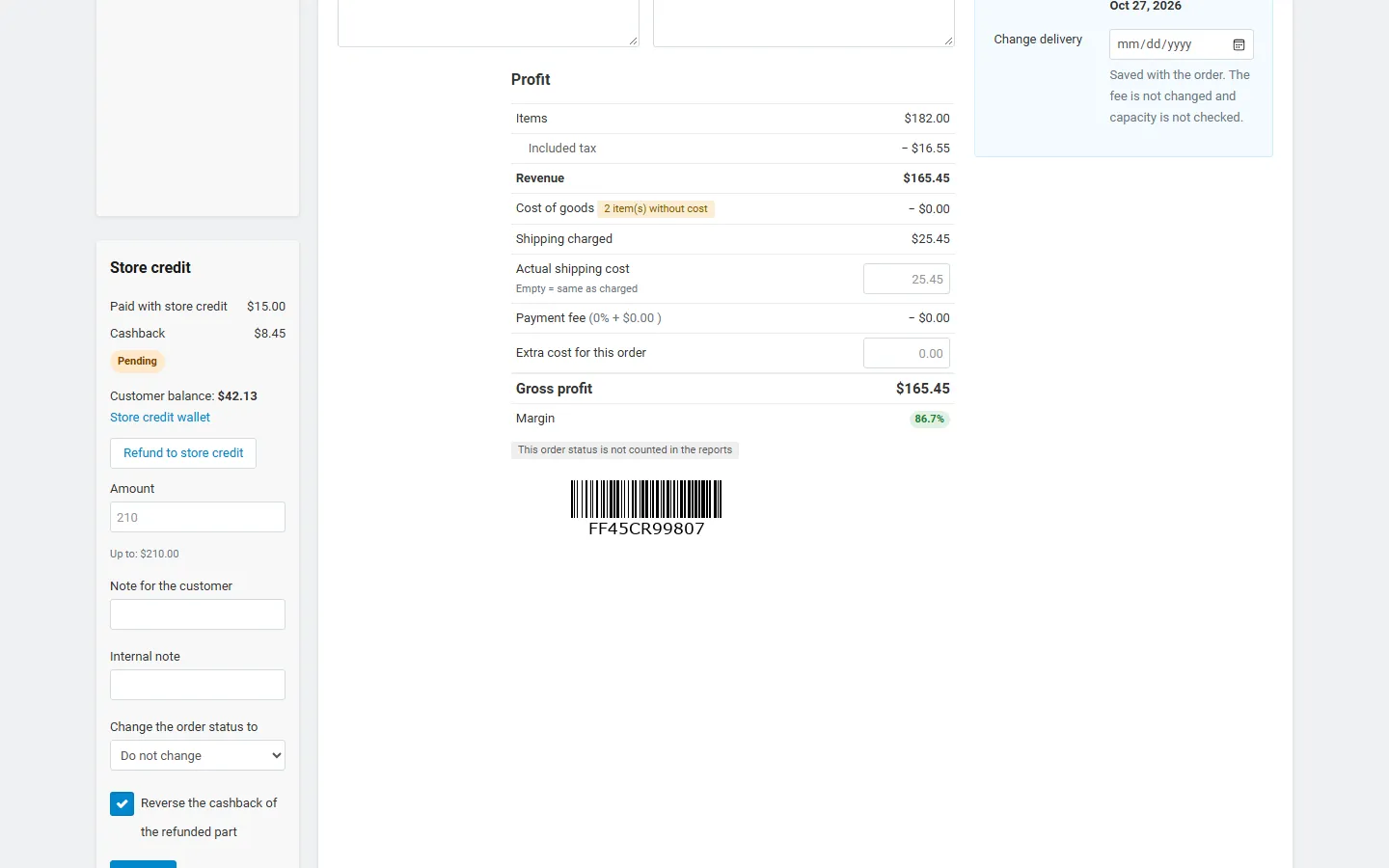
- Amount: up to what the order paid (order total + store credit − earlier refunds and returns).
- Note for the customer (shown in the history and the e-mail) and internal note (admin only).
- Change the order status to (optional).
- Reverse the cashback of the refunded part: takes back the same share of the order’s cashback.
The refund adds store credit; it does not refund the payment in your payment provider. A refunded order that is cancelled later returns only what was not refunded yet.
RMA: on a return (Orders → Return requests), select the approved items and click Refund to store credit: their price is refunded to the wallet with the return number in the note.
Adding and deducting store credit
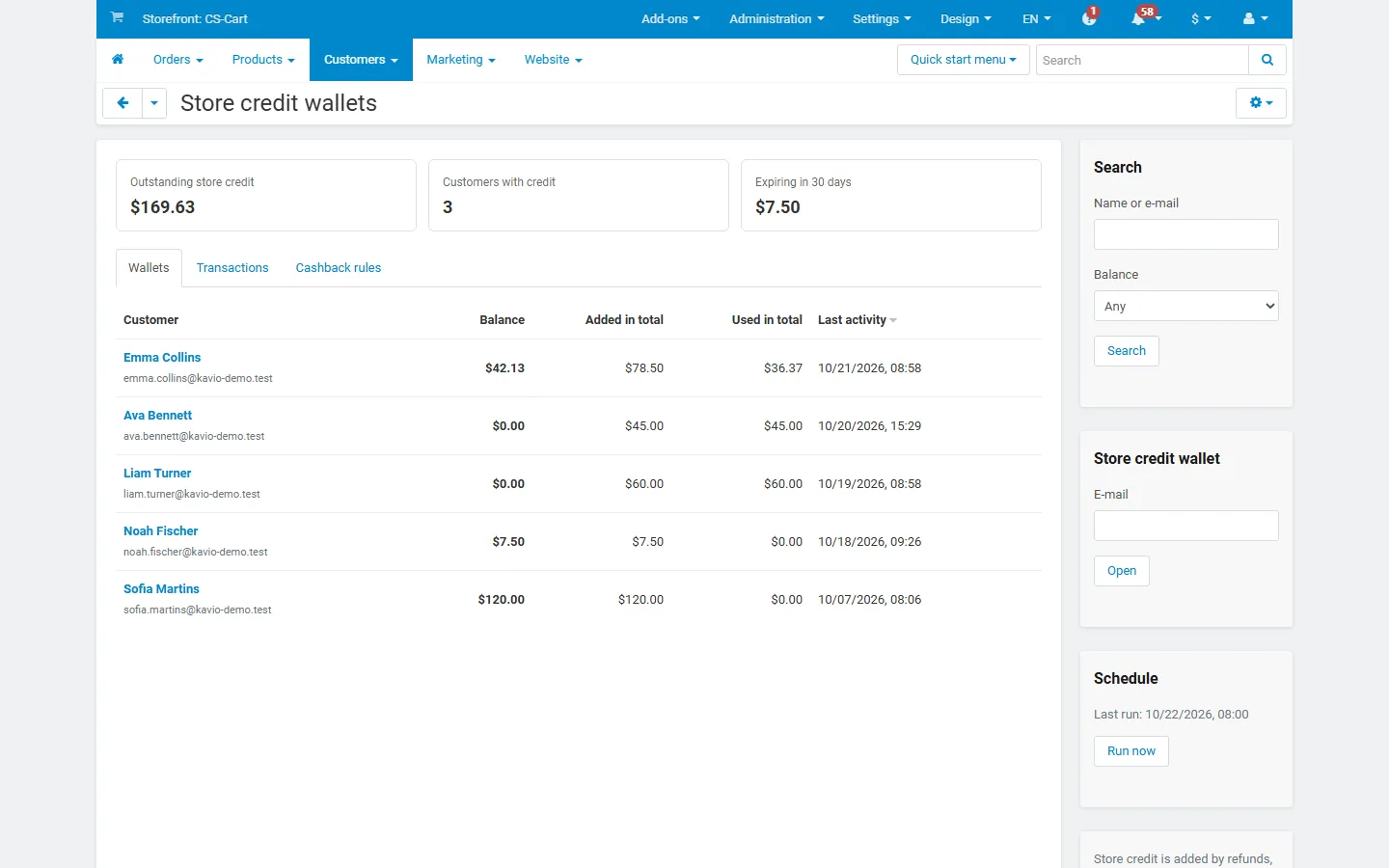
Section titled “Adding and deducting store credit”Customers → Store credit wallets lists every customer with a wallet: balance, total added and used, last activity, the outstanding store credit of the store and credit that expires within 30 days. Search by name or e-mail, filter by balance, export as CSV. To open the wallet of a customer without one, enter the e-mail in Store credit wallet, or use Store credit wallet in the customer’s profile.
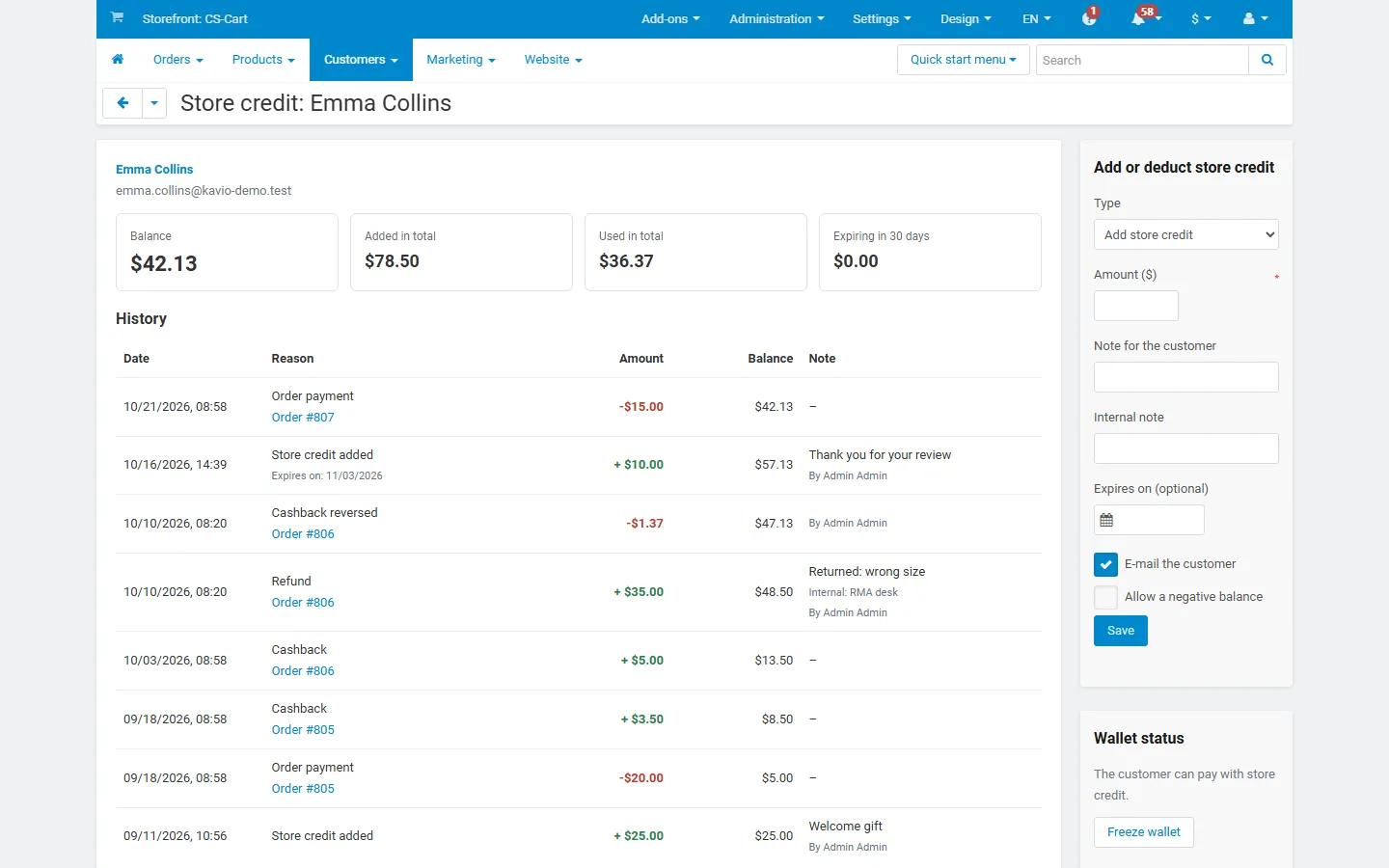
The wallet page shows the full ledger with reasons, orders, notes and who made each change. The sidebar form adds or deducts credit:
- Amount in the store currency, note for the customer, internal note;
- Expires on (optional, for added credit);
- E-mail the customer;
- Allow a negative balance (deductions only; otherwise a deduction larger than the balance is refused).
Freeze wallet stops the customer from paying with store credit (credits still arrive).
Reports
Section titled “Reports”Customers → Store credit wallets → Transactions: every ledger line with filters by reason and period, totals per reason (added, deducted, number of entries) and CSV export. The wallets page exports the balances; in Multi-Vendor, a third export lists the store credit used per vendor order.
Order editing
Section titled “Order editing”In Edit order (and Create order), Store credit to use sets the amount the order pays with store credit; the field shows the customer’s balance and what the order already uses. Recalculate and save: the difference is taken from or returned to the wallet.
Cashback
Section titled “Cashback”Create rules in Marketing → Cashback rules (see Configuration). The customer sees “Cashback you will earn” at checkout and “Cashback (pending)” on the order page. The cashback is added when the order reaches the cashback status (default Complete), reversed when the order is cancelled, and partly reversed with partial refunds when you tick the option.
Multi-Vendor
Section titled “Multi-Vendor”- When an order is split into vendor orders, the store credit is shared between them in proportion to their totals, exact to the cent, and each vendor order takes its own part from the wallet. Cancelling one vendor order returns its part only.
- Vendor payouts: like gift certificates, the vendor order amount (and so the vendor income) is the order total after store credit, and the payout details show the store credit part. The marketplace holds the store credit (it came from refunds, cashback or your credits) and settles the part paid with store credit with the vendor, for example with a payout in Vendors → Accounting. Export wallet use per vendor order (CSV) lists these amounts. RMA refund payouts leave out the store credit share, as for gift certificates.
- Vendors see the “Paid with store credit” line on their orders; they cannot open wallets, refund to store credit or edit cashback rules.
- With Direct customer-to-vendor payments each vendor checkout is its own order; store credit works per order.