

Usage
Overview · Installation · Configuration · Developer notes · FAQ
How a request travels
Section titled “How a request travels”- Order status changes. When an order reaches a trigger status (for example Complete), the add-on checks the customer (unsubscribed? consent mode? excluded user group or vendor? minimum total?) and the products (active, reviewable, not excluded, not reviewed before) and queues a request with a send date. If nothing qualifies, the request is still logged as Skipped with the reason, so you can see why a customer got no e-mail. Nothing is sent at this moment; checkout and the status change never wait for the mail server.
- The queue runs (cron, or the admin fallback). Due requests are checked again: an order that was canceled in the meantime cancels its request, a customer who unsubscribed or got a request for another order recently is skipped, already reviewed products are left out. Then the e-mail goes out.
- The customer taps a star. The review page opens without a login, with that rating chosen for that product and the product shown first.
- The review is saved in your product reviews as a verified purchase, with your moderation rules (CS-Cart’s “Review approval” setting). Administrators (and the vendor in Multi-Vendor) get the usual new-review notification.
- Reminder. If nothing was reviewed after the reminder delay, one reminder goes out.
- Reward. If a reward promotion is set, the customer gets a unique coupon by e-mail once the review is approved (or right away, depending on the setting).
The e-mails
Section titled “The e-mails”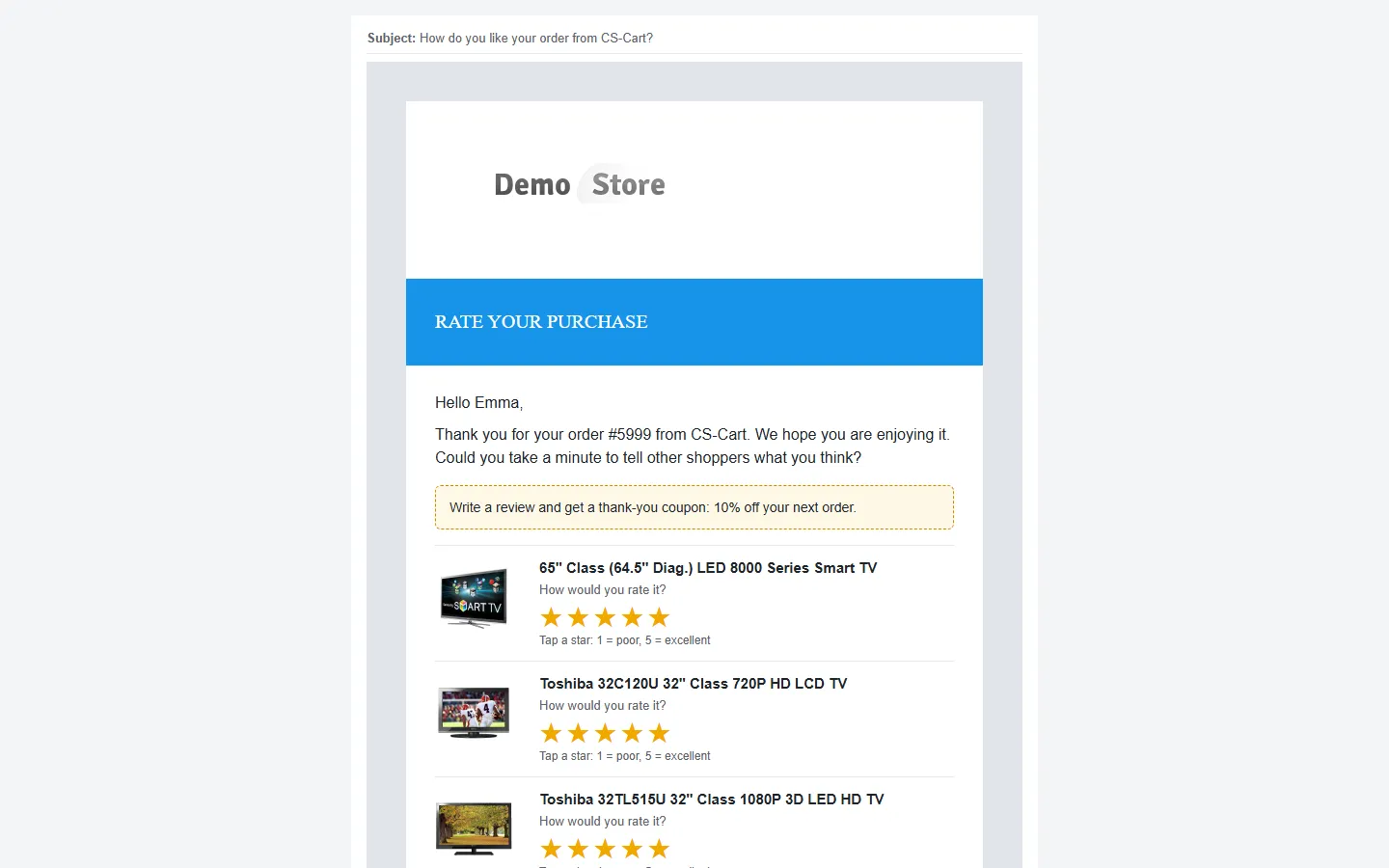
The request e-mail lists the ordered products with a picture and five stars each. Every star is a link: the customer’s rating is preselected on the review page. The Write a review button opens the page with all products. The footer has the unsubscribe link. Opens are counted with an invisible image (many mail apps block images, so the real open rate is usually higher), clicks are counted when a link is followed.
The reminder looks the same with a shorter text. The reward e-mail shows the coupon code, what it gives, its expiry date and a Continue shopping button.

All three are normal CS-Cart e-mail templates (Design → E-mail templates) with your store’s header, footer and colors. Edit the texts there; see E-mail templates for the variables.
The review page
Section titled “The review page”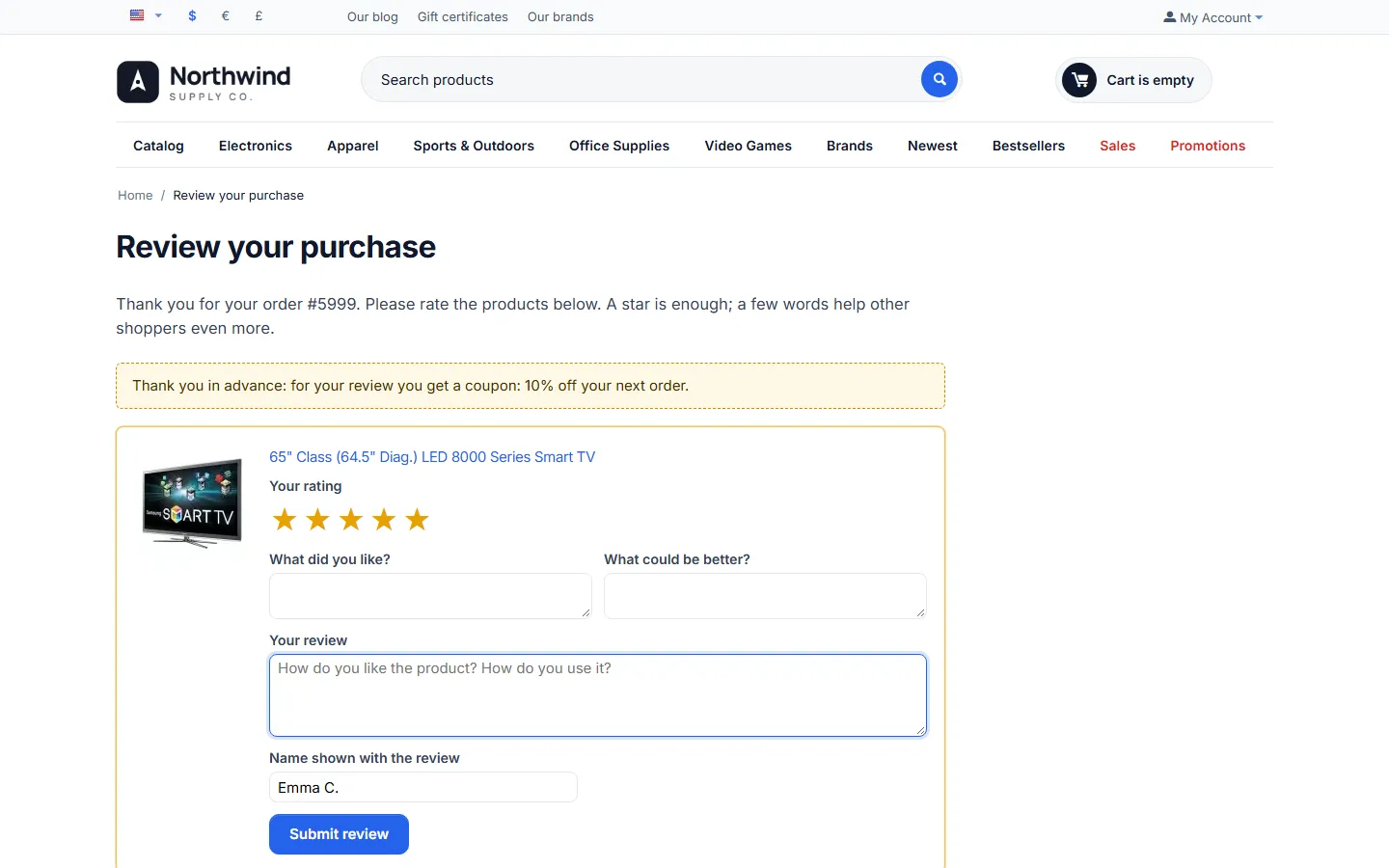
One card per product of the order with:
- the star picker (required),
- What did you like? and What could be better? when your product reviews use the advanced fields, and Your review,
- Name shown with the review, prefilled with the first name and the initial of the last name (for example Emma C.); the e-mail address is never shown.
Each card is sent on its own, so a customer can review one product now and another later from the same link. A reviewed product shows the given stars and “Thank you, your review will appear after a check” (or “is published”). A second review of the same product from the link is refused. Links expire after the configured number of days; an expired link explains this and points to the product pages.
Reviews written directly on the product page (for example by a logged-in customer who did not use the link) are counted for the request as well, when the customer and the product match.
Dashboard
Section titled “Dashboard”Marketing → Review requests.

- Tiles: requests sent in the period (and how many are scheduled), open rate and click rate, reviews received (and the share of requests that got at least one review), average rating (and how many reviews are published), reward coupons sent (and used).
- Requests and reviews per day, also as a table.
- Ratings from requests: the 1–5 star distribution, and the funnel sent → opened → clicked → reviewed.
- Products: how often each product was asked about, its reviews, review rate and average rating from requests.
- Sending: the last queue run, the cron line, recent errors (for example a mail server error), and Send a test e-mail: enter any address and, optionally, an order number (empty = the latest order). The test uses real links, so you can try the review page; reviews written from it are saved like any review. Test e-mails are not counted in the statistics.
The ⚙ menu has the request log, the exclusions, Queue orders of the last 30 days / 90 days (for orders placed before you installed the add-on; they are sent after the usual delay), the settings and the e-mail templates. Run now runs the queue immediately.
The license status bar at the top of the add-on’s pages shows a green chip when the license is valid; see License.
Request log
Section titled “Request log”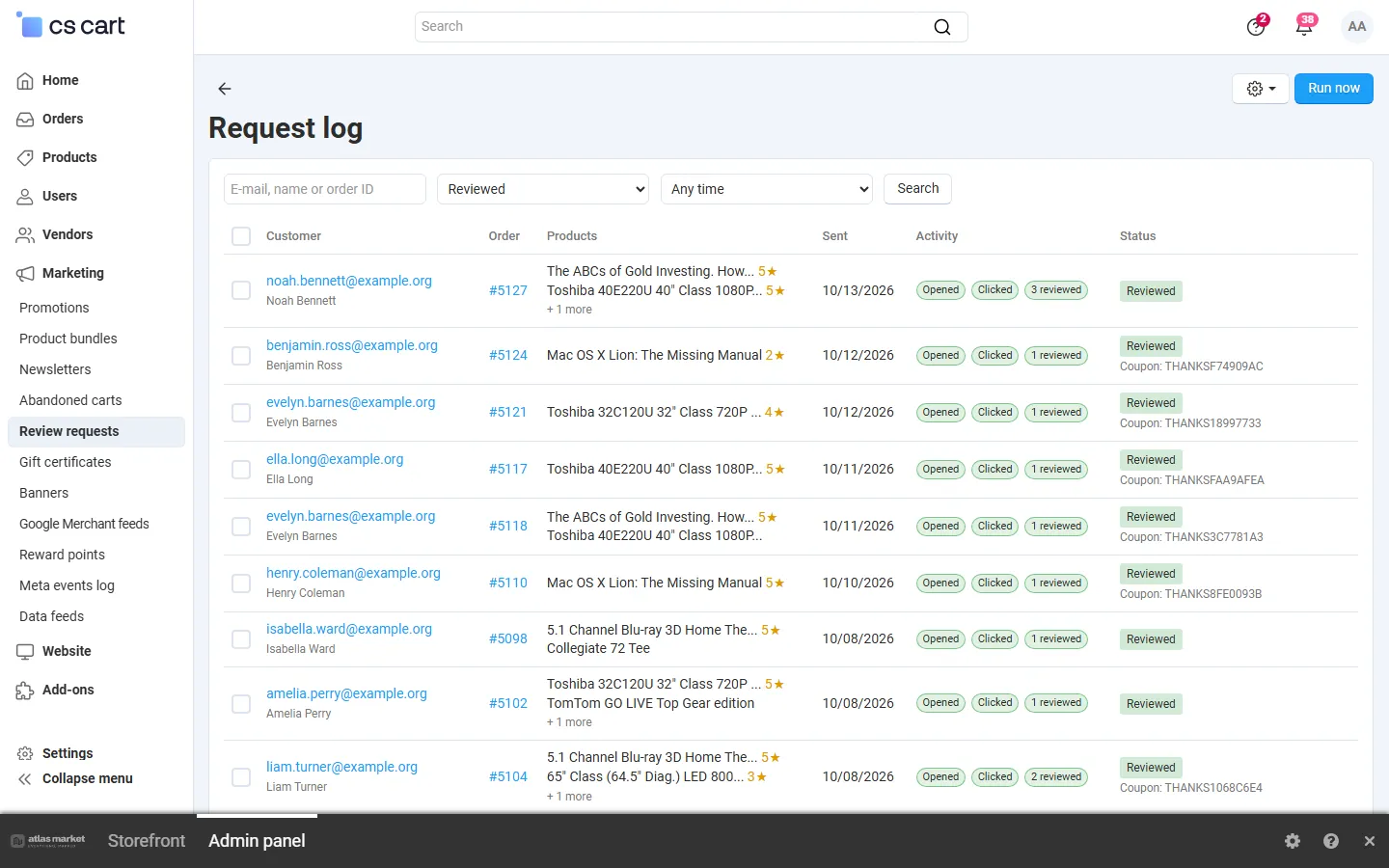
Search by e-mail, name or order number; filter by status and period. Each row shows the customer, the order, the products (with the stars a reviewed product got), the send date or the scheduled date, opened / clicked / reviewed flags and the status:
| Status | Meaning |
|---|---|
| Scheduled | Waiting for its send date |
| Sent / Reminded | E-mail (and reminder) sent, nothing reviewed yet |
| Reviewed | At least one product was reviewed |
| Cancelled | The order was canceled or deleted, or an administrator cancelled the request |
| Unsubscribed | The customer unsubscribed before the e-mail went out |
| Skipped | Not sent; the reason is shown (consent, recent request, exclusion, minimum total, nothing to review) |
| Failed | The mail server refused the e-mail three times |
Scheduled requests can be sent now or cancelled; any request can be deleted.
Request page: the customer and order, a timeline (queued, sent, opened, clicked, reminded, reviewed, reward sent), each product with its click and review (and a link to the review in Product reviews), the reward code and its state, and a preview of the request, reminder and reward e-mails exactly as the customer gets them.

Unsubscribe
Section titled “Unsubscribe”The unsubscribe link opens a confirmation page (“Stop asking [email protected] to review purchases?”) with a button, so link scanners of mail servers cannot unsubscribe anybody. Customers can subscribe again from the same page. Order and shipping e-mails are not affected.
Multi-Vendor
Section titled “Multi-Vendor”- Requests are created per vendor order, so a customer who bought from two vendors gets one e-mail per vendor order (the frequency limit counts only other orders).
- With Vendors see the review requests of their orders on, vendors find Marketing → Review requests in the vendor panel: the dashboard and the request log of their own orders, read-only. They cannot send, cancel, change exclusions or see other vendors’ requests.
- Vendors can be excluded on the Exclusions page.

CS-Cart Ultimate
Section titled “CS-Cart Ultimate”Settings of the General, Review reward and Privacy tabs can be set per storefront. The e-mails use the storefront’s name, logo, e-mail settings and URL, and the reward promotion must belong to that storefront.