

Delivery Date & Time Slots
Add-on ID: kv_delivery_date_time_slots · Edition: CS-Cart & Multi-Vendor · Latest version: 1.0.0 · Compatible with: CS-Cart & Multi-Vendor 4.17.2 – 4.21.x, PHP 7.4 – 8.3 · Changelog: view
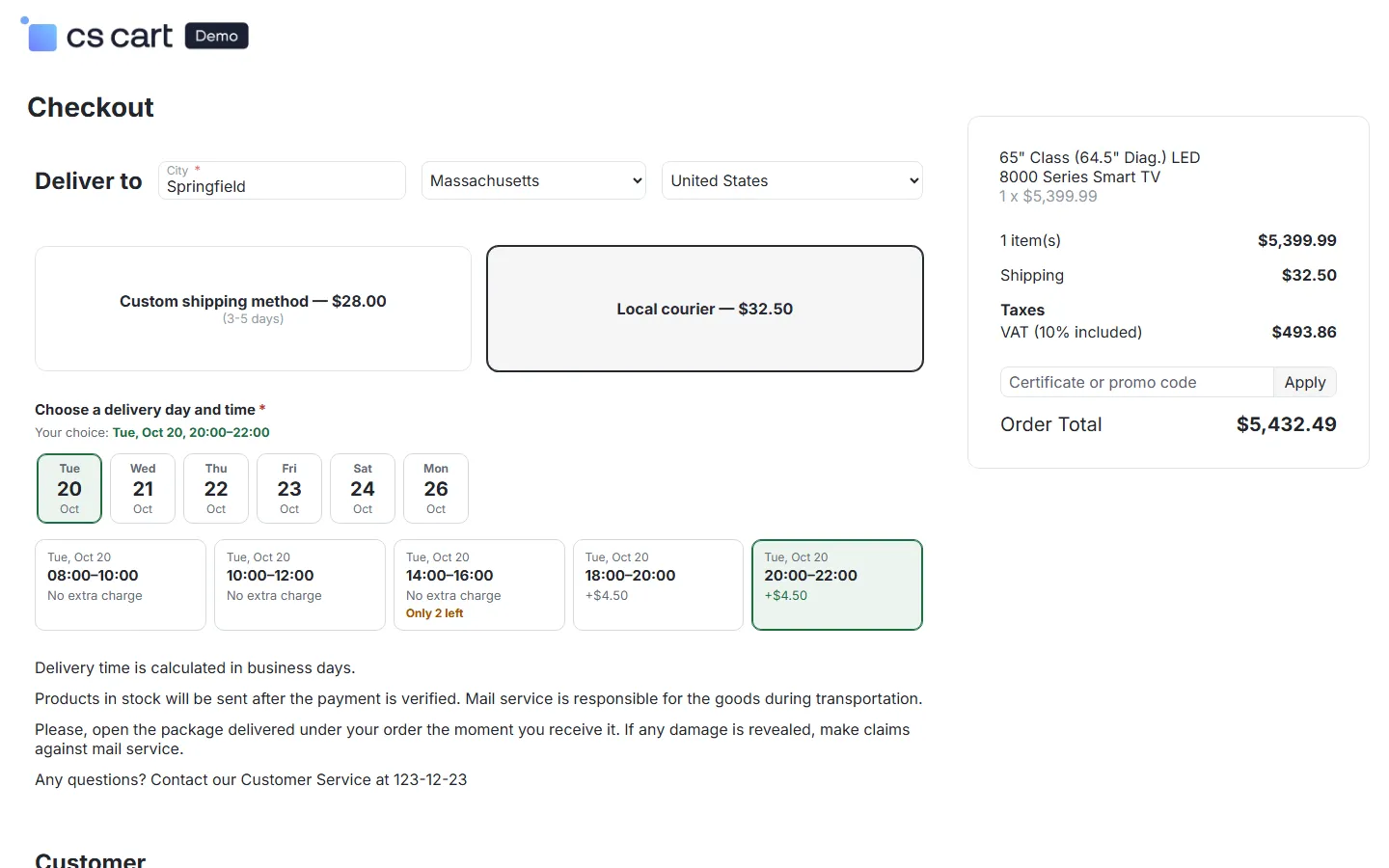
Delivery Date & Time Slots tells customers when their order arrives and lets them choose when it should arrive. One delivery calendar (working days, delivery days, closed days, the order cut-off and processing times) drives a live “Order within 2 h 13 min, get it by Thu, Oct 22” line on product pages, the estimate in the cart and at checkout, and a delivery day and time slot picker per shipping method with capacity limits and optional slot fees. CS-Cart itself only has a free-text delivery time per shipping method; this add-on calculates real dates.
- Delivery calendar: working days, delivery days, the order cut-off in your store time zone, processing days (per store, category or product) and transit days; closed days for dispatch, delivery or both, once or every year.
- Product page estimate with countdown: “Order within 2 h 13 min, get it by Thu, Oct 22”, or a date range. The countdown runs in the visitor’s browser, so pages stay fully cacheable (CS-Cart 4.21 full page cache, block cache).
- Cart and checkout estimate: per package, using the slowest product and the chosen shipping method.
- Delivery day or time slot picker per shipping method: off, estimate only, choose a day, or choose a day and a time slot. Slots per weekday with capacity, optional fee and a booking deadline; booked-out slots are shown as full; the choice can be required.
- Slot fees the safe way: the fee is added to the shipping cost of the chosen method, so taxes, totals, vendor payouts and invoices handle it like any shipping charge.
- Orders: the chosen day and slot (or the estimate) is stored on the order and shown on the admin, vendor and customer order pages, on the invoice and in the order e-mails; staff can change it on the order page; the order list gets a Delivery column and a delivery date filter.
- Delivery slot board: bookings against capacity per slot and day, colour-coded, with a click-through to the orders.
- Multi-Vendor: vendors can keep their own calendar, closed days, methods and slots in the vendor panel, or simply use the marketplace defaults; capacity per vendor or shared.
- CS-Cart Ultimate: a calendar per storefront, or one for all storefronts.
Documentation
Section titled “Documentation”| Page | Contents |
|---|---|
| Installation | Requirements, installing, upgrading, uninstalling |
| Configuration | The delivery calendar, shipping methods and slots, every setting, license |
| Usage | What customers see, orders, the slot board, vendors, invoices |
| Developer notes | Calendar engine, data model, hooks, full page cache, theme hooks, file map |
| FAQ | Common questions |
Compatibility
Section titled “Compatibility”- CS-Cart and CS-Cart Multi-Vendor 4.17.2 – 4.21.x (tested on CS-Cart Ultimate 4.17.2, Multi-Vendor 4.17.2 and Multi-Vendor 4.21.2, including the 4.21 full page cache, the Nova and Responsive themes).
- PHP 7.2.5 – 8.3, depending on your CS-Cart version.
- Works with every shipping method, including real-time carriers; the core delivery-time text of a method stays as it is.