

Email Log & Background Sending
Add-on ID: kv_email_log · Edition: CS-Cart & Multi-Vendor · Latest version: 1.0.0 · Compatible with: CS-Cart & Multi-Vendor 4.17.2 – 4.21.x, PHP 7.4 – 8.3 · Changelog: view
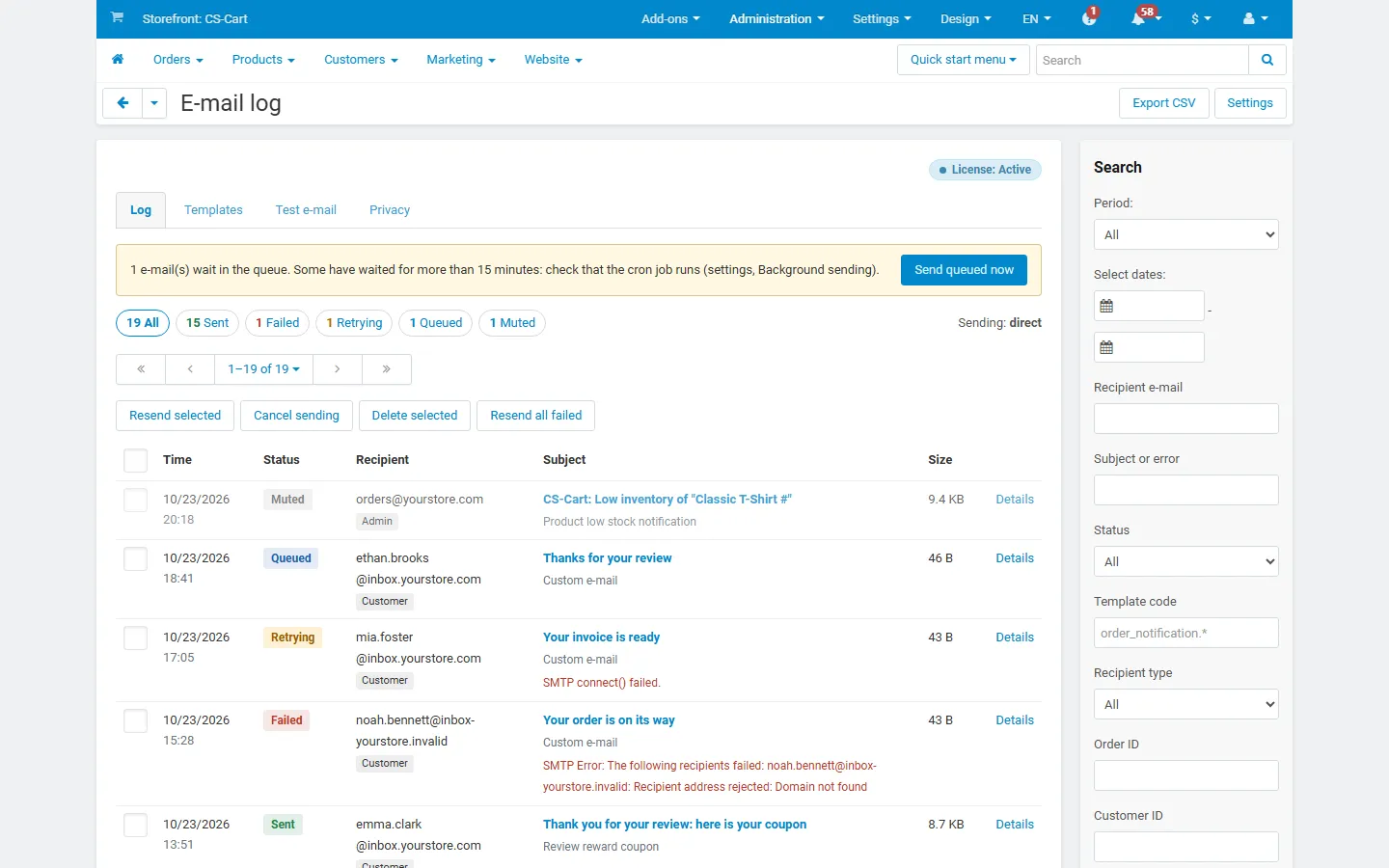
Email Log & Background Sending records every e-mail your store sends: order notifications, account e-mails, admin notices and the e-mails of other add-ons. For each one you see when it was sent, to whom, with which template, whether it went out, and the exact error when it did not. You can open the message as the customer received it, send it again, and stop a noisy notification without touching its template.
CS-Cart has no mail log. When a customer says “I never got my order confirmation”, you cannot check whether the store sent it, to which address, or what the mail server answered. This add-on answers that in seconds, and it can also take the sending out of the checkout: e-mails are sent after the page is answered or by cron, with automatic retries when the mail server is briefly unavailable.
- Complete log: time, recipient type (customer or admin), template, from, to, CC, BCC, reply-to, subject, size, status (sent, failed, retrying, queued, muted), transport and the full SMTP error. Order, customer and vendor are linked automatically.
- Message copy: the HTML message is stored (configurable) and shown in a sandboxed preview, with a text and an HTML view. Templates with sensitive content, such as password recovery, are never stored.
- Attachments: name, type and size are always logged; copies are optional, with a size limit.
- Resend: to the original recipients or to another address, one at a time, selected entries, or every failed e-mail of the current filter.
- Background sending: send directly (default), at the end of the request (the page answers first), or by cron. Password recovery and one-time codes always go out at once.
- Retries: temporary errors (connection problems, timeouts, SMTP 4xx answers) are retried after 1, 5, 15, 60 and 240 minutes; rejected addresses are not retried. A per-minute rate limit protects your mail provider’s quota.
- Mute a template: stop a notification nobody reads with one click; muted e-mails are still logged.
- Test e-mail: send a test with the store’s settings and see the SMTP conversation (passwords hidden) plus the SPF, DMARC and MX records of the sender domain.
- Privacy: find, export, anonymize or delete every e-mail of an address; the core GDPR anonymization covers the log too; retention periods for entries and messages.
- Order and customer tabs: an E-mails tab on the order and customer pages.
- Multi-Vendor: vendors can see the customer e-mails of their own orders (optional, read-only).
- Safe: the mail always goes out, even if the add-on fails.
Documentation
Section titled “Documentation”| Page | Contents |
|---|---|
| Installation | Requirements, installing, privileges, cron, upgrading, uninstalling |
| Configuration | Logging, background sending, retention, license |
| Usage | The log, entry details, resend, templates, test e-mail, privacy, vendor panel |
| Developer notes | How sending is captured, tables, hooks, file map |
| FAQ | Common questions, GDPR, license |
Compatibility
Section titled “Compatibility”| CS-Cart / Multi-Vendor | 4.17.2 – 4.21.x |
| PHP | 7.2.5 – 8.3 (whatever your CS-Cart version supports) |
| Mail transports | PHP mail(), sendmail and SMTP (the core settings); add-ons that send with their own transport are logged too |
| Storefront | No storefront output |
| Full page cache (4.21) | Supported: nothing runs on cached storefront pages |
| Other add-ons | Logs the e-mails of every add-on that sends through the core mailer, including the invoice PDFs of the core PDF documents add-on |