

Configuration
Overview · Installation · Usage · Developer notes · FAQ
Open Add-ons → Manage add-ons → Order Source & UTM Attribution → Settings. In CS-Cart Ultimate every storefront can have its own values.
General
Section titled “General”| Setting | Default | What it does |
|---|---|---|
| Record order sources | On | Records where new visitors come from and saves it with each new order. When off, stored sources, the order panel and the report stay available. |
| Remember sources across visits (cookie) | After consent | After consent: the first and last touch are kept in the first-party cookie kv_osa once the visitor allows it in Kavio Labs Cookie Consent Mode (without that add-on the cookie is used right away). Always: the cookie is always used. Never: no cookie; see the next setting. |
| Consent category | Analytics | The Cookie Consent Mode category that must be granted (Analytics or Marketing). |
| Without consent | Current visit only | Current visit only: the source is kept in the browser tab (sessionStorage, no cookie) until the order is placed, so the order still gets the source of the current visit. Do not record: nothing is kept and the order is saved as “Not tracked”. |
| Attribution window (days) | 90 | How long the cookie keeps the touches after the last campaign visit (1-730). |
| Referrer detail | Site and page | Store the referring page (https://site/page) or only the site. Query strings of referring pages are never stored. |
| Extra URL parameters to capture | (empty) | Comma-separated parameters stored with the click IDs, for example ref, aff_id. UTM tags and the common ad click IDs are always captured. |
Channels
Section titled “Channels”| Setting | What it does |
|---|---|
| Your other domains | One host per line. Visits from these hosts are internal navigation, not referrals (a blog, a separate checkout domain). The storefront host is always internal. |
| Ignored referrers | One host per line, subdomains included. Returns from payment pages and login providers must not replace the real source. PayPal, Stripe, Klarna, Mollie, Adyen, Authorize.net, Braintree, Square, 2Checkout, Worldpay, Opayo, PayU, Razorpay and Google sign-in are listed by default. |
| Extra search engines | Added to the built-in list (Google, Bing, Yahoo, DuckDuckGo, Yandex, Baidu, Ecosia, Qwant, Brave Search, Naver, Seznam, Startpage and more). A host ending in a dot matches every country domain: yahoo. matches yahoo.com and yahoo.co.jp. |
| Extra social networks | Added to the built-in list (Facebook, Instagram, X, LinkedIn, Pinterest, Reddit, YouTube, TikTok, Threads, Telegram, WhatsApp and more). |
| Extra AI assistants | Added to the built-in list (ChatGPT, Perplexity, Gemini, Copilot, Claude, Meta AI, Mistral, DeepSeek, Grok and more). |
After changing these lists, open Orders → Order sources and click Reclassify to apply the new rules to stored orders.
How channels are decided
Section titled “How channels are decided”- A UTM medium decides first:
cpc,ppc,paid,paidsearch= paid search (paid social when the source is a social network);paid_social= paid social;display,banner,cpm,retargeting= display;email,newsletter= email;sms,push= SMS and push;affiliate,partner= affiliates;social= organic social;organic= organic search;referral= referral; any other medium = other campaigns. - Without UTM tags, an ad click ID decides (gclid = paid search on Google, msclkid = paid search on Bing, ttclid = paid social on TikTok, and so on).
- Otherwise the referring site decides: AI assistant, webmail (email), search engine, social network, or any other site (referral).
- No campaign tag and no outside site: direct. A direct visit never replaces an earlier campaign as the last touch.
Admin panel
Section titled “Admin panel”| Setting | Default | What it does |
|---|---|---|
| Order statuses counted in the report | Paid, Complete | Only orders in these statuses are counted. |
| Show the source in the order list | On | The Source column in Orders → Orders. |
| Vendors see the sources of their orders (Multi-Vendor) | On | Vendors see the order panel, the list column and filter, and the report for their own orders. |
License
Section titled “License”The license status is shown in a License card at the top of the add-on page, above the tabs, so you see it on every tab. The License tab holds the key itself. The key is stored once for the whole installation.
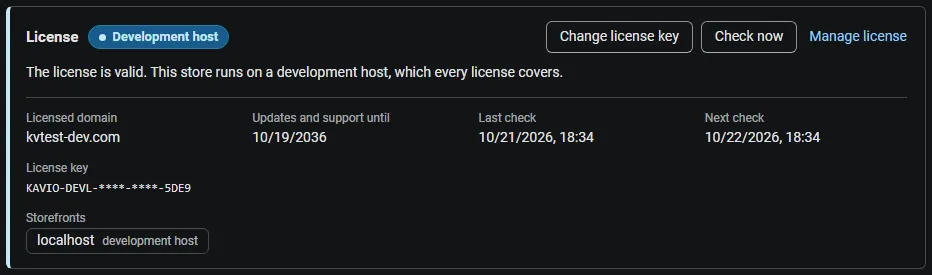
The License card shows:
- the status in color: green when valid, blue for a development host or the 14-day period before a key is required (with the days left), amber when the license server could not be reached (with the days left) or a Marketplace number is still being verified, red when the add-on is switched off;
- in plain words what the status means and, when the add-on is (or will be) switched off, what stops: new visits and orders are no longer attributed: the storefront script stays off and new orders get no source; stored sources, the order panel, the order list filter and the report stay available;
- the licensed domain, every storefront with its result (covered, development host, not covered), the end of the updates and support period, the last and the next check, and the key in use (masked);
- the actions Enter license key / Change license key, Check now, Manage license and, without a valid license, Buy a license.
In Add-ons → Manage add-ons the add-on’s row shows a small license badge next to its name. The Order sources report shows the status as a small chip.
What is covered: one license is bound to one domain and all its subdomains. Local development hosts (localhost, private IP addresses, *.local, *.test) are always covered.
When it checks: when the key is saved, when you click Check now, and then once a day on an admin page view. You can also run the check from cron:
php admin.php --dispatch=kv_order_source_attribution_license.checkExactly what is sent to cs-cart.kaviolabs.com: the license key, the add-on ID and version, the host names of your storefronts, the CS-Cart version and edition, and a random number that protects the answer. Nothing about your customers or orders.
| Status | Color | Add-on |
|---|---|---|
| Valid | green | works |
| Development host | blue | works |
| Pending (first 14 days without a key) | blue | works, shows the days left |
| Pending verification (Marketplace number) | amber | works |
| Grace period (server unreachable, up to 14 days) | amber | works, shows the days left |
| Not activated, invalid key, revoked, domain mismatch, not verified | red | new attribution is switched off |
The update and support period does not switch anything off: when it ends the add-on keeps working, you only stop receiving new versions. Only administrators who may manage settings see the license information; vendors never do.