

Usage
What shoppers see
Section titled “What shoppers see”Product page. Up to four lines in the price area (or below the add to cart buttons), in this order and only when there is something real to say:
- Sale ends in 1d 04h 12m 33s – the end of a promotion that applies to this product for this shopper.
- 5 other shoppers are viewing this now – refreshed every minute while the page is open.
- 12 people bought this in the last 24 hours
- Only 3 left in stock – with an optional stock bar.
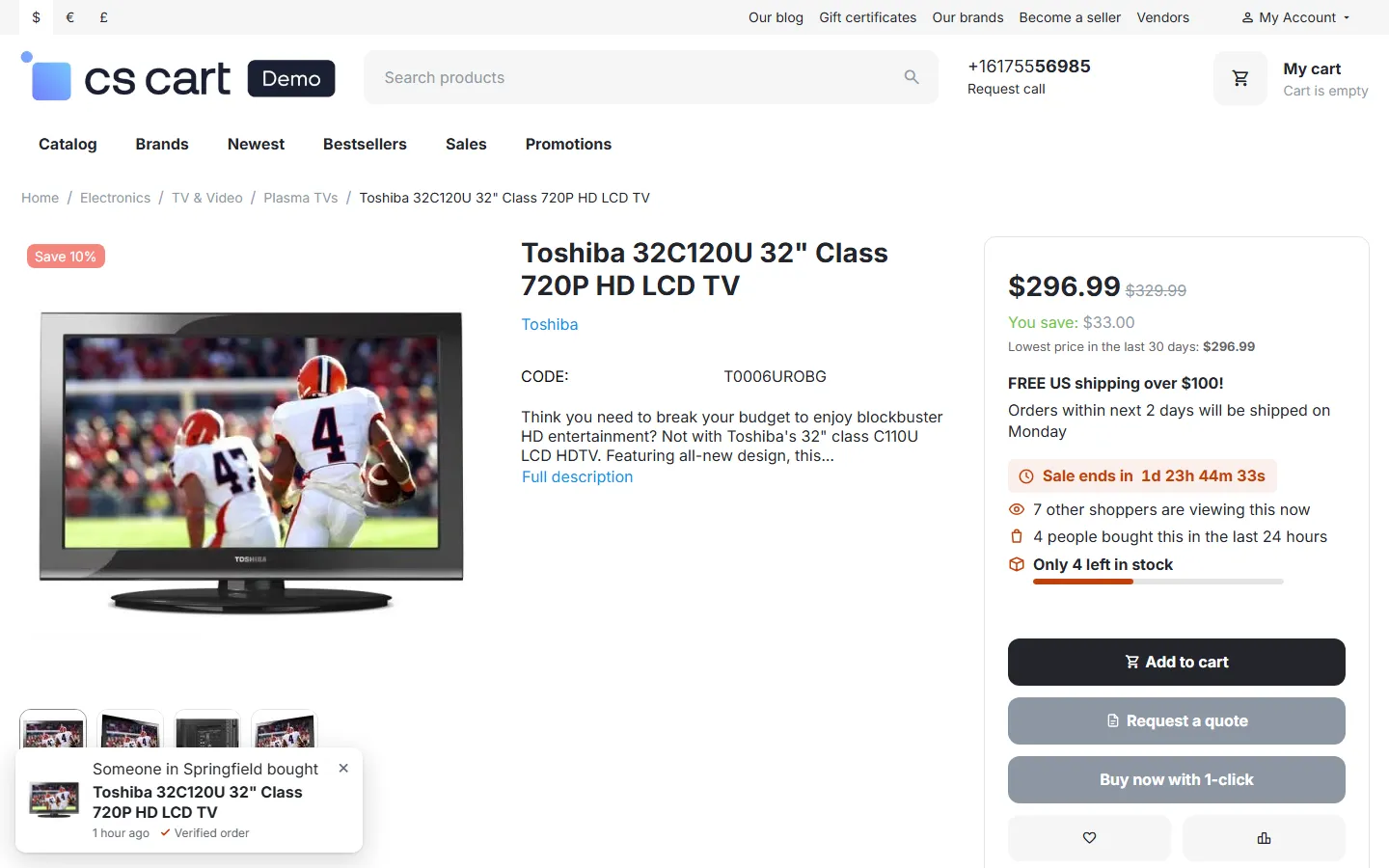
Product lists (category, search, home page blocks, related products). One small badge on the product image: Only 3 left when the stock is low, otherwise 12 bought in 24 hours. Products without a real reason show nothing.

Cart. A low-stock note under each item that is running out, and a countdown for promotions applied to the cart that end soon (“Weekend Deal ends in 1d 23h 42m”).

Recent-purchase toasts (when switched on). A small card in a corner: product image and name, “Someone in Springfield bought”, “2 hours ago · Verified order”. The card links to the product, pauses while the pointer or keyboard focus is on it and has a close button; after closing, no more toasts appear in this browser session.
The honesty rules
Section titled “The honesty rules”The add-on is built so that it cannot show fake urgency:
- Every count is read from your store when the page is shown: orders, stock, promotions and the viewer signals. There is no “boost”, no random number and no fixed fake value.
- Numbers below your minimum are hidden, not rounded up.
- A countdown appears only for a real promotion end date. When the promotion ends, the countdown disappears; it never restarts for the next visitor.
- “Viewers now” counts other people only, never the shopper himself, and ignores search engine bots.
- Recent purchases are real orders in the statuses you chose; the time is shown coarsely (“2 hours ago”).
This is in line with the EU Unfair Commercial Practices Directive and similar rules that forbid false urgency and fake reviews or counters. You remain responsible for your own wording if you change the texts.
Privacy
Section titled “Privacy”- Viewers now stores, per product page view, an anonymous 16-character code computed from the IP address and browser with a key that changes every day. The code cannot be turned back into the IP address, no cookie is set, and the rows are deleted after an hour.
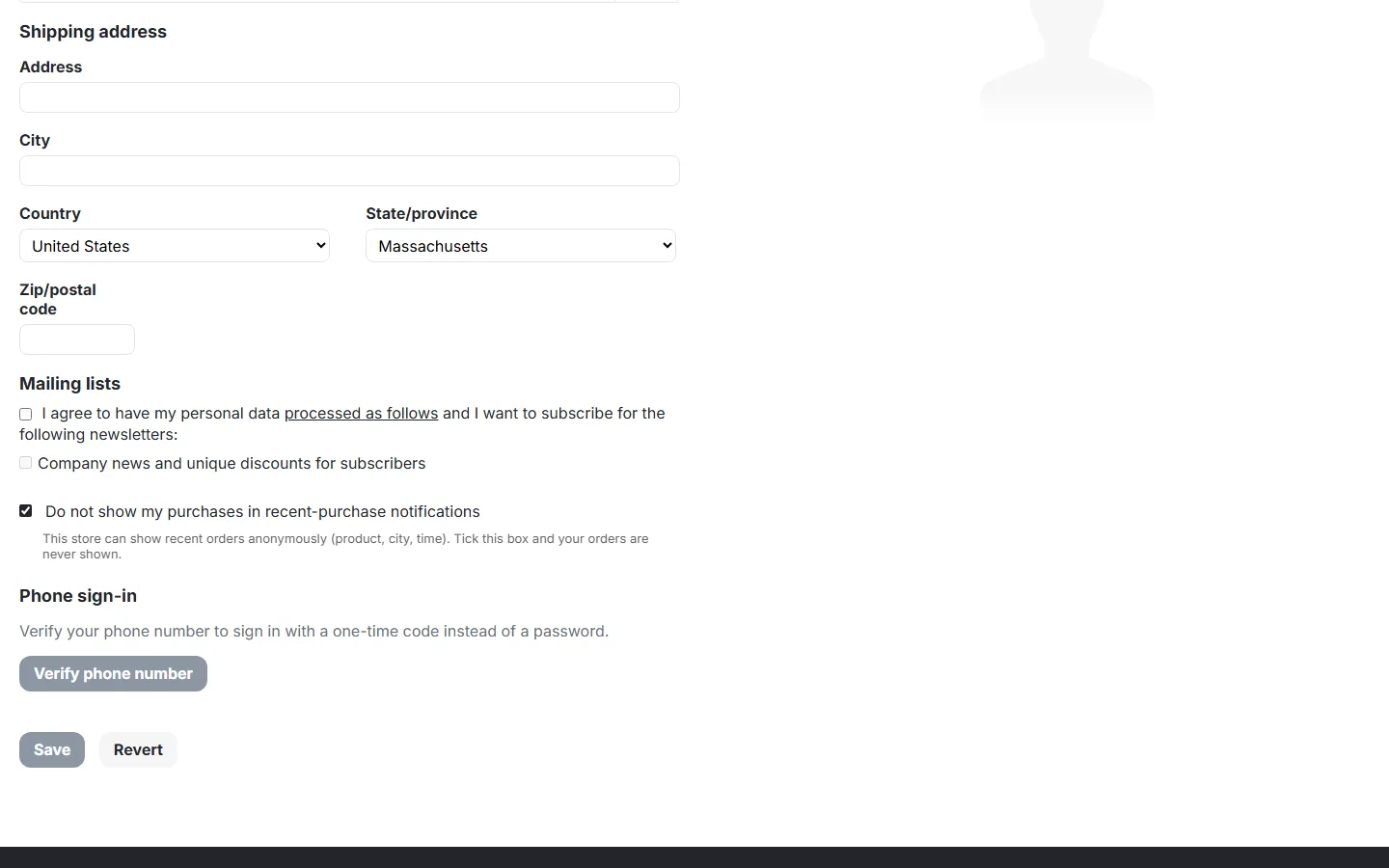
- Recent-purchase toasts show at most a first initial and a city, never a full name, street or e-mail. Mention them in your privacy policy. Customers can tick Do not show my purchases in recent-purchase notifications in their profile (the checkbox appears while toasts are on); their orders are then never shown. Guest orders can be fully anonymised with Customer shown as: “Someone” and Show the city: off.
- When a customer account is deleted, the opt-out row is deleted too.
Multi-Vendor
Section titled “Multi-Vendor”Sales are counted over all vendors’ orders (the marketplace parent order is not counted twice). Every vendor’s product page shows the same honest messages; vendors have nothing to configure. Settings are the administrator’s.
CS-Cart Ultimate
Section titled “CS-Cart Ultimate”Each storefront has its own settings, and orders and viewers are counted per storefront.
Accessibility
Section titled “Accessibility”- Shoppers who ask their device to reduce motion get no slide or fade, and the countdown changes once a minute instead of every second. You can also switch animations off for everyone.
- Toasts are announced politely to screen readers, never move the keyboard focus and can be closed with a labelled button.
- The countdown has a calm text label for screen readers; the ticking digits are hidden from them.