

Product Price in Any Currency
Add-on ID: kv_product_price_currency · Edition: CS-Cart & Multi-Vendor · Latest version: 1.0.0 · Compatible with: CS-Cart & Multi-Vendor 4.17.2 – 4.21.x, PHP 7.4 – 8.3 · Changelog: view
Product Price in Any Currency lets you enter a product’s prices in the currency you buy or sell it in (for example EUR or GBP) while your store keeps working in its primary currency. The add-on converts the currency prices into the primary currency when you save the product and again whenever the exchange rate changes. The converted price is saved as the normal product price, so promotions, taxes, price filters, sorting, feeds, the cart and orders work exactly as before.
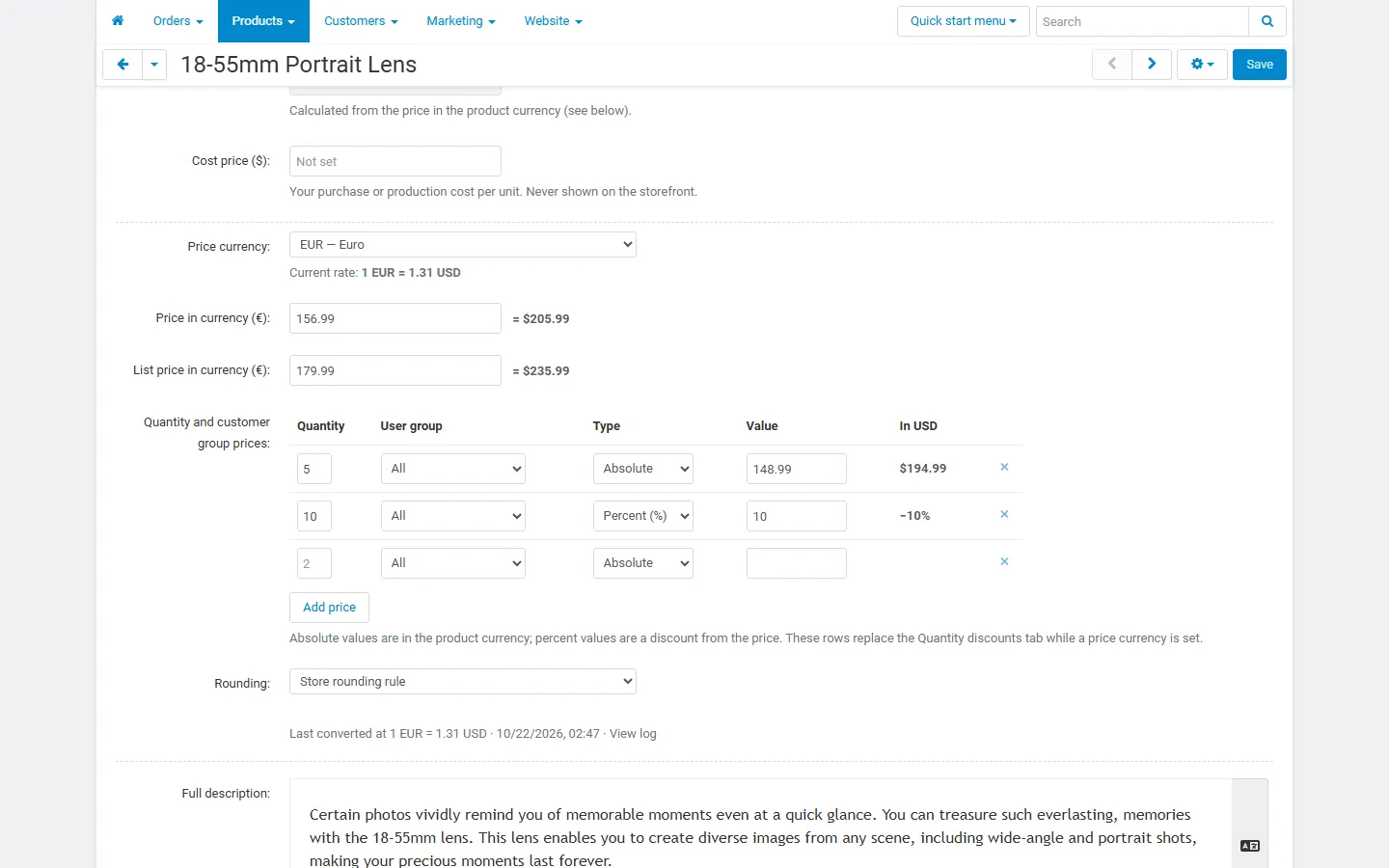
- A price currency per product: choose any currency from Administration → Currencies on the product page, then enter the price, the list price and the quantity and customer group prices in that currency. A live preview shows the converted price.
- Automatic recalculation: when you change a rate in Administration → Currencies (or through the REST API), the products priced in that currency get their new prices at once. A cron job also picks up rates changed by other tools and finishes large catalogs in the background.
- Rounding rules: keep exact prices, round to a step (0.05, 0.10, 1, …) or to a price ending (.99, .95, …), up, down or to the nearest value. A product can opt out of rounding.
- Bulk assignment: price a whole category (with subcategories), a vendor’s or storefront’s products or the whole catalog in a currency with one click. Today’s prices stay the same; from then on they follow the rate.
- Recalculation log: every run with its trigger, rate change, number of checked and changed products, and the old and new price of each product.
- Import, export and REST API: “Price currency”, “Currency price” and “Currency list price” columns in the product export and import (also in Advanced import), and a
kv_price_currencyfield in the REST API. - Product list: the currency price under the primary price, and a “Price currency” filter in the product search.
- Multi-Vendor: allow vendors to price their products in the currencies you choose.
- Variations: new variations take the currency of their parent product; one checkbox applies a currency to all variations of a product.
- Works with our other add-ons: price history (EU Omnibus) records each recalculated price, spreadsheet and feed import tools keep working, cost and profit reports and feeds read the converted prices.
Documentation
Section titled “Documentation”| Page | Contents |
|---|---|
| Installation | Requirements, installing, upgrading, disabling, uninstalling |
| Configuration | Every setting, cron, license |
| Usage | Pricing a product, rate changes, bulk assignment, log, import, vendors |
| Developer notes | Data model, hooks, REST API, file map |
| FAQ | Common questions |
Compatibility
Section titled “Compatibility”- CS-Cart and Multi-Vendor 4.17.2 – 4.21.x (tested on CS-Cart 4.17.2 with PHP 8.1, Multi-Vendor 4.17.2 with PHP 8.1 and Multi-Vendor 4.21.2 with PHP 8.3).
- PHP 7.2.5 – 8.3, depending on your CS-Cart version.
- Uses the currencies and exchange rates of Administration → Currencies. Works with the core Product variations, Advanced import and REST API.
- No storefront output: any storefront theme works.