

Usage
The image optimizer page
Section titled “The image optimizer page”Website → Image optimizer (administrators with the View settings privilege; actions need Manage settings).
The license status bar at the top shows a small green chip when the license is valid, or a banner with the status and the actions when it is not.

Overview tab
- Images found / Optimised / Waiting / Saved per full load / Errors. Saved per full load adds up, for every image, the difference between the original and its smaller copy (AVIF or WebP): what a browser saves when it loads every image once.
- Progress bar, Optimise now and Scan for new images. Optimise now first scans the
imagesfolder for new and changed files, then converts the waiting ones in batches of up to 8 seconds and updates the bar. It never blocks the store; you can leave the page and the work continues with cron or the background batches. Scan for new images starts a full scan at once (otherwise the folder is scanned once a day, and new thumbnails are noticed right after CS-Cart creates them). - Savings per format (WebP, AVIF, compressed originals) and Image groups (thumbnails, product and category images, banners, other images) with their size and saving.
- Server support: which library writes WebP and AVIF on this server, GD and Imagick versions, and where the images are stored.
- Storefront: how optimised images are served, the formats and qualities, lazy loading and compression.
- Automation: the cron command, the last run and the last full scan.
- Maintenance:
- Retry failed images: images that failed three times are not retried automatically.
- Create all copies again: after you changed the quality or the formats. The current copies are used until the new ones are ready.
- Restore originals: puts back every original that Compress original images rewrote, from its backup, and switches compression off. An image you replaced since then is kept.
- Delete optimised copies: deletes every WebP and AVIF copy. The storefront shows the originals until the copies are created again. The originals are not touched.
- Release the run lock (only shown while a run is marked as running): if a run was interrupted, the next one starts by itself after 5 minutes; this button releases it at once.
Files tab
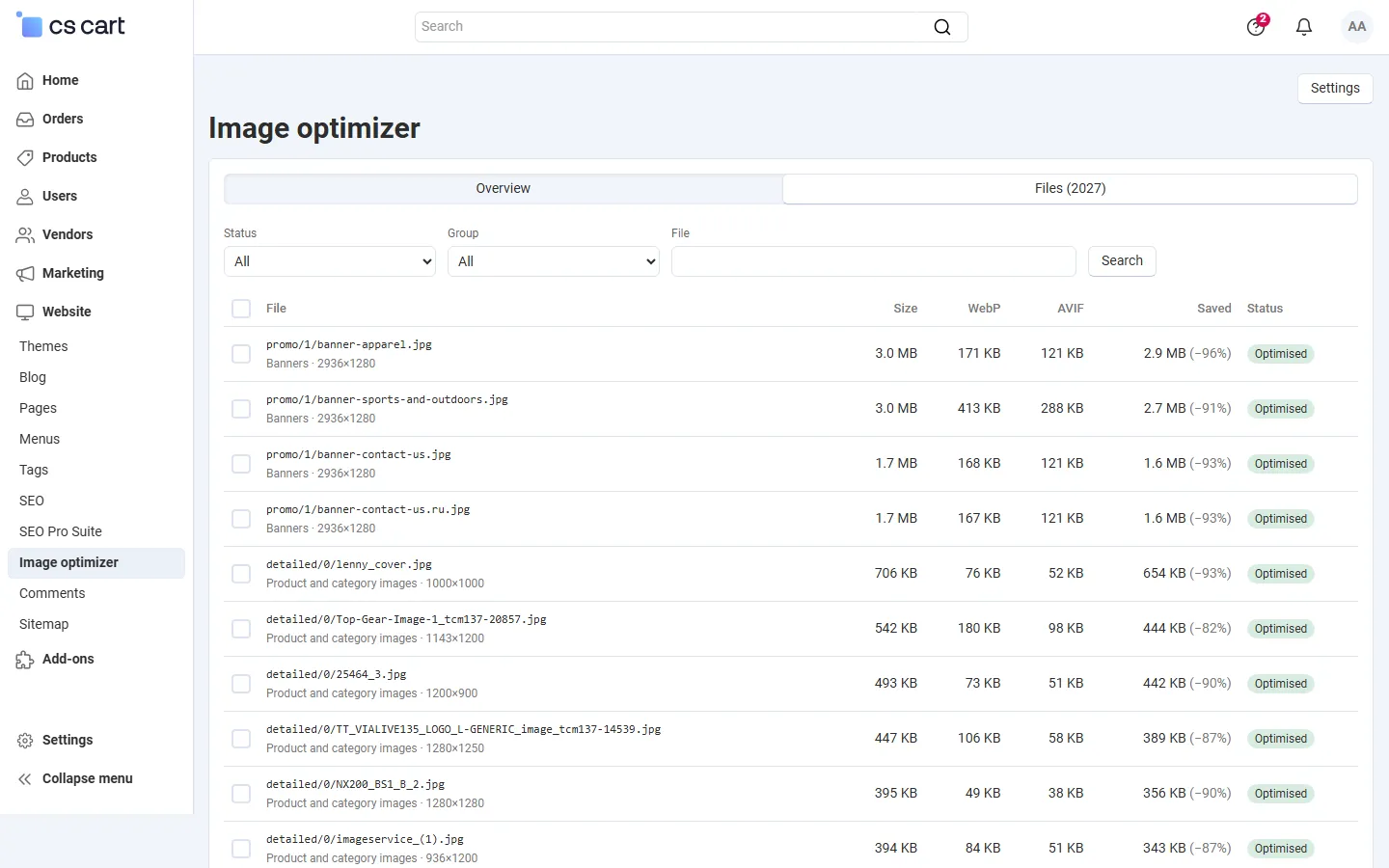
Every image the add-on found, with its group, dimensions, size, the WebP and AVIF size, the saving and the status:
| Status | Meaning |
|---|---|
| Optimised | Processed. Copies that would not be smaller were not kept; the note says so. |
| Waiting | New or changed, converted by the next run. |
| Skipped | Not converted, with the reason (animated, too large, colour profile with GD, not readable). |
| Error | The image library failed (the note says why). Retried up to three times. |
| Excluded | By a pattern, a switched-off group or by hand. Has no copies. |
Filter by status, group or file name and sort by size, saving or status. Select files and choose Optimise again, Exclude (deletes the copies and keeps the file out) or Include again.
php /path/to/store/admin.php --dispatch=kv_image_optimizer_webp.cronRun it every 15 minutes, for example. Each run works for Seconds per run (default 20) and prints a short JSON summary. Add --seconds=600 for the first run of a large catalog and --rescan=Y to scan the whole folder at once. Runs never overlap: a second run while one is working exits at once.
Without cron, the add-on works in short background batches while an administrator uses the admin panel (setting Process while an administrator works in the admin panel).
What visitors get
Section titled “What visitors get”With the default Picture element, an image of the CS-Cart image template becomes:
<picture class="kv-iow-picture"> <source type="image/avif" srcset="…/images/kv_image_optimizer_webp/thumbnails/280/280/detailed/1/shoe.jpg.avif 1x, …/shoe.jpg.avif 2x"> <source type="image/webp" srcset="…/images/kv_image_optimizer_webp/thumbnails/280/280/detailed/1/shoe.jpg.webp 1x, …/shoe.jpg.webp 2x"> <img class="ty-pict cm-image" src="…/images/thumbnails/280/280/detailed/1/shoe.jpg" width="280" height="280" loading="lazy" decoding="async" alt="…"></picture>- Browsers with AVIF support load the AVIF copy, others the WebP copy, very old browsers the original. The
<picture>element adds no box (display: contents), so the layout of the theme does not change. - Retina images (the core HiDPI add-on) get copies for both sizes; a format is only offered when every size has a copy.
- An image gets its sources only once its copies exist and are newer than the image. A replaced image shows the new original until its copies are made again.
- The zoom and lightbox keep loading the original detailed image (in Replace with WebP mode they load its WebP copy).
- E-mails, the admin panel, structured data (JSON-LD), social media tags and product feeds keep the original image addresses.
- Images inside product descriptions and pages (uploaded in the text editor) are not changed.
Multi-Vendor and CS-Cart Ultimate
Section titled “Multi-Vendor and CS-Cart Ultimate”- Multi-Vendor: images uploaded by vendors are optimised like all others. The image optimizer page and its settings are for the marketplace administrator only; vendors do not see them.
- CS-Cart Ultimate: all storefronts share the images, so the settings and the copies apply to every storefront. The license is checked per storefront host.