

Configuration
Overview · Installation · Usage · Developer notes · FAQ
Open Add-ons → Manage add-ons → Instant Live Search with Typo Tolerance (or the Settings button on Products → Instant search). On CS-Cart Ultimate the dropdown, results page and analytics settings can be set per storefront.
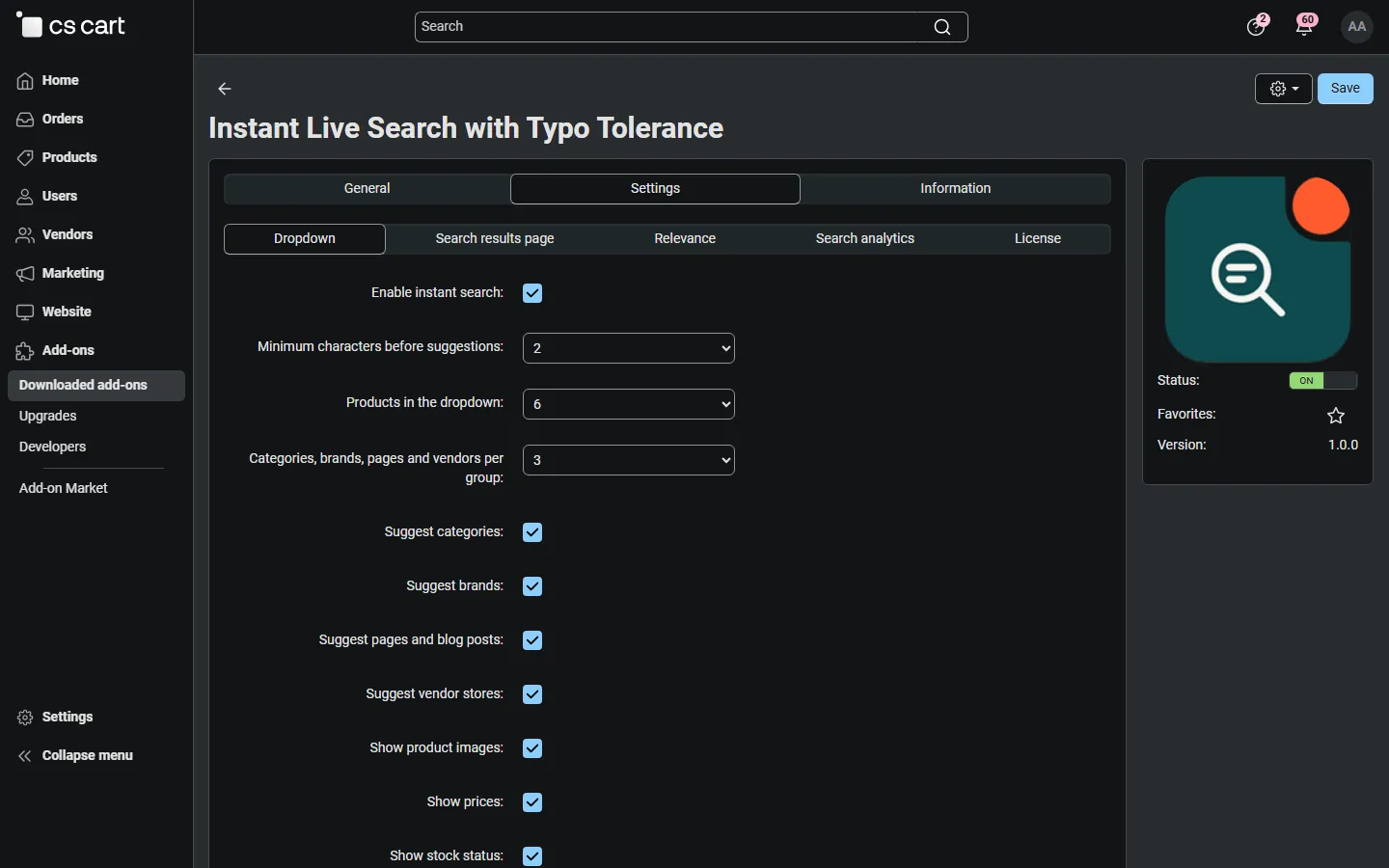
Dropdown
Section titled “Dropdown”| Setting | Default | Description |
|---|---|---|
| Enable instant search | On | Switches the dropdown and the results page ranking on or off. When off, the storefront uses the standard CS-Cart search; the index and analytics are kept. |
| Minimum characters before suggestions | 2 | The dropdown searches from this many letters on. Below it, recent and popular searches are shown. |
| Products in the dropdown | 6 | 4, 6, 8 or 10 products. |
| Categories, brands, pages and vendors per group | 3 | How many of each are listed next to the products; None shows products only. |
| Suggest categories / brands / pages and blog posts / vendor stores | On / On / On / On | Which groups the dropdown may show. Brands are the variants of your Brand type feature. Vendor stores exist on Multi-Vendor only. |
| Show product images / prices / stock status / product code (SKU) | On / On / On / Off | What a product line shows. Prices include catalog promotions and the customer’s group prices. Stock shows In stock, Out of stock or Available to order (back orders); it is hidden for products without inventory tracking. |
| Show the vendor name of products | Off | Multi-Vendor only. |
| Show the visitor’s recent searches | On | Up to 6 recent searches, stored only in the visitor’s browser. |
| Popular searches shown before typing | empty | One search per line. Empty: the most frequent searches with results of the last 30 days (from the analytics). |
| Suggestion cache lifetime (seconds) | 300 | How long an answer is reused for the same search, language, currency, storefront and customer group. 0 switches the cache off. Saving products, categories or these settings refreshes the cache automatically. |
Search results page
Section titled “Search results page”| Setting | Default | Description |
|---|---|---|
| Results page ranking | Instant search ranking | Instant search ranking: the results page finds the same typo-tolerant matches as the dropdown and sorts them by relevance (“Sort by Relevance” in the sorting box). Product filters, the other sortings and pagination keep working. Standard CS-Cart search: the results page is left to CS-Cart; only the dropdown uses the add-on. If the bundled Searchanise add-on is active, the results page is always left to Searchanise. |
| Show popular products when nothing is found | On | A search without results shows popular searches and four popular products below the “No products found” message (in the dropdown and on the results page). |
Relevance
Section titled “Relevance”| Setting | Default | Description |
|---|---|---|
| Typo tolerance | On | A word that does not exist in your catalog is matched to the closest words: one typo for words of 4 to 7 letters, two typos for longer words (swapped letters count as one). Words of 1 to 3 letters and numbers are never changed. |
| Allow results that miss one word | On | When no product matches every word of a search of two or more words, products matching all words but one are shown (ranked lower). At least one word must match without a typo. |
| Rank popular products higher | On | Adds a small bonus for products that are viewed more often. |
| Search in product features | On | Feature values (for example colors, materials, sizes) are searchable. Brands are always searchable. Rebuild the index after changing this. |
| Search in product descriptions | Off | Short and full descriptions are searchable with a low weight. The index gets larger. Rebuild the index after changing this. |
The add-on page shows a notice when one of the two index settings was changed after the last rebuild.
Search analytics
Section titled “Search analytics”| Setting | Default | Description |
|---|---|---|
| Collect search analytics | On | Counts searches, results and clicks per day and search phrase. |
| Keep analytics for (days) | 180 | Older rows are deleted by the cron command. |
| Scheduled index update | The cron command line for your store (see Installation). |
License
Section titled “License”The license status is shown in a License card at the top of the add-on page, above the tabs, so you see it on every tab. The License tab holds the key itself. The key is stored once for the whole installation.
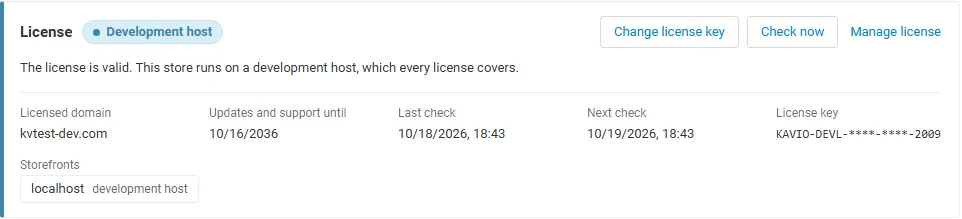
The License card shows:
- the status in color: green when valid, blue for a development host or the 14-day period before a key is required (with the days left), amber when the license server could not be reached (with the days left) or a Marketplace number is still being verified, red when the add-on is switched off;
- in plain words what the status means and, when the add-on is (or will be) switched off, what stops: the instant search dropdown is hidden and the search results page uses the standard CS-Cart search; your index, synonyms and search analytics are kept;
- the licensed domain, every storefront with its result (covered, development host, not covered), the end of the updates and support period, the last and the next check, and the key in use (masked);
- the actions Enter license key / Change license key (opens the License tab), Check now (verifies at once and stays on the page), Manage license (your licenses on cs-cart.kaviolabs.com) and, without a valid license, Buy a license.
In Add-ons → Manage add-ons the add-on’s row shows a small license badge next to its name, for example License: Valid or License: Pending · 9 days left. Products → Instant search shows the license status in a bar at the top.
| Setting | Description |
|---|---|
| License key | Your Kavio Labs license key (KAVIO-XXXX-XXXX-XXXX-XXXX, from My licenses on cs-cart.kaviolabs.com) or your CS-Cart Marketplace license number. If you entered the Marketplace license number in Add-ons → Manage add-ons (the add-on’s license field), leave this empty: the add-on uses that number. |
| License status | Points to the License card and explains what the check sends. |
What the license covers. A license is bound to the base domain you entered at purchase (for example example.com) and covers every subdomain of it (www.example.com, shop.example.com, staging.example.com). Local development hosts are always allowed: localhost, 127.0.0.1 and other private IP addresses, and host names ending in .localhost, .test, .local, .example or .invalid. A store on a different base domain needs its own license. If you move your store to a new domain, contact support.
When the add-on checks. When you save the key, and then once a day. The check runs only in the admin panel (on a page you open) or from cron, never while customers browse or search, and takes a few seconds at most. A cron job keeps the license verified even when nobody opens the admin panel:
php /path/to/store/admin.php --dispatch=kv_instant_live_search_license.checkWhat is sent. The check sends this to https://cs-cart.kaviolabs.com and nothing else: the license key, the add-on ID and version, the host names of your storefronts, your CS-Cart version and edition, and a random one-time value. No customer, search, order or personal data is sent. The server answers with a digitally signed result, so a forged answer is ignored.
Statuses.
| Status (card) | Color | What happens |
|---|---|---|
| Valid | Green | The license is valid for this domain. Everything works. |
| Development host | Blue | The store runs on a local development host, which every license covers. Everything works. |
| Pending verification | Amber | A CS-Cart Marketplace license number was accepted, but the Marketplace has not confirmed it yet. Everything works. |
| Pending · N days left | Blue | No verified key yet (a new installation). Everything works for 14 days. |
| Grace period · N days left | Amber | The last checks failed (for example a network problem). The add-on keeps working for 14 days after the first failed check. |
| Not activated, Invalid key, Revoked, Domain mismatch, Not verified | Red | The instant search dropdown is hidden and the search results page uses the standard CS-Cart search. The admin page, the index, synonyms and analytics stay available and are kept. Domain mismatch shows the licensed domain next to the domain your store runs on. |