

Configuration
Settings: Add-ons → Manage add-ons → Loyalty Program with VIP Tiers → Settings. Tiers: Customers → Loyalty tiers. The settings are global (tiers are customer user groups, which CS-Cart keeps global, also with several storefronts).
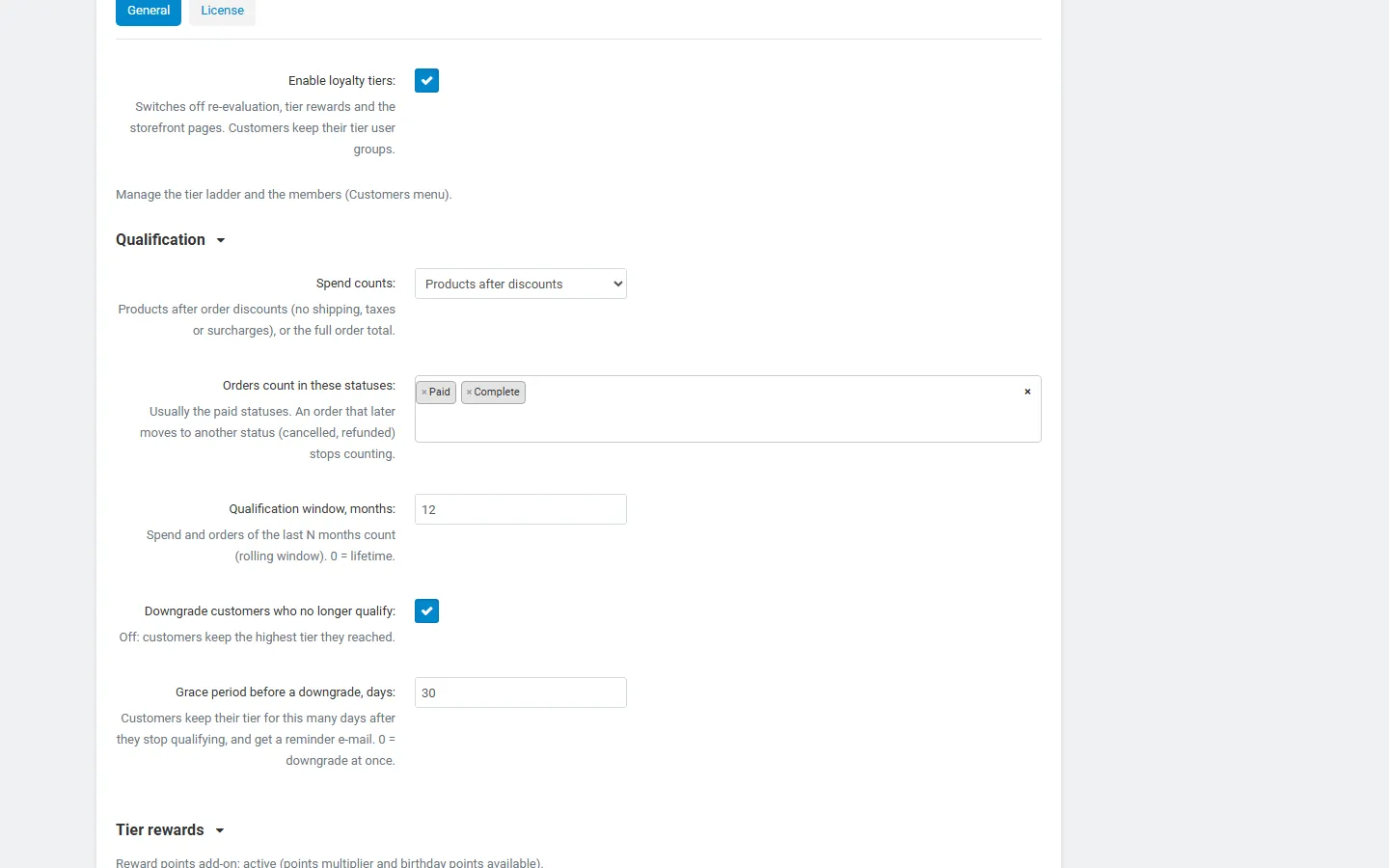
General
Section titled “General”| Setting | Default | Description |
|---|---|---|
| Enable loyalty tiers | On | Off: no re-evaluation, no tier rewards, no My tier page and badge. Customers keep their tier user groups. |
Qualification
Section titled “Qualification”| Setting | Default | Description |
|---|---|---|
| Spend counts | Products after discounts | Products after discounts: the order subtotal minus order discounts (no shipping, taxes or surcharges). Order total: the full order total. |
| Orders count in these statuses | Processed, Complete | Only orders in these statuses count. An order that later moves to another status (Canceled, Declined, a refund status) stops counting, so refunds lower the spend by themselves. Parent orders of Multi-Vendor are never counted; their vendor orders are. |
| Qualification window, months | 12 | Spend and orders of the last N months count (a rolling window). 0 = lifetime. |
| Downgrade customers who no longer qualify | On | Off: customers keep the highest tier they reached. |
| Grace period before a downgrade, days | 30 | A customer who stops qualifying keeps the tier for this many days and gets a “keep your tier” e-mail. Reaching the goals again ends the grace period. 0 = downgrade at once. Upgrades always happen at once. |
Tier rewards
Section titled “Tier rewards”The settings show which connected add-ons are active.
| Setting | Default | Description |
|---|---|---|
| Points multiplier (Reward points add-on) | On | Multiplies the reward points an order earns by the multiplier of the customer’s tier. |
| Tier cashback (Store Credit Wallet add-on) | On | Adds the tier’s cashback percentage to the store credit cashback of an order (on top of the wallet’s own cashback rules). Needs the Store Credit Wallet add-on with its cashback on. |
| Birthday rewards | On | Gives the tier’s birthday reward once a year on the customer’s birthday. |
| Ask for the birthday in the customer profile | On | Adds a Birthday field to the storefront profile and the admin customer page. Hidden while the core Age verification add-on is active, which has its own birthday field (both use the same value). |
| Give a missed birthday reward up to N days later | 7 | If the schedule did not run on the birthday, the reward is still given within this many days. |
Storefront
Section titled “Storefront”| Setting | Default | Description |
|---|---|---|
| Show the tier in the account menu | On | A “Gold member” badge (or a “Loyalty program” link for customers without a tier) in the My account menu. |
| Show all tiers on the My tier page | On | The tier ladder with goals and perks below the customer’s own tier. |
| Early access label on product pages | On | Products limited to early-access tiers (product User groups setting) show “Early access for Gold members”. |
E-mails to customers
Section titled “E-mails to customers”Tier upgrade, tier downgrade and grace period started can be switched off one by one. The texts are in Design → E-mail templates (Loyalty tier changed, Loyalty tier grace period, Loyalty birthday reward). The birthday e-mail is sent with every birthday reward. “Recalculate all customers” sends e-mails only if you tick Send tier e-mails.
Vendors (Multi-Vendor)
Section titled “Vendors (Multi-Vendor)”An information line explains the vendor impact: tiers are marketplace-wide, and vendors can use the tier user groups in their own user group prices and promotions.
Schedule
Section titled “Schedule”| Setting | Default | Description |
|---|---|---|
| Run the scheduler on admin activity when no cron job runs | On | At most once an hour, after an admin page was sent. |
| Cron URL key | random | Secret key of the storefront cron URL. Empty = URL off. |
The schedule re-evaluates tier members not checked for 20 hours (orders leave a rolling window with time), ends grace periods and manual tiers on their date, and gives birthday rewards. Run it once a day or more often:
php /path/to/store/admin.php --dispatch=kv_loyalty_tiers.cronor call https://yourstore.com/index.php?dispatch=kv_loyalty_tiers.cron&key=<cron key>.
Tier editor
Section titled “Tier editor”Customers → Loyalty tiers → + (or click a tier).
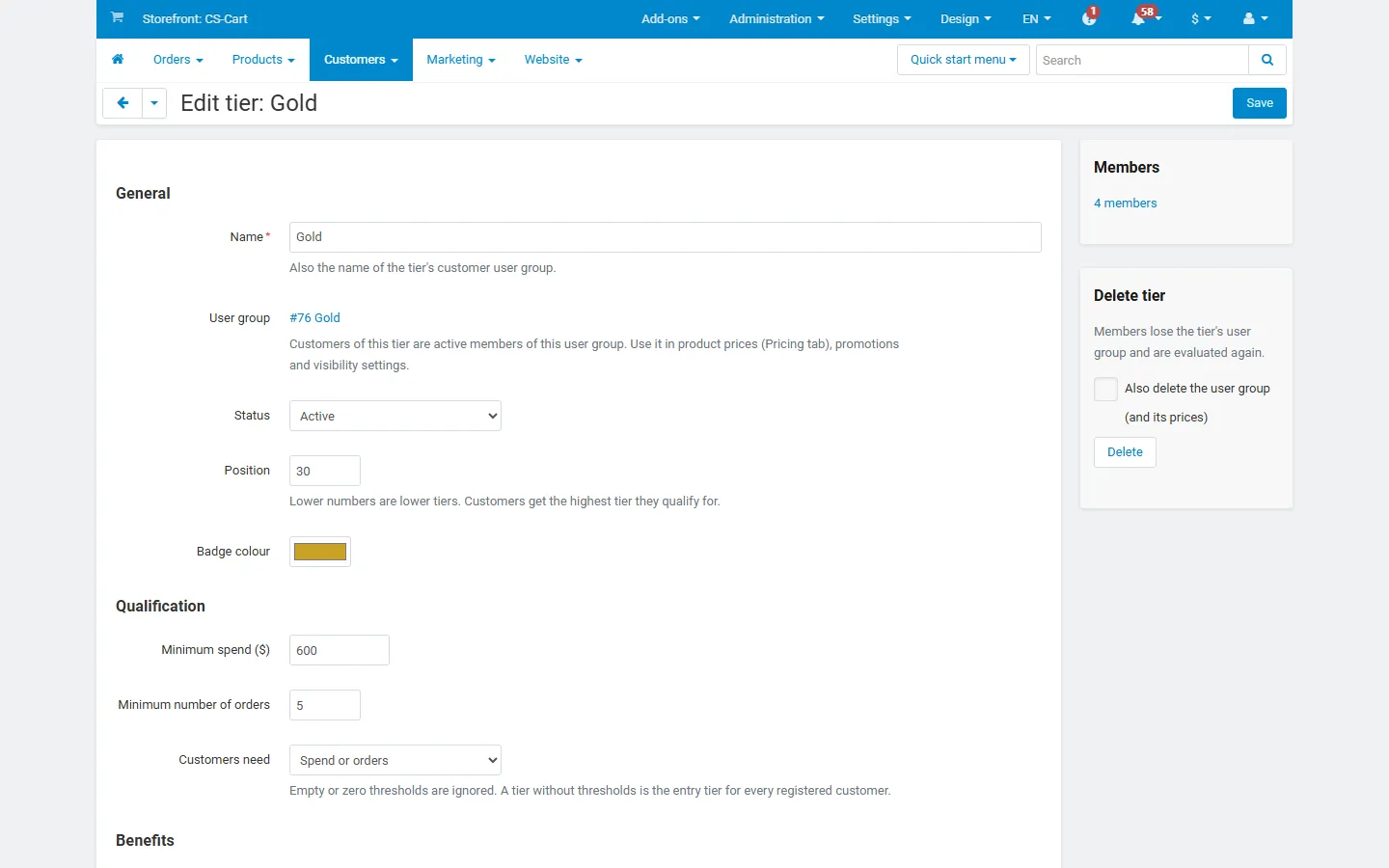
| Field | Description |
|---|---|
| Name | Also the name of the tier’s customer user group. Renaming the tier renames the group. |
| User group | New tiers create a hidden customer user group (customers cannot request it on their profile page). Or choose an existing customer user group, for example one that already has prices. |
| Status | A disabled tier qualifies nobody; its members are re-evaluated on the next check. |
| Position | Lower = lower tier. Customers get the highest tier they qualify for. |
| Badge colour | Used for the badge, the My tier page and the ladder. |
| Minimum spend, Minimum number of orders | Empty or zero thresholds are ignored. A tier without thresholds is the entry tier for every registered customer (new customers get it at registration). |
| Customers need | Spend and orders (both goals) or Spend or orders (one of them). |
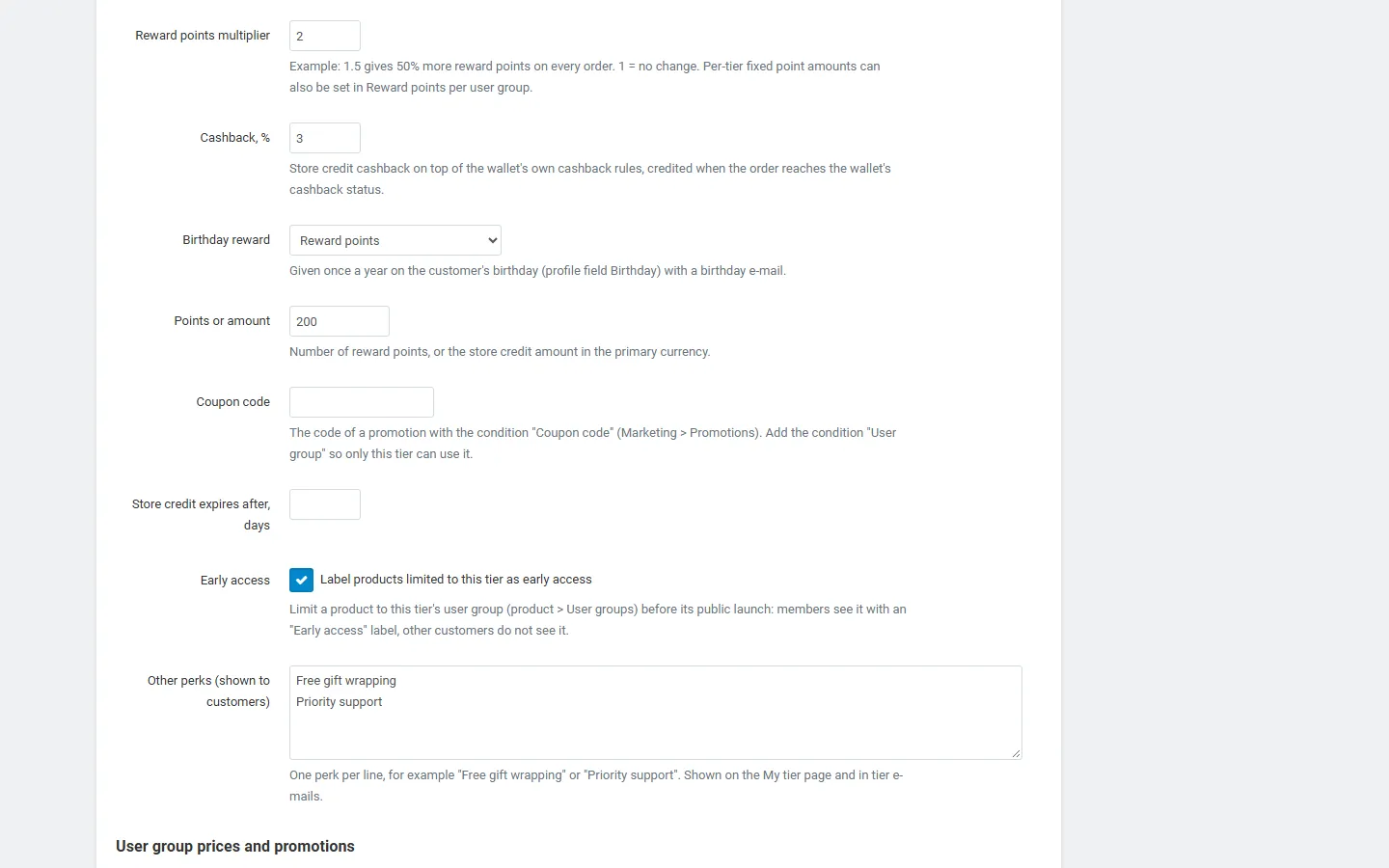
| Reward points multiplier | 1.5 = 50% more points, 1 = unchanged. |
| Cashback, % | Store credit cashback of the Store Credit Wallet add-on. |
| Birthday reward | None, reward points, store credit (with an optional expiry in days) or a coupon code. A coupon code belongs to a core promotion with the condition “Coupon code”; add the condition “User group” so only this tier can use it. |
| Early access | Label products limited to this tier as early access. |
| Other perks | One perk per line, shown to customers (for example “Free gift wrapping”). |
| Promotions for this tier | Active promotions whose conditions include “User group” = this tier, with links to create cart and catalog promotions. |
| Recalculate all customers after saving | Use it after changing thresholds. |
Deleting a tier removes its members from the tier’s user group and evaluates them again. Tick Also delete the user group to delete the group with its prices; otherwise the group stays.
License
Section titled “License”The license status is shown in a License card at the top of the add-on page, above the tabs, so you see it on every tab. The License tab holds the key itself. The key is stored once for the whole installation.
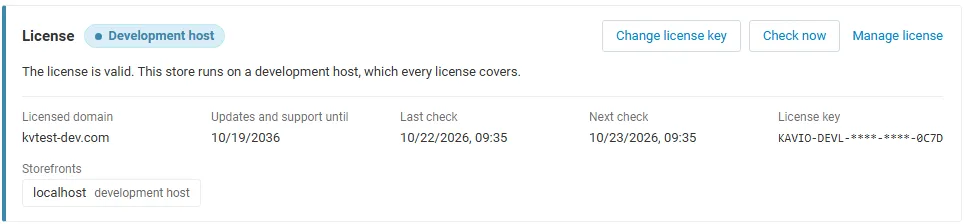
The License card shows:
- the status in color: green when valid, blue for a development host or the 14-day period before a key is required (with the days left), amber when the license server could not be reached (with the days left) or a Marketplace number is still being verified, red when the add-on is switched off;
- in plain words what the status means and, when the add-on is (or will be) switched off, what stops: tiers are no longer re-evaluated and no new tier rewards are given; the My tier page and badges are hidden; customers keep their current tier user groups, so prices and promotions tied to them keep working;
- the licensed domain, every storefront with its result (covered, development host, not covered), the end of the updates and support period, the last and the next check, and the key in use (masked);
- the actions Enter license key / Change license key (opens the License tab), Check now (verifies at once and stays on the page), Manage license (your licenses on cs-cart.kaviolabs.com) and, without a valid license, Buy a license.
In Add-ons → Manage add-ons the add-on’s row shows a small license badge next to its name, for example License: Valid or License: Pending · 9 days left.
The add-on’s own admin pages (tiers, tier editor, members, member page, tier history) show the license status in a bar at the top: a small green chip when the license is valid, or a banner with the status, what is switched off and the same actions as the card.
| Setting | Description |
|---|---|
| License key | Your Kavio Labs license key (KAVIO-XXXX-XXXX-XXXX-XXXX, from My licenses on cs-cart.kaviolabs.com) or your CS-Cart Marketplace license number. If you entered the Marketplace license number in Add-ons → Manage add-ons (the add-on’s license field), leave this empty: the add-on uses that number. |
| License status | Points to the License card and explains what the check sends. |
What the license covers. A license is bound to the base domain you entered at purchase (for example yourstore.com) and covers every subdomain of it (www.yourstore.com, shop.yourstore.com, staging.yourstore.com). Local development hosts are always allowed: localhost, 127.0.0.1 and other private IP addresses, and host names ending in .localhost, .test, .local, .example or .invalid. A store on a different base domain needs its own license. If you move your store to a new domain, contact support.
When the add-on checks. When you save the key, and then once a day. The check runs only in the admin panel (on a page you open) or from cron, never while customers browse the storefront or place orders, and takes a few seconds at most. A cron job keeps the license verified even when nobody opens the admin panel:
php /path/to/store/admin.php --dispatch=kv_loyalty_tiers_license.checkWhat is sent. The check sends this to https://cs-cart.kaviolabs.com and nothing else: the license key, the add-on ID and version, the host names of your storefronts, your CS-Cart version and edition, and a random one-time value. No customer or order data is sent. The server answers with a digitally signed result, so a forged answer is ignored.
Statuses.
| Status (card) | Color | What happens |
|---|---|---|
| Valid | Green | The license is valid for this domain. Everything works. |
| Development host | Blue | The store runs on a local development host, which every license covers. Everything works. |
| Pending verification | Amber | A CS-Cart Marketplace license number was accepted, but the Marketplace has not confirmed it yet. Everything works. |
| Pending · N days left | Blue | No verified key yet (a new installation). Everything works for 14 days. |
| Grace period · N days left | Amber | The last checks failed (for example a network problem). The add-on keeps working for 14 days after the first failed check. |
| Not activated, Invalid key, Revoked, Domain mismatch, Not verified | Red | Tiers are no longer re-evaluated (orders, the schedule and “Recalculate all customers” change nothing), no tier rewards are given (points multiplier, tier cashback, birthday rewards) and the My tier page, the account menu badge and the early access label are hidden. Customers keep their current tier user groups, so user group prices and promotions keep working. The tier editor, members, history, manual tiers, CSV and the REST API keep working. Domain mismatch shows the licensed domain next to the domain your store runs on. |
When your updates and support period ends, the add-on keeps working. Only updates and support stop.
License information appears in the admin panel only, and only for administrators who may manage add-ons; vendors and customers never see it. When the add-on is switched off, other admin pages also show a notice once per session with a link to the add-on page; the add-on page and the add-on’s own pages show the card or the status bar instead.