

Usage
Overview · Installation · Configuration · Developer notes · FAQ
Everything is in Website → 404 & redirects, on four tabs: Redirect rules, 404 log, Test a URL and Import / export. Each page shows the license status in a bar at the top. Access follows the core SEO privileges: administrators who may view SEO rules can open the pages, those who may manage SEO rules can change them.
How a request is handled
Section titled “How a request is handled”- Core first. If the URL is a page of your store (a product, category, page or any other address CS-Cart knows), the page is shown. If core SEO has a 301 redirect for it (created automatically when an SEO name changed, or by hand in Website → SEO → 301 redirects), that redirect is used.
- Then your rules, for URLs that would end in “Page not found”: an exact rule for the URL wins; otherwise the wildcard and regex rules are checked by priority.
- No rule: the visitor sees the normal 404 page and the URL is logged.
A rule marked Override existing pages is applied before step 1: it also redirects URLs that exist and wins over a core SEO redirect for the same URL. Use it sparingly, for example to send a discontinued category to its successor while keeping the old category.
Requests that are not page views (POST forms, AJAX calls, the API) are never redirected or logged.
Redirect rules
Section titled “Redirect rules”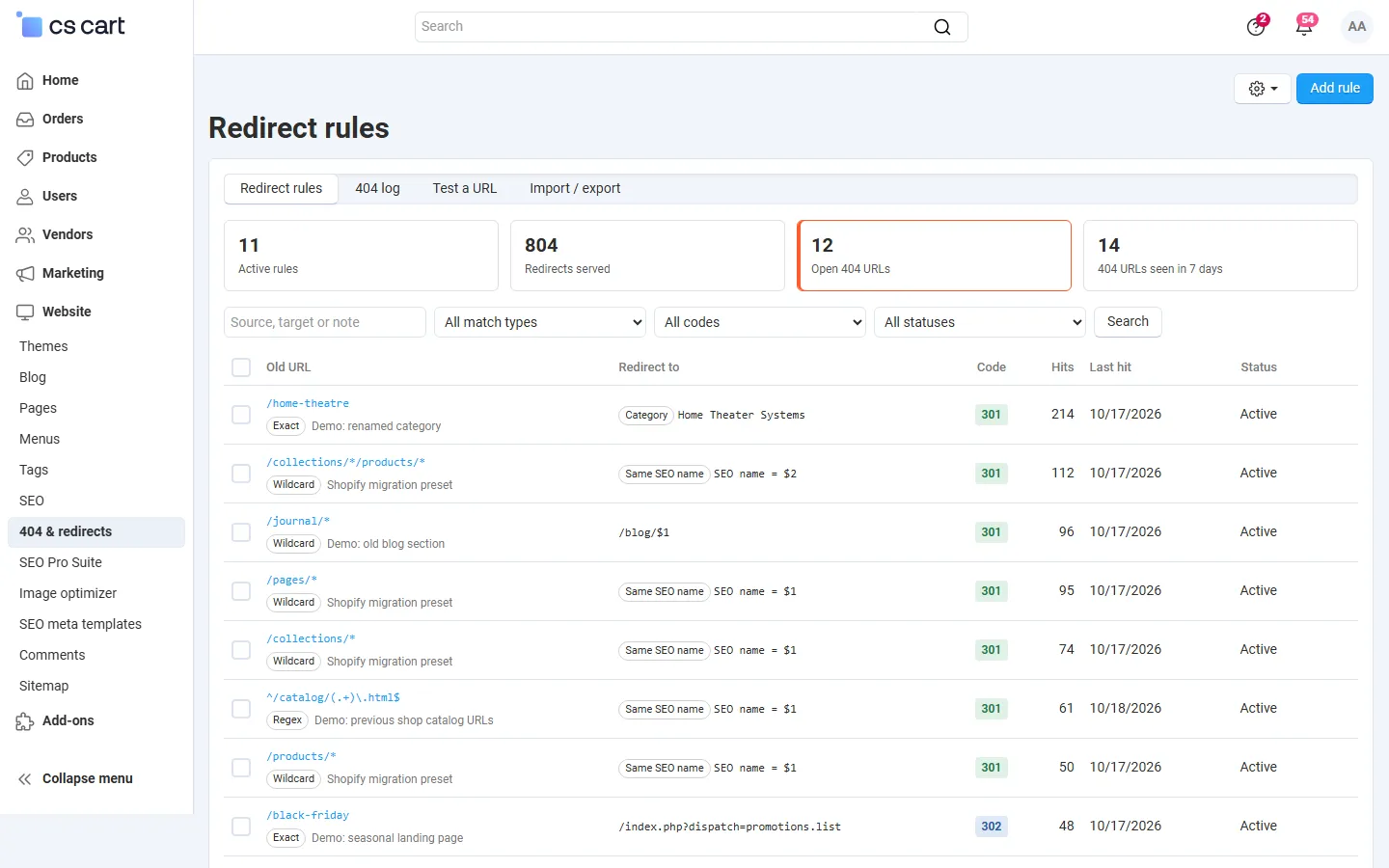
Click Add rule (or Create redirect in the 404 log).
| Field | Description |
|---|---|
| Match type | Exact: one URL. Wildcard: * matches any text, for example /blog/*; the matched parts are available as $1, $2 … in the target. Regex: a regular expression on the path, for example ^/item-(\d+)\.html$ with the target /product-$1.html. |
| Old URL | The path of the old URL (/old-category/old-product.html). You can paste a full URL; it is reduced to its path. Matching ignores letter case and a trailing slash, and tracking parameters are ignored. An exact rule with a query (/index.php?dispatch=products.view&product_id=12) matches only that query; one without a query matches the path with any query. |
| Code | 301 moved permanently (search engines move the ranking), 302 temporary (for example a seasonal page), 410 gone (removed for good, no target; search engines drop the URL faster than with a 404). |
| Redirect to | A path on this storefront (/new-page.html), a full URL (other domains are allowed), or a product, category or page chosen with the picker. With an object, the redirect always goes to its current SEO URL in the visitor’s language. |
| Storefront | CS-Cart Ultimate in the All storefronts mode: one storefront or all of them. With a storefront selected at the top of the admin panel, rules belong to that storefront. |
| Language | Only when the store has more than one language: apply the rule only to that language (taken from the URL, the sl parameter or the default language). |
| Priority | Order of the wildcard and regex rules, lower first. Exact rules always win over patterns. |
| Pass the query string | Adds the query of the old URL (?color=red) to the target. Tracking parameters are never passed. |
| Override existing pages | See above. |
| Note, Status | Your note; inactive rules are kept but not applied. |
Checks when you save. A rule that would send a URL to itself, or a loop such as /a → /b → /a, is refused. If the target is redirected again by another rule (a chain), the rule is saved with a warning and marked Chain in the list: point it to the final URL to save a hop. Regular expressions must be valid, at most 255 characters and without nested repetitions such as (a+)+; at most 100 regex rules can be active.
The list shows each rule’s hits and last hit, and the tiles at the top the number of active rules, redirects served, open 404 URLs and 404 URLs seen in the last 7 days. Select rules to activate, disable or delete them together.
404 log
Section titled “404 log”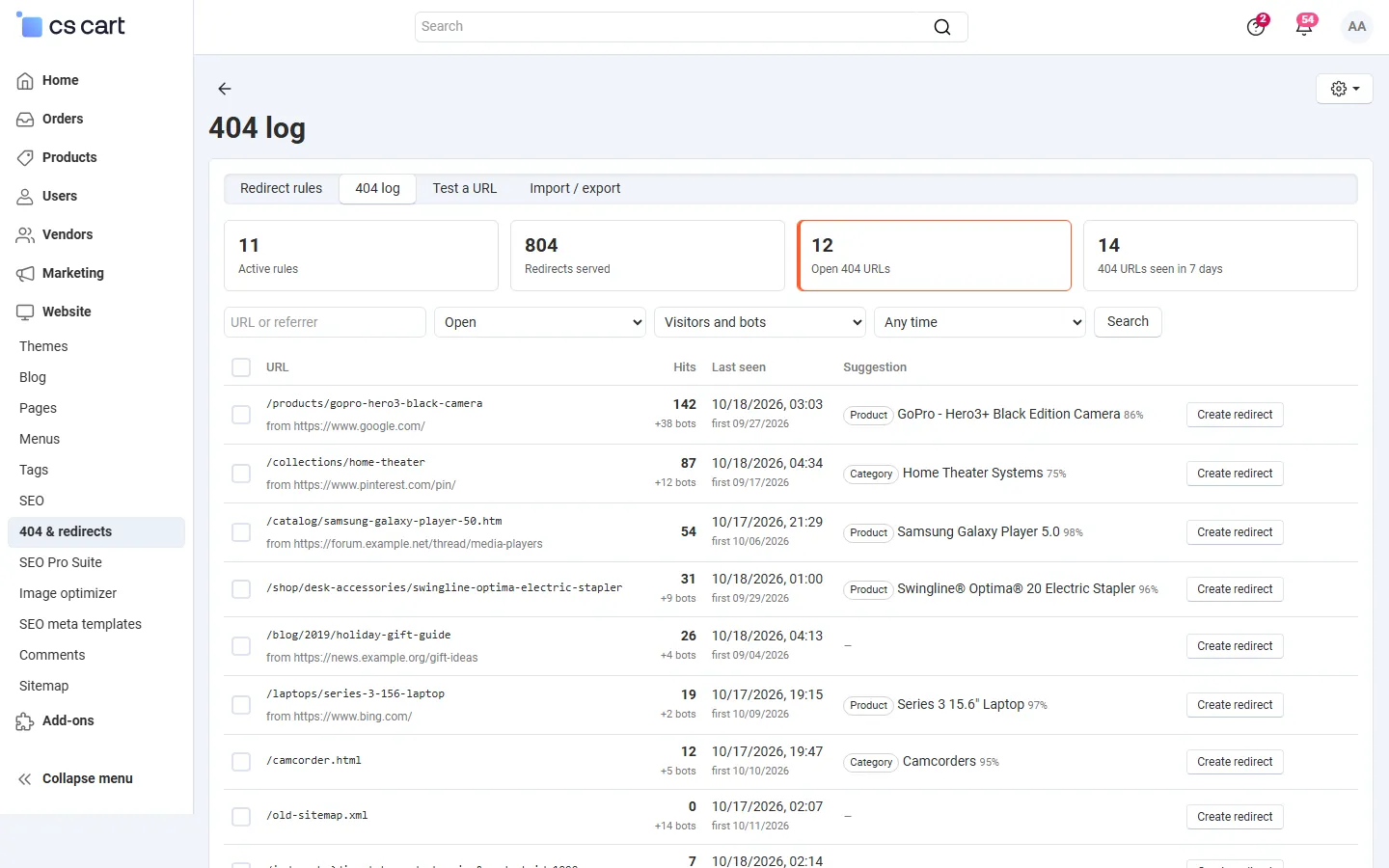
Each entry is one URL with its hits by visitors (bold) and by search engine bots, when it was first and last seen, the last referring page and, if found, a suggestion: the product, category or page whose SEO name is most similar to the URL.
- Create redirect opens the rule form with the URL as the old URL and the suggestion as the target. After saving, the entry is marked Redirected and links to its rule.
- Redirect selected to suggestions (301) creates exact 301 rules for all selected entries that have a suggestion, in one step. Entries without a suggestion are skipped.
- Ignore hides an entry from the open list (hits are still counted); Reopen brings it back.
- Filters: open, redirected, ignored or all entries; visitors or bots; period. Sort by hits, URL or last seen.
- Export log (CSV) exports the filtered list. Clear the log deletes all entries; Update the log now writes the pending buffer and runs the retention at once.
When you save an exact rule for a URL that is in the log, the entry is marked as redirected automatically. Deleting the rule reopens it.
New hits appear within about a minute (see Installation → Cron).
Test a URL
Section titled “Test a URL”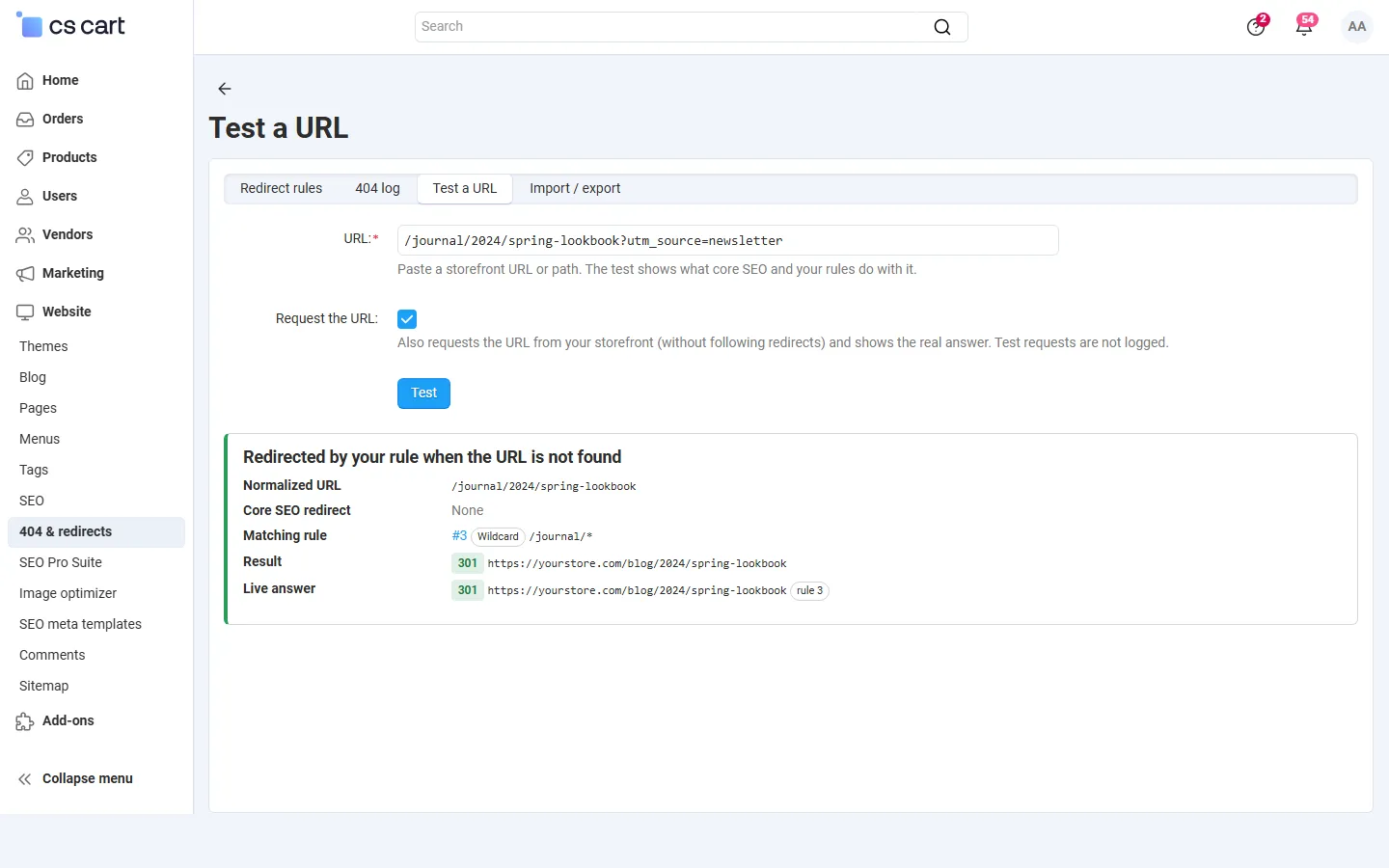
Paste a URL or path and click Test. The result shows the normalized URL, whether core SEO has a redirect for it, which of your rules matches, the redirect target and code, and a chain if there is one. With Request the URL the add-on also requests the URL from your own storefront (without following redirects) and shows the real answer: status code, Location and the rule that answered. Test requests are not logged. If nothing matches, Create redirect opens the rule form for the URL.
Import and export
Section titled “Import and export”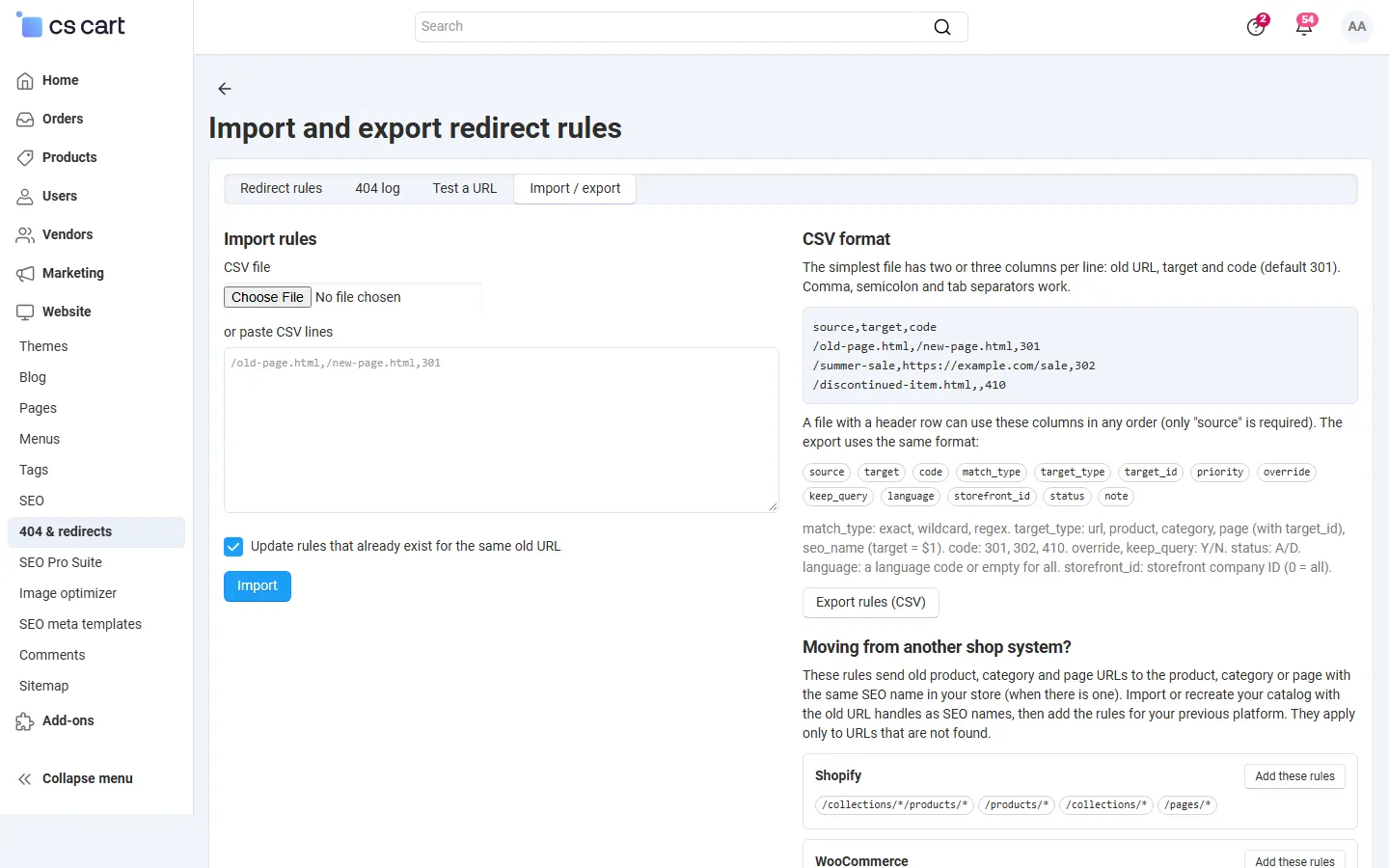
Upload a CSV file or paste lines. The simplest format is one rule per line: old URL, target and optionally the code (default 301):
/old-page.html,/new-page.html,301/summer-sale,https://example.com/sale,302/discontinued-item.html,,410Comma, semicolon and tab separators work. A file with a header row can use these columns in any order (only source is required); Export rules (CSV) produces the same format, so you can edit rules in a spreadsheet and import them back:
source, target, code, match_type (exact|wildcard|regex), target_type (url|product|category|page), target_id, priority, override (Y/N), keep_query (Y/N), language, storefront_id, status (A/D), note
With Update rules that already exist for the same old URL an existing rule is updated, otherwise it is skipped. Every line goes through the same checks as the form; the result lists created, updated and skipped lines with the reason for each refused line. Up to 50,000 lines and 10 MB per file.
Multi-Vendor
Section titled “Multi-Vendor”Rules and the log are managed by the marketplace administrators only and apply to the whole marketplace (vendor storefront URLs included). Vendors have no access.
CS-Cart Ultimate
Section titled “CS-Cart Ultimate”Rules and log entries belong to a storefront. Select a storefront at the top of the admin panel to see and manage only its rules and 404s; in the All storefronts mode the lists show a storefront column, and a new rule can apply to one storefront or to all of them. Apply redirect rules and Log 404 errors can be set per storefront.