

Configuration
Overview · Installation · Usage · Developer notes · FAQ
Settings: Add-ons → Manage add-ons → SEO Meta Templates (or the Settings tab on the add-on’s pages). The templates themselves are managed under Website → SEO meta templates (see Usage).
General
Section titled “General”| Setting | Default | Description |
|---|---|---|
| Apply templates on the storefront | On | Off: templates are not applied; the storefront shows the stored meta and the core defaults. The admin pages, the preview and the audit keep working. |
| Maximum title length | 60 | Generated titles are cut on a word boundary at this length (10 – 255). A title that is too long first drops its optional [...] parts. Search engines show about 60 characters. |
| Maximum description length | 155 | Generated descriptions are cut on a word boundary at this length (20 – 255) and end with “…”. Search engines show about 155 characters. |
| Cut generated texts to the maximum length | On | Off: generated texts are only cut at 255 characters, the size of the core fields. |
The lengths apply to generated values only; the meta you entered yourself is never shortened. The audit uses the same limits to flag stored meta that is too long.
On CS-Cart Ultimate these settings can differ per storefront (select the storefront in the admin panel before you open the settings).
License
Section titled “License”The license status is shown in a License card at the top of the add-on page, above the tabs, so you see it on every tab. The License tab holds the key itself. The key is stored once for the whole installation.
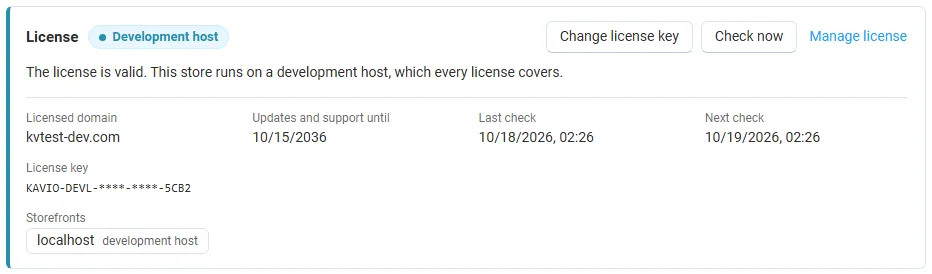
The License card shows:
- the status in color: green when valid, blue for a development host or the 14-day period before a key is required (with the days left), amber when the license server could not be reached (with the days left) or a Marketplace number is still being verified, red when the add-on is switched off;
- in plain words what the status means and, when the add-on is (or will be) switched off, what stops: templates are no longer applied on the storefront and the bulk fill is unavailable; pages show the meta you entered per object and the core defaults; meta already written by the bulk fill stays;
- the licensed domain, every storefront with its result (covered, development host, not covered), the end of the updates and support period, the last and the next check, and the key in use (masked);
- the actions Enter license key / Change license key (opens the License tab), Check now (verifies at once and stays on the page), Manage license (your licenses on cs-cart.kaviolabs.com) and, without a valid license, Buy a license.
In Add-ons → Manage add-ons the add-on’s row shows a small license badge next to its name, for example License: Valid or License: Pending · 9 days left. The add-on’s own pages (templates, audit, bulk fill) show the license status in a bar at the top.
| Setting | Description |
|---|---|
| License key | Your Kavio Labs license key (KAVIO-XXXX-XXXX-XXXX-XXXX, from My licenses on cs-cart.kaviolabs.com) or your CS-Cart Marketplace license number. If you entered the Marketplace license number in Add-ons → Manage add-ons (the add-on’s license field), leave this empty: the add-on uses that number. |
| License status | Points to the License card and explains what the check sends. |
What the license covers. A license is bound to the base domain you entered at purchase (for example example.com) and covers every subdomain of it (www.example.com, shop.example.com, staging.example.com). Local development hosts are always allowed: localhost, 127.0.0.1 and other private IP addresses, and host names ending in .localhost, .test, .local, .example or .invalid. A store on a different base domain needs its own license. If you move your store to a new domain, contact support.
When the add-on checks. When you save the key, and then once a day. The check runs only in the admin panel (on a page you open) or from cron, never while customers browse the storefront, and takes a few seconds at most. A cron job keeps the license verified even when nobody opens the admin panel:
php /path/to/store/admin.php --dispatch=kv_seo_meta_templates_license.checkWhat is sent. The check sends this to https://cs-cart.kaviolabs.com and nothing else: the license key, the add-on ID and version, the host names of your storefronts, your CS-Cart version and edition, and a random one-time value. No customer, product, order or personal data is sent. The server answers with a digitally signed result, so a forged answer is ignored.
Statuses.
| Status (card) | Color | What happens |
|---|---|---|
| Valid | Green | The license is valid for this domain. Everything works. |
| Development host | Blue | The store runs on a local development host, which every license covers. Everything works. |
| Pending verification | Amber | A CS-Cart Marketplace license number was accepted, but the Marketplace has not confirmed it yet. Everything works. |
| Pending · N days left | Blue | No verified key yet (a new installation). Everything works for 14 days. |
| Grace period · N days left | Amber | The last checks failed (for example a network problem). The add-on keeps working for 14 days after the first failed check. |
| Not activated, Invalid key, Revoked, Domain mismatch, Not verified | Red | Templates are no longer applied on the storefront and the bulk fill is unavailable. Pages show the meta you entered per object and the core defaults; meta already written by the bulk fill stays. Templates, the preview, the audit and undo stay available. Domain mismatch shows the licensed domain next to the domain your store runs on. |