

Configuration
Overview · Installation · Usage · Developer notes · FAQ
Open Add-ons → Manage add-ons → Advanced Promotions → Settings. On CS-Cart (Ultimate) the settings can differ per storefront.
| Setting | Default | What it does |
|---|---|---|
| How to use | Links to add a cart promotion and to the promotions list. | |
| Apply the add-on’s conditions and bonuses | On | Off: promotions that use the add-on’s conditions or bonuses do not apply; core promotions keep working. |
| Cents of line discounts | Exact order total | A discount that does not split evenly over the units of a line (one free item out of three at $16.97) leaves a remainder of a cent or two. Exact order total puts it into the order discount, so the total is exact. Round per unit rounds the unit discount instead (the total may differ by a cent or two, no order discount line). |
| Show discount notes in the cart and at checkout | On | The note under each discounted line in the cart and in the checkout summary. |
| Show discount notes in the customer’s order details | On | The same note on the customer’s order page. The admin and vendor order pages always show it. |
The offers themselves are set up in Marketing → Promotions: see Usage.
License
Section titled “License”The license status is shown in a License card at the top of the add-on page, above the tabs, so you see it on every tab. The License tab holds the key itself. The key is stored once for the whole installation.
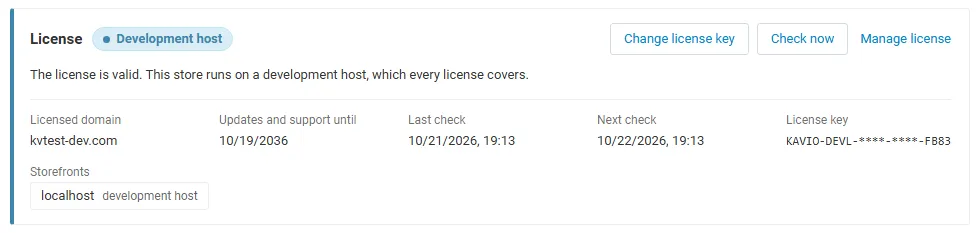
The License card shows:
- the status in color: green when valid, blue for a development host or the 14-day period before a key is required (with the days left), amber when the license server could not be reached (with the days left) or a Marketplace number is still being verified, red when the add-on is switched off;
- in plain words what the status means and, when the add-on is (or will be) switched off, what stops: promotions that use the Advanced Promotions conditions or bonuses stop applying to new carts; core promotions, the promotion editor and placed orders are not changed;
- the licensed domain, every storefront with its result (covered, development host, not covered), the end of the updates and support period, the last and the next check, and the key in use (masked);
- the actions Enter license key / Change license key, Check now, Manage license and, without a valid license, Buy a license.
In Add-ons → Manage add-ons the add-on’s row shows a small license badge next to its name.
When it checks: when you save a key, then once a day from the admin panel; or from cron: php admin.php --dispatch=kv_advanced_promotions_license.check. What is sent: the license key, the add-on ID and version, your storefront host names, the CS-Cart version and edition, and a random nonce. Nothing about your customers or orders. Only administrators who may manage settings see the license details; vendors never do.