

Peppol sending and receiving
Since version 1.1.0 the add-on sends your e-invoices and e-credit notes over the Peppol network and fetches the e-invoices your suppliers send to you. It does this with your own account at a Peppol access point provider: the store talks to the provider’s API directly, with the API key you enter. Kavio Labs never sees, stores or relays your documents, and the provider’s prices and contract are between you and the provider.
Supported providers
Section titled “Supported providers”| Provider | What you need | Test environment |
|---|---|---|
| Recommand (Belgium) | API key, API secret and the company ID (c_...) from the Recommand dashboard. The company must be verified there before it can send or receive. |
A playground team with its own API keys: transmissions are simulated, or go over the Peppol test network when the playground was created with the test network option. |
| B2Brouter (Spain) | API key and the account ID from B2Brouter (Developers > API keys). | Separate test environment (staging) with its own key: choose Test (staging) on the Peppol page. |
Both are Peppol access point providers with a public, documented API; Recommand states a free plan for low volumes. Create the account on the provider’s website and check its prices there; the add-on does not create accounts. Any other provider can be connected with a small driver add-on (see Developer notes).
Connect your account
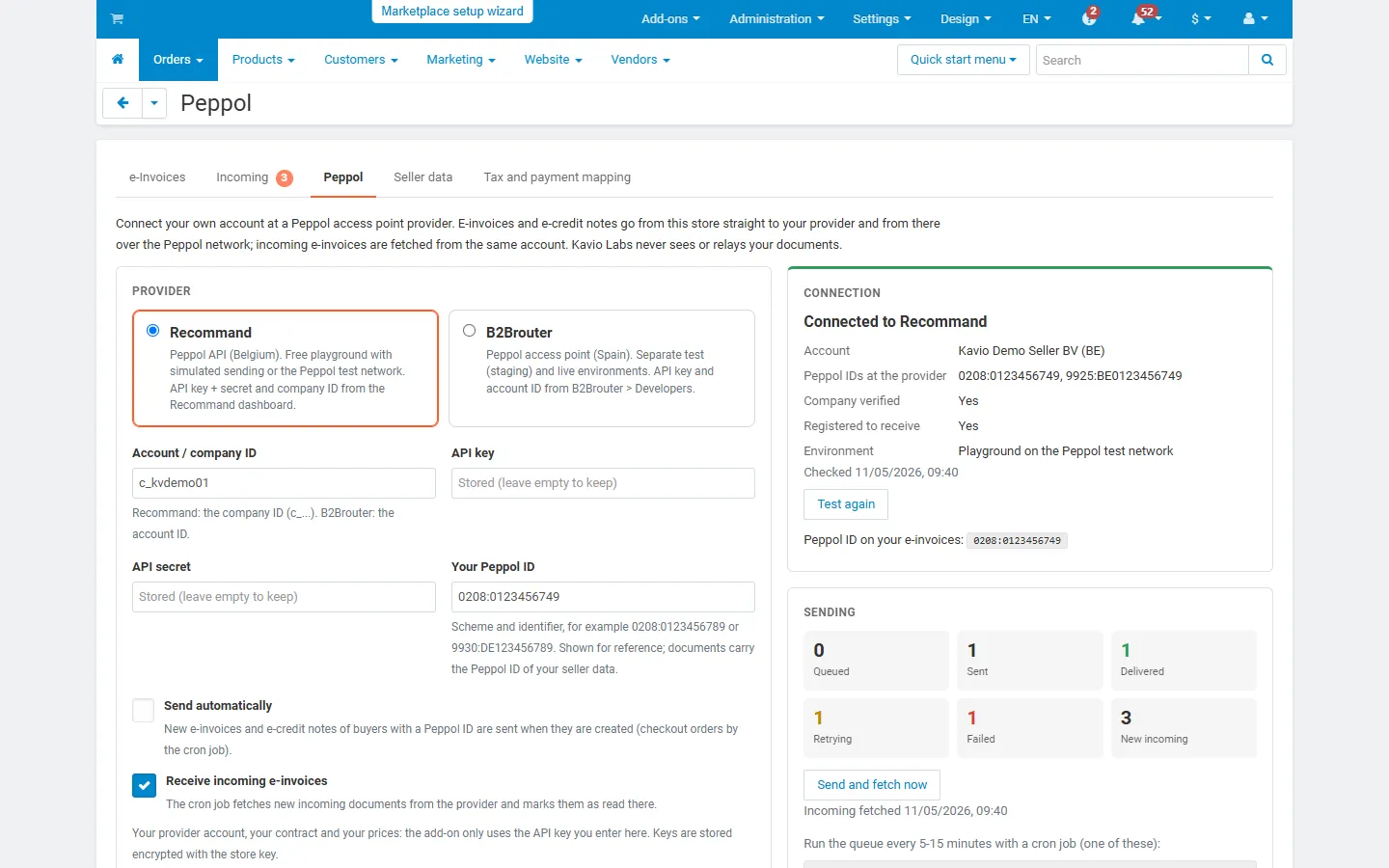
Section titled “Connect your account”- Fill in your Seller data first (Orders > e-Invoices > Seller data), including the electronic address (Peppol ID), for example
0208:0123456789for a Belgian enterprise number or9930:DE123456789for a German VAT ID. This is the address your e-invoices are sent from, so it must be an ID that your provider registered for you. - Open Orders > e-Invoices > Peppol.
- Choose the provider, enter the account or company ID and the API key (Recommand also the API secret).
- Leave Send automatically and Receive incoming e-invoices on, or switch them off.
- Click Save and test. The connection card shows the account name, the Peppol IDs of the account, whether the company is verified and registered to receive, and the environment (live, playground or test network).
If the Peppol ID on your e-invoices is not one of the IDs of the provider account, the page says so: providers refuse documents sent under somebody else’s ID.
Keys are stored encrypted with the key of your store (crypt_key in config.local.php), never shown again and never sent anywhere except to the provider. Leave a key field empty to keep the stored key.
Set up the cron job
Section titled “Set up the cron job”Sending of orders placed at checkout, retries, delivery confirmations and incoming e-invoices are handled by a cron job. The Peppol page shows the two ways to run it (every 5 to 15 minutes):
# URL with a secret key (any cron service)curl -s "https://your-store.example/index.php?dispatch=kv_eu_e_invoicing.cron&key=<key from the Peppol page>"
# or the CS-Cart console on your serverphp /path/to/store/admin.php --dispatch=kv_eu_e_invoicing.cron
Without a cron job you can still use Send and fetch now on the Peppol page.
Sending
Section titled “Sending”- Automatically: with Send automatically on, every new e-invoice or e-credit note of a buyer with a Peppol ID is sent when it is created. Documents created in the admin panel go out at once (up to five per request); documents created at checkout are queued and sent by the next cron run.
- By hand: Send via Peppol on the document page; Send again after a failure.
- In bulk: select documents in Orders > e-Invoices and click Send via Peppol. Documents without a buyer Peppol ID or already sent are skipped.
Before sending, the add-on checks that the document passes its own Peppol checks and that the buyer has a Peppol ID (from the checkout field Peppol ID, or derived from the VAT ID). Use Look up on the Peppol page to check whether a participant is registered on Peppol and accepts invoices and credit notes.
Delivery states
Section titled “Delivery states”| State | Meaning |
|---|---|
| Queued | Waiting for the next cron run. |
| Sent | Handed over to the provider and the Peppol network; the delivery confirmation is checked in the background for up to 7 days. |
| Delivered | The receiving access point confirmed the delivery. |
| Retrying | The provider could not be reached or asked to slow down. The document is sent again after 5 min, 15 min, 1 h, 3 h and 12 h. |
| Failed | The provider or the receiver refused the document (for example a validation error or a recipient that is not registered on Peppol), or all retries failed. The reason is shown on the document; fix it and click Send again. |
Every attempt, delivery check and lookup is written to the Peppol activity of the document and of the connection.
Receiving
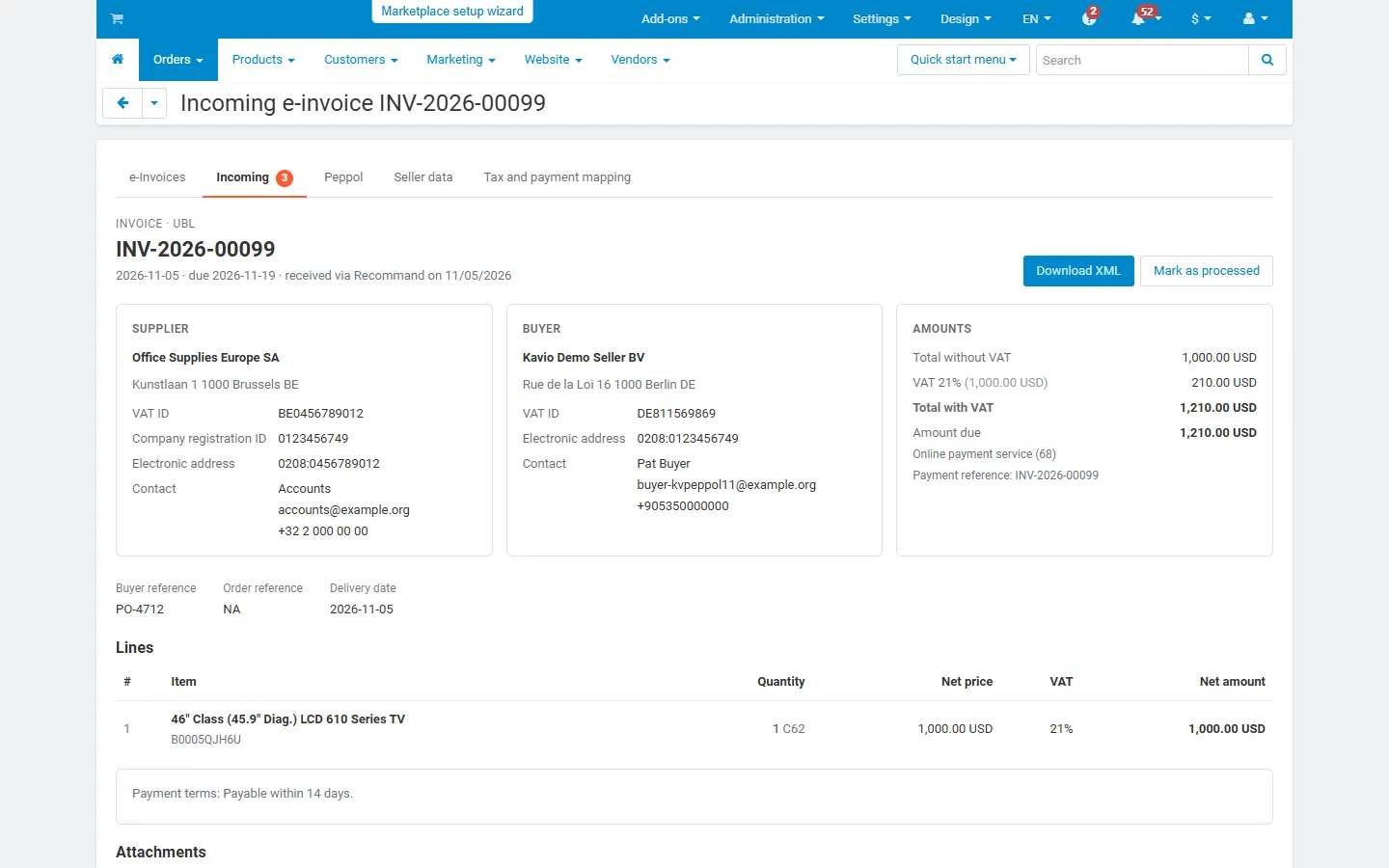
Section titled “Receiving”With Receive incoming e-invoices on, the cron job fetches new incoming documents from your provider account, stores them in the store and marks them as read at the provider (only after they were stored, so nothing is lost when a run stops).
Orders > e-Invoices > Incoming lists them with supplier, dates, status and total. The viewer shows supplier and buyer, references, lines, VAT breakdown, totals, payment details (IBAN, payment reference, terms), notes and attachments, and offers the original XML and the embedded attachments for download. Mark a document as processed when it is booked, and add an internal note.
The viewer reads UBL (Peppol BIS 3.0, XRechnung UBL) and CII (XRechnung CII, the XML of Factur-X / ZUGFeRD). Other documents are stored and can be downloaded as XML.
Multi-Vendor
Section titled “Multi-Vendor”When vendors are the sellers on their e-invoices, every vendor opens Orders > e-Invoices > Peppol in the vendor panel and connects its own provider account. Its e-invoices are sent under its own Peppol ID, and it sees only its own incoming e-invoices. The marketplace administrator can switch this off with the setting Vendors connect their own Peppol account; vendor e-invoices are then not sent by the add-on (they are never sent under the marketplace’s Peppol ID). In marketplace mode (the marketplace is the seller), the marketplace connection sends every e-invoice.
Ultimate
Section titled “Ultimate”Each storefront has its own seller data and its own Peppol connection.
License
Section titled “License”Sending, retries and fetching incoming e-invoices need a valid license. Without one, queued documents wait and nothing is fetched; incoming e-invoices already stored stay readable.
Mandates and your obligations
Section titled “Mandates and your obligations”Peppol and structured e-invoices are becoming mandatory in more countries, for example:
- Belgium: structured electronic invoices between VAT-liable businesses since 1 January 2026, exchanged in practice over Peppol (source: einvoice.belgium.be).
- Germany: businesses whose total turnover in the previous year exceeded EUR 800,000 must issue structured e-invoices (EN 16931, for example XRechnung or ZUGFeRD) for supplies from 1 January 2027; the transition for all others ends on 31 December 2027; receiving has been mandatory since 1 January 2025 (source: § 27 (38) UStG). Germany does not require Peppol for business invoices; Peppol is one of the accepted ways to exchange them.
- Slovakia: domestic B2B e-invoicing from 1 January 2027 under Act No. 385/2025 Coll., exchanged through certified providers on the Peppol network; check that your provider is on the list of the Slovak Financial Administration.
These summaries are not legal or tax advice. Rules, dates and exceptions change; check them with your tax advisor and the official sources. Whether a given provider is accepted in your country is for the provider to confirm.
Trademarks
Section titled “Trademarks”Peppol is a trademark of OpenPeppol AISBL. Recommand and B2Brouter are trademarks of their respective owners. The names and logos are used only to identify the network and the services the add-on connects to; they do not imply any partnership with, certification by or endorsement from their owners. EU e-Invoicing is an independent product of Kavio Labs.