

WhatsApp Chat Button
Add-on ID: kv_whatsapp_chat_button · Edition: CS-Cart & Multi-Vendor · Latest version: 1.0.0 · Compatible with: CS-Cart & Multi-Vendor 4.17.2 – 4.21.x, PHP 7.4 – 8.3 · Changelog: view
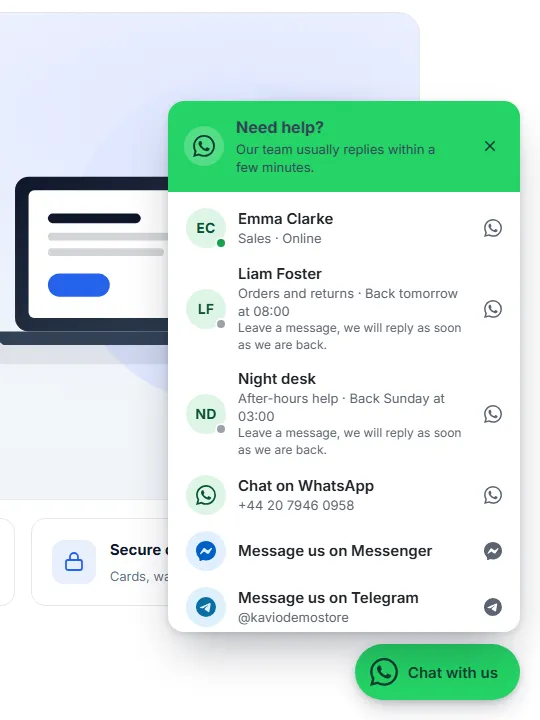
WhatsApp Chat Button puts a floating chat button on your storefront. Visitors open WhatsApp, Messenger, Telegram, a phone call, an SMS or an e-mail with one click, with a message that is already typed for them. On product pages an Ask about this product button sends the product name, the SKU, the selected options and the link; on the cart and checkout pages a help link sends the cart contents. Several agents or departments can answer, each with a photo, a role and working hours.
- One button, every channel: WhatsApp, Facebook Messenger, Telegram, phone, SMS, e-mail and, with our Help Desk add-on, a support ticket link. One contact opens directly; several contacts open a small panel to choose from.
- Agents and departments: name, role, photo, channel and contact per agent, weekly working hours in the agent’s own time zone. Outside their hours agents show “Back tomorrow at 08:00” and can still get a message, or they are hidden. “Rotate” mode sends each visitor to one online agent.
- Ask about this product: a button under the add-to-cart buttons that opens the chat with the product name, SKU, selected options and link already typed.
- Cart help link: “Questions about your order? Chat with us” on the cart and checkout pages, with the cart lines and the total in the message.
- Looks right on every page: bottom right or left, offsets for desktop and phones, round icon or icon with label, three sizes, your colours, a greeting bubble after a few seconds. The button moves above sticky add-to-cart bars, bottom navigation bars and cookie notices by itself.
- Click statistics: clicks per day, channel, agent and place (button, panel, product page, cart). Counts only: no IP address, customer, cookie or page address is stored.
- Multi-Vendor: vendors enter their own WhatsApp number in the vendor panel. Their product pages and store page then show the vendor first, with your team as the fallback, and vendors see their own click counts.
- Privacy and speed: no third-party script is loaded, nothing is sent to WhatsApp or any other service before the visitor clicks. The button can wait for cookie consent, and it works with the full page cache of CS-Cart 4.21.
Documentation
Section titled “Documentation”| Page | Contents |
|---|---|
| Installation | Requirements, installing, upgrading, uninstalling |
| Configuration | Settings, agents and working hours, vendor numbers, license |
| Usage | What visitors see, messages, statistics, analytics events, Multi-Vendor and Ultimate |
| Developer notes | Data, hooks, storefront script and events, full page cache, file map |
| FAQ | Common questions |
Compatibility
Section titled “Compatibility”| CS-Cart / Multi-Vendor | 4.17.2 – 4.21.x (Ultimate and Multi-Vendor editions) |
| PHP | 7.2.5 – 8.3 (whatever your CS-Cart version supports) |
| Themes | Responsive and themes based on it (Bright, Nova and others) |
| Full page cache (4.21) | Supported: the page output is the same for every visitor; online states are worked out in the browser |
| Channels | WhatsApp (wa.me), Messenger (m.me), Telegram (t.me), phone (tel:), SMS (sms:), e-mail (mailto:), Help Desk ticket |
| Related add-ons by Kavio Labs | Cookie Consent (waits for consent), Ecommerce Tracking Pro (click events), Help Desk & Support Tickets (ticket link) |