

Usage
Overview · Installation · Configuration · Developer notes · FAQ
The storefront label
Section titled “The storefront label”On the product page the label appears under the price, for example:
$100.00$80.00 Lowest price in the last 30 days: $90.00
- With the default settings it is shown only when a reduction is visible: a catalog promotion discount (“You save”) or a list price strike-through.
- The amount is the lowest final price (the price after catalog promotions) in the 30 days before the current price took effect. Example: a product cost $100 for months, $90 from 10 days ago and $80 since 5 days ago. The label next to $80 shows $90, the lowest price in the 30 days before the $80 started.
- The amount is converted to the currency the customer selected, like every other price, and follows the same option price modifiers: when a selected option adds $10, the label adds $10 too.
- When the customer picks another variation or option, the label is refreshed together with the price.
- In product lists the label is shown when Also show the label in product lists is on.
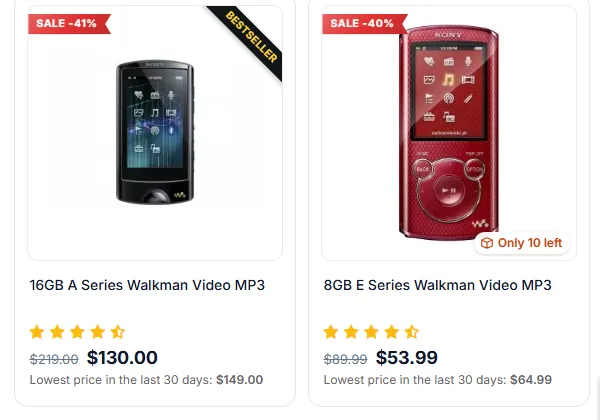
Who sees it. The recorded history is the price a guest sees. Customers who see the same price (most customers) see the label too. When a customer sees a different price, for example a usergroup price or a promotion for registered customers only, the label is not shown to that customer, so a value that does not belong to their price is never displayed.
The Price history tab
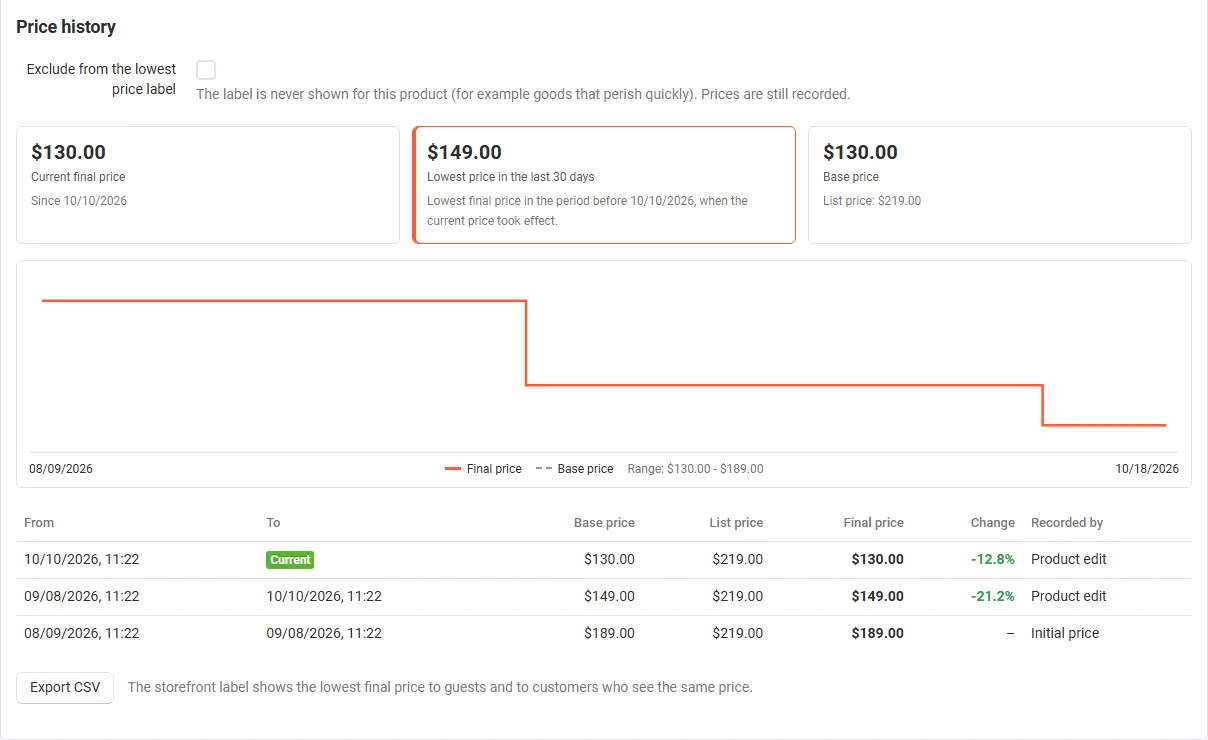
Section titled “The Price history tab”Every product (and every variation) has a Price history tab in the product editor:
- the current final price and since when it applies;
- the lowest price over the period, exactly as the label shows it, with the dates it is based on;
- the base price and the list price;
- a chart of the final price (orange) and the base price (dashed) over the last 90 days;
- every change with its period, prices, the change in percent and what recorded it (Initial price, Product edit, Scheduled check, Promotion change, Import or mass update);
- the Exclude from the lowest price label checkbox (administrators) and Export CSV for this product.
The Omnibus price history page
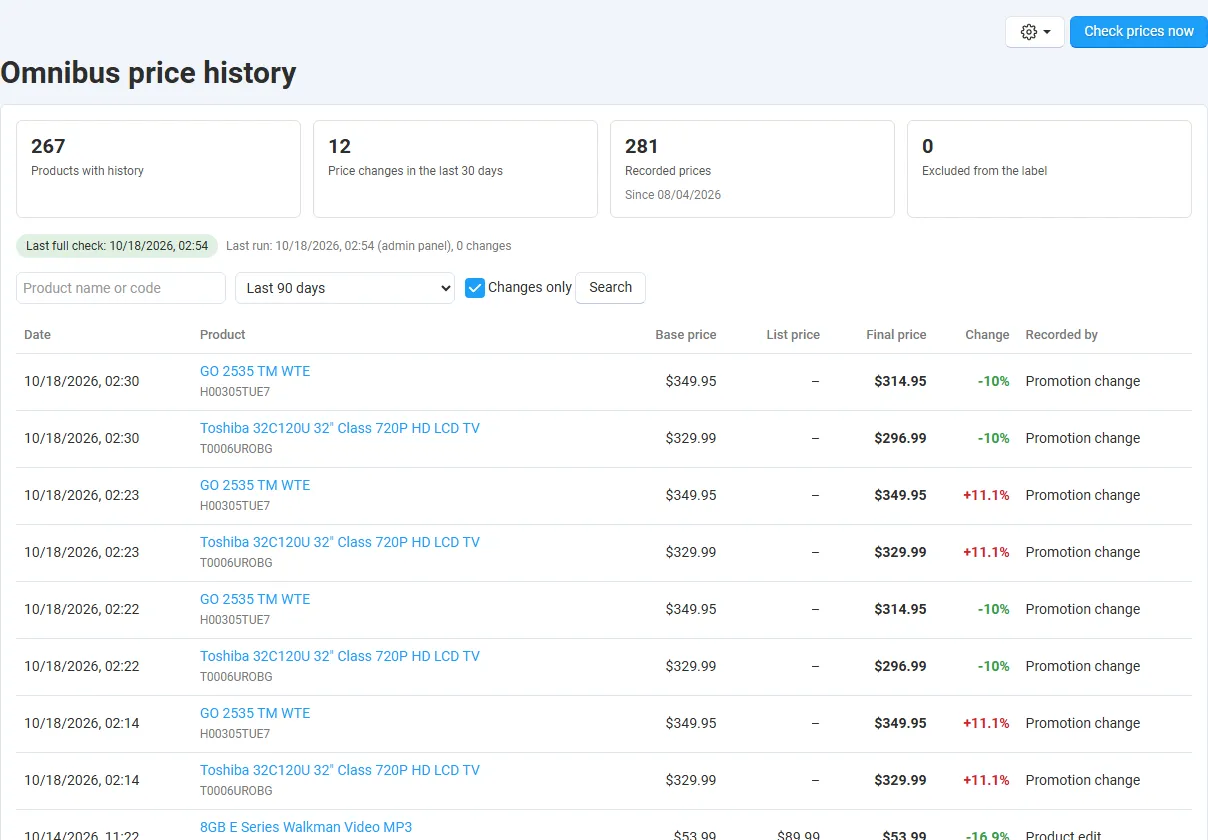
Section titled “The Omnibus price history page”Products → Omnibus price history lists all price changes of the catalog:
- tiles: products with history, price changes in the last 30 days, recorded prices, excluded products;
- the recording status: full check progress, waiting edited products and the last run;
- filters: product name or code, period (7, 30, 90, 365 days or all time), storefront (when there are several), Changes only (hides the initial prices);
- the list with date, product, base price, list price, final price, change in percent and source;
- Export CSV (gear menu) exports the filtered rows with the previous final price and the change in percent; Check prices now compares every product with its last recorded price at once.
CSV export
Section titled “CSV export”Columns: product_id, product_code, product, storefront_id, valid_from, valid_to (empty = current), price, list_price, final_price, previous_final_price, change_percent, source. Amounts are in the primary currency; times are in the store’s time zone. Text cells that start with =, +, - or @ are prefixed with an apostrophe so spreadsheet programs do not run them as formulas.
Exclusions
Section titled “Exclusions”Tick Exclude from the lowest price label on the Price history tab and save the product. The label is never shown for it; its prices are still recorded, so you can include it again at any time.
Multi-Vendor
Section titled “Multi-Vendor”- Prices of all vendors are recorded. Vendors see the Price history tab of their own products (read-only) and can export their own product’s CSV.
- The Omnibus price history page, the settings and the exclusions are for the marketplace administrator only.
CS-Cart Ultimate
Section titled “CS-Cart Ultimate”- Every storefront has its own history: storefront-specific prices of shared products and storefront-specific promotions are recorded separately, and each storefront shows its own lowest price.
- The General settings (label, period, wording) can differ per storefront.