

Usage
Overview · Installation · Configuration · Developer notes · FAQ
Signing in with a phone number
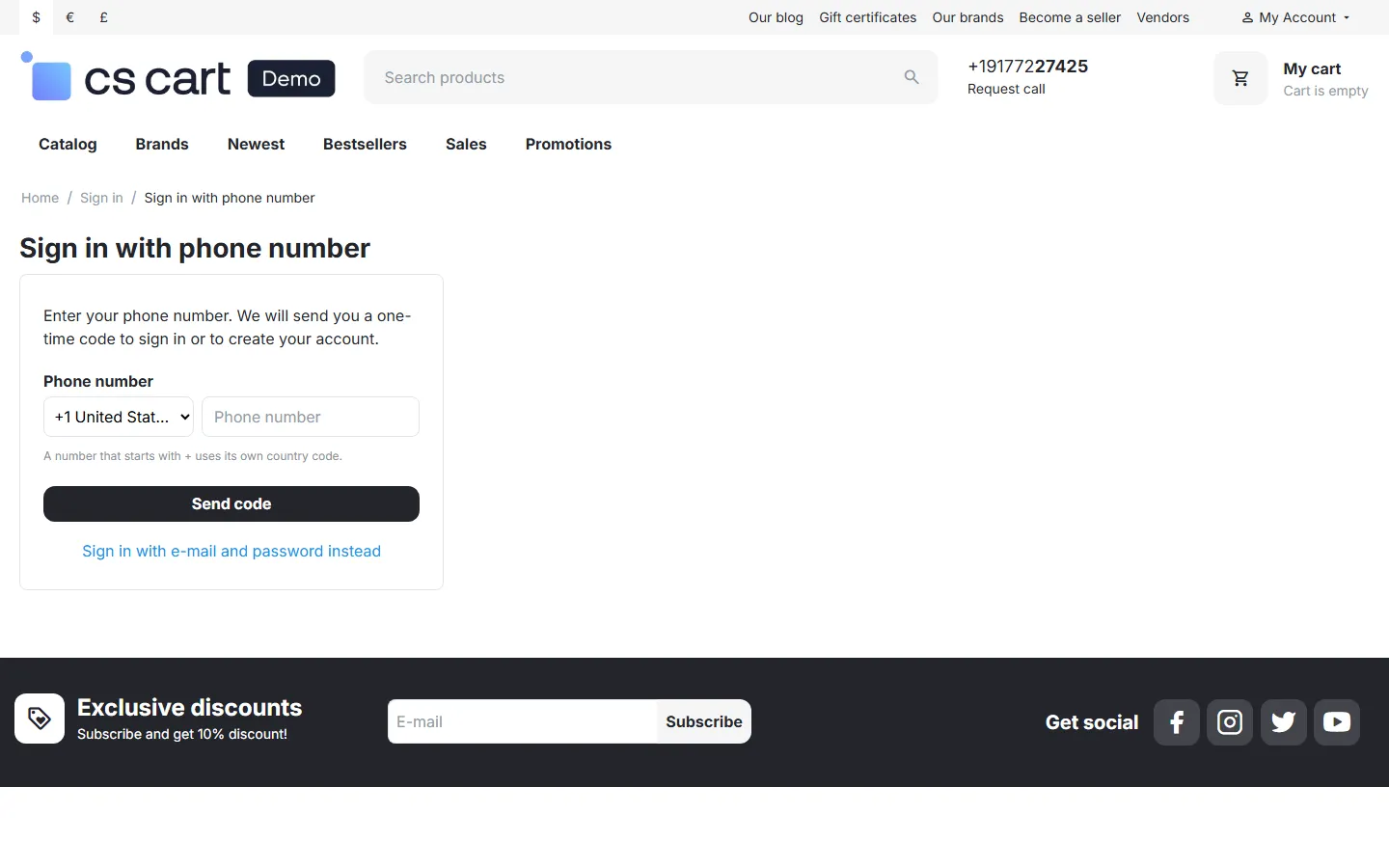
Section titled “Signing in with a phone number”Every CS-Cart sign-in form gets an or divider and a Sign in with phone number button: the header pop-up, the Sign in page and the sign-in at checkout. The button opens the phone sign-in page:
- Phone number. The customer picks the country (preselected from the settings) and types the number. A number that starts with
+or00uses its own country code. Send code sends the code by SMS or WhatsApp. - Code. The page says where the code was sent (the number is shown masked) and offers Change number and Resend code with a countdown. The code field accepts autofill from the SMS on phones; the full code submits by itself.
- Done. With the right code the customer is signed in and returns to the page they came from (for example checkout). A guest cart is kept, exactly as with a password sign-in.
A wrong code shows how many attempts are left. After too many wrong codes, or when the code has expired, the customer requests a new one.
Privacy of accounts. Until the right code is entered the page behaves the same for every number, whether it has an account or not, so nobody can find out which numbers are registered.
Registering with a phone number
Section titled “Registering with a phone number”When the confirmed number has no account (and registration by phone is on), the customer gets a short form: first and last name and an e-mail address, as configured. Create account creates a normal customer account with the number as its verified phone and signs it in. If the store approves new accounts manually (Settings → General → Administrator must approve new accounts), the customer is told that the account waits for approval.
The core registration page shows a Register with your phone number instead link.
Verifying the number in the profile
Section titled “Verifying the number in the profile”My account → Profile details shows a Phone sign-in panel:
- Verified: the number customers sign in with, with a Change number link.
- Not verified: the profile number (if any) and a Verify phone number button that sends a code to confirm it.
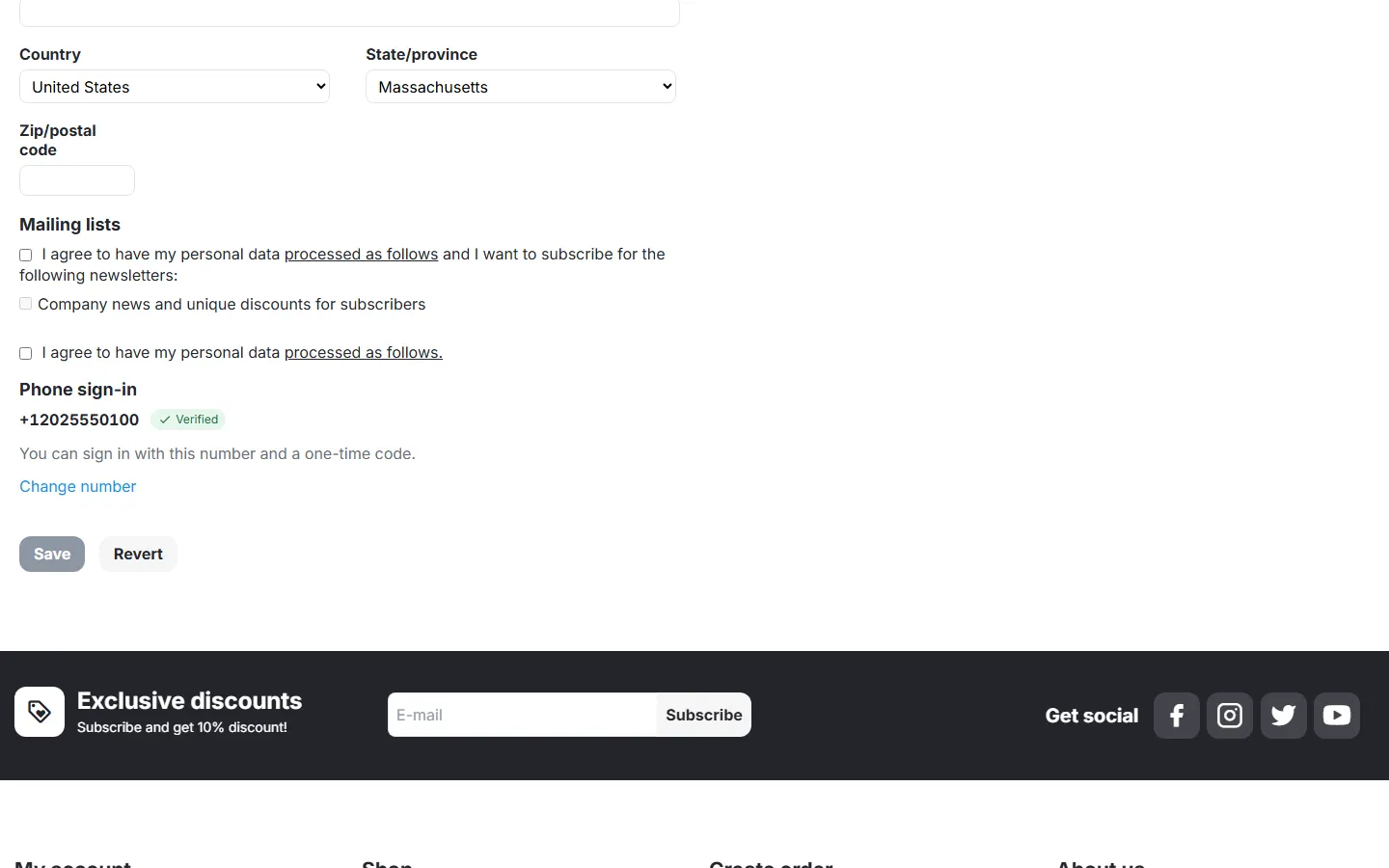
When a customer changes the phone in the profile form to another number, the verification of the old number is removed; signing in with the new number verifies it again. A number verified on one account moves to the account that verifies it later.
Existing customers
Section titled “Existing customers”With Match phone numbers saved in customer profiles on (default), customers whose profile already holds their phone number can sign in by phone right away; formatting does not matter ((202) 555-0100, +1 202 555 0100 and 2025550100 are the same number). If several accounts hold the same number, phone sign-in is refused for it until one of them verifies it in the profile.
Administrators and vendor staff never sign in by phone; only customer accounts are matched.
Sign-in log
Section titled “Sign-in log”Users → Phone sign-in log lists codes sent, codes confirmed, sign-ins, registrations, verified numbers, wrong codes, blocks by the rate limits and refused sign-ins, with the masked number, the customer, channel and provider, IP address and details (provider message ID or error). Filter by number, event and period. The tiles show the last 24 hours. Codes are never stored or shown.
Send a test code sends a code to any number through the configured delivery and logs the provider’s answer: use it to check your Twilio, gateway or WhatsApp settings before going live.

Test mode
Section titled “Test mode”After installation the add-on runs in test mode: nothing is sent, and the sign-in page shows the code for the test numbers from the settings (and a notice that test mode is on). Other numbers get no code in test mode. Switch Send codes by to SMS or WhatsApp before you go live: anybody who knows a test number can sign in to the account that uses it.
Multi-Vendor
Section titled “Multi-Vendor”Customers sign in and register by phone as in CS-Cart. Vendors and vendor staff are never matched by phone, and the vendor panel has no part of the add-on. The sign-in log is for marketplace administrators only.
CS-Cart Ultimate
Section titled “CS-Cart Ultimate”Every storefront can have its own settings (for example its own sender or default country). When customers are not shared between storefronts, a number signs in only to the account of the current storefront.