

Spreadsheet Bulk Product Editor
Add-on ID: kv_bulk_product_editor · Edition: CS-Cart & Multi-Vendor · Latest version: 1.0.0 · Compatible with: CS-Cart & Multi-Vendor 4.17.2 – 4.21.x, PHP 7.4 – 8.3 · Changelog: view
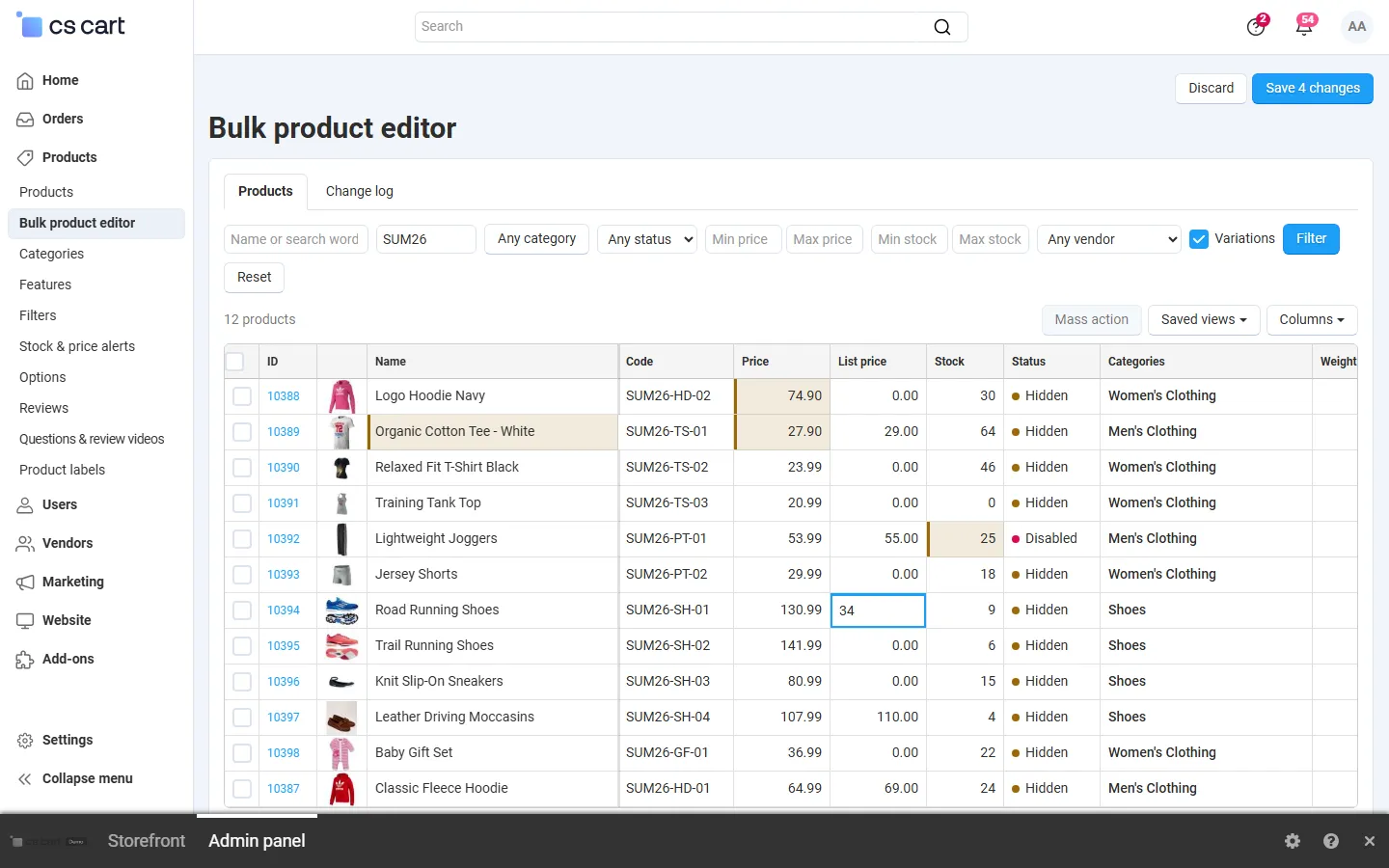
Spreadsheet Bulk Product Editor turns your catalog into a fast, spreadsheet-style grid in the admin panel. Change prices, stock, names, codes, statuses, categories, weights, SEO fields and product features right in the cells, then save them all at once. For bigger jobs, mass actions change hundreds or thousands of products with a preview first, and every change lands in a change log that you can undo. CS-Cart’s own bulk edit covers a few fields of the products on one page; this editor covers the whole catalog.
- Inline editing: click or press Enter to edit a cell, Tab and the arrow keys to move, paste a column from Excel or Google Sheets to fill many rows at once. Changed cells are highlighted until you save.
- Fields: name, code, price, list price, stock, status, categories (with the main category), weight, free shipping, shipping freight, page title, meta description, meta keywords, search words, SEO name and product features (text, number, checkbox, select and brand). Short and full descriptions can be changed with find and replace.
- Mass actions with preview: set a value; increase or decrease by an amount or a percentage; list price from the price (or the other way round) plus or minus a percentage; round to cents, whole numbers, .99 or .95; find and replace (optionally case-sensitive); add text at the start or end; add or remove categories, set the main category; set or clear a feature. The preview shows before and after for the first products and how many will change.
- Selected products or the whole filter: apply an action to the products you ticked or to every product that matches the filter, even 10,000 and more. Large actions run in short steps with a progress bar.
- Change log and undo: every save and mass action is recorded with who, when, and the old and new value of every cell. Undo restores the old values; values that were changed again since then are left alone.
- Filters, columns and saved views: search by name or code, category, status, price and stock ranges, vendor; choose the columns (including features); save filters and columns as named views and share them with your team.
- Safe by design: every change goes through the standard CS-Cart product update, so SEO redirects, variations, other add-ons and caches stay in sync. Values are validated before saving, and a value someone else changed in the meantime is not overwritten.
- Multi-Vendor: vendors edit only their own products in the vendor panel (can be switched off). CS-Cart Ultimate: edit per storefront, respecting shared products.
Documentation
Section titled “Documentation”| Page | Contents |
|---|---|
| Installation | Requirements, installing, upgrading, uninstalling |
| Configuration | Settings, privileges, vendor access, license |
| Usage | The grid, inline editing, mass actions, change log and undo, views, vendors, Ultimate |
| Developer notes | How values are saved, data model, endpoints, limits, file map |
| FAQ | Common questions |
Compatibility
Section titled “Compatibility”| CS-Cart / Multi-Vendor | 4.17.2 – 4.21.x (Ultimate and Multi-Vendor editions) |
| PHP | 7.2.5 – 8.3 (whatever your CS-Cart version supports) |
| Admin panel | 4.17 back office and the 4.18+ light and dark schemes |
| Catalog size | Tested with 10,000+ products (server-side paging, mass actions in steps) |
| Full page cache (4.21) | Supported: the add-on has no storefront output; saved products are refreshed by core |