

Folio Theme
Edition: CS-Cart & Multi-Vendor · Latest version: 1.0.0 · Compatible with: CS-Cart & Multi-Vendor 4.17.2 – 4.21.x, PHP 7.4 – 8.3 · Changelog: view
Folio is a classic, conversion-first storefront theme for bookshops, stationers and office-supply stores. Every standard e-commerce element sits where shoppers expect it, and the theme answers the questions book and paper buyers ask first: “do you have it?” (search by title, author, ISBN or SKU), “which edition?” (format chips: hardcover, paperback, e-book, audiobook), “what is it like inside?” (Look inside pages), “what’s next in the series?” and, for offices, “can I order the same again, in bulk?” (pack sizes, bulk prices and a quick reorder line).
What you get
Section titled “What you get”- The Folio theme, a child of the standard Responsive theme, so every add-on keeps working.
- Four styles:
- Library (default): ivory paper, a library-green menu band and buttons, vermilion bookmarks and walnut shelves.
- Stationer: bright white with fountain-pen blue buttons, a highlighter-yellow office band and highlighter marks behind section titles.
- Lamplight (dark): a deep green-black reading room with brass buttons and cream catalogue cards.
- Kraft: kraft paper and oxblood with a teal office band, stitched shelf rails and pill buttons.
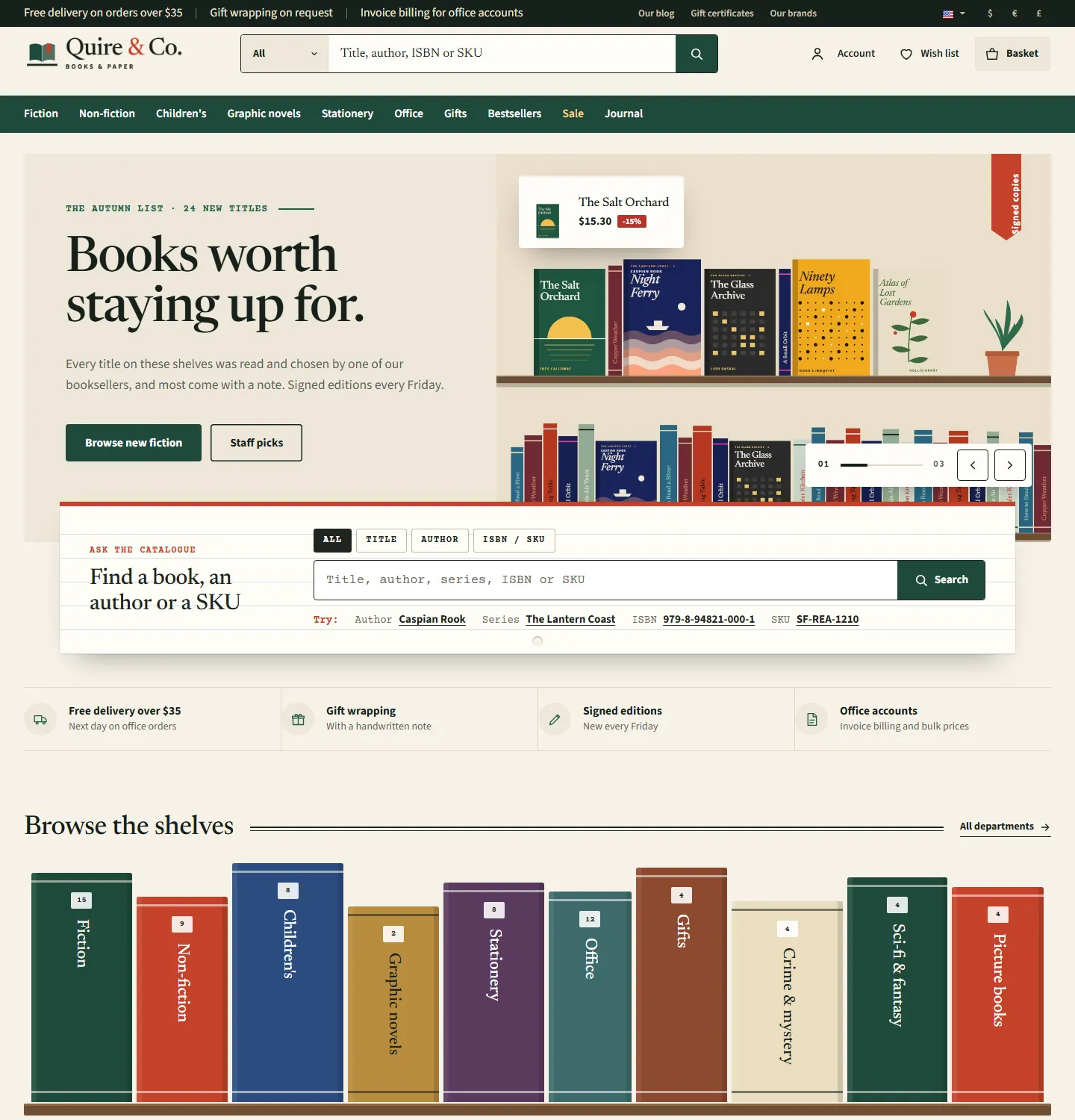
- Cover shelves: covers stand upright on a shelf ledge (a solid ledge in Library and Lamplight, a thin line in Stationer, a stitched rail in Kraft), with the series line, the “by Author” link and format chips on every card; Staff pick bookmark ribbons, round sale stickers and New, Coming soon and Signed tabs.
- Search by title, author, ISBN or SKU: the standard product search also finds author, publisher and series names, the ISBN and the product code with or without hyphens; a scope select (All, Title, Author, ISBN / SKU) sits inside the header search.
- Ask the catalogue: a ruled library index card under the hero with the search scopes and “Try:” hints built from your catalogue (an author, a series, an ISBN and a SKU).
- Browse the shelves: your departments as book spines of different heights with the number of titles.
- The chart: a numbered top 10 with covers, authors, prices and add buttons, next to a Book of the month card with a staff note.
- Staff picks with shelf-talkers: a handwritten-style note card under each recommended cover.
- Author, series and publisher lists: author and series links open the filtered list; a list filtered by one author shows an author header (titles, series).
- Format bar on category and search pages: All formats + Hardcover, Paperback, E-book, Audiobook with counts.
- Look inside: books with inside pages get a bookmark button on the cover that opens the image viewer on the first inside page; the thumbnails become a page strip.
- Catalogue card on product pages: ISBN or SKU in typewriter type, author, publisher or brand, series, published, pages, formats, reading age and pack size.
- Office supplies: pack-size options as buttons, bulk prices from quantity discounts as a price tier strip, a quick reorder line with the SKU to copy, and an office band on the homepage with a reorder pad (SKU or ISBN search); a link to the quick order pad when the Kavio B2B Quick Order Form add-on is active.
- Header: top bar with your promises and quick links, logo, the search-first field, labelled Account, Wish list and Basket, and a mega menu band with a Formats column in the book departments and a Sale item.
- Homepage: hero slider (headline, text, two buttons, a price sticker for a paired product on a shelf scene; edited as banners), Ask the catalogue, promise strip, Browse the shelves, New releases / Bestsellers / Coming soon tabs, the chart and the book of the month, staff picks, two promo banners, the stationery shelf, the office band with office essentials, publisher wordmarks (on Multi-Vendor: seller cards), editorial review quotes, From the journal (blog), newsletter and footer.
- Phones: compact header with the full search below, a bottom bar (Home, Shop, Search, Account, Basket), swipe shelves, a filter sheet, a swipe gallery and the sticky add-to-cart bar.
- Installs with complete demo content: the store looks finished right after activation.
- Self-hosted fonts (Newsreader, Source Sans 3 and Courier Prime, SIL Open Font License); no external font requests.
Compatibility
Section titled “Compatibility”- CS-Cart, CS-Cart Ultimate, Multi-Vendor and Multi-Vendor Ultimate 4.17.2 – 4.21.x (tested on 4.17.2 and 4.21.2).
- PHP 7.2.5 to 8.3, depending on your CS-Cart version.
- Works with the full page cache of 4.21: theme output holds catalogue data only; Look inside, the scope placeholder and the SKU copy button run in the shopper’s browser.
Licence
Section titled “Licence”Folio uses a domain-bound licence like every Kavio Labs product. Without a valid licence (after the 14-day period of a new installation, or 14 days after the licence server became unreachable) the storefront shows the standard Responsive look instead of the Folio design; cart, checkout and orders keep working and visitors see no message. See Configuration.
Next steps
Section titled “Next steps”- Installation
- Configuration
- Usage: authors, series, formats, search, Look inside, staff picks, pack sizes and office reorders
- Developer notes
- FAQ