

Bulk Quick Order Form
Add-on ID: kv_b2b_quick_order_form · Edition: CS-Cart & Multi-Vendor · Latest version: 1.0.0 · Compatible with: CS-Cart & Multi-Vendor 4.17.2 – 4.21.x, PHP 7.4 – 8.3 · Changelog: view
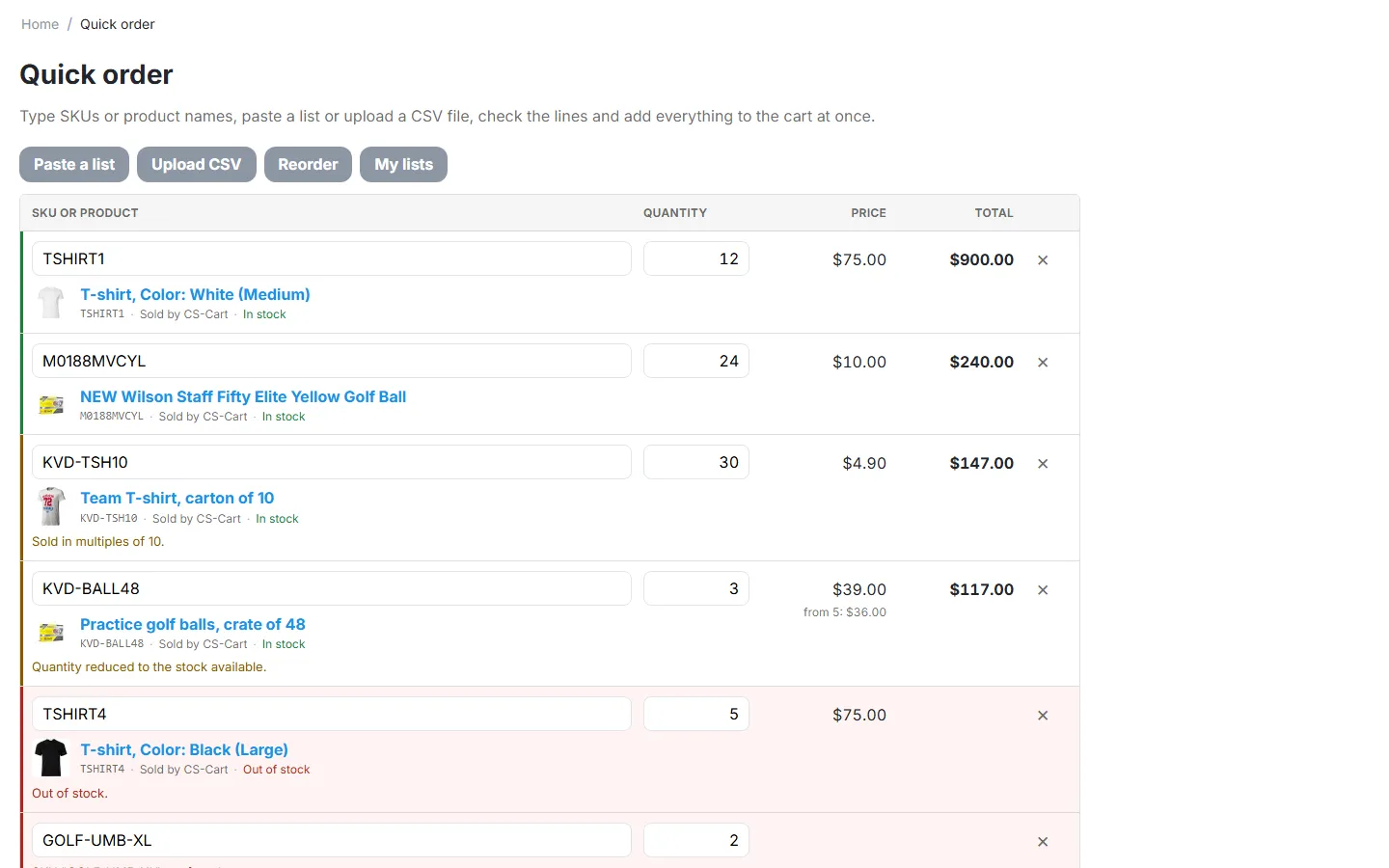
Bulk Quick Order Form gives business buyers a fast order page: they type SKUs or product names, paste a list or upload a CSV file, see every line checked against stock and quantity rules with their own price, and add everything to the cart in one click. Regular customers reorder from a past order or from their saved order lists. CS-Cart has no quick order form of its own; buyers otherwise open every product page one by one.
- Type-ahead lines: SKU or product name with suggestions (image, SKU, vendor, stock, price), variation SKUs included. Keyboard first: arrows and Enter pick a product, Enter in the quantity jumps to the next line, Ctrl + Enter adds everything to the cart.
- Paste a list: “SKU, quantity” lines separated by comma, semicolon, tab or space, straight from a spreadsheet, an e-mail or an ERP export. Pasting several lines into a SKU field works too.
- CSV upload: a file with SKU and quantity columns fills the form (read in the browser, never stored on the server). A CSV template is one click away.
- Per-line checks before anything reaches the cart: unknown SKU, not available to this customer, out of stock (counting what is already in the cart), minimum and maximum order quantity, quantity step, pre-order, zero price, and products whose options must be chosen (with a link to the product page). Duplicate lines are merged.
- Your customer’s real price: user-group prices, quantity tiers (“from 10: $15.00”), catalog promotions and price lists of other add-ons are applied by CS-Cart itself, exactly as in the cart; line totals and an estimated order total update as the customer types.
- Reorder: load the products of one of the last orders into the form, then change quantities before adding.
- Saved order lists: “Weekly restock”, “Site B tools”: save the form as a named list, load it later, update or delete it.
- Access control: everyone, signed-in customers only, or selected user groups (for example the trade groups of our B2B Registration & Approval add-on); other visitors see a sign-in prompt or a short message with a link to apply for a trade account.
- Anywhere in your store: a quick order page, a Quick order form block for any page and a Quick order link in the customer account menu. Works with every theme based on Responsive (Nova, Bright and others).
- Multi-Vendor: products of all vendors on one form; the cart splits by vendor at checkout as usual.
Documentation
Section titled “Documentation”| Page | Contents |
|---|---|
| Installation | Requirements, installing, upgrading, uninstalling |
| Configuration | Settings: general, reorder and lists, license |
| Usage | The quick order page and block, pasting and CSV, line results, reorder, lists, Multi-Vendor and Ultimate |
| Developer notes | Endpoints, data model, hooks, file map |
| FAQ | Common questions |
Compatibility
Section titled “Compatibility”| CS-Cart / Multi-Vendor | 4.17.2 – 4.21.x (Ultimate and Multi-Vendor editions) |
| PHP | 7.2.5 – 8.3 (whatever your CS-Cart version supports) |
| Themes | Responsive and themes based on it (Bright, Nova and others) |
| Full page cache (4.21) | Supported: the page is never cached, and the block prints the same markup for every visitor; prices and customer data are loaded separately for each visitor |
| External services | None |