

Usage
Overview · Installation · Configuration · Developer notes · FAQ
The product block
Section titled “The product block”On every product page that has recommendations, the Frequently bought together block appears above the product tabs (Description, Reviews, …) in all product page templates of Responsive-based themes, including Nova.
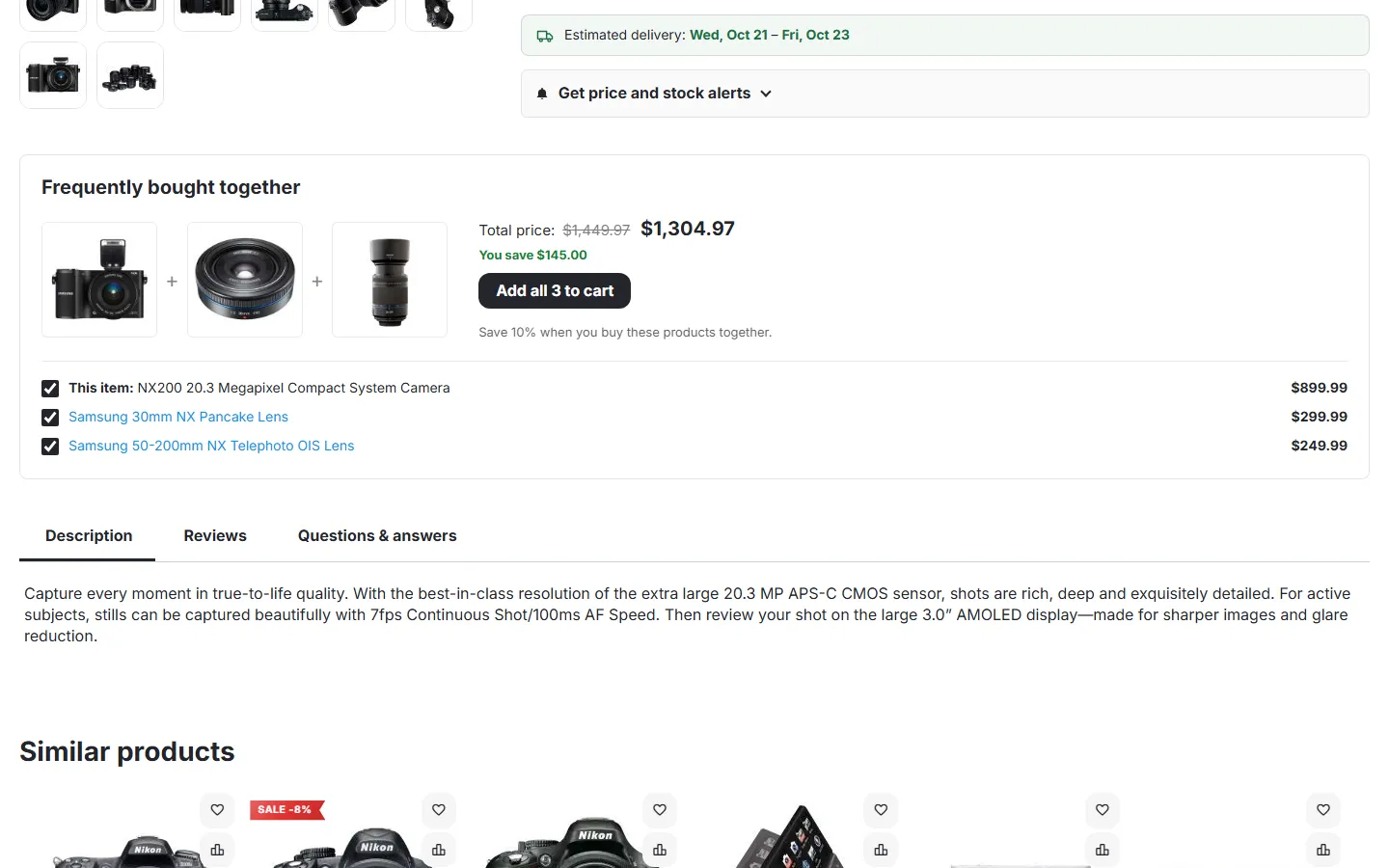
- The viewed product comes first (“This item”), followed by up to three products bought with it.
- Shoppers untick products they do not want. The total, the saving and the button follow at once: Add all 3 to cart, Add both to cart, Add to cart.
- One click adds the ticked products to the cart with one AJAX request and opens the usual “added to cart” pop-up. The viewed product is added with the options the shopper picked in the product form.
- Shown are only products that can be bought right away: active and visible on this storefront, in stock (or on backorder, or not tracked), with a price, a minimum quantity of 1 and no required text or file option.
Where the products come from
Section titled “Where the products come from”- Pinned products of this product, in your order.
- Pairs from your orders, strongest first (recent orders weigh more).
- Popular products of the same category, when there is not enough data yet (setting When there is not enough order data).
Excluded products and products of excluded categories never appear. In Multi-Vendor, with Recommend only products of the same vendor, only products of the vendor of the viewed product appear.
The cart block
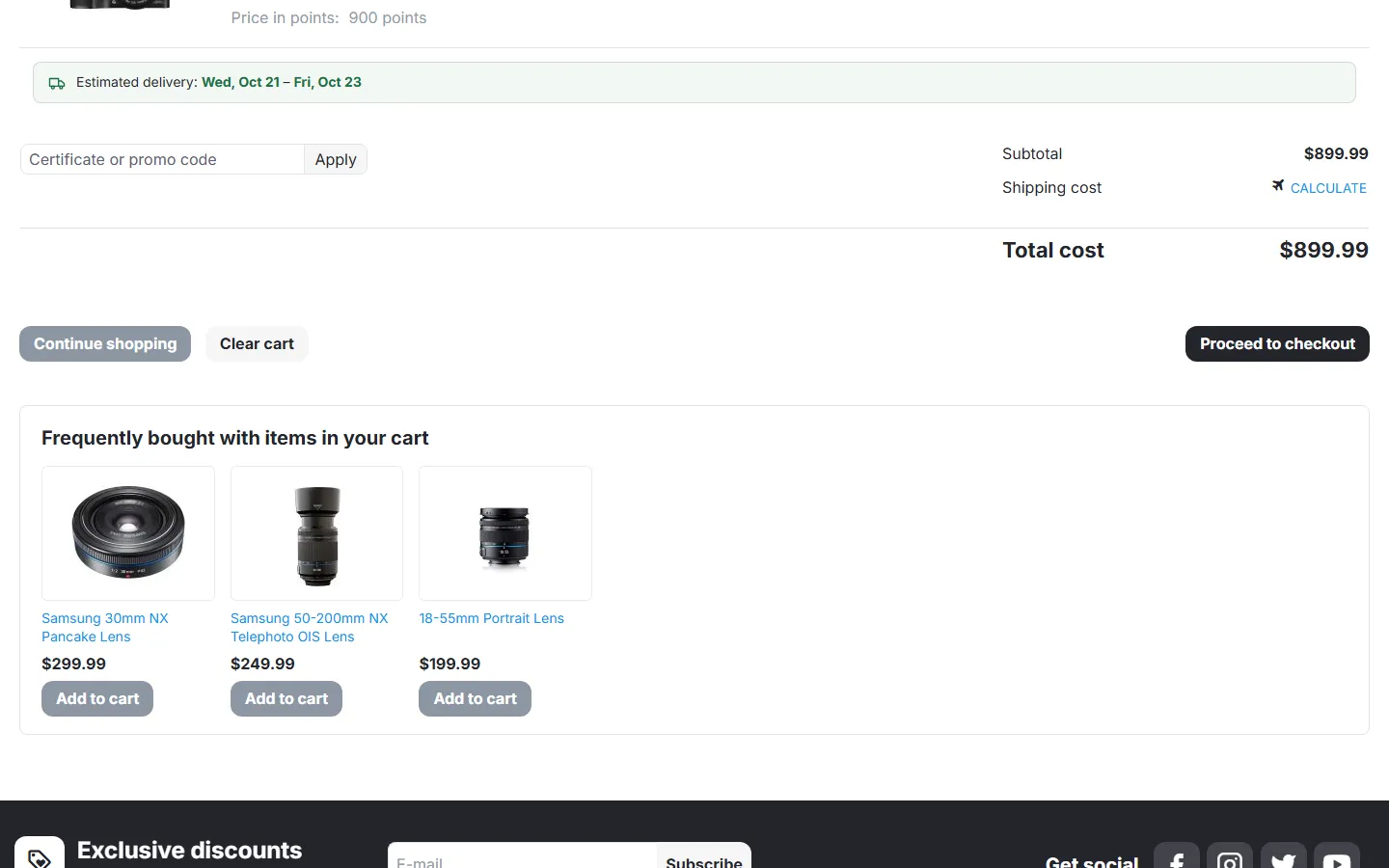
Section titled “The cart block”Below the cart, “Frequently bought with items in your cart” shows up to four products bought with the products in the cart (and not in it yet), each with Add to cart. Products added here belong to the set of the cart product they were recommended for, so the bundle discount applies to them too.
Pins and exclusions
Section titled “Pins and exclusions”Open a product in Products → Products and go to the Bought together tab.
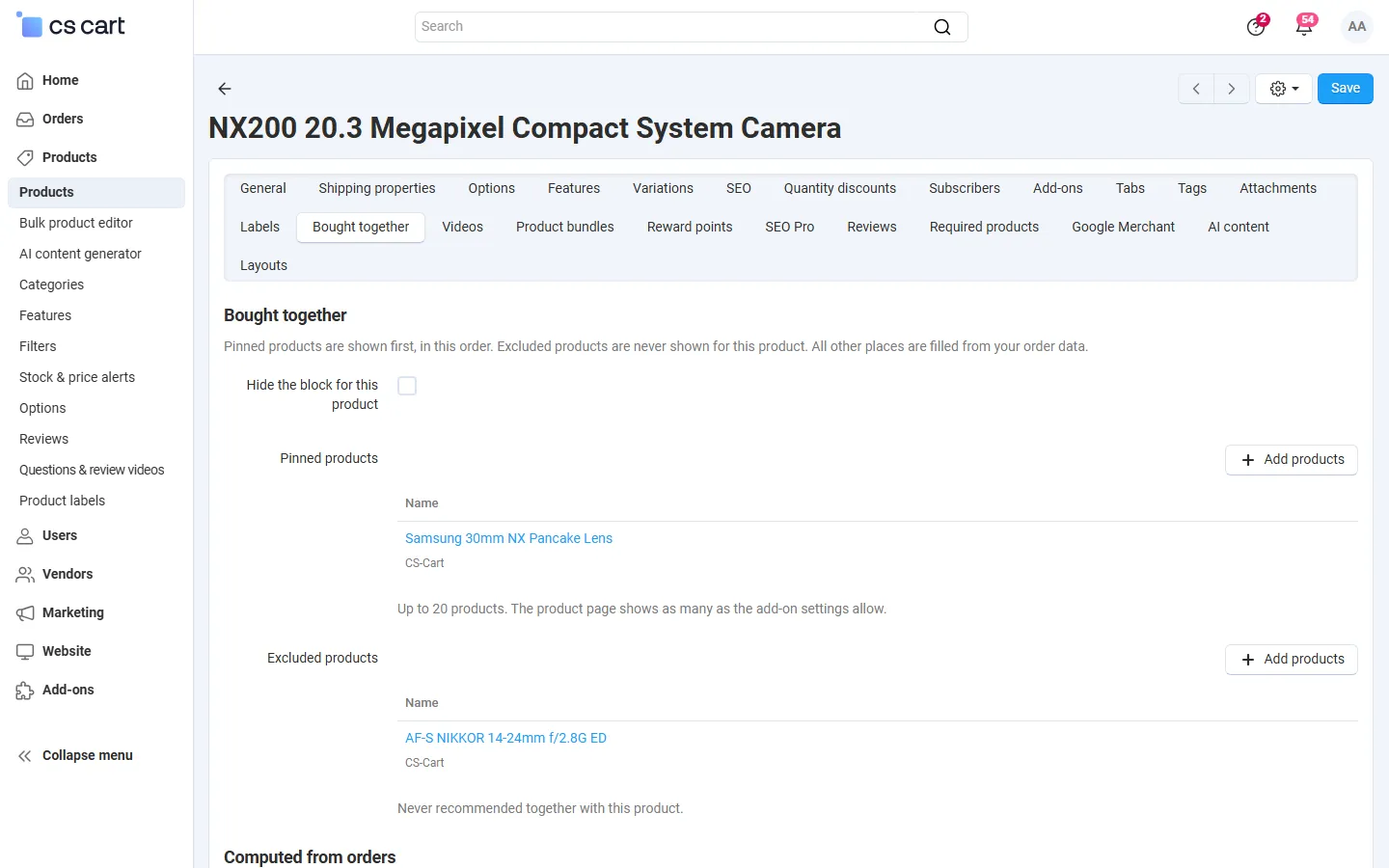
- Hide the block for this product: no block on this product’s page, and its pairs are not used in the cart block.
- Pinned products: shown first, in this order (up to 20; the page shows as many as the settings allow).
- Excluded products: never recommended with this product.
- Computed from orders: the current pairs of this product with the number of orders and the confidence.
Vendors see the same tab for their own products and can only pin or exclude their own products.
Bundle discount
Section titled “Bundle discount”The add-on adds the bonus Frequently bought together discount to cart promotions. To give 10% off products bought together:
- Marketing → Promotions → Add promotion → Cart promotion.
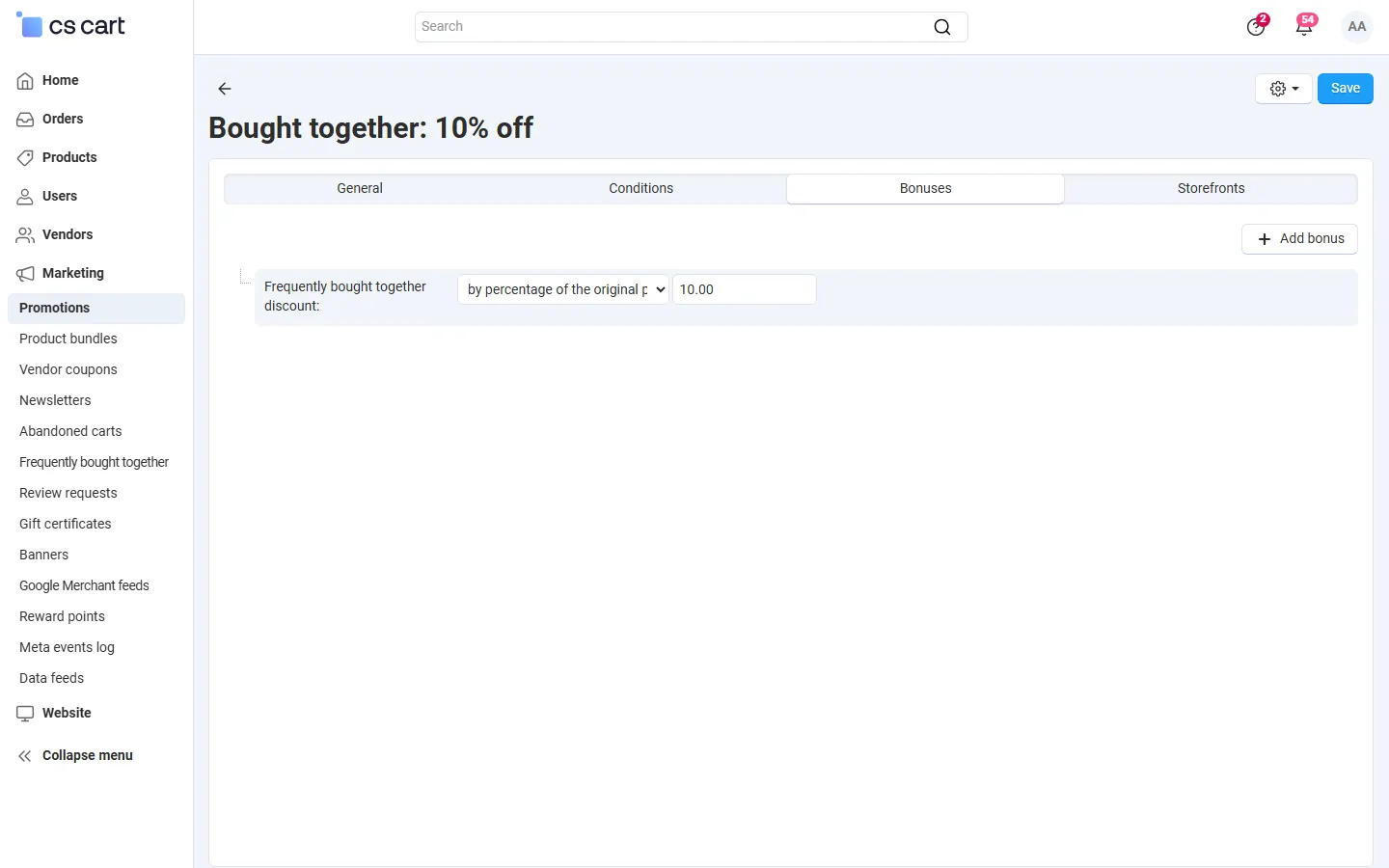
- Name it (for example “Bought together: 10% off”), status Active.
- Bonuses → Add bonus → Frequently bought together discount, by percentage of the original price, 10.
- Save.
How it works: a set is the product of a block plus the products added with the block for it. When the cart holds the product and at least one other product of its set, every line of the set gets the discount. Products added in other ways are not discounted. The discount is a normal CS-Cart promotion, so it shows in the cart, in the order and in your promotion reports, and you can add conditions (dates, user groups, a minimum subtotal) as usual. The block shows “You save $X” only for an active promotion with a percentage and without conditions, so it never promises a saving the cart would not give.
Analytics
Section titled “Analytics”Marketing → Frequently bought together (administrators):
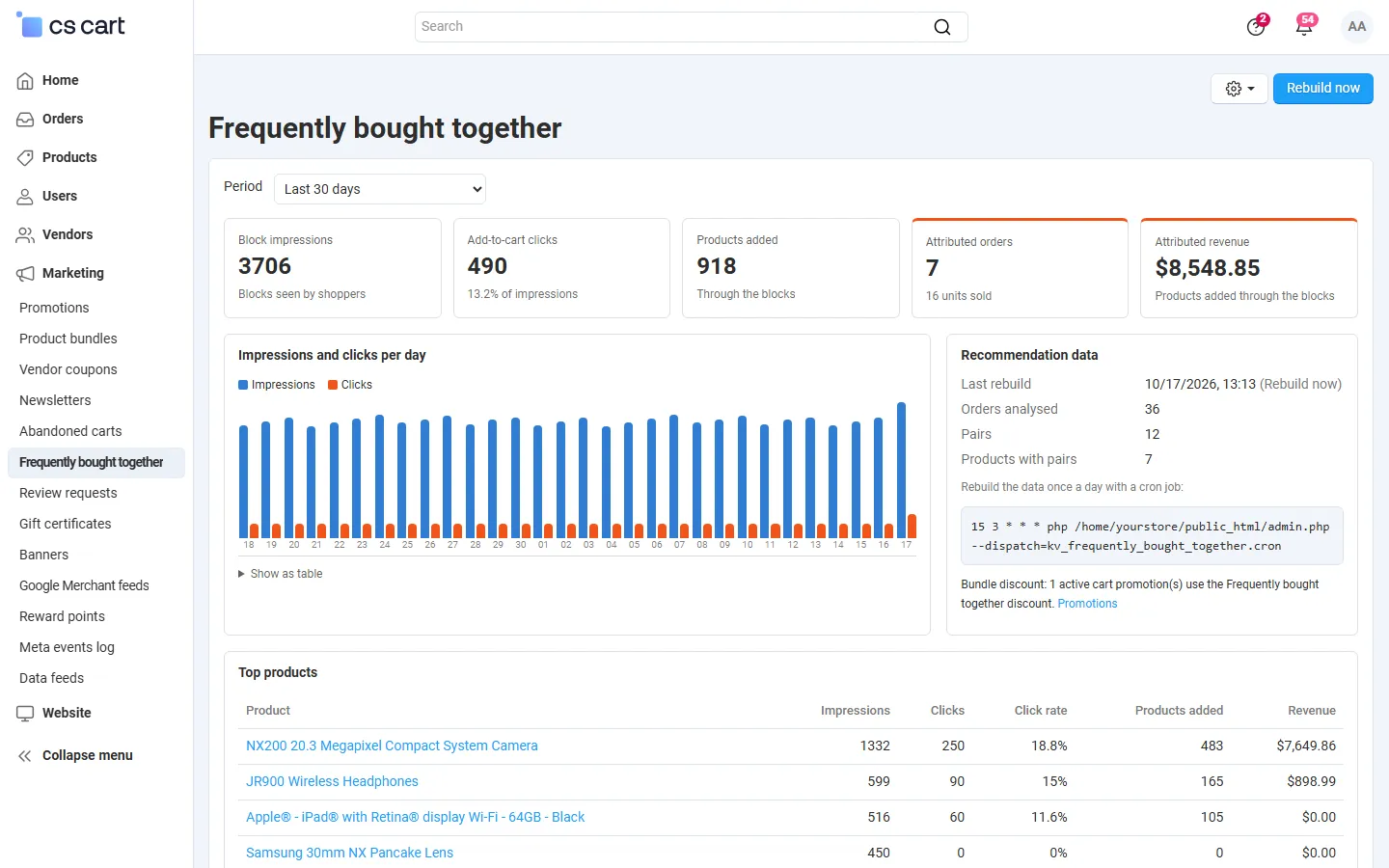
- Block impressions: a block counts as seen when at least half of it is visible on the screen (counted once per page view).
- Add-to-cart clicks and the click rate, products added through the blocks.
- Attributed orders and revenue: order lines added through the blocks, in orders with the selected statuses.
- A daily chart (also as a table), top products (the products whose blocks sell best) and the strongest pairs.
- Recommendation data: last rebuild, orders analysed, pairs, the cron command, Rebuild now, and whether a bundle discount promotion is active.
Multi-Vendor
Section titled “Multi-Vendor”- Pairs are learned across the whole marketplace; a checkout with products of several vendors counts as one basket.
- With Recommend only products of the same vendor (default) a vendor’s product page and the cart recommend only products of the same vendor as the product they belong to.
- Vendors edit pins and exclusions of their own products in the vendor panel. The analytics page is for administrators.
CS-Cart Ultimate
Section titled “CS-Cart Ultimate”Pairs and statistics are kept per storefront (orders of storefront A only feed the recommendations of storefront A). The General settings can be set per storefront.