

Make an Offer
Add-on ID: kv_make_an_offer · Edition: CS-Cart & Multi-Vendor · Latest version: 1.0.0 · Compatible with: CS-Cart & Multi-Vendor 4.17.2 – 4.21.x, PHP 7.4 – 8.3 · Changelog: view
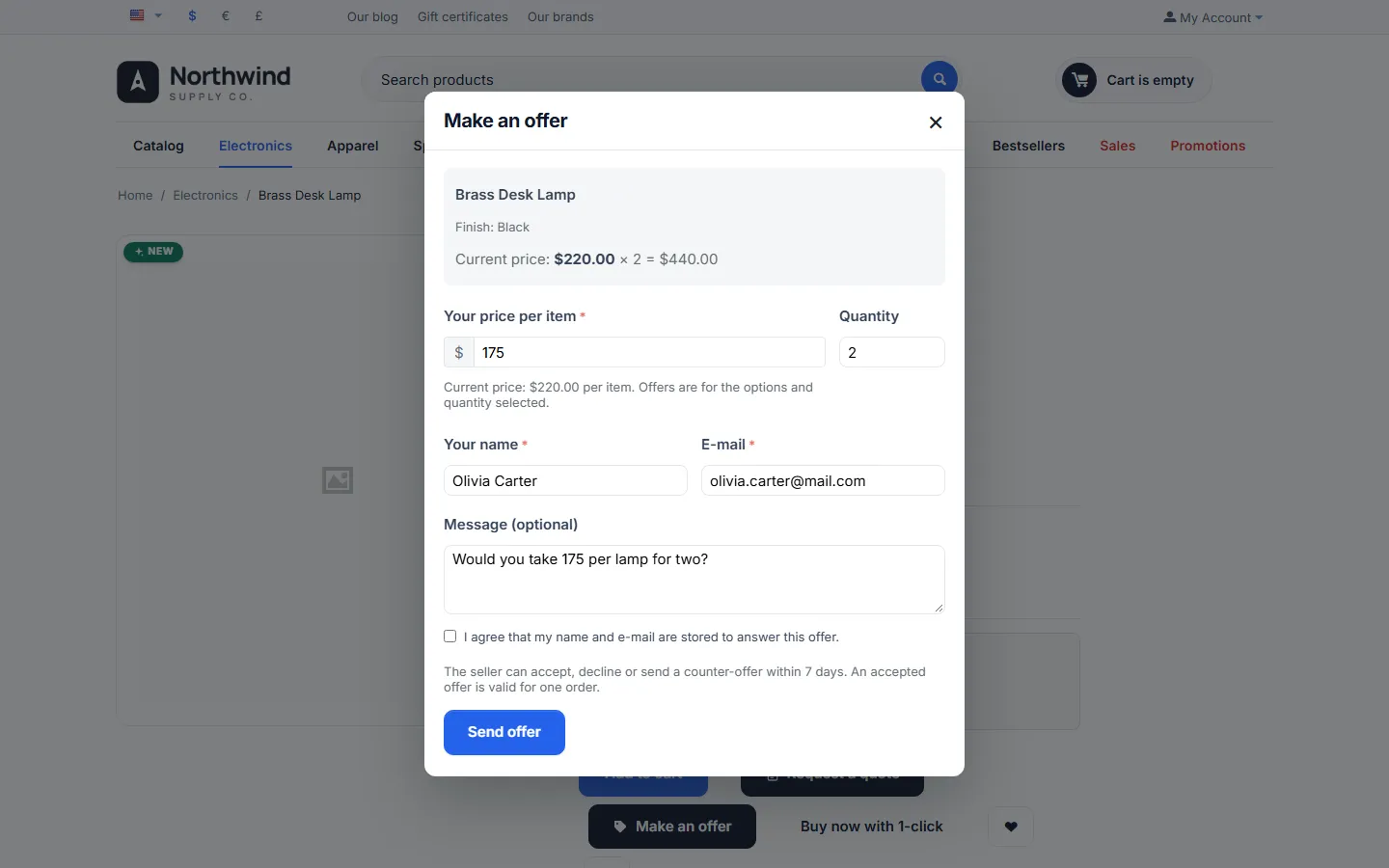
Make an Offer lets shoppers propose their own price. A Make an offer button next to Add to cart opens a short form for the options and quantity the shopper selected. You, or the vendor on a marketplace, accept the offer, decline it or answer with a counter-offer. Once an offer is accepted, the shopper adds the item to the cart at the agreed price with one click and checks out as usual. The price is enforced on the server: it is valid for that customer, that product, those options and that quantity, for one order and for a limited time.
Haggling works for slow sellers, high-value items, bulk quantities, refurbished or end-of-line stock and marketplaces where buyers expect to negotiate. CS-Cart has no offer workflow: stores handle such requests by e-mail and create manual orders or coupons that anyone can reuse. This add-on keeps the whole negotiation in one place and the agreed price safe.
- Make an offer button on the product page and in quick view, for the selected options, variation and quantity; an accessible dialog (keyboard, screen readers, full-screen on phones) and a page version for browsers without JavaScript.
- Where offers are allowed: all products, or only the products, categories and vendors you choose; rules per product, per category (with subcategories) and per vendor.
- Automatic answers (hidden): accept at a hidden minimum price or at a percentage of the price, decline below a floor percentage. Shoppers never see the values.
- Negotiation: accept, decline or counter-offer with a message; the customer accepts or declines the counter-offer or makes a new, higher offer, up to the number of rounds you allow. Deadlines for each side.
- Server-side price enforcement: single use, exact quantity and options, owner only, deadline; quantity and price edits in the cart are reset; markers sent by the browser are ignored.
- Clear promotion rules: choose whether the offer price is final, or cart promotions and coupons, or all promotions apply.
- My offers page, offer page with history and signed e-mail links (guests answer from the e-mail).
- Guests can make offers with their name and e-mail and a consent checkbox (optional).
- Limits: open offers per customer, offers per product in 30 days, maximum quantity, a guest limit per connection.
- E-mails for every step (received, accepted, counter-offer, declined, expired; new offer and customer answers for staff and vendors) through Administration > Notifications.
- Offers list with status tabs, filters, statistics (acceptance rate, average discount, offers ordered, revenue at offer prices) and CSV export.
- Multi-Vendor: vendors answer offers on their own products in the vendor panel; the administrator sees and can answer every offer.
- Full page cache ready (4.21): the product page output is the same for every visitor; everything personal is loaded on demand.
Documentation
Section titled “Documentation”| Page | Contents |
|---|---|
| Installation | Requirements, installing, privileges, upgrading, uninstalling |
| Configuration | Settings, rules, promotions, notifications, license |
| Usage | The shopper flow, answering offers, counter-offers, the cart, vendors, statistics |
| Developer notes | Data model, statuses, price enforcement, hooks, file map |
| FAQ | Common questions, security, license |
Compatibility
Section titled “Compatibility”| CS-Cart / Multi-Vendor | 4.17.2 – 4.21.x |
| PHP | 7.2.5 – 8.3 (whatever your CS-Cart version supports) |
| Themes | Responsive, Bright, Nova (4.21) and themes based on them, including the Kavio Labs themes |
| Products | Simple products, product options, product variations; downloadable products |
| Full page cache (4.21) | Supported |
| Ultimate | Settings and offers per storefront |