

Configuration
KSeF connection
Section titled “KSeF connection”Orders → KSeF invoices → KSeF connection
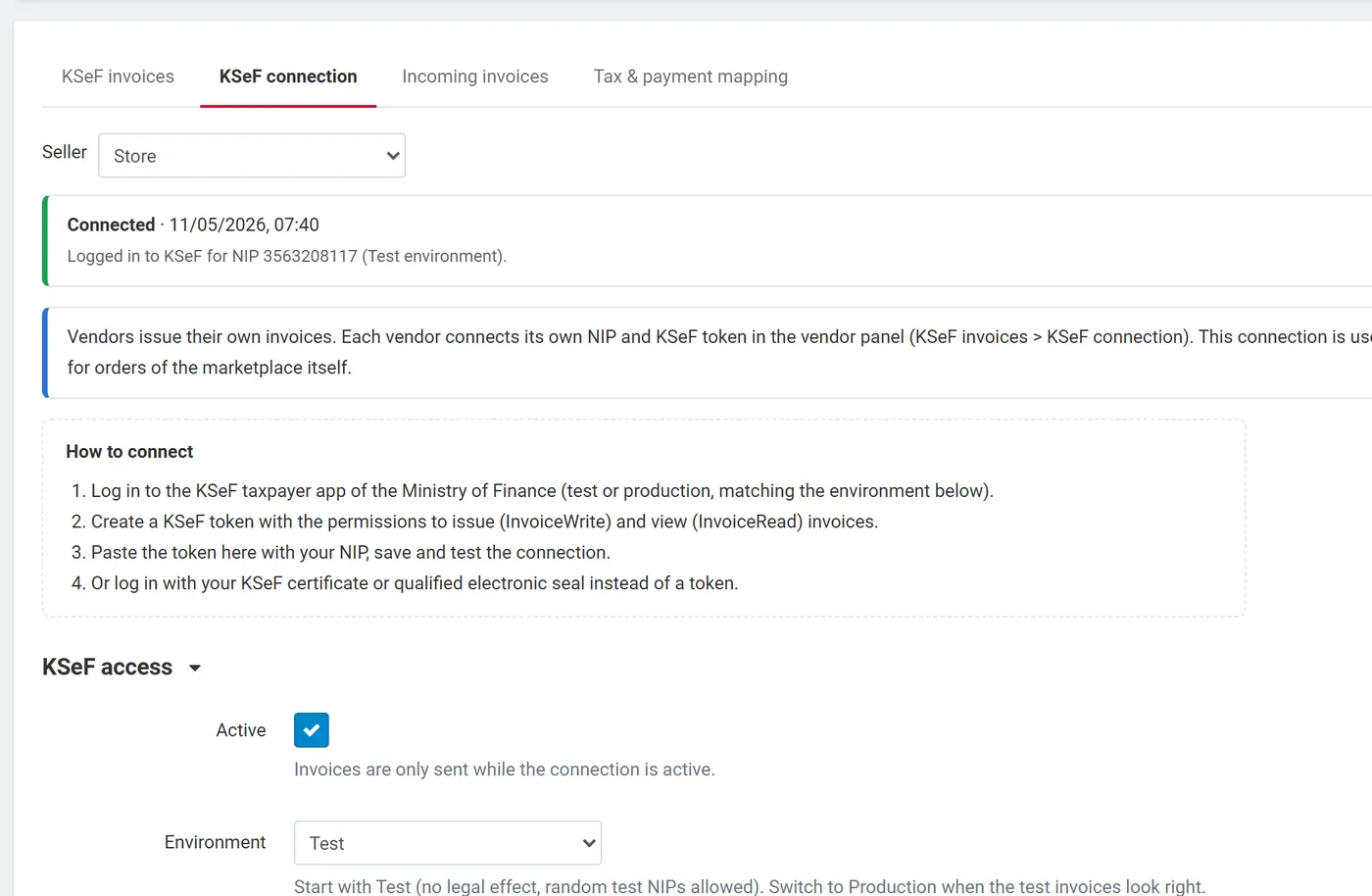
| Field | Meaning |
|---|---|
| Active | Invoices are only sent while the connection is active. |
| Environment | Test (no legal effect; any test NIP), Demo (pre-production, same rules as production) or Production. Start with Test, check a few invoices, then switch. |
| NIP of the seller | Ten digits without PL. It is the KSeF login context and the seller NIP (Podmiot1) on every invoice. |
| Log in with | KSeF token (recommended) or Certificate. |
| KSeF token | Created in the KSeF taxpayer application with the permissions to issue (InvoiceWrite) and view (InvoiceRead) invoices. Stored encrypted; the page only shows its last characters. |
| Certificate | A KSeF certificate or a qualified electronic seal for your NIP as a .p12 / .pfx file with its password, or the certificate and the private key as PEM. Stored encrypted. The add-on signs the KSeF login request with it (XAdES). |
| Seller data | Full name, address, place of issue, e-mail, phone, bank account, bank name, SWIFT, KRS, REGON, BDO and a footer text, printed on every invoice. Empty fields are taken from your company settings when the connection is first opened. |
Save and test connection logs in to KSeF and shows the result. The last result is shown on the page and on the KSeF invoices list.
How to get a KSeF token
Section titled “How to get a KSeF token”- Log in to the KSeF taxpayer application of the Ministry of Finance (test or production, matching the environment).
- Generate a token for your NIP with the permissions InvoiceWrite and InvoiceRead.
- Paste it in the add-on with your NIP and test the connection.
The token is a secret: anyone with it can issue invoices in your name. Revoke it in the taxpayer application if it leaks.
Settings
Section titled “Settings”Add-ons → Manage → KSeF e-Invoicing for Poland → Settings
General
Section titled “General”| Setting | Default | Meaning |
|---|---|---|
| Create KSeF invoices | on | Off: no new invoices; queued invoices are still sent. |
| Create the KSeF invoice when the order status becomes | Processed, Complete | The invoice is created once per order at the first of these statuses. |
| Also invoice orders without a buyer tax ID (B2C) | off | Off: only orders with a NIP or VAT ID get a KSeF invoice. On: consumer orders too (buyer without tax ID). |
| Sending | Instant in the admin panel | Instant: invoices created in the admin are sent at once; storefront orders always go through the queue. Queue: everything through the queue. |
| Create a full correction when the order status becomes | none | For example Canceled or Refunded. |
| Who issues the invoices (Multi-Vendor) | Automatic | See Multi-Vendor. |
| Send queue | The cron command and URL. |
Numbering
Section titled “Numbering”| Setting | Default | Meaning |
|---|---|---|
| Invoice numbers | Automatic | Automatic: when the Kavio Labs Invoices & Credit Notes add-on is active, the KSeF invoice gets the same number as its PDF invoice. Otherwise, and with Own series, the formats below are used. |
| Invoice number format | INV/{YYYY}/{MM}/{N} |
Tokens {YYYY} {YY} {MM} {DD} {N}. KSeF rejects a second invoice with the same number for your NIP. |
| Correction number format | COR/{YYYY}/{MM}/{N} |
|
| Digits of {N} | 5 | |
| Restart the counter | Every year | Every year, every month or never. Counters are gapless and kept per seller. |
Invoice content
Section titled “Invoice content”| Setting | Default | Meaning |
|---|---|---|
| Default unit on invoice lines | pcs | Unit text (P_8A), for example szt.. Products can have their own unit. |
| Name of the shipping line / payment surcharge line | Shipping / Payment surcharge | Shipping and surcharges are invoice lines with their own VAT rate. |
| Paid statuses | Processed, Complete | The invoice shows the payment date; other orders get a due date and your bank account. |
| Payment term in days | 14 | Due date of unpaid orders. |
| Untaxed sales to EU businesses are | Goods | Goods: 0 % intra-Community supply (0 WDT). Services: np II (reverse charge). |
| Legal basis of VAT exemption | Required when you sell exempt (zw) items. The type (Polish act, EU directive, other) is a separate setting. | |
| Effect of corrections | On the date of the correction | TypKorekty of correction invoices. |
| Show KSeF invoices to customers | on | KSeF number, QR code, printable view and XML on the customer’s order page. |
Tax and payment mapping
Section titled “Tax and payment mapping”Orders → KSeF invoices → Tax & payment mapping
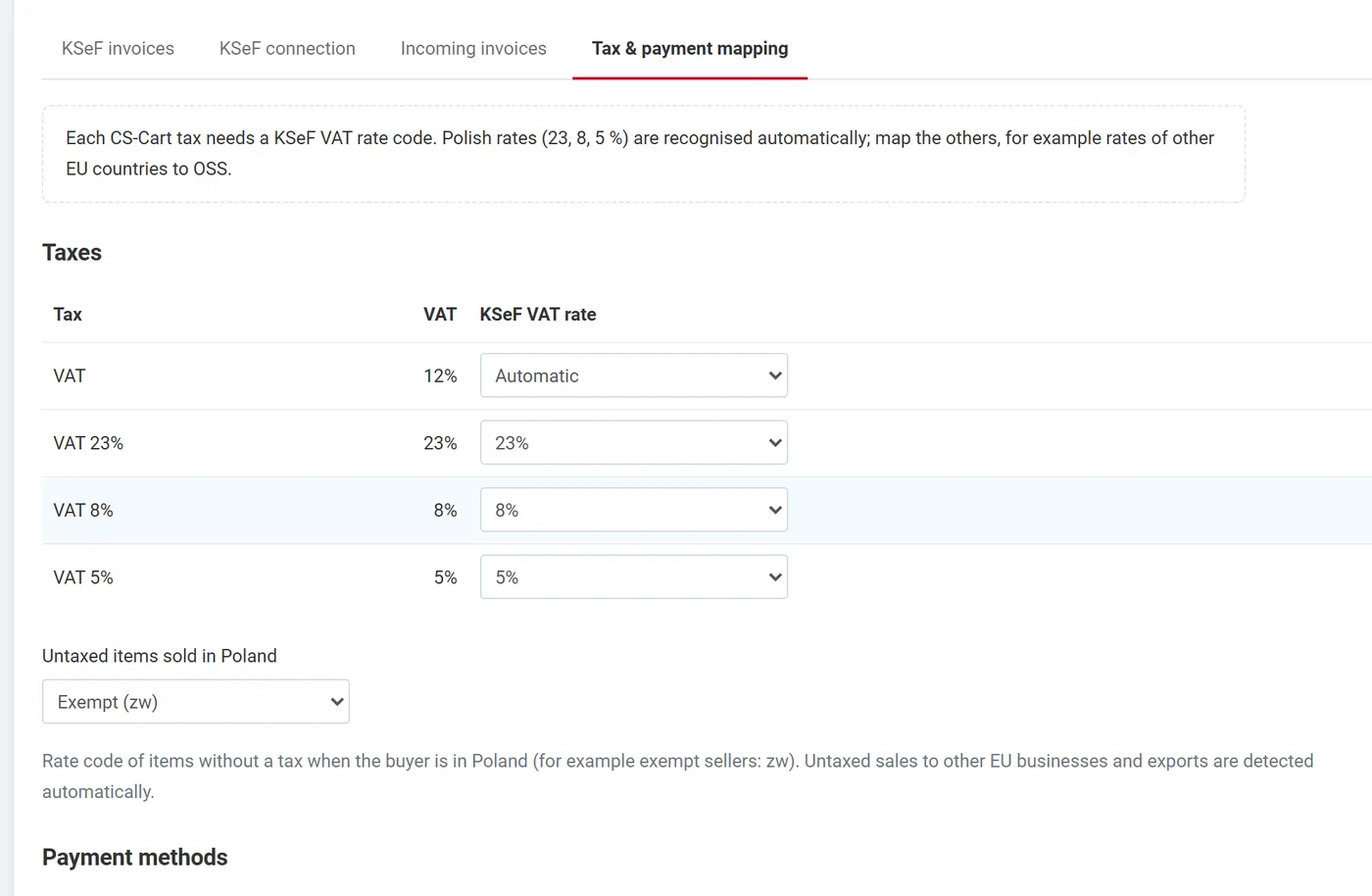
- Taxes: each CS-Cart tax gets a KSeF VAT rate code. Taxes of 23, 22, 8, 7, 5, 4 and 3 % are recognised automatically; map other rates, for example 19 % of another EU country to OSS (B2C distance sales under the One-Stop-Shop procedure: the add-on writes the rate of the buyer country and the procedure mark WSTO_EE).
- Untaxed items sold in Poland: the rate code of items without a tax when the buyer is in Poland (default: exempt, zw). Untaxed sales to EU businesses with a VAT ID and exports outside the EU are detected from the buyer’s country.
- Payment methods: each payment method gets a KSeF payment form (cash, card, voucher, cheque, credit, bank transfer, mobile). Common gateways are recognised automatically (BLIK as mobile, Przelewy24 / PayU / Tpay as transfer, card gateways as card).
Products
Section titled “Products”The product editor has three KSeF fields:
- KSeF GTU code (GTU_01 – GTU_13), written to the invoice line.
- Annex 15 goods (split payment): B2B invoices of PLN 15,000 or more with such items get the split payment mark (MPP) and the Annex 15 mark on the line.
- Unit on KSeF invoices.
Currency
Section titled “Currency”Invoices are issued in your store’s primary currency. When that is not PLN, the add-on adds the VAT amounts in PLN (P_14_xW) using the PLN rate of your store currencies. Polish law requires a specific exchange rate (generally the NBP rate of the last business day before the tax point): keep your PLN rate up to date or ask your tax advisor.
Multi-Vendor
Section titled “Multi-Vendor”| Mode | Who issues |
|---|---|
| Vendors | Every vendor connects its own NIP and KSeF token in the vendor panel (Orders → KSeF invoices → KSeF connection) and issues the invoices of its orders with its own gapless numbering. Orders of a vendor without an active connection wait until it connects. |
| Marketplace | The marketplace owner issues every invoice with the marketplace connection. |
| Automatic | Vendors when the Direct payments add-on is active, otherwise the marketplace. |
Vendors never see the tax and payment mapping or other vendors’ documents.
License
Section titled “License”The add-on checks its license against your domain. Without a valid license (after the trial):
No new KSeF invoices or corrections are created. Invoices already created keep being sent to KSeF, and their KSeF numbers, UPO receipts and verification codes stay available.
The license card at the top of the add-on page shows the status, the licensed domain and when updates end. Development and staging hosts (localhost, .test, .local) work without restrictions.