

Configuration
Open Add-ons > Manage add-ons > Email Log & Background Sending > Settings. Template lists take one template code per line. Add A: or C: in front for only the admin or only the customer version, and use * as a wildcard, for example order_notification.*. (custom) stands for e-mails without a template. The codes are shown on the Templates tab of the log.
Logging
Section titled “Logging”| Setting | Default | Description |
|---|---|---|
| Log e-mails | On | Off: e-mails go out as without the add-on and nothing new is logged; the existing log stays. |
| Store the message | All e-mails | Keeps the message for the preview and for resending. Failed e-mails only keeps it only for e-mails that could not be sent. Never keeps none (resend is then not possible). |
| Never store the message of these templates | recover_password, one_time_password_request, upgrade_backup_info |
E-mails with secret links or codes. They are logged (recipient, status) but their message is not kept, so they cannot be resent. |
| Keep copies of attachments | Off | Off: only name, type and size are logged. On: copies are kept for download and resend. |
| Maximum attachment size per e-mail (KB) | 1024 | Attachments of an e-mail larger than this in total are not copied. |
| Do not log these templates | (empty) | Sent normally, not logged. |
| Muted templates (not sent) | (empty) | Logged as Muted and not sent. Easier from the Templates tab. |
| Vendors see the e-mails of their orders | Off | Multi-Vendor only. Adds Orders > E-mail log to the vendor panel (read-only). |
Background sending
Section titled “Background sending”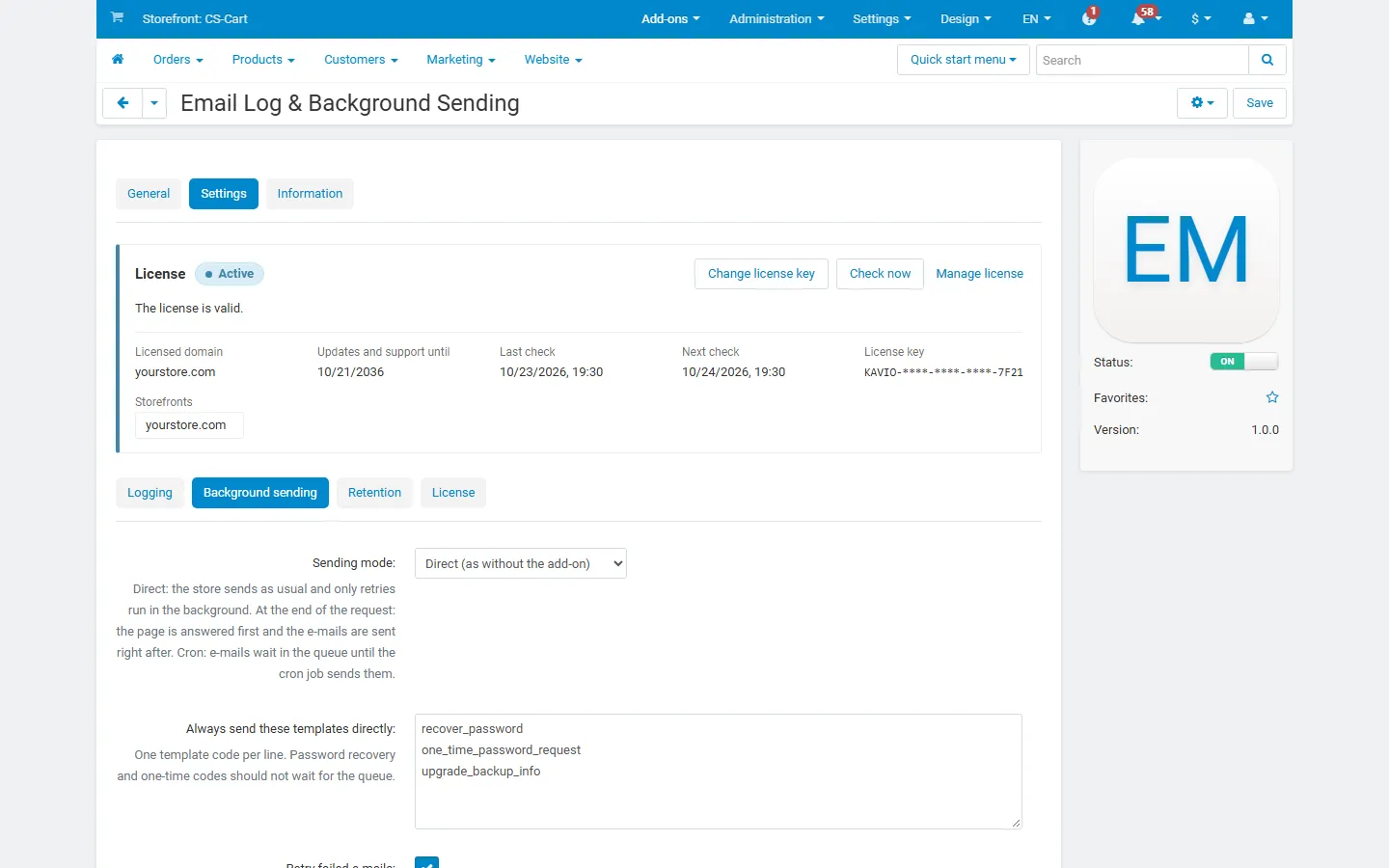
| Setting | Default | Description |
|---|---|---|
| Sending mode | Direct | Direct: the store sends as usual; only retries run in the background. At the end of the request: e-mails are queued and sent right after the page is answered (on PHP-FPM and LiteSpeed the visitor no longer waits for the mail server; elsewhere they are sent at the end of the same request). By cron: e-mails wait in the queue until the cron job sends them. |
| Always send these templates directly | recover_password, one_time_password_request, upgrade_backup_info |
Never queued. |
| Retry failed e-mails | On | Temporary errors are retried after 1, 5, 15, 60 and 240 minutes. Permanent errors (unknown or rejected address, SMTP 5xx) fail at once. |
| Maximum attempts | 5 | Including the first one. |
| Maximum e-mails per minute | 0 (no limit) | For queued sending, retries and bulk resends. Direct sending is not delayed. |
| E-mails per background run | 50 | How many queued e-mails one request or Send queued now sends at most. |
| Cron job | The command and URL for your cron (see Installation). |
E-mails that a caller sends with its own transport settings (for example a test e-mail of another add-on) are always sent directly and only logged.
Retention
Section titled “Retention”| Setting | Default | Description |
|---|---|---|
| Keep log entries (days) | 90 | 0 keeps them forever. Queued and retrying e-mails are never deleted. |
| Keep messages and attachments (days) | 30 | After this time the message and attachment copies are removed; the entry stays. 0 keeps them as long as the entry. |
The cleanup runs once a day: from the cron job, or when an administrator opens the log.
License
Section titled “License”The license status is shown in a License card at the top of the add-on page, above the tabs, so you see it on every tab. The License tab holds the key itself. The key is stored once for the whole installation.
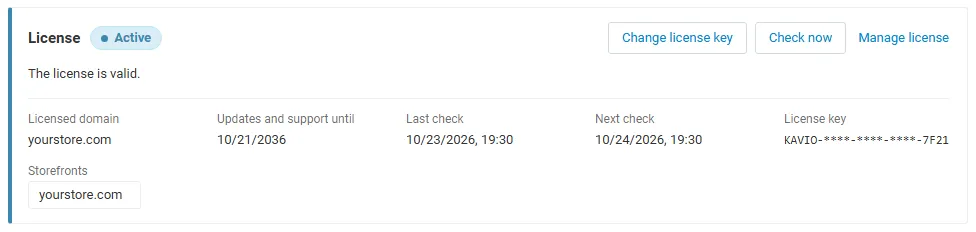
The License card shows:
- the status in color: green when valid, blue for a development host or the 14-day period before a key is required (with the days left), amber when the license server could not be reached (with the days left) or a Marketplace number is still being verified, red when the add-on is switched off;
- in plain words what the status means and, when the add-on is (or will be) switched off, what stops: e-mails are no longer logged, muted or queued and go out directly as without the add-on; the existing log stays readable, exportable and purgeable, and e-mails already queued are still delivered;
- the licensed domain, every storefront with its result (covered, development host, not covered), the end of the updates and support period, the last and the next check, and the key in use (masked);
- the actions Enter license key / Change license key (opens the License tab), Check now (verifies at once and stays on the page), Manage license (your licenses on cs-cart.kaviolabs.com) and, without a valid license, Buy a license.
The check runs only in the admin panel and from cron (php admin.php --dispatch=kv_email_log_license.check), never on the storefront.