

Configuration
AI service
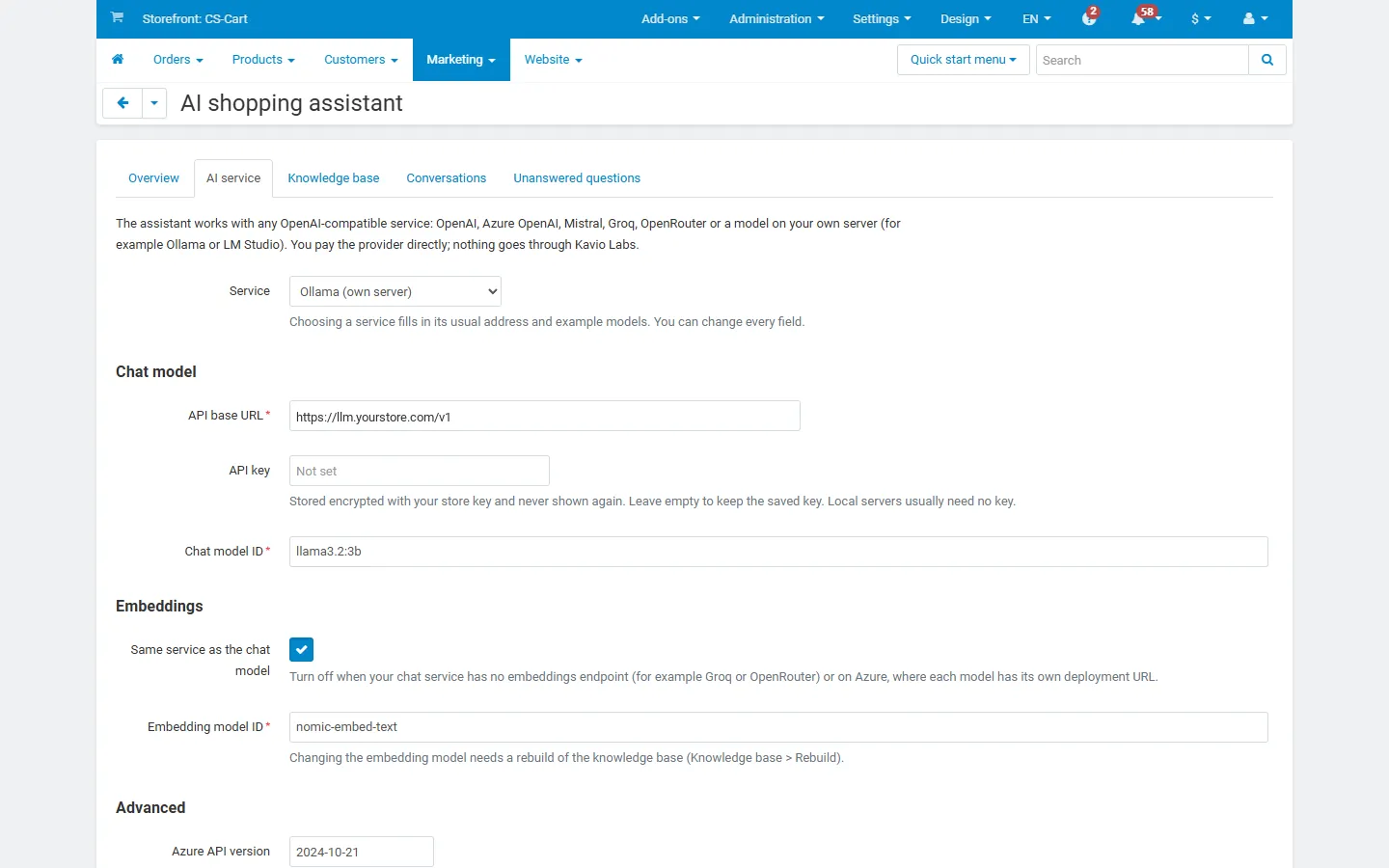
Section titled “AI service”Marketing → AI shopping assistant → AI service. Choosing a service fills in its usual address and example model names; every field can be changed.
| Field | What to enter |
|---|---|
| API base URL | The OpenAI-compatible endpoint, without /chat/completions. OpenAI https://api.openai.com/v1, Mistral https://api.mistral.ai/v1, Groq https://api.groq.com/openai/v1, OpenRouter https://openrouter.ai/api/v1, Ollama http://localhost:11434/v1. Azure OpenAI: the deployment URL https://<resource>.openai.azure.com/openai/deployments/<deployment>. |
| API key | Stored encrypted with your store key and never shown again (only a masked hint). Leave empty to keep the saved key. A model on your own server usually needs no key. |
| Chat model ID | The model that writes the answers, for example a small, fast model of your provider. On Azure: the deployment name. |
| Embeddings | Same service as the chat model on, or a separate URL and key. Turn it off for services without an embeddings endpoint (Groq, OpenRouter) and on Azure, where each model has its own deployment URL. |
| Embedding model ID | For example text-embedding-3-small (OpenAI), mistral-embed (Mistral) or nomic-embed-text (Ollama). Changing it needs a rebuild of the knowledge base. |
| Azure API version | Only used for Azure OpenAI addresses. |
| Temperature, max answer tokens, timeout | Defaults: 0.2, 450, 40 s. A low temperature keeps answers close to your data. |
| Prices for the cost counter | Your provider’s prices in USD per million input, output and embedding tokens. Used only for the cost estimate on the Overview page; 0 for a model on your own server. |
Test connection sends one short chat request and one embedding request and shows the model, the vector size and the response time.
What it costs you
Section titled “What it costs you”You pay your AI provider per token. A typical answer sends the rules, up to 6 short sources and the last few messages (roughly 1,000–2,500 input tokens) and gets back 50–250 output tokens; the question itself is embedded (10–30 tokens). The first sync embeds every product, page, document and FAQ entry once (about 200 tokens per product on average in our test catalogue: 257 products, 14 pages and 4 other sources took 54,000 tokens); later syncs only embed what changed. The Overview page shows requests, tokens and the estimated cost for today and the last 30 days. Set a daily budget in the settings to cap it.
With a model on your own server (for example Ollama) there is no per-token cost, but the server needs enough memory and preferably a GPU.
Knowledge base
Section titled “Knowledge base”Marketing → AI shopping assistant → Knowledge base.
- Sync now works through the queue from the open page and shows the progress.
- Check for changes queues changed products (by their update time), all pages, documents and FAQ entries, and every document whose source was deleted or switched off. Unchanged texts are skipped without calling the AI service.
- Rebuild deletes the knowledge base and queues everything again. Use it after changing the embedding model.
- Sources lists every indexed item with its chunk count and status; Sync again re-queues one item.
- FAQ: answers the assistant should use, for example delivery times, returns, payment, store hours.
- Documents: PDF, TXT and Markdown files up to 10 MB (size guides, policies, manuals). Only the extracted text is kept. Scanned PDFs (pictures of text) and password-protected PDFs cannot be read.
Saving a product, page or blog post queues it automatically. Product prices and stock are never part of the knowledge base, so price and stock changes need no sync.
Automatic sync (cron)
Section titled “Automatic sync (cron)”Run every 15 minutes from the store folder:
php admin.php --dispatch=kv_ai_shopping_assistant.cronor call the private address shown on the Knowledge base page (index.php?dispatch=kv_ai_shopping_assistant.cron&key=...). Each run checks for changes once a day, works through the queue for up to about a minute and deletes conversations older than the history setting.
Settings
Section titled “Settings”Add-ons → Manage add-ons → AI Shopping Assistant → Settings. In CS-Cart Ultimate the Assistant section can differ per storefront.
Assistant
Section titled “Assistant”| Setting | Default | Notes |
|---|---|---|
| Show the assistant on the storefront | On | |
| Assistant name, Welcome message | Shown in the chat window. | |
| Suggested questions | 3 examples | One per line, up to 4 buttons. |
| Instructions for the assistant | Be friendly and brief… | Tone and preferences. Added to the built-in rules; it cannot switch them off. |
| Answer when nothing is found | Shown with a Contact us link when the assistant has no answer. | |
| Contact page link | empty | A full URL or a dispatch such as pages.view?page_id=20. |
| Note under the chat | For example that answers are generated by AI. | |
| Position, Accent colour | Bottom right, #1f6feb | The text colour on the accent is chosen for contrast automatically. |
| Hide on the checkout page | On | |
| Order status lookup | On | The Track my order button and order questions. |
| Product cards per answer | 3 | 0, 2, 3, 4 or 6. |
| Remove sentences with prices that are not in the store data | On | See FAQ. |
Knowledge base
Section titled “Knowledge base”Which sources to use (products, pages, blog posts, approved review texts, documents, FAQ entries), Sources per answer (6), Minimum similarity (0.45) and Sources per sync step (40). A higher minimum similarity gives fewer but safer answers. 0.45 fits nomic-embed-text; models such as OpenAI text-embedding-3-small give lower scores, start with 0.3 and check the scores in Try the assistant.
Limits and privacy
Section titled “Limits and privacy”| Setting | Default |
|---|---|
| Max characters per message | 500 |
| Messages per visitor per hour | 30 |
| Questions per conversation | 40 |
| Daily token budget / daily cost budget (USD) | 0 = no limit |
| Keep conversations for (days) | 90 |
Visitors are identified by a salted hash of the IP address for rate limits; the IP address itself is not stored.
Permissions
Section titled “Permissions”Two privileges, View and Manage the AI shopping assistant (Marketing group), control the admin pages for administrators who are not root.
License
Section titled “License”The add-on checks its license key for your store’s domain once a day from the admin panel (never from the storefront). Development hosts such as localhost always work.
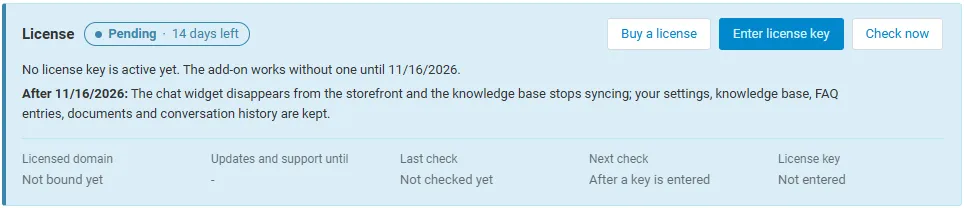
| Key | Enter it in Settings → License, or use the CS-Cart Marketplace license number in Add-ons → Manage add-ons. |
| Check now | The Check now button on the License tab repeats the check at once. |
| Server not reachable | The add-on keeps working during a grace period. |
Without a valid license: the chat widget disappears from the storefront and the knowledge base stops syncing; your settings, knowledge base, FAQ entries, documents and conversation history are kept. The admin pages stay available.