

Configuration
Settings are in Add-ons → Manage add-ons → EU e-Invoicing → Settings. On CS-Cart Ultimate every storefront has its own values. The seller data and the tax and payment mapping have their own pages under Orders → e-Invoices.
General
Section titled “General”| Setting | Default | Description |
|---|---|---|
| Create e-invoices | On | Off: no new e-invoices or e-credit notes are created. Documents created so far stay available. |
| Create the e-invoice when the order reaches | Processed, Complete | The e-invoice is created once per order, the first time the order reaches one of these statuses. You can also create it on the order page at any time. |
| Invoice numbers | Automatic | Automatic: when Invoices & Credit Notes is active, its invoice and credit note numbers and dates are used (the PDF invoice and the e-invoice match); otherwise the add-on numbers its own documents. Own numbers in this add-on: own series even when Invoices & Credit Notes is active. |
| Own invoice number format | INV-{YYYY}-{N} |
Tokens: {YYYY} {YY} {MM} {DD} {N} (sequence) {VENDOR} (seller id). |
| Own credit note number format | CN-{YYYY}-{N} |
|
| Digits of {N} | 5 | Padded with zeros. |
| First number of a new series | 1 | Applies when a series starts (first document, or the first of a new year). |
| Start a new series every year | On | |
| Create a full e-credit note when the order reaches | Canceled | Own numbering only, for orders that have an e-invoice. With Invoices & Credit Notes, its credit notes (full or partial, returns, wallet refunds) become e-credit notes automatically. |
| Next numbers | Shows the next own numbers, or that Invoices & Credit Notes numbers the documents. | |
| Seller on e-invoices (Multi-Vendor) | Automatic | See Multi-Vendor. |
Numbers are given out inside a database transaction: two orders paid at the same moment never get the same number, and a failed document never leaves a gap.
Formats and delivery
Section titled “Formats and delivery”| Setting | Default | Description |
|---|---|---|
| Main format | Factur-X / ZUGFeRD | Used for the status in lists, the ZIP default and the order page shortcut. |
| Customers can download | Factur-X | Download links on the customer’s order page. Factur-X is a normal PDF for people and an e-invoice for software. |
| Attach to the order status e-mail | Business orders only | The e-invoice is attached to the customer e-mail of the status change that created it. Business orders: the order has a VAT ID, a Peppol ID, a company name or a buyer reference of its own. |
| Attached format | Factur-X / ZUGFeRD | |
| Send e-invoices with | No driver | Peppol access point drivers (see Developer notes). |
| Send automatically | Off | Sends a new e-invoice right after it is created when the buyer gave a Peppol ID and the Peppol check has no errors. |
Tax and payment
Section titled “Tax and payment”| Setting | Default | Description |
|---|---|---|
| VAT category of untaxed sales | Zero rated (Z) | For lines without a CS-Cart tax that are not reverse charge or export: Zero rated (Z), Exempt (E) or Not subject to VAT (O). |
| Exemption text (category E) | empty | Printed on exempt invoices, for example the legal basis of a small-business exemption. Empty: “Exempt from VAT”. |
| Untaxed sales to EU businesses with a VAT ID | Intra-community supply (K) | K for goods, AE (reverse charge) for services. Applied when the buyer has a VAT ID, the goods go to another EU country and no tax was charged. With EU VAT Number Validation, its reverse-charge decision for the order is used. |
| Untaxed sales outside the EU are exports (G) | On | |
| Default unit | One (C62) | UN/ECE unit of products without their own unit. |
| Payment term (days) | 14 | Due date of unpaid invoices. |
| Orders in these statuses are paid | Processed, Complete | Their e-invoices show the full amount as paid (amount due 0). |
| Buyer reference when the buyer gave none | Use the order number | XRechnung and Peppol need a buyer reference; public buyers in Germany give their Leitweg-ID at checkout. |
Seller data
Section titled “Seller data”Orders → e-Invoices → Seller data. Every field you leave empty is taken from Settings → Company (Ultimate: the storefront’s company; Multi-Vendor vendors: their vendor profile). The placeholders show the values that are used now.
| Field | Used as |
|---|---|
| Legal name, trading name | Seller name (BT-27) and trading name (BT-28) |
| VAT ID | Seller VAT identifier with country prefix (BT-31). Empty: the store VAT number of EU VAT Number Validation, or the vendor’s tax number. |
| Tax number | National tax registration (BT-32), for sellers without a VAT ID or when both are needed |
| Company registration ID + scheme | BT-30, for example a commercial register number |
| Additional legal information | BT-33, for example managing director and register court |
| Electronic address | Your Peppol participant ID (scheme + identifier, BT-34). Empty: Peppol files use the scheme of your VAT ID, XRechnung and Factur-X use the contact e-mail. |
| Address, contact name, phone, e-mail | Seller address and contact (XRechnung needs phone and e-mail) |
| IBAN, BIC, account holder | Payment account for credit transfer invoices |
| Payment terms text | Printed on unpaid invoices instead of “Payable within N days” |
Tax and payment mapping
Section titled “Tax and payment mapping”Orders → e-Invoices → Tax and payment mapping.
- Taxes: each CS-Cart tax becomes a VAT category. Automatic: Standard rate (S) for rates above 0 %, Zero rated (Z) for 0 %. Choose Exempt (E), Reverse charge (AE) or another category for special taxes and add an exemption text where the category needs one.
- Payment methods: the payment means code written on the e-invoice. Automatic: cash on delivery = Cash (10), payment methods with an online processor = Online payment service (68), cheque = Cheque (20), everything else = SEPA credit transfer (58). Credit transfer prints your IBAN. XRechnung does not accept card (48) without card details or direct debit without a mandate, so use “Online payment service” for card payments.
Units per product are set in the product editor (Quantity section, “Unit on e-invoices”).
Multi-Vendor
Section titled “Multi-Vendor”Seller on e-invoices:
- Automatic (default): vendors are the sellers when the core Direct payments add-on is active or when Invoices & Credit Notes numbers invoices per vendor; otherwise the marketplace is the seller.
- Vendors: every vendor order is invoiced in the vendor’s name, with the vendor’s seller data and number series.
- Marketplace: every order is invoiced in the marketplace’s name.
When vendors are the sellers, vendors find Orders → e-Invoices and Seller data in their panel, create e-invoices for their own orders and rebuild them. Otherwise they can only see and download the e-invoices of their orders. The tax and payment mapping always stays with the marketplace administrator. Orders split into vendor orders get their e-invoices on the vendor orders.
License
Section titled “License”The add-on checks its license key for your store’s domain once a day from the admin panel (never from the storefront). Development hosts such as localhost always work.
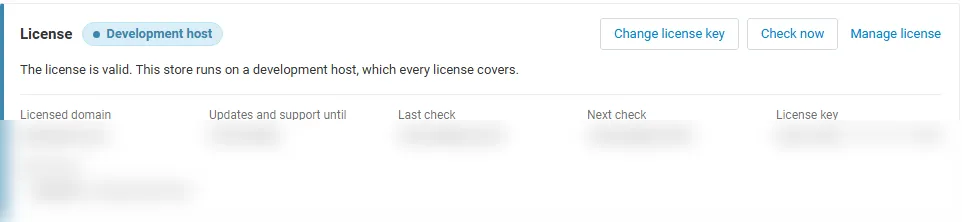
| Key | Enter it in Settings → License, or use the CS-Cart Marketplace license number in Add-ons → Manage add-ons. |
| Check now | The Check now button on the License tab repeats the check at once. |
| Server not reachable | The add-on keeps working during a grace period. |
Without a valid license: no new e-invoices or e-credit notes are created, nothing is attached to e-mails and nothing is sent over Peppol; e-invoices created so far stay downloadable for you, your vendors and your customers. The admin pages stay available.