

Installation
Overview · Configuration · Usage · Developer notes · FAQ
Requirements
Section titled “Requirements”- CS-Cart or Multi-Vendor 4.17.2 – 4.21.x.
- PHP 7.4 – 8.3 (as your CS-Cart version allows).
- Write access to
var/(the add-on keeps its compiled rules and GeoIP databases invar/kv_bot_country_blocker/). - Optional: APCu (faster rate limits and GeoIP caching), a cron job for maintenance.
Install
Section titled “Install”- In the admin panel open Add-ons > Manage add-ons, click the upload icon and upload
kv_bot_country_blocker-1.0.1.zip. - Find Bot & Country Blocker in the list and click Install.
- Open the add-on settings, License tab, and enter your license key (or the CS-Cart Marketplace license number in Add-ons > Manage).
- Open Website > Bot & Country Blocker.
After the installation the add-on runs in learning mode with a set of default rules: nothing is blocked yet, every decision is only logged.
License
Section titled “License”The license is checked once a day from the admin panel; the storefront never waits for it. The license card at the top of the add-on page shows the state, the licensed domain and the update period.
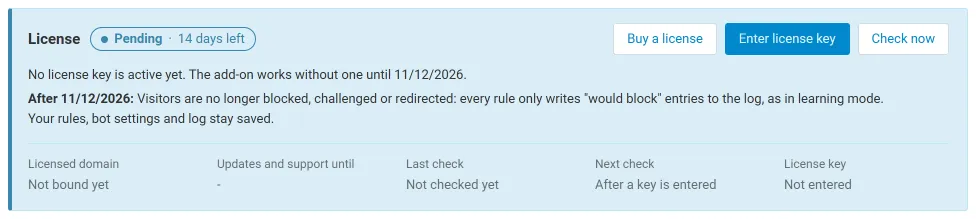
Without a valid license (after the 14-day trial and grace periods) the rules are no longer enforced: every rule only writes “would block” entries to the log, as in learning mode. Your rules, bot settings and log stay saved.
Recommended cron job
Section titled “Recommended cron job”Maintenance (log retention, expired bans, list URLs, the optional monthly GeoIP update) runs by itself once an hour when an administrator opens the admin panel. For stores with heavy bot traffic add a daily cron job:
php /path/to/your/store/admin.php --dispatch=kv_bot_country_blocker.cronThe exact command for your store is shown in the add-on settings, Log tab.
Update
Section titled “Update”Upload the new zip over the installed add-on (Add-ons > Manage add-ons, upload) or install the Upgrade Center package. Your rules, settings and log are kept; missing tables and settings are added automatically on the next admin page view.
Uninstall
Section titled “Uninstall”Add-ons > Manage add-ons > Bot & Country Blocker > Uninstall. The add-on removes its tables, settings, language variables, compiled rules, downloaded GeoIP databases and its group in robots.txt.