

Configuration
Overview · Installation · Usage · Developer notes · FAQ
Add-on settings
Section titled “Add-on settings”Add-ons → Manage add-ons → Multichannel Product Feeds → Settings.
General
Section titled “General”| Setting | Default | Description |
|---|---|---|
| Products per batch | 200 | Products loaded per database batch (1–2000). Memory stays flat for any catalog size; lower it on servers with very little memory. |
| Time per step for web cron and “Generate now” (seconds) | 20 | Large feeds are built in steps. A step stops after this time; the next cron call or the progress bar continues where it stopped. The console cron always runs to the end. |
| Skip items with errors | On | Items a channel would reject (missing required values, zero price, duplicate ID) are left out of the file and listed in the validation report. Off: they are written anyway. |
| Use the Google category mapping of Product Feed Pro for Google Merchant Center | On | When that add-on is installed, its category mapping is used for categories that are not mapped here. |
| Vendors can manage their own feeds | Off | Multi-Vendor only. Vendors get Marketing → Multichannel feeds in the vendor panel and can create feeds of their own products. |
| Scheduled generation | The console command and the cron URL with its secret key. |
Custom labels
Section titled “Custom labels”The computed labels you can map to custom_label_0 … custom_label_4 (or any other column):
| Setting | Default | Label |
|---|---|---|
| Price bands | 0-25,25-50,50-100,100-250,250+ |
Price band: the band of the feed price, e.g. 50-100. |
| Bestseller period (days) / minimum units sold | 90 / 5 | Bestseller: bestseller when the product sold at least this many units in the period. |
| New arrival period (days) | 30 | New arrival: new for products created in the period. |
| Low stock threshold | 5 | Stock level: in_stock, low_stock or out_of_stock. |
The labels On sale, Top-level category and Vendor need no setting.
Feed settings
Section titled “Feed settings”Marketing → Multichannel feeds → Add feed shows the channel templates; the channel cannot be changed after the feed is created.
General
Section titled “General”| Field | Description |
|---|---|
| Name | Shown in the admin panel only. |
| Storefront (Ultimate) / Vendor (Multi-Vendor) | Ultimate: the storefront whose catalog, prices and URLs the feed uses. Multi-Vendor: All vendors or one vendor’s products only. |
| File format | The formats the channel accepts: CSV, TSV, XML or JSON. |
| Compress with gzip | Serves a .gz file. |
| Target country | Used in shipping entries and as the market of the feed. |
| Language, Currency | Texts in this language, prices converted to this currency with the store rates. idealo expects EUR. |
| Generate automatically | Every 1, 3, 6, 12 or 24 hours, or manual only. Needs the cron job. |
| Status | A disabled feed is not generated and its URL answers “not found”. |
Products
Section titled “Products”| Field | Description |
|---|---|
| Only these categories / Exclude categories | Subcategories are included. Empty = the whole catalog of the storefront. |
| Include out-of-stock products | Sent with availability “out of stock”. Off by default for idealo. |
| Variations as separate items | Each variation is an item; item_group_id groups them. Off: only the main products. |
| Only products with an image | Every channel requires an image. |
| Price range | In the feed currency. |
| Exclude product IDs, Only these vendors | Comma-separated IDs; vendor list on Multi-Vendor. |
| Item ID | Product code (SKU) or product ID, plus an optional prefix. It must match the content IDs your pixels send; when Marketing Pixels Pack or Server-Side Tracking for Meta is installed, the page shows whether their content IDs match. |
| Add variation values to titles | For example “T-shirt - Red, M”. |
Fields
Section titled “Fields”One row per column of the channel template, marked Required, Recommended or Optional, with the maximum length and the allowed values.
- Source: Automatic (see the hint under the select), Fixed value, a product field, a computed label, a product feature or a product option. Columns like
link,priceoravailabilityare computed and need no source. - Default: used when the source is empty for a product.
- Include: optional columns can be left out of the file.
- Custom feed: every column can be renamed.
- Default Google category: used when neither the product’s categories nor their parents are mapped. The mapping itself is on the Category mapping page.
Each rule has a condition (category, vendor, price, stock, units sold, age, on sale, product code, a feature or any item field) and an action: Exclude the product, or Set field to a value. Rules run in order; values may use {title}, {brand}, {product_code} and {id}.
Links and UTM
Section titled “Links and UTM”Add UTM tags to product links appends utm_source, utm_medium, utm_campaign and utm_content (defaults per channel, for example facebook / paid_social / meta_catalog). Extra link parameters are appended as they are. Placeholders: {id}, {product_id}, {sku}.
Price and shipping
Section titled “Price and shipping”| Field | Description |
|---|---|
| Price adjustment | A percentage added to every price (for example VAT), negative values lower prices. |
| Send sale prices | Catalog promotions give sale_price and sale_price_effective_date. |
| Shipping cost | Not sent, flat rate, or flat rate with free shipping above an amount; service name; shipping weight. Microsoft requires shipping for Germany, idealo always. |
| idealo: delivery method key, payment methods | The delivery cost goes into deliveryCosts_<key>; each payment method line paypal=0.00 becomes a paymentCosts_paypal column. |
Delivery
Section titled “Delivery”The feed URL with its secret token, the file size, and the cron command for this feed. Regenerate feed URL token (toolbar) makes the old URL stop working.
License
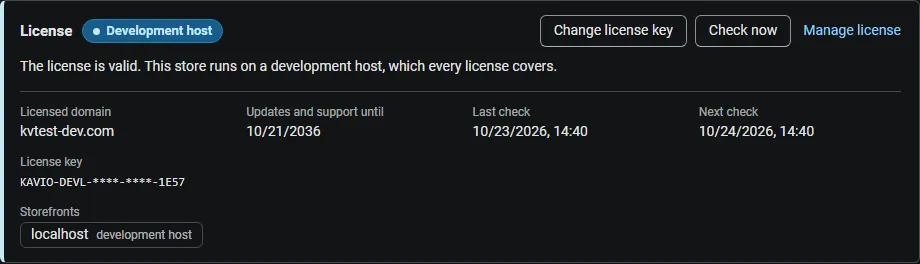
Section titled “License”The license status is shown in a License card at the top of the add-on page, above the tabs. The License tab holds the key itself.
| Setting | Description |
|---|---|
| License key | Your Kavio Labs license key (KAVIO-XXXX-XXXX-XXXX-XXXX) or your CS-Cart Marketplace license number. If you entered the Marketplace license number in Add-ons → Manage add-ons, leave this empty. |
| License status | Points to the License card and explains what the check sends. |
What the license covers. A license is bound to the base domain you entered at purchase (for example yourstore.com) and covers its subdomains. Local development hosts (localhost, private IP addresses, *.local, *.test) are always allowed.
When the add-on checks. When you save the key, and then once a day, only in the admin panel or from cron, never while visitors browse the storefront:
php /path/to/store/admin.php --dispatch=kv_multichannel_feeds_license.checkWhat is sent. The license key, the add-on ID and version, the host names of your storefronts, your CS-Cart version and edition, and a random one-time value. No products, prices or feed files are sent.
Without a valid license, feed generation is switched off: scheduled and manual runs stop, and the feed URLs keep serving the last generated files unchanged. The feed editor, the preview, the validation report and the category mapping keep working.