

Configuration
Open Add-ons → Manage add-ons → Referral & Affiliate Program → Settings. The settings are global (one program for the whole installation) and are on four tabs: General, Refer a friend, Affiliates and License.
General
Section titled “General”| Setting | Default | Description |
|---|---|---|
| Enable the referral program | On | Off: no tracking, no new rewards or commissions, and the scheduler stops. Existing data stays. |
| Link parameter | ref |
Name of the URL parameter of referral links, for example https://yourstore.com/?ref=ANNA4821. Any page of the store works as a link target. |
| Attribution window, days | 30 | How long a click counts. Orders and sign-ups within this many days are attributed to the link owner. |
| When a visitor clicks several links | Last click wins | Last click: the newest link wins. First click: the first link keeps the visitor for the whole window. |
| Referral cookie | With consent | With consent: when the Cookie Consent Mode add-on is active, the cookie is set only after the visitor allowed the consent category below; without that add-on it is set at once. Always: set at once. |
| Consent category | Marketing | Category of the Cookie Consent Mode add-on that allows the referral cookie. |
| Without consent | Browsing session only | The code is kept in the browser tab session (no cookie) and sent with the sign-up or checkout form. Do not track: nothing is kept. |
| Add UTM tags to shared links | Automatic | Automatic: only while the Order Source & UTM Attribution add-on is active, so its reports show these orders in the referral and affiliate channels. |
| Welcome bar for invited visitors | On | A small bar at the bottom of the page: “Anna K. invited you: create an account and get 10% off your first order.” Shown once per browsing session, only for refer-a-friend links with a welcome coupon. |
| Paid order statuses | Processed, Complete | When an attributed order reaches one of these statuses, the hold period of its reward or commission starts. |
| Refund and cancel statuses | Canceled, Declined, Failed | An order in one of these statuses cancels a pending reward or commission. A commission that was already paid out gets a negative adjustment on the next payout. |
| Approve every reward and commission by hand | Off | Off: entries without fraud flags are granted when the hold period ends. On: every entry waits in Needs review. |
| Flagged entries | Hold for review | What happens with entries that have fraud flags: Hold for review (they wait in Needs review after the hold) or Reject (rejected at once). |
| Run the scheduler on admin activity | On | Runs the schedule at most once an hour after an admin page was sent, when no cron job runs. |
| Cron URL key | random | Secret key of the storefront cron URL. Empty = the URL is off. |
The Cron job box shows the command and the URL:
php /path/to/store/admin.php --dispatch=kv_referral_program.cronRun it every hour. It releases entries whose hold ended and expires welcome coupons.
Refer a friend
Section titled “Refer a friend”| Setting | Default | Description |
|---|---|---|
| Enable refer a friend | On | Customers get a personal link and code on the Refer a friend page of their account. |
| Welcome coupon promotion | none | The promotion whose single-use codes friends get when they create an account (see Coupons). |
| Welcome coupon valid for, days | 30 | The code is withdrawn after this many days. 0 = until the promotion ends. |
| Reward type | Store credit | Store credit (Store Credit Wallet add-on), Reward points (core add-on) or Coupon (a promotion with auto-generated coupons). If the chosen type is not available when a reward is due, the reward waits in Needs review. |
| Reward amount | Fixed | Fixed or Percent of the first order (products after discounts). |
| Amount | 10 | Fixed: store credit in your primary currency, or a number of reward points. Percent: % of the friend’s first order (for points: points worth that amount, rounded). |
| Reward coupon promotion | none | Used when the reward type is Coupon. |
| Minimum first order, products after discounts | 0 | First orders below this amount earn no reward (checked when the hold ends). |
| Hold period, days | 14 | The reward is granted this many days after the friend’s order was paid. 0 = at once. |
| Reward guest checkouts of friends | On | Off: only friends with an account count. Guests are recognised by their link or cookie and their e-mail. |
| Rewards per referrer and month / in total | 10 / 0 | Caps. Friends above a cap are recorded as rejected with the flag Monthly limit or Total limit. 0 = no limit. |
| Invite friends by e-mail | On | An invite form on the Refer a friend page: up to 5 addresses at once, never to existing customers, at most once per address in 30 days, from any customer. |
| Invitations per customer and day | 10 | Daily limit per customer. |
Affiliates
Section titled “Affiliates”| Setting | Default | Description |
|---|---|---|
| Enable the affiliate program | On | Customers apply on the Affiliate program page of their account. |
| Approve applications automatically | Off | Off: applications wait in Marketing → Affiliates (status Applied). |
| Default commission | Percent | Percent of the products after discounts, or a Fixed amount per order. |
| Commission value | 10 | Percent or amount. Category rates and an affiliate’s own rate override it. |
| Commission on new customers only | Off | On: only the first order of a customer earns a commission. |
| Commission hold period, days | 30 | A commission becomes payable this many days after the order was paid. |
| Minimum payout | 50 | Affiliates can request a payout when their approved balance reaches this amount. |
| Payout methods | PayPal, Bank transfer, Store credit | Methods affiliates can choose in the application. Store credit needs the Store Credit Wallet add-on. |
| Affiliate terms | empty | Shown on the application form; applicants must accept them. Empty = no terms checkbox. |
| E-mail the store about applications and payout requests | On | Sent to the orders department e-mail of the store. |
Commission base. Product lines (unit price × quantity) less the order discount, pro rata. Shipping, taxes added on top, payment surcharges and other fees are not part of it. When your prices include tax, the base includes it too.
Rate precedence. The affiliate’s own rate (affiliate page) → the category rate of the product’s main category (or its nearest parent with a rate, Marketing → Referrals & commissions → Category rates) → the default. A fixed commission is paid once per checkout.
Coupons
Section titled “Coupons”Welcome coupons and coupon rewards use the CS-Cart condition Coupon code (auto-generated). Each reward adds a new single-use code to the promotion; the code is withdrawn when an order uses it or when it expires. The discount is the promotion’s bonus, so you edit it in Marketing → Promotions (percent or amount, free shipping, a minimum subtotal, dates and so on).
To create one: Marketing → Promotions → Add cart promotion, add the condition Coupon code (auto-generated) with an empty value and a bonus (for example Order discount: 10%), then choose the promotion on the Refer a friend tab. On Ultimate, a promotion belongs to one storefront: with several storefronts, use store credit or reward points for the referrer reward.
License
Section titled “License”The license status is shown in a License card at the top of the add-on page, above the tabs, so you see it on every tab. The License tab holds the key itself. The key is stored once for the whole installation.
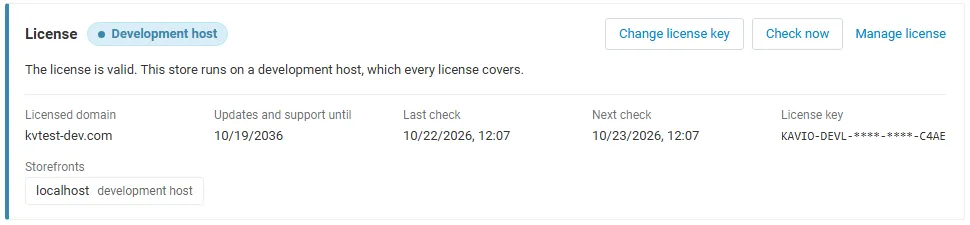
The License card shows:
- the status in color: green when valid, blue for a development host or the 14-day period before a key is required (with the days left), amber when the license server could not be reached (with the days left) or a Marketplace number is still being verified, red when the add-on is switched off;
- in plain words what the status means and, when the add-on is (or will be) switched off, what stops: no new referral links, clicks, sign-ups, rewards or commissions are recorded and the sharing tools are hidden; existing rewards and commissions keep their hold and review flow and can be approved and paid out;
- the licensed domain, every storefront with its result (covered, development host, not covered), the end of the updates and support period, the last and the next check, and the key in use (masked);
- the actions Enter license key / Change license key (opens the License tab), Check now (verifies at once and stays on the page), Manage license (your licenses on cs-cart.kaviolabs.com) and, without a valid license, Buy a license.
In Add-ons → Manage add-ons the add-on’s row shows a small license badge next to its name, for example License: Valid or License: Pending · 9 days left.
The add-on’s own admin pages (rewards and commissions, affiliates, affiliate page, payouts, referrers, category rates) show the license status in a bar at the top: a small green chip when the license is valid, or a banner with the status, what is switched off and the same actions as the card.
| Setting | Description |
|---|---|
| License key | Your Kavio Labs license key (KAVIO-XXXX-XXXX-XXXX-XXXX, from My licenses on cs-cart.kaviolabs.com) or your CS-Cart Marketplace license number. If you entered the Marketplace license number in Add-ons → Manage add-ons (the add-on’s license field), leave this empty: the add-on uses that number. |
| License status | Points to the License card and explains what the check sends. |
What the license covers. A license is bound to the base domain you entered at purchase (for example yourstore.com) and covers every subdomain of it (www.yourstore.com, shop.yourstore.com, staging.yourstore.com). Local development hosts are always allowed: localhost, 127.0.0.1 and other private IP addresses, and host names ending in .localhost, .test, .local, .example or .invalid. A store on a different base domain needs its own license. If you move your store to a new domain, contact support.
When the add-on checks. When you save the key, and then once a day. The check runs only in the admin panel (on a page you open) or from cron, never while customers browse the storefront or place orders, and takes a few seconds at most. A cron job keeps the license verified even when nobody opens the admin panel:
php /path/to/store/admin.php --dispatch=kv_referral_program_license.checkWhat is sent. The check sends this to https://cs-cart.kaviolabs.com and nothing else: the license key, the add-on ID and version, the host names of your storefronts, your CS-Cart version and edition, and a random one-time value. No customer or order data is sent. The server answers with a digitally signed result, so a forged answer is ignored.
Statuses.
| Status (card) | Color | What happens |
|---|---|---|
| Valid | Green | The license is valid for this domain. Everything works. |
| Development host | Blue | The store runs on a local development host, which every license covers. Everything works. |
| Pending verification | Amber | A CS-Cart Marketplace license number was accepted, but the Marketplace has not confirmed it yet. Everything works. |
| Pending · N days left | Blue | No verified key yet (a new installation). Everything works for 14 days. |
| Grace period · N days left | Amber | The last checks failed (for example a network problem). The add-on keeps working for 14 days after the first failed check. |
| Not activated, Invalid key, Revoked, Domain mismatch, Not verified | Red | No new referrals or commissions: the storefront script is not printed (links are not tracked), new orders and sign-ups are not attributed, no welcome coupons are issued, and invitations and affiliate applications are closed; the Refer a friend page is hidden. Existing pending rewards and commissions still end their hold, refunds still cancel them, admins can approve and reject, affiliates can still see their dashboard and request payouts of their approved balance, and admins can mark payouts paid. Domain mismatch shows the licensed domain next to the domain your store runs on. |
When your updates and support period ends, the add-on keeps working. Only updates and support stop.
License information appears in the admin panel only, and only for administrators who may manage add-ons; vendors and customers never see it. When the add-on is switched off, other admin pages also show a notice once per session with a link to the add-on page; the add-on page and the add-on’s own pages show the card or the status bar instead.