

Configuration
Open Add-ons > Manage add-ons > Sales Reports Pro > Settings.
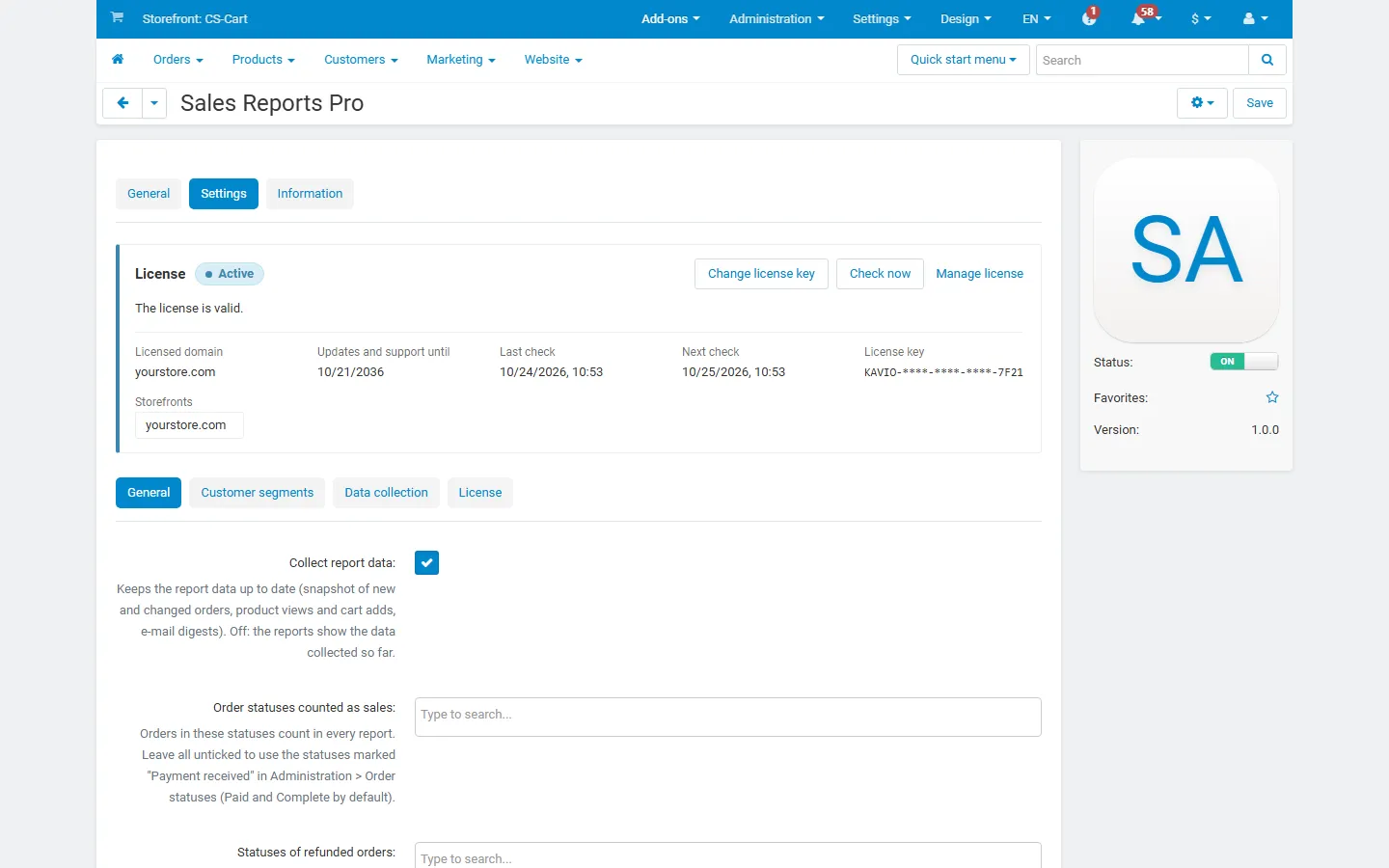
General
Section titled “General”| Setting | Default | What it does |
|---|---|---|
| Collect report data | On | Keeps the report data up to date: new and changed orders, product views and cart adds, e-mail digests. Off: the reports show the data collected so far. |
| Order statuses counted as sales | none ticked = automatic | Orders in these statuses count in every report. With nothing ticked, the add-on uses the statuses marked Payment received in Administration > Order statuses (Paid and Complete by default). Changing this takes effect immediately; no rebuild is needed. |
| Statuses of refunded orders | none | Statuses that mean “paid, then refunded in full”, for example a custom “Refunded” status. These orders count in gross sales, and their whole total counts as a refund. |
| Return statuses counted as refunds | Completed | Shown while the core RMA add-on is active. Accepted items of returns in these statuses count as returned and refunded. |
| Weeks start on | Monday | For weekly grouping and weekly digests. |
| Vendors see the reports of their company | Off | Multi-Vendor only. Vendors get Orders > Sales Reports Pro in the vendor panel with the reports of their own orders. Customer e-mail addresses are hidden from vendors; digests, user group actions and the rebuild stay with the administrator. |
Customer segments
Section titled “Customer segments”The RFM scores go from 1 (low) to 5 (high). Each field takes four numbers, separated by commas.
| Setting | Default | Meaning |
|---|---|---|
| Recency thresholds (days) | 30,90,180,365 | Last order within 30 days scores 5, within 90 days 4, within 180 days 3, within 365 days 2, older 1. |
| Frequency thresholds (orders) | 2,3,5,8 | 8 or more orders score 5, 5 or more 4, 3 or more 3, 2 or more 2, one order 1. |
| Monetary thresholds (net sales) | 100,250,500,1000 | Lifetime net sales in the primary currency; 1000 or more scores 5, and so on. |
Segments are taken from the recency and frequency scores (the classic RFM grid); the monetary score sorts the customers within a segment. Change the thresholds to match your store: a store selling furniture needs longer recency windows than one selling coffee.
Data collection
Section titled “Data collection”| Setting | Default | What it does |
|---|---|---|
| Count product page views | On | Counts views of product pages for the funnel, once per product and browser session. Staff and bots are skipped. The count is sent after the page has loaded, so it works with the full page cache. |
| Keep view counts (days) | 730 | Older daily view and cart-add counts are deleted once a day. 0 = keep forever. |
| Cron job | – | The command and URL for your cron job, with the time of the last run. |
License
Section titled “License”The license status is shown in a License card at the top of the add-on page, above the tabs, so you see it on every tab. The License tab holds the key itself. The key is stored once for the whole installation.
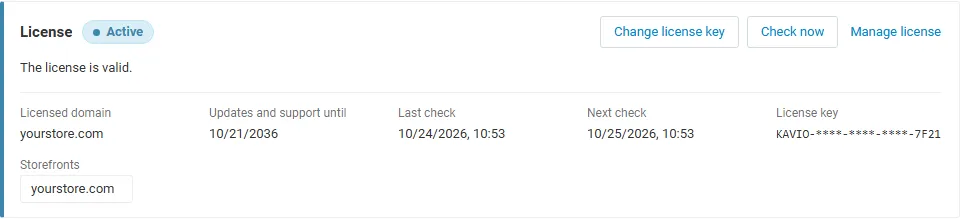
The License card shows:
- the status in color: green when valid, blue for a development host or the 14-day period before a key is required (with the days left), amber when the license server could not be reached (with the days left) or a Marketplace number is still being verified, red when the add-on is switched off;
- in plain words what the status means and, when the add-on is (or will be) switched off, what stops: no new data is collected: the report snapshot, the product view counter and the e-mail digests stop; reports and CSV exports of the data collected so far stay available;
- the licensed domain, every storefront with its result (covered, development host, not covered), the end of the updates and support period, the last and the next check, and the key in use (masked);
- the actions Enter license key / Change license key (opens the License tab), Check now (verifies at once and stays on the page), Manage license (your licenses on cs-cart.kaviolabs.com) and, without a valid license, Buy a license.
The check runs only in the admin panel and from cron (php admin.php --dispatch=kv_sales_reports_pro_license.check), never on the storefront.