

Configuration
Overview · Installation · Usage · Developer notes · FAQ
Open Add-ons > Manage add-ons > Bot & Country Blocker > Settings (or the “Settings” button on the add-on pages).
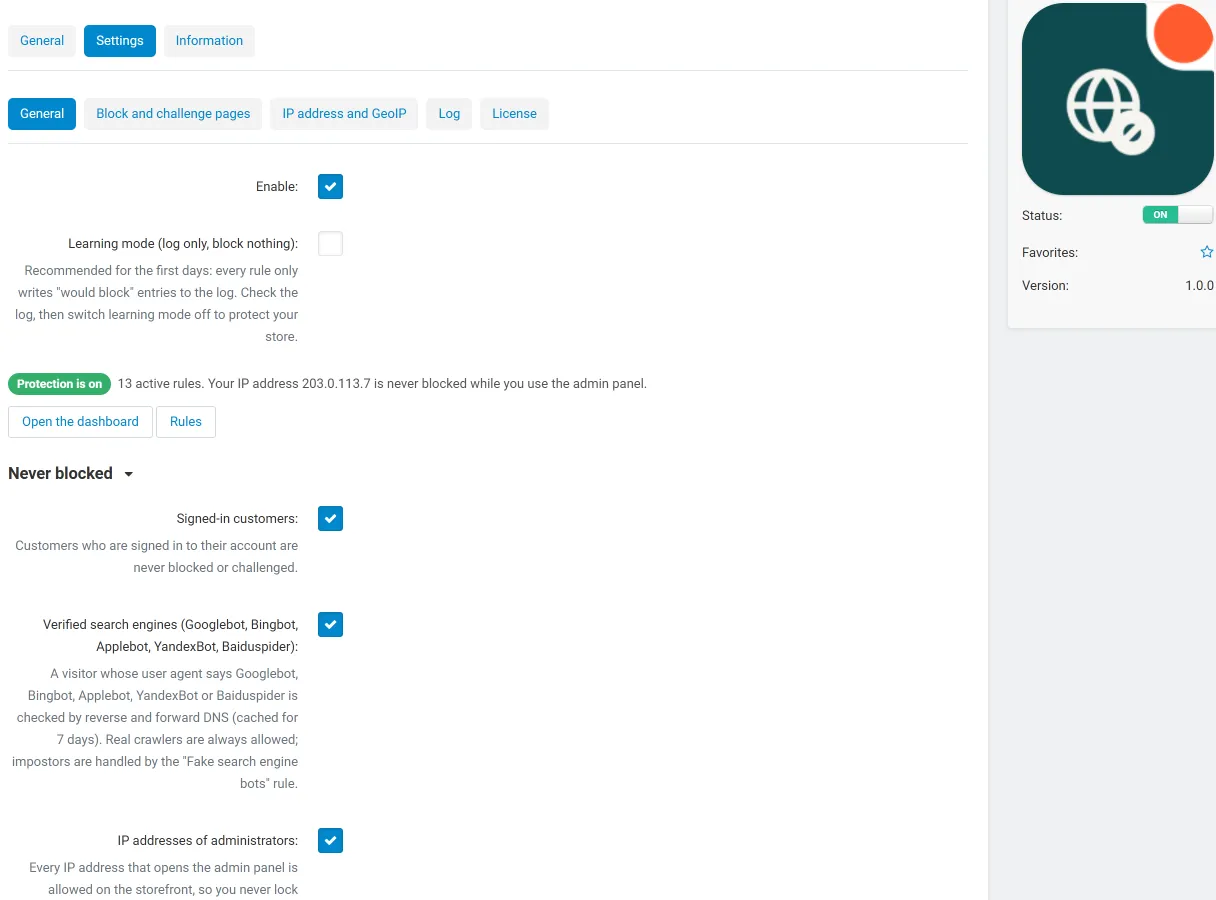
General
Section titled “General”| Setting | Default | What it does |
|---|---|---|
| Enable | On | Switches the storefront check on or off. |
| Learning mode | On | Rules only log what they would do (“would block”). Switch it off on the dashboard when the log looks right. |
| Signed-in customers | On | Customers who are signed in are never blocked or challenged. |
| Verified search engines | On | Googlebot, Bingbot, Applebot, YandexBot and Baiduspider are verified by reverse and forward DNS (cached 7 days) and always allowed. |
| IP addresses of administrators | On | Every IP address that opens the admin panel is allowed on the storefront for the number of days below (default 30). |
| Paths and dispatches that are never checked | empty | One per line: paths start with / (prefix match), anything else is a dispatch (products.view, my_addon.*). Payment notifications (payment_notification.*) and /robots.txt are always allowed. |
| Add the blocked AI crawlers to robots.txt | Off | Writes a Disallow: / group for the AI crawlers you block or challenge (between marker lines, with the core robots.txt backup) and removes it when switched off. |
On CS-Cart Ultimate the general and page settings can differ per storefront.
Block and challenge pages
Section titled “Block and challenge pages”| Setting | Default | What it does |
|---|---|---|
| Accent colour | #2563eb | Colour of the icon and button on the pages. |
| Show the reference and IP address | On | The block page shows a reference such as BCB-3F2 and the visitor’s IP address. Search the log by reference when a customer writes to you. |
| Titles and messages | English texts | Block page, challenge page, checkout restriction page. Placeholders: [store], [ip], [country], [ref]. |
| Challenge difficulty | Normal (16) | Leading zero bits of the proof of work. 16 takes a phone about a second; each step doubles the work. |
| A solved challenge is valid for | 24 hours | The pass cookie is bound to the visitor’s network (/24 or /48) and browser. |
The small texts of the pages (Reference, Your IP address, Back to the store, Checking your browser) are language variables (kv_bot_country_blocker.page_*) and follow the storefront’s default language.
IP address and GeoIP
Section titled “IP address and GeoIP”| Setting | Default | What it does |
|---|---|---|
| Visitor IP address | Automatic | The connection address, Cloudflare’s CF-Connecting-IP only when the request really comes from a Cloudflare edge address, and the header below only from your trusted proxies. Forged headers are ignored. |
| Trusted proxies | empty | IP addresses or ranges of your own reverse proxies or load balancers. |
| Client IP header of the trusted proxies | X-Forwarded-For | X-Real-IP, True-Client-IP and similar headers work too. |
| GeoIP databases | Shows the country and ASN databases in use. Manage them on the Tools tab. | |
| Monthly GeoIP update | Off | DB-IP Lite (no account) or MaxMind GeoLite2 (free account) once a month with the cron job. |
| MaxMind account ID / licence key | empty | Only for the MaxMind download. |
| Setting | Default | What it does |
|---|---|---|
| Keep log entries for | 30 days | Older entries are deleted. Daily counters for the dashboard are kept for 400 days. |
| Maximum log entries | 200,000 | The oldest entries beyond this number are deleted. |
| Cron | The command for your store. |
Default rules
Section titled “Default rules”| Order | Rule | Action |
|---|---|---|
| 10 | Vulnerability scanner paths (honeypot, 24 h ban) | Block |
| 20 | Fake search engine bots | Block |
| 30 | Empty user agent | Block |
| 40 | Built-in bot list (per bot, see the Bots tab) | Per bot |
| 50 | Compare attack (session-less actions) | Challenge |
| 60 | Browser impostors | Challenge |
| 70 | Search and filter flood (30 requests per minute) | Challenge |
| 80 | Site-wide flood (240 requests per minute, 10 min ban) | Block |
| 90 | Hosting and data-centre networks (disabled) | Challenge |
License
Section titled “License”Enter the license key in the License tab of the settings. See Installation.