

Serial Numbers & Warranty Tracker
Add-on ID: kv_serial_warranty · Edition: CS-Cart & Multi-Vendor · Latest version: 1.0.0 · Compatible with: CS-Cart & Multi-Vendor 4.17.2 – 4.21.x, PHP 7.4 – 8.3 · Changelog: view
Serial Numbers & Warranty Tracker gives every unit you sell its own serial number. You record incoming stock with the product code, the quantity and the month and year of manufacture, print a barcode label for each unit, and the serial numbers are linked to the customer’s order line when you dispatch. Months or years later you scan or type the serial number and see the exact sale date, the order, the customer and the warranty, and you handle warranty claims and replacements with the full history of every unit.
It is made for stores that sell monitors, cameras, electronics, appliances, tools or anything else with a warranty: products whose factory sticker often shows only the manufacture month (the same for every unit of a batch) and whose customers buy the same model again and again.
The five everyday workflows
Section titled “The five everyday workflows”| You need to | How the add-on does it |
|---|---|
| 1. Record incoming stock | Products → Serial numbers → Receive stock: product (its code is shown everywhere), quantity, manufacture month and year, lot and the supplier’s reference (delivery note, container, invoice). Every receipt is listed with its product code, units and manufacture month, and is in the CSV export. |
| 2. Give every unit a unique serial number and label it | Serial numbers are generated from a pattern such as [SKU]-[YY][MM]-[SEQ:5] (for example UV27-4K-2609-00001) or scanned / pasted from the manufacturer’s numbers. Duplicates are refused. Print barcode labels (Code 128, PDF) for label rolls or A4 sheets and stick them on the units. |
| 3. Link serial numbers to the order at dispatch | When you create a shipment, the shipped units get serial numbers automatically (oldest stock first). Or assign them when the order reaches a status, or scan them on the order’s Serial numbers tab. With Orders Admin Pro, every assignment is noted on the order timeline. |
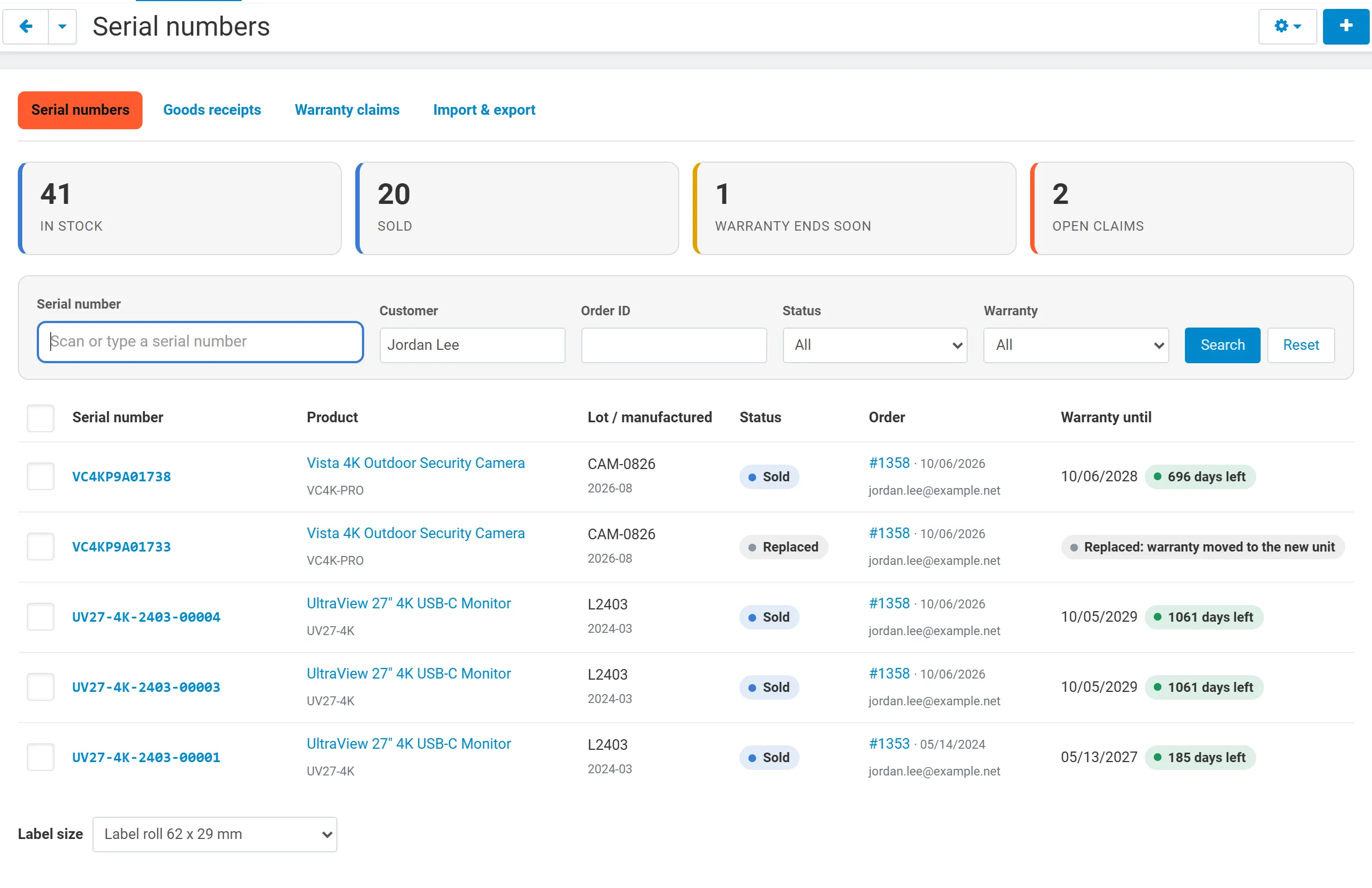
| 4. Find a unit’s sale and customer | Scan or type a serial number in the register: sale date, order and customer. Search by customer name or e-mail to see all units of a repeat buyer across many orders of the same model, each with its own sale date and warranty. |
| 5. Handle warranty returns and replacements | Open a warranty claim on the serial number (repair, replacement, refund, inspection), link it to a return request, and swap in a replacement unit: the old serial becomes “Replaced”, the new one is linked to the same customer and order, keeps the remaining warranty, and both keep their history. |
Features
Section titled “Features”- Goods receipts with product code, quantity, manufacture month and year, lot, reference and notes.
- Serial numbers generated from a pattern (per product or a store default) or scanned with any USB / Bluetooth barcode scanner (the scanner’s Enter adds the code to the list).
- Barcode labels (PDF) with product name, serial number, Code 128 barcode and manufacture month, lot or warranty end: label roll 62 x 29 mm, 50 x 25 mm or an A4 sheet of 3 x 8 labels.
- Order linking on shipment creation, on an order status, or by scanning on the order page; serials of cancelled or deleted orders go back to stock.
- Warranty per product: length in months and start on the order date, the dispatch date or the manufacture month. Dates can be corrected per unit.
- Serial register with search by serial number, customer name or e-mail, order, status and warranty state (under warranty, ends soon, expired), bulk status changes and CSV export.
- Unit page with the barcode, sale, customer, goods receipt, warranty bar, claims, the order’s return requests and a complete history.
- Warranty claims with type, status, fault and resolution, linked to a core RMA return request or a Returns Portal withdrawal; replacements swap the unit; refunds mark it as returned.
- For customers: My serial numbers & warranties in the account, serial numbers and warranty under each line of the order page, and a public Warranty check page (serial in, product and warranty out, never personal data).
- CSV import and export of serial numbers (bring in your existing records).
- Multi-Vendor: vendors receive stock, label, assign and handle claims for their own products only.
- Full page cache safe (4.21): customer data is shown only on pages that are never cached.
Documentation
Section titled “Documentation”| Page | Contents |
|---|---|
| Installation | Requirements, installing, privileges, upgrading, uninstalling |
| Configuration | Settings: patterns, automatic assignment, warranty, customer pages, vendors, license |
| Usage | The five workflows step by step, labels, CSV, customer pages |
| Developer notes | Data model, statuses, hooks, PHP API, file map |
| FAQ | Common questions, other add-ons, license |