

AI Product Content Generator
Add-on ID: kv_ai_content_generator · Edition: CS-Cart & Multi-Vendor · Latest version: 1.0.0 · Compatible with: CS-Cart & Multi-Vendor 4.17.2 – 4.21.x, PHP 7.4 – 8.3 · Changelog: view
AI Product Content Generator writes and improves product texts with an AI model of your choice, using your own API key: full and short descriptions, key feature bullets, meta titles, meta descriptions, meta keywords and search words. It works on a single product page or on hundreds of products at once, and nothing is written to a product until you apply it. You pay your AI provider directly, at their prices, and the add-on shows what every request cost.
- Any provider with your own key: the OpenAI API and every OpenAI-compatible service (for example OpenRouter, Groq, Mistral, DeepSeek, Google Gemini through its OpenAI-compatible endpoint, or a local Ollama / LM Studio server), and the Anthropic API. A built-in test mode writes sample texts without any provider, so you can try the whole workflow first.
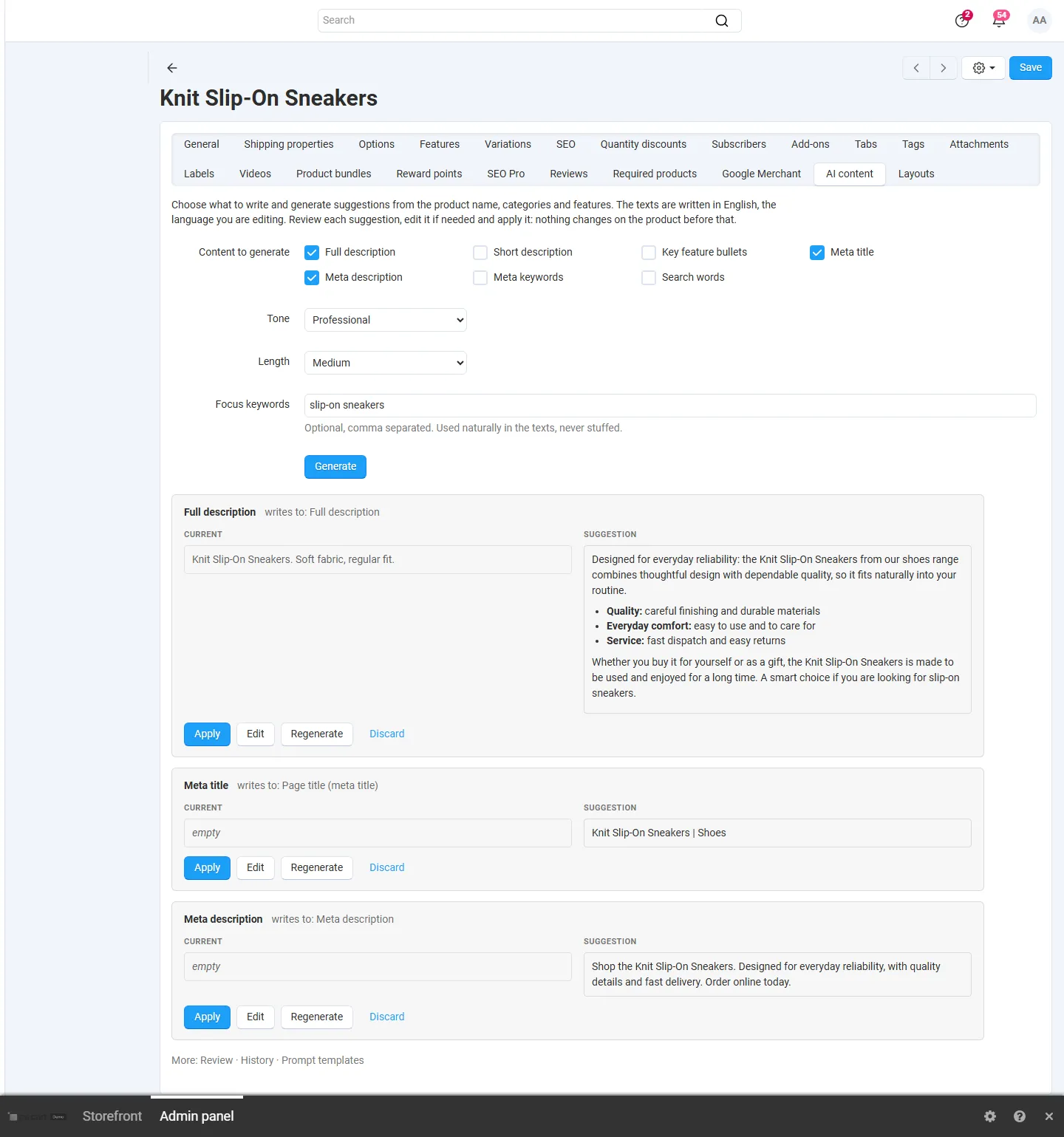
- Product page tab “AI content”: choose what to write, the tone, the length and focus keywords, click Generate, compare each suggestion with the current text, edit it and apply it, or regenerate or discard it.
- Bulk generation: select products in the product list (Actions › Generate content with AI) or pick categories, then run the job in the browser with a progress bar or in the background by cron.
- Review first or fill empty fields: results wait in a review list (apply one by one or in bulk), or are written only into fields that are still empty. Existing texts are never overwritten without your confirmation.
- History and undo: every applied text keeps the value it replaced; Undo restores it as long as nobody changed the field since.
- Prompt templates: a default prompt per content type that you can edit, own variants, and variables such as
{product_name},{features},{categories},{brand},{keywords}and{tone}. Store guidelines (brand voice, words to avoid) are added to every request. - Costs under control: usage log with tokens, cost, duration and errors per request, a monthly budget that stops new requests, a requests-per-minute limit and automatic retries with back-off.
- Safe key handling: the API key is stored encrypted, never shown again in full, never logged and never sent anywhere but to your provider.
Documentation
Section titled “Documentation”| Page | Contents |
|---|---|
| Installation | Requirements, installing, upgrading, uninstalling |
| Configuration | Provider and API key, writing defaults, costs and limits, cron, license |
| Usage | Product tab, bulk generation, review, history and undo, prompt templates, usage log |
| Developer notes | Data model, how texts are written, the LLM kit, endpoints, file map |
| FAQ | Common questions |
Compatibility
Section titled “Compatibility”| CS-Cart / Multi-Vendor | 4.17.2 – 4.21.x (Ultimate and Multi-Vendor editions) |
| PHP | 7.2.5 – 8.3 (whatever your CS-Cart version supports), with the cURL extension |
| AI providers | OpenAI and OpenAI-compatible Chat Completions APIs, Anthropic Messages API, test mode |
| Admin panel | 4.17 back office and the 4.18+ light and dark schemes |
| Full page cache (4.21) | Supported: the add-on has no storefront output; applied texts are refreshed by core |