

EU Withdrawal Button & Returns Portal
Add-on ID: kv_returns_portal · Edition: CS-Cart & Multi-Vendor · Latest version: 1.0.0 · Compatible with: CS-Cart & Multi-Vendor 4.17.2 – 4.21.x, PHP 7.4 – 8.3 · Changelog: view
EU Withdrawal Button & Returns Portal helps you provide the online withdrawal function that EU consumer law asks online shops to offer from 19 June 2026: a clearly labelled “Withdraw from contract here” button, a short withdrawal statement, a final “Confirm withdrawal” button and an acknowledgement of receipt with the date and time of the statement. Around it, the add-on gives you a withdrawal register in the admin panel (and the vendor panel on Multi-Vendor), cancels orders that have not shipped yet and opens return requests in the core RMA add-on.
Not legal advice. The add-on implements the steps described below. Whether your store meets the rules of the countries you sell to depends on your terms, your pre-contract information, your product range and national law. Please have your texts and settings reviewed by your legal adviser.
What the add-on implements
Section titled “What the add-on implements”The 2023 amendment of the EU Consumer Rights Directive (Directive (EU) 2023/2673, new Article 11a of Directive 2011/83/EU) describes the withdrawal function. The table shows the parts of that article and what the add-on does for each.
| Article 11a | What the add-on does |
|---|---|
| A withdrawal function labelled “withdraw from contract here” or an unambiguous equivalent, continuously available during the withdrawal period, prominently displayed and easily accessible | A “Withdraw from contract here” strip at the bottom of every storefront page, a link in the customer account menu, a button on the order page, a column in the order list, a box in the customer’s order e-mails and a Withdrawal button block you can place anywhere. Guests find their order by order number and e-mail. The label is a language variable you can change. |
| The consumer can provide or confirm their name, the contract and the electronic means for the confirmation | Step 1 (the statement): name and e-mail prefilled from the order, the order (and on Multi-Vendor each vendor’s part of it), the whole order or selected items. A reason is optional and never required. |
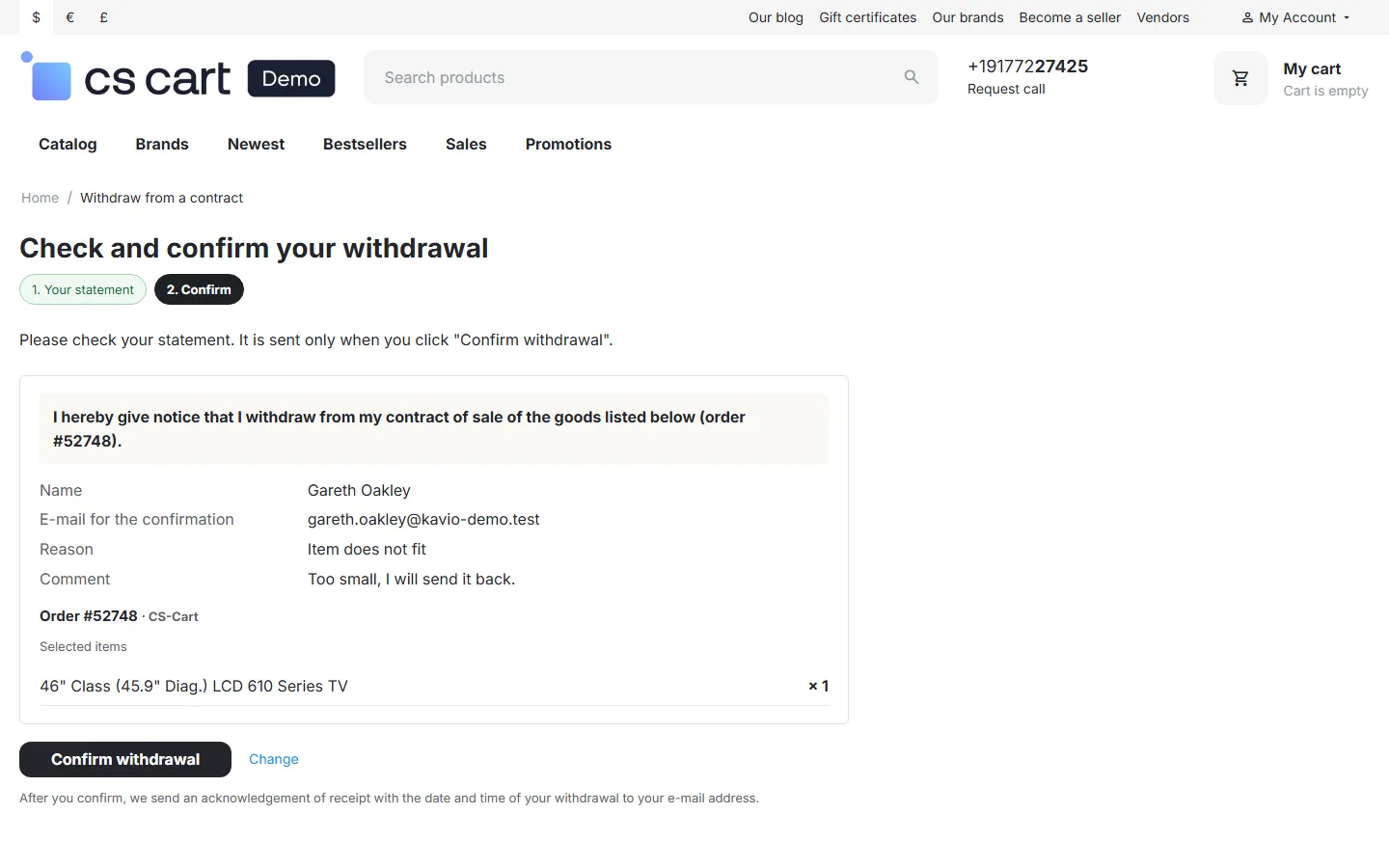
| A confirmation function labelled “confirm withdrawal” or an unambiguous equivalent | Step 2: a summary of the statement with a single “Confirm withdrawal” button. Nothing is sent before it is clicked. |
| An acknowledgement of receipt on a durable medium, with the content and the date and time of submission, without undue delay | Right after the click: an e-mail to the address from the statement with the full statement, the reference and the submission date and time (store time and UTC), with the confirmation attached as a document (HTML, or PDF through the core PDF documents add-on). The same confirmation can be downloaded from the confirmation page. |
| A statement submitted before the period ends counts as in time | The submission time is stored with each statement, and the register flags statements sent after the period. With the default settings such statements are still accepted, so you decide. |
Features
Section titled “Features”- Withdrawal button everywhere: footer strip, account menu, order page and order list, order e-mails and a Block Manager block. The links are static, so they work with the full page cache of CS-Cart 4.21.
- Two-step statement for guests and signed-in customers: order look-up protected by the store’s image verification (and Captcha Pro when installed) and a request limit; signed links in e-mails skip the look-up.
- Whole order or selected items and quantities, optional reasons and a comment.
- Withdrawal period of 14 days (configurable) from delivery, shipment or the order date; items you exclude (for example personalised, perishable or sealed hygiene goods) are shown as “not covered”.
- Acknowledgement e-mail with the statement, the date and time and an attached confirmation; the store (and the vendor on Multi-Vendor) gets a notice.
- Follow-up actions: orders that have not shipped are cancelled (status of your choice); otherwise a return request is created in the core RMA add-on.
- Withdrawal register: status, notes, refund countdown (14 days by default), “after the period” flag, bulk status, CSV export and a notice on the order page.
- Multi-Vendor: one statement for a marketplace order creates one record per vendor; vendors see and process their own withdrawals in the vendor panel.
- Model withdrawal form page with your store’s details (Annex I(B) of the directive).
Documentation
Section titled “Documentation”| Page | Contents |
|---|---|
| Installation | Requirements, installing, upgrading, uninstalling |
| Configuration | Settings, period, exclusions, follow-up actions, e-mails, license |
| Usage | The customer flow, the register, Multi-Vendor, e-mails |
| Developer notes | Data, hooks, templates, file map |
| FAQ | Common questions, GDPR, license |
Compatibility
Section titled “Compatibility”| CS-Cart / Multi-Vendor | 4.17.2 – 4.21.x |
| PHP | 7.2.5 – 8.3 (whatever your CS-Cart version supports) |
| Themes | Responsive, Bright and Nova and their child themes |
| Full page cache (4.21) | Supported: the links are static; the withdrawal pages are never cached and write no session data on a first visit |
| Core RMA add-on | Optional: return requests are created when it is active |
| PDF documents add-on | Optional: for a PDF confirmation |