

Configuration
Open Add-ons → Manage add-ons → Pantry theme → Settings.

| Setting | Default | Description |
|---|---|---|
| Sticky header | On | Keeps a compact header (logo, search, cart) at the top while shoppers scroll. |
| Mobile bottom bar | On | Home, menu, search, account and cart as a bar at the bottom of the screen on phones. |
| “More” menu for long top menus | On | Top-menu items that do not fit on one line move into a “More” dropdown instead of wrapping to a second row. |
| Product card style | Theme default | Theme default (the style’s card: tinted image well, unit line, Add button), Outlined, Plate (filled image well) or Minimal (no frame). |
| Show the second image on hover | On | Product grids show the next product image when the pointer is over a card. Needs Settings → Appearance → Thumbnails gallery for product lists, which the theme switches on when you activate it. |
| Product page layout | Classic | Classic (image and details side by side) or Large gallery (wide images, the details column follows on scroll). |
| Subtle animations | On | Sections fade in while scrolling. Visitors who prefer reduced motion never see animations. |
| Install the demo content when the theme is activated | On | When a storefront switches to this theme, the next admin page adds the theme’s demo catalogue (categories, products with images, blog posts, reviews and a main menu; on Multi-Vendor also a demo shop) and points the homepage blocks of the theme layout at it. Runs once per storefront (re-activating or upgrading adds nothing). Your own products, categories and pages are never changed; delete demo items you do not need in Products, Categories and Website → Blog. Turn it off before activating the theme to start with an empty design. |
Delivery and basket
Section titled “Delivery and basket”| Setting | Default | Description |
|---|---|---|
| Free delivery from (order subtotal) | 40 | Subtotal in your primary currency from which you deliver for free. Shown in the top bar (“Free delivery on baskets over $40.00”) and as progress in the phone basket bar (“$15.20 to free delivery”). 0 hides both. When the Free Shipping Progress Bar add-on (Kavio Labs) is active, the basket bar shows that add-on’s message and progress instead, so the figures always match your shipping rules. |
| Delivery pill: title | Same-day delivery | First line of the pill in the header, e.g. “Same-day delivery” or “Next slot: today 6-8 pm”. Empty hides the pill. |
| Delivery pill: second line | Pick a two-hour slot at checkout | Second line of the pill. |
| Delivery note | Order by 2 pm for same-day delivery | Shown in the top bar and in a box under the buy button on product pages. Empty hides it. |
| Basket bar on phones | On | Floating bar above the bottom bar with the number of items, the basket total, the free-delivery progress and a View basket button (hidden on the cart and checkout pages and while the basket is empty). |
The pill and the notes are static texts: Pantry does not choose delivery slots. Real slot selection needs a shipping add-on with time slots; Pantry styles the checkout so such an add-on fits in. Keep the texts true for your store.
Colours and fonts: Website → Themes → Theme editor (per style).
License
Section titled “License”The licence status is shown in a License card at the top of the add-on page, above the tabs. The License tab holds the key itself. The key is stored once for the whole installation.
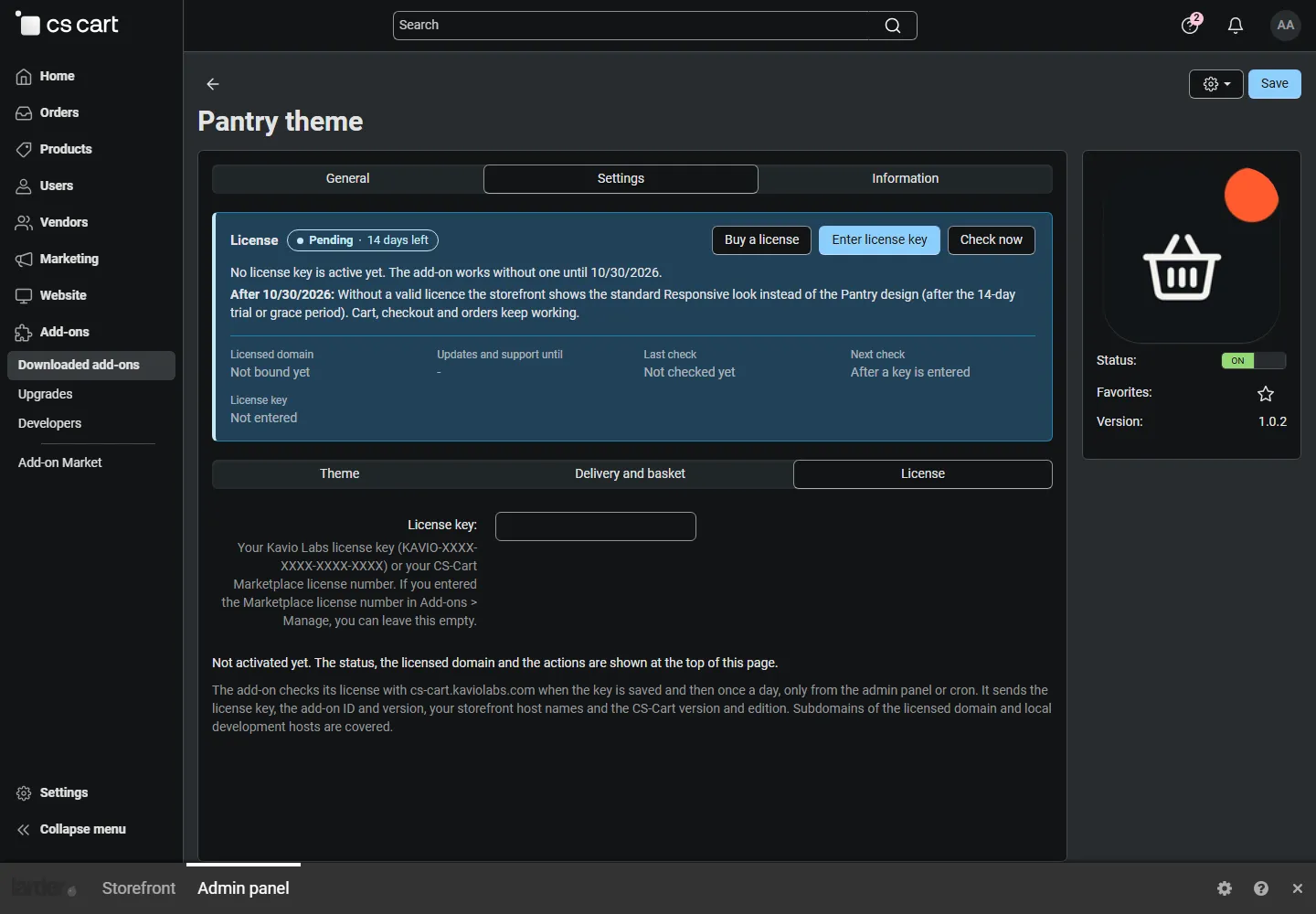
The card shows the status in colour (green valid, blue development host or the 14-day period of a new installation, amber when the licence server could not be reached, red when the theme design is switched off), what happens when it is switched off, the licensed domain and every storefront with its result, the end of the updates period, the last and next check, and the actions Change license key, Check now, Manage license and Buy a license.
| Setting | Description |
|---|---|
| License key | Your Kavio Labs licence key (KAVIO-XXXX-XXXX-XXXX-XXXX, from My licenses on cs-cart.kaviolabs.com) or your CS-Cart Marketplace license number. If you entered the Marketplace number in Add-ons → Manage add-ons, leave this empty. |
| License status | Points to the License card and explains what the check sends. |
What the licence covers. The base domain you entered at purchase (for example example.com) and every subdomain
of it. Local development hosts (localhost, private IP addresses, *.localhost, *.test, *.local, *.example,
*.invalid) are always allowed. A store on a different base domain needs its own licence.
When it checks. When you save the key and then once a day, only in the admin panel or from cron, never while customers browse the storefront:
php /path/to/store/admin.php --dispatch=kv_theme_pantry_license.checkWhat is sent. Only this, to https://cs-cart.kaviolabs.com: the licence key, the add-on ID and version, the host
names of your storefronts, your CS-Cart version and edition, and a random one-time value. No customer, order or
personal data. The answer is digitally signed.
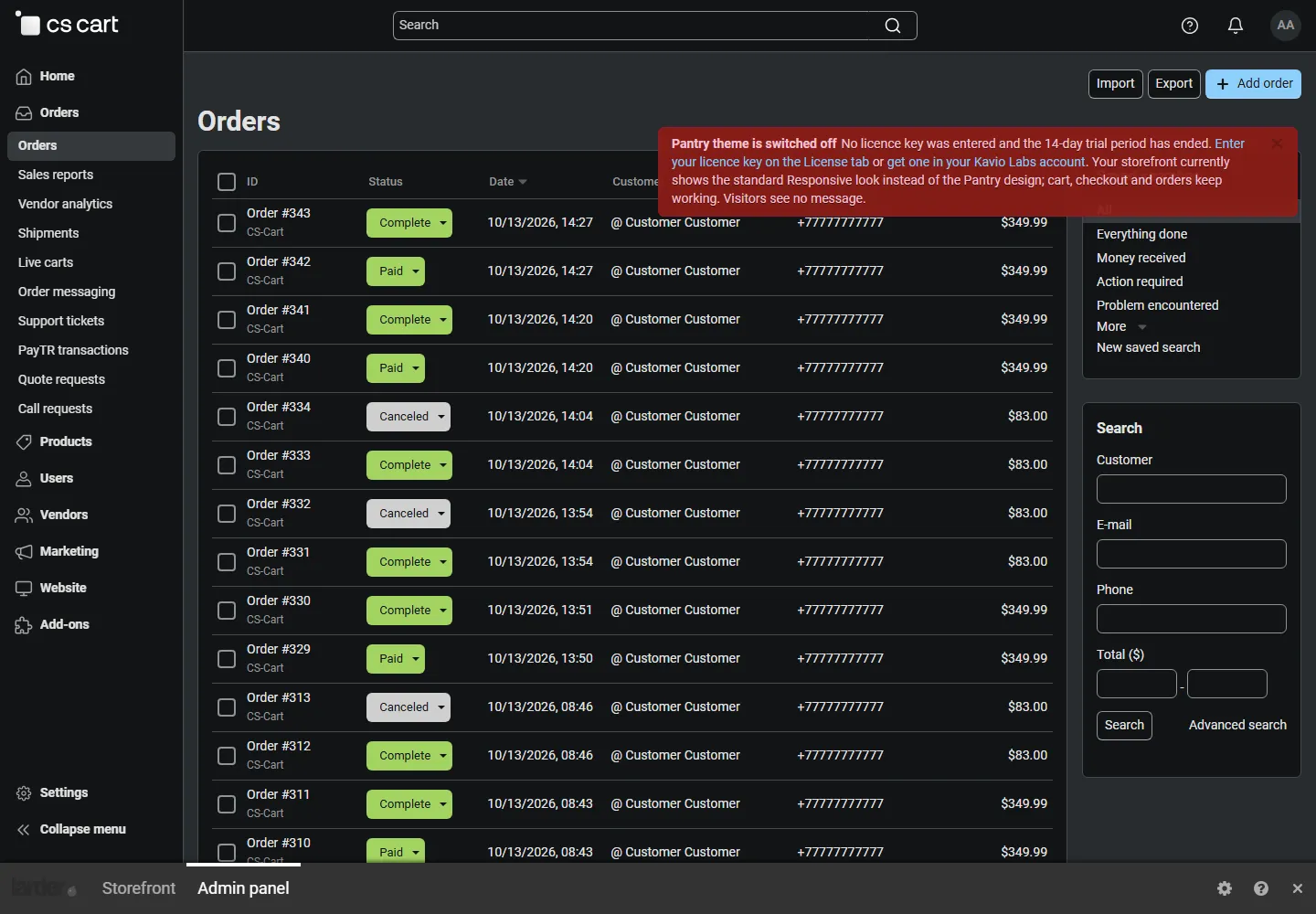
What happens without a valid licence. A new installation works for 14 days without a key. If the licence server cannot be reached, the theme keeps working for 14 days after the first failed check. After that, or with an invalid, revoked or other-domain licence, the Pantry design is switched off: the storefront shows the standard Responsive look (standard stylesheet and menu, the Pantry hero and sections hidden; the colours of the active style stay). Cart, checkout, orders and customer accounts keep working; visitors see no message. The design is also switched off while the add-on is disabled or uninstalled.
While a storefront uses Pantry and the design is switched off, every admin page shows a notice that names the theme, the reason (no key after the trial period, invalid key, revoked, other domain, licence not verified for 14 days) and how to fix it, and Website → Themes shows the same text above the current theme.
| Status (card) | Colour | Storefront |
|---|---|---|
| Valid | Green | Pantry design. |
| Development host | Blue | Pantry design. |
| Pending · N days left | Blue | Pantry design for 14 days after installation. |
| Grace period · N days left | Amber | Pantry design for 14 days after the first failed check. |
| Not activated, Invalid key, Revoked, Domain mismatch, Not verified | Red | Standard Responsive look; the store keeps working. |
When your updates period ends, the theme keeps working; only updates and support stop. Licence information appears in the admin panel only, for administrators who may manage add-ons; vendors and customers never see it.