

Usage
Overview · Installation · Configuration · Developer notes · FAQ
Everything is under Website → SEO meta templates, with the tabs Templates, Meta audit, Bulk fill and Settings.
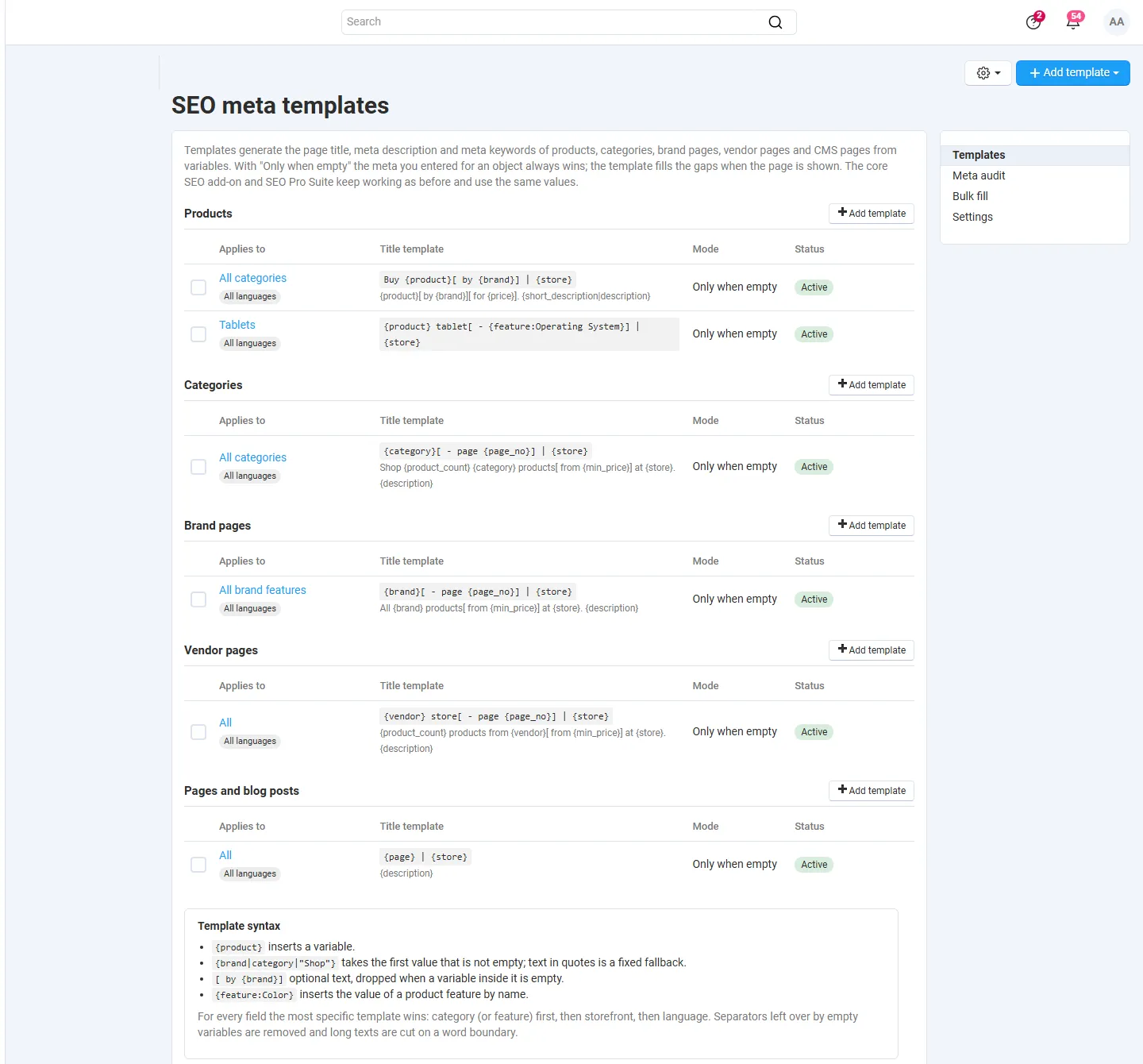
Templates
Section titled “Templates”Click Add template and choose the page type: products, categories, brand pages, vendor pages (Multi-Vendor) or pages and blog posts. A template has three texts, each optional:
| Field | Printed as |
|---|---|
| Page title | <title> of the page |
| Meta description | <meta name="description"> |
| Meta keywords | <meta name="keywords"> (a comma-separated list; duplicates are removed) |
Leave a text empty to keep the core default for that field, or to inherit it from a more general template.
Scope. Every template applies to a scope:
- Category (products and categories): the template applies to this category and all its subcategories; for products their main category counts. All categories is the general template.
- Feature (brand pages): one brand feature, or All brand features.
- Storefront (only shown with more than one storefront) and Language: one storefront or language, or all of them.
There is one template per scope. For each field the most specific template that has a text wins: the nearest category (or the feature) first, then the storefront, then the language. So a category template can change only the title and take the description from the general template.
Apply. Only when empty (the default) keeps the meta you entered for an object and fills only the empty fields. Override replaces the entered meta on the storefront; the stored value itself is not changed. Switch a template off with Active to stop using it without deleting it.
Syntax
Section titled “Syntax”| Write | Result |
|---|---|
{product} |
the variable’s value |
{brand|category|"Shop"} |
the first value that is not empty; text in quotes is a fixed fallback |
[ by {brand}] |
optional text: dropped when a variable inside it is empty |
{feature:Color} |
the value of the product feature named “Color” (any feature; its ID also works: {feature:12}) |
After the variables are filled in, double spaces and separators (-, |, :, ,, ·, /) left at the start, at the end or twice in a row are removed, and so are empty brackets. Unknown variables give an empty text; the editor and the preview list them.
Variables
Section titled “Variables”| Variable | Products | Categories | Brand pages | Vendor pages | Pages |
|---|---|---|---|---|---|
{store} store name, {year} current year |
✓ | ✓ | ✓ | ✓ | ✓ |
{product}, {sku}, {price}, {short_description} |
✓ | ||||
{category}, {parent_category} |
✓ (main category) | ✓ | |||
{brand} |
✓ (first brand feature) | ✓ (page name) | |||
{feature:Name} |
✓ | ||||
{vendor} |
✓ (MV) | ✓ | |||
{feature_name} |
✓ | ||||
{min_price}, {product_count}, {page_no} |
✓ | ✓ | ✓ | ||
{description} |
✓ | ✓ | ✓ | ✓ | ✓ |
{page} |
✓ |
- Prices are base prices (customer group “All”, quantity 1; the storefront price on Ultimate) in the primary currency, without catalog promotions, so every visitor and the page cache get the same text. A product without a price gives an empty
{price}. {min_price}and{product_count}count the active products (for categories including subcategories).{page_no}is empty on the first page and the page number from page 2 on, for example{category}[ - page {page_no}].- Descriptions are used as plain text (HTML removed).
Live preview
Section titled “Live preview”The editor shows the result for a sample object on the right while you type: a search result look-alike and every field with its length. Search the sample by name or ID. The note under each field tells whether the template is applied or the entered meta is kept. The preview uses the unsaved form, so you can try texts before you save.
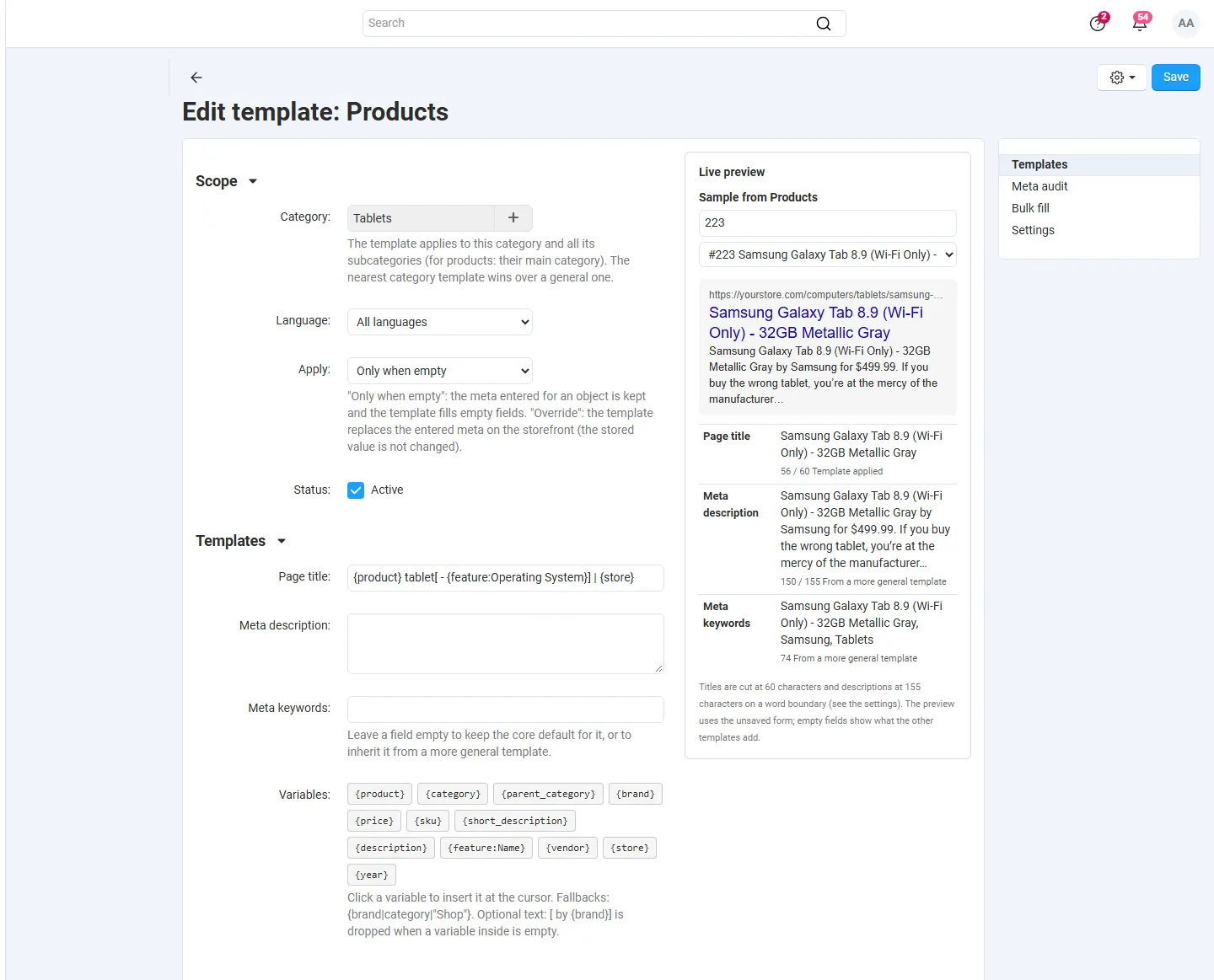
On the storefront
Section titled “On the storefront”When a product, category, brand, vendor or CMS page is shown, the add-on picks the templates for the page’s object, storefront and language, fills in the variables and gives the result to the theme as the page title, meta description and meta keywords. Nothing is added to the page itself: the theme prints its usual tags, so there is always exactly one title and one description. Other pages (home, search, cart, checkout, account) are not changed.
SEO Pro Suite builds its Open Graph and Twitter titles and descriptions from the same values, so social previews match the search result.
Meta audit
Section titled “Meta audit”Meta audit checks the meta stored for every active object of a type in a language:
- Empty title / description (with a note when a general template fills them on the storefront);
- Title / description too long (over the lengths in the settings);
- Duplicate title / description (the same text on more than one object).
Click a counter to list those objects. For empty fields the generated value is shown in green. The object name opens its edit page.
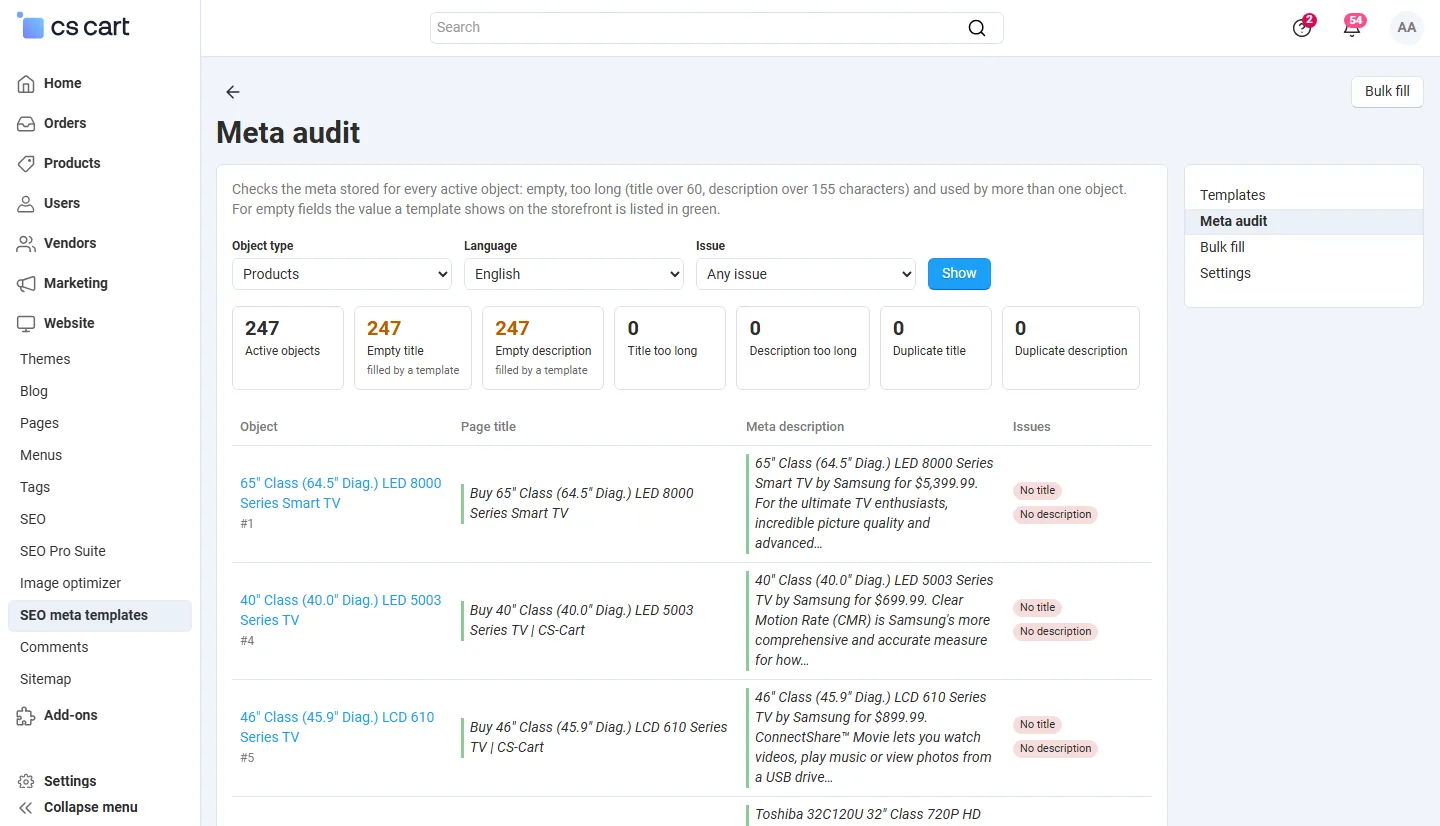
Bulk fill
Section titled “Bulk fill”The storefront does not need a bulk fill: templates fill empty fields when a page is shown. Use Bulk fill when the meta should be stored in the fields, for example for feeds, exports or other add-ons that read them.
Choose the object types, fields and languages (and on several storefronts whose templates to use) and click Fill empty meta now. The job runs in batches of 100 objects with a progress bar; you can leave it running on large catalogs. Only empty fields are written, never the ones you filled in. Values with prices, counts or the year are stored as they are at that moment.
Recent runs lists every run. Undo empties the fields a run wrote again, except fields that were edited since.
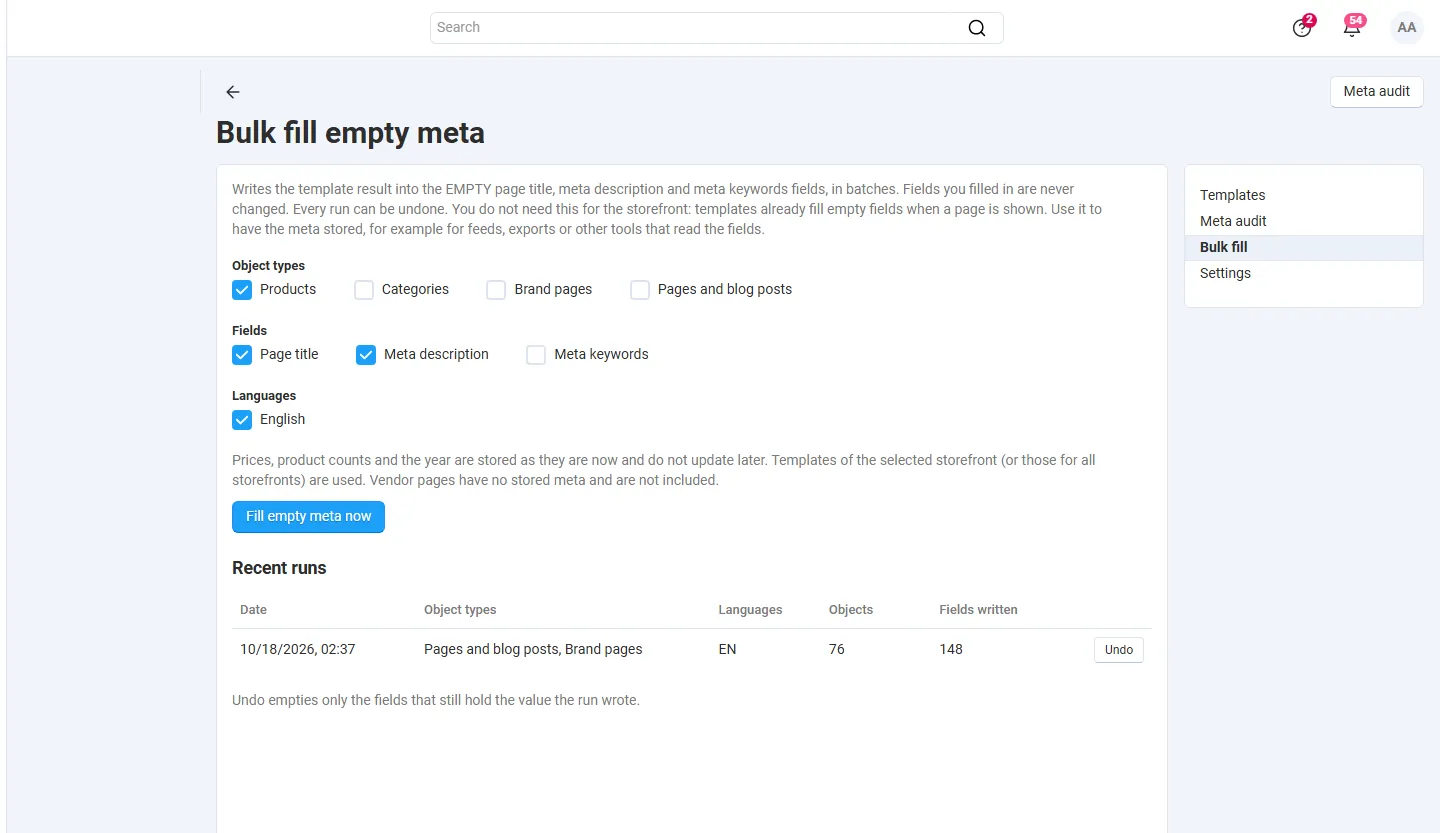
Multi-Vendor
Section titled “Multi-Vendor”- Vendor pages (the vendor’s product list and its “About” page) have their own template type and the
{vendor}variable; products can use{vendor}too. - Vendor pages have no stored meta fields in CS-Cart. Only when empty keeps a description another add-on set for the vendor page (for example Vendor Storefront Pro); Override replaces it.
- Templates are managed by the marketplace administrator only. Vendors have no access to the add-on’s pages.
CS-Cart Ultimate
Section titled “CS-Cart Ultimate”- Templates can apply to one storefront or to all; the settings (lengths) can differ per storefront.
- Shared products with storefront-specific descriptions: the storefront’s own meta counts as “entered” for Only when empty, and
{product}uses the storefront’s name. - The bulk fill writes the main description fields (the values shown on storefronts without their own descriptions).