Give every vendor real sales, product, conversion and payout analytics, and compare all vendors side by side as the marketplace owner.
Available Updated Oct 15, 2026Version 1.0.0Multi-Vendor 4.17.2 – 4.21.x No core file edits
Built for
Vendor Analytics Dashboard: overview1 of 15
What it does
The core vendor dashboard shows a few totals. Vendors want to know what sells, what is viewed but not bought, who their best customers are, how much was refunded and what their payouts look like.
Vendor Analytics Dashboard adds an Analytics page to the vendor panel and a Vendor analytics page to the admin panel. Every figure is compared with the previous period or the same period last year, and every list exports to CSV.
What it changes for your store
10 key figures per vendor, each with the change against a comparison period.
Product views, cart adds and view-to-order rate per product show where listings lose buyers.
An anonymous marketplace median lets vendors see where they stand.
The admin compares all vendors by revenue, share, growth, conversion, refunds and commission.
Strict data isolation. Vendors only ever see their own data.
Cached aggregate queries for large marketplaces, 0 core file changes.
How it works
Vendor
Open Orders, Analytics, pick a period and a comparison. The page shows the key figures, a sales chart, orders by status, payouts and balance from vendor accounting, top and most viewed products and top customers.
Admin
Open Orders, Vendor analytics to sort and filter all vendors, export the list, or open any vendor's dashboard as the vendor sees it.
Storefront
Product views and cart adds are counted per day in the background, without any visible change.
Features
Vendor panel analytics: revenue, orders, average order value, items, customers, returning customers, views, cart adds, conversion and refunds
Comparison with the previous period or the same period last year, with up and down changes
Date presets and custom dates, with daily, weekly or monthly chart grouping
Sales chart for revenue, orders or product views, with a table view
Orders by status and payouts, balance and commission from core vendor accounting
Top products, most viewed products with conversion, and top customers
Anonymous marketplace benchmark for vendors
Admin vendor comparison with sorting, search, status and plan filters and totals
CSV export of every list, safe for spreadsheets
Settings for counted order statuses, vendor access, customer and payout visibility, exports and cache
Vendor privilege for staff and vendor user groups
Full page cache compatible, no core file changes, clean uninstall
What you get
Package
kv_vendor_analytics_dashboard-1.0.0.zip, installed through Add-ons → Manage add-ons
Updates & support
12 months included. Download new versions from your account and install them in Add-ons → Manage add-ons or the Upgrade Center.
License
1 production installation. Staging, dev and localhost are free and unlimited. The add-on keeps working after the update period ends. How licensing works
Compatibility
We list only the builds we install and test on. “Tested” means the full test plan was run on that build; “Supported” means the build is inside the supported range and uses the same hooks.
CS-Cart version and edition compatibility
CS-Cart version
CS-Cart
CS-Cart Ultimate
Multi-Vendor
Multi-Vendor Ultimate
4.22 and later
Not available
Not available
Testing next
Testing next
4.21.2
Not available
Not available
Tested
Supported
4.20.x
Not available
Not available
Supported
Supported
4.19.x
Not available
Not available
Supported
Supported
4.18.x
Not available
Not available
Supported
Supported
4.17.2
Not available
Not available
Tested
Supported
Before 4.17.2
Not available
Not available
Not supported
Not supported
Last tested build: Multi-Vendor 4.21.2, Oct 15, 2026Tested on: Multi-Vendor 4.17.2, Multi-Vendor 4.21.2
Requirements
PHP
CS-Cart Multi-Vendor 4.17.2 – 4.21.x (tested on Multi-Vendor 4.17.2 with PHP 8.1 and Multi-Vendor 4.21.2 with PHP 8.3). The add-on is Multi-Vendor only; CS-Cart (Standard/Ultimate) refuses the installation with "Edition of your cart (ULTIMATE) is not supported. Required: MULTIVENDOR."
PHP
PHP 7.2.5 – 8.3, as supported by your CS-Cart version
Requirement
No other add-on is required. When Vendor plans is active, commission figures are shown; when RMA is active, return requests are counted
Core changes
None. Hooks and template overrides only
1.0.0
Oct 15, 2026
Latest
Added 11
Vendor panel page Orders → Analytics: revenue, orders, average order value, items sold, customers, returning customers, product views, cart adds, view-to-order rate and refunds, each compared with the previous period or the same period last year.
Sales chart (revenue, orders or product views) with the comparison period, hover details and a table view.
Orders by status, payouts and balance from core vendor accounting, top products, most viewed products with conversion, top customers.
Anonymous marketplace benchmark (median revenue, average order value and conversion of the vendors with sales, from 3 vendors on).
Date presets (7, 30, 90 days, this or last month, this year, last 12 months) and custom dates.
Admin page Orders → Vendor analytics: vendor comparison with share, growth, conversion, refunds and commission; sorting, search, status and plan filters; each vendor's dashboard as the vendor sees it; marketplace dashboard.
CSV export of sales over time, top products, most viewed products, top customers and the vendor comparison.
Per-day product view and cart-add counter (once per product and session, bots and staff excluded) with retention and daily maintenance (admin panel or cron).
Settings for counted order statuses, defaults, list size, result cache, vendor access, vendor payouts/customers/export visibility, benchmark, view counting and retention; privilege "View vendor analytics" for admin staff and vendor user groups.
Compatible with CS-Cart Multi-Vendor 4.17.2 – 4.21.x, PHP 7.2.5 – 8.3 and the 4.21 full page cache.
Tested on Multi-Vendor 4.17.2, Multi-Vendor 4.21.2. First release.
Why does the revenue differ from the core dashboard?
The core dashboard sums orders in its own status selection. This add-on counts the statuses you choose in Order statuses counted as sales, by default the statuses that count for vendor payouts, so the figures match vendor accounting. Parent orders of multi-vendor carts are never counted twice.
Are product views available for the time before the installation?
No. CS-Cart keeps only an all-time view counter per product without dates, so the add-on starts its own per-day counter when it is installed. Sales figures are available for all existing orders right away.
Why are product views lower than in Google Analytics?
A product is counted once per visitor session, bots and staff are excluded, and with the CS-Cart 4.21 full page cache, page views served directly from the cache do not reach the store. The counter is meant for comparing products and periods inside your marketplace, not as a traffic tool.
Can a vendor see another vendor's figures?
No. The vendor is always taken from the logged-in vendor user, every query is filtered by it, and a vendor cannot open the comparison page or the marketplace dashboard. The benchmark shows only anonymous medians, and only when at least 3 vendors have sales.
Can I hide customer names or payouts from vendors?
Yes. Turn off Show top customers to vendors or Show payouts and balance to vendors on the Vendor panel tab. Vendors can export CSV controls the exports.
Can I give only some vendors access?
Yes, with the bundled Vendor privileges add-on: give the View vendor analytics privilege to the vendor user groups that should see the page. To switch the page off for all vendors, turn off Vendors can open their analytics.
Will the add-on slow down a large marketplace?
Figures are calculated with a few aggregate queries per page on indexed columns and cached for 15 minutes by default (adjustable). The storefront only gets one small database write per first product view in a session and per add to cart, and nothing is printed on the storefront.
How are refunds counted?
From vendor accounting: amounts recorded as Order refunded (order edits that lower the total and RMA refunds) in the period. With the RMA add-on, return requests are counted too.
Does it work with the CS-Cart 4.21 full page cache?
Yes. Nothing is printed on cached pages, and the counter writes are excluded from cache invalidation, so they never purge cached pages.
What does uninstalling remove?
The view and cart-add counters, the settings, the privilege and the language variables. Orders, payouts and other core data are only read by the add-on and stay untouched.
Is CS-Cart (not Multi-Vendor) supported?
No. The add-on is built for Multi-Vendor marketplaces; installing it on CS-Cart Standard or Ultimate is refused.
What happens if the license lapses?
Without a valid license (no key after the 14-day start period, an invalid or revoked key, a domain the license does not cover, or no successful check for 14 days), the analytics pages and CSV exports show a notice instead of figures and new product views are not counted. Orders, payouts and the storefront keep working, and collected counters are kept. Once the license is valid again, everything is back.
The admin panel shows a license notice.
Open Add-ons → Manage add-ons → Vendor Analytics Dashboard → Settings → License. The status line says what is wrong: no key, a key for another add-on, a revoked license, or a domain that the license does not cover. Fix it and click Check now. See License.
Does the add-on work on my staging copy?
Yes. Subdomains of your licensed domain (for example staging.example.com) and local development hosts (localhost, private IP addresses, .local, .test) are covered by the same license.
What happens if your license server is down?
Nothing changes for 14 days: the add-on keeps working and retries every hour. Only if no check succeeds for 14 days is it switched off until the next successful check.
Does the license check slow down my storefront or checkout?
No. The check runs in the admin panel or from cron, once a day. The storefront only reads the stored result.
Add a released add-on to this order and save 15% on it. It uses the same edition and store domain.
Vendor Analytics DashboardThis add-on
+
Advanced Commission RulesCharge the right commission for every vendor, category, product, price band, sales tier and promotion, on top of your vendor plans.
$129
+
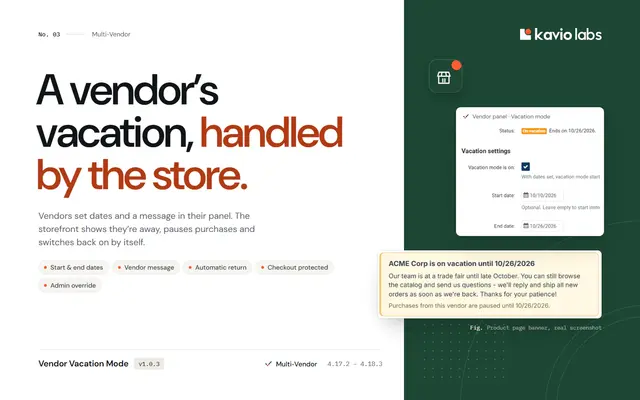
Vendor Vacation ModeLet vendors pause their store for a vacation with dates, a message and automatic return, without angry customers or cancelled orders.
$59
Also from Kavio Labs
Available now and coming next, tested on the same CS-Cart builds.