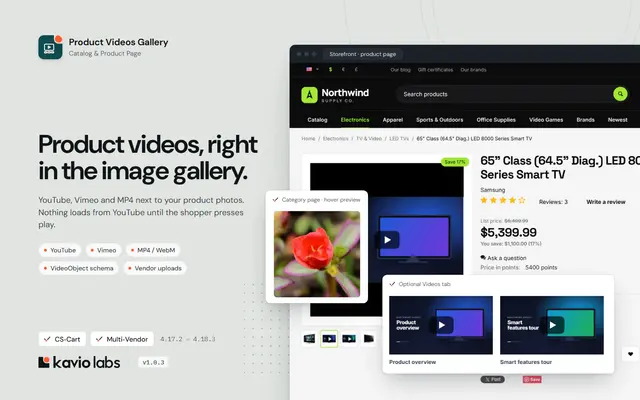
Show YouTube, Vimeo and MP4 videos right in the product image gallery, with no third-party requests until the shopper clicks play.
Available Updated Oct 13, 2026Version 1.2.1CS-Cart, Multi-Vendor 4.17.2 – 4.21.x No core file edits
Built for
Product Videos Gallery: overview1 of 11
What it does
Shoppers decide by looking at the product gallery, so this add-on puts your videos there. It is for CS-Cart and Multi-Vendor stores that want to show products in action.
Attach several YouTube, Vimeo or self-hosted MP4/WebM videos to any product, or upload video files. Video thumbnails with a play icon join the image thumbnails, and the video plays in the main image area, sized to match your product images. Videos can also appear in quick view, in an optional "Videos" product tab and in product lists.
What it changes for your store
Fast pages. 0 requests to YouTube or Vimeo until the shopper presses play, and preview images are served from your own server.
Privacy by default. Youtube-nocookie and Vimeo do-not-track players.
Search visibility. Schema.org VideoObject data for every video, which helps products appear in video results.
More attention in listings. A play badge and a muted hover preview mark products with videos.
Less manual work. Add videos in bulk through import, and videos follow product cloning and deletion.
How it works
Admin or vendor
Open a product, go to the Videos tab, paste a YouTube, Vimeo or MP4 link or upload a file, and save. The title and preview image are filled in automatically. Set a title, a position and a status. Bulk-add videos with the Videos column in import, export and Advanced Import.
Shopper
Video thumbnails appear in the gallery, after the main image, first or last. A click loads the player in place, and switching back to a photo stops it. In Multi-Vendor, you decide whether vendors manage their own videos. No core changes, clean uninstall.
Features
YouTube, Vimeo, MP4/WebM/OGV links and video uploads
Several videos per product, each with a title, preview image, position and status
Videos inside the product image gallery, placed after the main image, first or last
Optional "Videos" product tab and quick view support
Click-to-play players that load lazily, with youtube-nocookie and Vimeo do-not-track
Play badge and muted hover preview in product lists
VideoObject JSON-LD for SEO
"Videos" column in import/export and Advanced Import
Videos follow product cloning and deletion
Multi-Vendor: vendors manage their own products' videos
No core file changes, clean uninstall
What you get
Package
kv_product_videos-1.2.0.zip, installed through Add-ons → Manage add-ons
Updates & support
12 months included. Download new versions from your account and install them in Add-ons → Manage add-ons or the Upgrade Center.
License
1 production installation. Staging, dev and localhost are free and unlimited. The add-on keeps working after the update period ends. How licensing works
For developers
Uses 8 CS-Cart PHP hooks, and provides 7 hooks of its own. No core files are changed.
Compatibility
We list only the builds we install and test on. “Tested” means the full test plan was run on that build; “Supported” means the build is inside the supported range and uses the same hooks.
CS-Cart version and edition compatibility
CS-Cart version
CS-Cart
CS-Cart Ultimate
Multi-Vendor
Multi-Vendor Ultimate
4.22 and later
Testing next
Testing next
Testing next
Testing next
4.21.2
Supported
Supported
Tested
Supported
4.20.x
Supported
Supported
Supported
Supported
4.19.x
Supported
Supported
Supported
Supported
4.18.3
Supported
Supported
Tested
Supported
4.17.2
Tested
Supported
Tested
Supported
Before 4.17.2
Not supported
Not supported
Not supported
Not supported
Last tested build: Multi-Vendor 4.21.2, Oct 13, 2026Tested on: Multi-Vendor 4.17.2, CS-Cart 4.17.2, Multi-Vendor 4.21.2, Multi-Vendor 4.18.3
Requirements
Platform
CS-Cart and Multi-Vendor 4.17.2 – 4.21.x (tested on CS-Cart 4.17.2, Multi-Vendor 4.17.2 and Multi-Vendor 4.21.2 with PHP 8.3)
PHP
PHP 7.4 – 8.3, as supported by your CS-Cart version
Theme
Responsive or any theme based on it (Bright theme included)
Outgoing HTTPS
Optional. Used once per saved YouTube/Vimeo video to copy its title and preview image
Uploads
Optional. To upload video files, raise upload_max_filesize and post_max_size in PHP to fit your files
Core changes
None. Hooks and template overrides only
1.2.0
Oct 13, 2026
Latest
Added 3
License check. Enter your license key (or CS-Cart Marketplace license number) on the new License tab of the settings. The add-on verifies it with cs-cart.kaviolabs.com when the key is saved and then once a day, only from the admin panel or cron, never on storefront requests. The license covers the domain entered at purchase and all its subdomains; local development hosts are always allowed.
License status on the License tab (status, licensed domain, result per storefront, last check, end of the updates period) with a Check now button, and a cron entry point (php admin.php --dispatch=kv_product_videos_license.check).
Without a valid license for the store's domain the storefront shows no videos of this add-on (gallery, tab, list badge, hover preview, structured data); core 4.21 videos are not affected and video management in the admin panel keeps working. The admin panel shows a notice. New installations and upgrades from 1.1.x work for 14 days before a key is required, and if the license server cannot be reached the add-on keeps working for 14 days.
Fixed 2
The cached product page now refreshes when videos are added, changed or deleted and when the license state changes (before, the page could keep showing the previous videos until the cache was cleared).
Singular and plural forms ("1 video was not added") instead of "video(s)" in the notice shown when a product reaches the video limit (new language variable, so in-place upgrades add it).
Tested on Multi-Vendor 4.17.2, CS-Cart 4.17.2, Multi-Vendor 4.21.2, Multi-Vendor 4.18.3. No breaking changes.
1.1.0
Oct 12, 2026
Added 2
Setting "When a product also has CS-Cart videos" (Show both / Show only the CS-Cart videos) for CS-Cart 4.21 and later, which can show product videos of their own on some license plans. Default: show both.
Compatible with CS-Cart and Multi-Vendor 4.21 and PHP 8.3: tested on Multi-Vendor 4.21.2 with PHP 8.3 and the new Nova theme. The add-on now declares the supported range 4.17.2 – 4.21.x.
Tested on Multi-Vendor 4.17.2, CS-Cart 4.17.2, Multi-Vendor 4.21.2, Multi-Vendor 4.18.3. No breaking changes.
1.0.4
Oct 12, 2026
Added 1
In-place upgrades now complete themselves. After the add-on files are replaced (uploading the new zip over the installed add-on in Add-ons → Manage add-ons, copying the files by FTP, or installing an Upgrade Center package), the next admin page view adds any missing tables, columns, settings, language variables and e-mail templates, and updates the stored add-on version and icon flag. Existing data and setting values are kept. A hidden schema_version setting records the last applied version.
Tested on Multi-Vendor 4.17.2, CS-Cart 4.17.2, Multi-Vendor 4.21.2, Multi-Vendor 4.18.3. No breaking changes.
1.0.3
Oct 12, 2026
Fixed 1
The add-on icon is now shown in the admin add-ons list: the package ships a 150×150 icon and addon.xml declares has_icon.
Tested on Multi-Vendor 4.17.2, CS-Cart 4.17.2, Multi-Vendor 4.21.2, Multi-Vendor 4.18.3. No breaking changes.
1.0.2
Oct 12, 2026
Removed 1
Unused language files from the package.
Tested on Multi-Vendor 4.17.2, CS-Cart 4.17.2, Multi-Vendor 4.21.2, Multi-Vendor 4.18.3. No breaking changes.
1.0.1
Oct 11, 2026
Fixed 1
Videos tab: the poster image uploader listed the video file types (mp4, m4v, webm, ogv) as allowed. It now lists the supported image types, and its file picker offers images only. The video file uploader lists and accepts video types only. Both are still validated on save.
Tested on Multi-Vendor 4.17.2, CS-Cart 4.17.2, Multi-Vendor 4.21.2, Multi-Vendor 4.18.3. No breaking changes.
1.0.0
Oct 11, 2026
Added 13
Videos per product: YouTube (watch, youtu.be, Shorts, live, embed links), Vimeo (public and unlisted), direct MP4/M4V/WebM/OGV links and uploaded video files (CS-Cart storage, images/kv_product_videos/).
A "Videos" tab on the product editing page in the admin panel and the Multi-Vendor vendor panel. Each video has a title per language, a preview image, a position and a status. Several videos can be added in one save.
Automatic title, duration (Vimeo) and preview image import from YouTube/Vimeo when a video is saved. Images are stored locally.
Storefront: video slides and play-icon thumbnails inside the core product image gallery, placed after the main image, first or last. Also works in quick view, with a fallback list below the images and an optional "Videos" product tab.
Video slides match the aspect ratio of the product images when the theme sets no fixed image height, so no empty band appears under the player.
Privacy-friendly click-to-play players: no third-party request before play, youtube-nocookie and Vimeo do-not-track.
Optional muted autoplay when a video slide is opened.
Product lists: a video badge and a muted hover preview (uploaded/MP4 only, or all videos).
schema.org VideoObject JSON-LD on the product page.
A "Videos" field in product import/export and Advanced Products Import (URL|Title|D entries separated by ///).
Multi-Vendor: vendors manage videos of their own products, controlled by a setting.
Settings for placement, gallery position, the Videos tab, quick view, autoplay, the maximum number of videos, list badge, hover preview, privacy mode, metadata copying, structured data and vendor access.
Tested on Multi-Vendor 4.17.2, CS-Cart 4.17.2, Multi-Vendor 4.21.2, Multi-Vendor 4.18.3. First release.
Does the add-on load YouTube or Vimeo scripts on every product page?
No. Until the shopper presses play, the page contains only a local preview image and a play button. The player iframe is created on click. With Privacy-enhanced players on, YouTube loads from youtube-nocookie.com and Vimeo gets dnt=1. Two optional features do contact these services earlier: hover previews with the All videos option, and muted autoplay after the shopper navigates to a video slide.
Do I need cookie consent for the videos?
With the default settings no third-party request is made before the shopper clicks play, and that click is an explicit user action. Your legal requirements depend on your jurisdiction. If in doubt, ask your legal advisor, keep privacy mode on and leave hover previews on Only uploaded and MP4/WebM videos.
The YouTube/Vimeo video has no preview image.
The preview image is copied when you save the video. If your server cannot make outgoing HTTPS requests, or if Copy title and preview image is off, no image is copied. In that case upload a preview image in the Videos tab. Private or deleted videos have no public preview either.
My Vimeo video is not accepted or does not play.
Use the public link. For unlisted videos, use the link that contains the hash (https://vimeo.com/123456789/abcdef1234). The video's embed privacy settings on Vimeo must allow embedding on your domain.
Uploading a large video file fails.
The upload is limited by PHP: upload_max_filesize, post_max_size and max_execution_time. Raise these limits, or upload the file by FTP into the store's var/files area and pick it with the Server button. For very large files, host them on a CDN and paste the direct .mp4 link.
Which video formats should I use for uploads?
MP4 (H.264 video, AAC audio) plays in all modern browsers. WebM (VP9/AV1) is a good second option. Keep product videos short and compressed. Hover previews work best with small files of 1–3 MB.
The videos do not appear in the gallery of my custom theme.
The add-on extends the core Responsive gallery (.cm-preview-wrapper, #images_preview_<id>). If your theme renders a different gallery, the videos appear below the product images instead. This fallback is the same as the Below the product images placement. To integrate with a custom gallery, see the developer guide. You can also contact us.
Can I show videos only in a separate tab?
Yes. Set Show videos to Only in the "Videos" product tab. To show both the gallery and the tab, keep the gallery placement and turn on Also show a separate "Videos" product tab.
How do I translate video titles?
Switch the content language at the top of the product editing page, edit the titles in the Videos tab, and save. You can also import the Videos column once per language.
Are videos copied to product variations or vendor offers?
No. Videos belong to a single product. A cloned product gets copies of the videos. Variations and Multi-Vendor vendor offers of common products keep their own video lists.
Can vendors add videos?
In Multi-Vendor, yes. They need Allow vendors to manage videos of their products on, and the right to edit their products. A vendor can only manage videos of their own products.
What happens to the videos when I uninstall the add-on?
All videos, their preview images and uploaded files are deleted. Export the products with the Videos column first if you may need them later.
Does it work with the SEO add-on's structured data?
Yes. The add-on prints separate VideoObject blocks, so it does not interfere with the Product markup of the SEO add-on. You can turn the markup off with Add VideoObject structured data.
The videos disappeared from the storefront and the admin panel shows a license notice.
Open Add-ons → Manage add-ons → Product Videos Gallery → Settings → License. The status line says what is wrong: no key, a key for another add-on, a revoked license, or a domain that the license does not cover. Fix it and click Check now. See License.
Does the add-on work on my staging copy?
Yes. Subdomains of your licensed domain (for example staging.example.com) and local development hosts (localhost, private IP addresses, .local, .test) are covered by the same license.
What happens if your license server is down?
Nothing visible: the add-on keeps the last verified result and keeps working for 14 days while it retries. The admin panel shows a notice from the first failed check.
Does the license check slow down my storefront?
No. The check runs in the admin panel or from cron, once a day. The storefront only reads the stored result.
Add a released add-on to this order and save 15% on it. It uses the same edition and store domain.
Product Videos GalleryThis add-on
+
Photo & Video Reviews with Q&APlanned Not for sale yet
+
Shipping Goal Progress BarShow shoppers how close they are to free shipping, a gift or a discount, with live progress in the mini-cart, cart, checkout and a sticky bar.
$39
Also from Kavio Labs
Available now and coming next, tested on the same CS-Cart builds.