Kiosk is a storefront theme for direct-to-consumer brands with a small catalogue in many colours and sizes: drinkware, bags, cookware, socks, phone cases, pet gear and candles, on CS-Cart or Multi-Vendor. Most of their shoppers come from social links on a phone, so Kiosk is built phone-first.
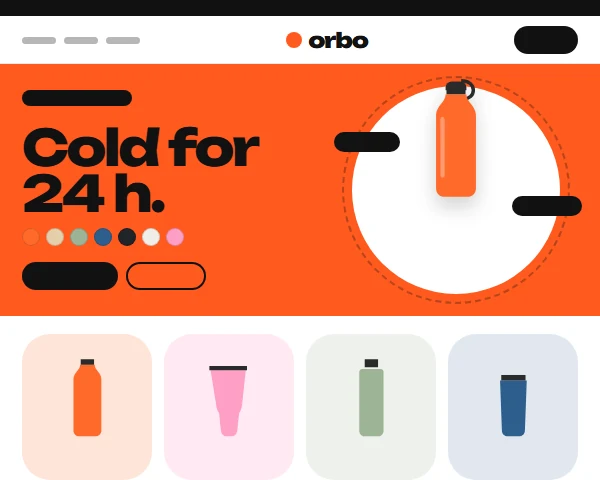
Four styles change more than the colour: Tangerine (flood hero), Kelly (split hero), Bubblegum (ink outlines) and Ultramarine (crisp, brand-coloured type).
Four styles, one theme
Each style changes the ground, bands, type weight and card treatment, not only the accent colour. Open any of them in the live demo.
Kiosk shortens the way from a social link to the cart:
Colour swatches swap the product image without a reload
Quick add on every card puts the picked colour in the cart
Sizes to scale with the price of each size
Bundle builder adds three products in one tap
Floating buy bar and tab bar on phones
Text contrast of at least 4.5:1 in every style, self-hosted fonts
Works with the 4.21 full page cache and with Kavio Labs add-ons
How it works
Install the package in Add-ons: it adds the Kiosk theme without touching your storefront. Activate Kiosk in Website, Themes, pick a style and accept the recommended settings: the demo catalogue fills every section at once. Give your products a Colour option with one image per colour and a Size option with price modifiers; the swatches, sizes and quick add use them. Edit the hero texts and pick the hero, sizes and bundle products in the Block Manager.
Features
Colour-picker hero: swatches swap the product image, floating feature tags on a disc
Swatch cards with tinted image wells, up to five swatches and a quick-add pill
Sizes to scale: the sizes of one product on a ruler with prices
Bundle builder with take-out and put-back slots and a running total
Product pages with named colour swatches, segmented sizes and a tinted gallery that follows the colour
Segmented, sticky category bar and a bundle promo tile inside the product grid
Floating tab bar, swipe gallery with dots and a floating buy bar on phones
Four styles: Tangerine, Kelly (split hero), Bubblegum (ink outlines) and Ultramarine
Installs with full demo content: every section and demo products are ready after activation
Child of Responsive: add-on hooks keep working
CS-Cart and Multi-Vendor 4.17.2 to 4.21.x
What you get
Package
kv_theme_kiosk-1.0.0.zip: the theme and its wrapper add-on, installed through Add-ons → Manage add-ons. Activate it in Website → Themes and pick a style.
Editions
CS-Cart, CS-Cart Ultimate, Multi-Vendor and Multi-Vendor Ultimate 4.17.2 – 4.21.x, one package. A child theme of Responsive: no core files are changed and add-on templates keep working.
Updates & support
12 months included. Updates keep the theme files you changed; your layouts are never replaced.
License
1 production installation; subdomains, staging, dev and localhost are free. The theme checks its license for your domain once a day from the admin panel. Without a valid license the storefront shows the standard Responsive look instead of the Kiosk design; cart, checkout and orders keep working. How licensing works
Compatibility
We list only the builds we install and test on. “Tested” means the full test plan was run on that build; “Supported” means the build is inside the supported range and uses the same hooks.
CS-Cart version and edition compatibility
CS-Cart version
CS-Cart
CS-Cart Ultimate
Multi-Vendor
Multi-Vendor Ultimate
4.22 and later
Testing next
Testing next
Testing next
Testing next
4.21.2
Supported
Supported
Tested
Supported
4.20.x
Supported
Supported
Supported
Supported
4.19.x
Supported
Supported
Supported
Supported
4.18.x
Supported
Supported
Supported
Supported
4.17.2
Tested
Supported
Tested
Supported
Before 4.17.2
Not supported
Not supported
Not supported
Not supported
Last tested build: Multi-Vendor 4.21.2, Oct 16, 2026Tested on: CS-Cart 4.17.2, Multi-Vendor 4.21.2, Multi-Vendor 4.17.2
Requirements
Platform
CS-Cart (incl. Ultimate) or Multi-Vendor 4.17.2 – 4.21.x
Requirement
Administrator access to the admin panel
Core changes
None. Hooks and template overrides only
1.0.0
Oct 16, 2026
Latest
Added 5
Kiosk theme (child of Responsive) with four styles: Tangerine, Kelly, Bubblegum, Ultramarine.
Colour-picker hero stage, swatch cards with quick add, sizes to scale, bundle builder, segmented category bar,
App chrome on phones: floating tab bar, swipe gallery with dots and counter, floating buy bar above the tab bar.
Demo content on activation: the Orbo drinkware catalogue (7 categories, 27 products, one image per colour).
Domain-bound licence with the standard Responsive look as the off effect; self-healing upgrades.
Tested on CS-Cart 4.17.2, Multi-Vendor 4.21.2, Multi-Vendor 4.17.2. First release.
Does Kiosk work with my add-ons?
Yes. Kiosk is a child of the standard Responsive theme and does not override product, cart or checkout templates, so add-on hooks keep working. Kavio Labs add-ons are styled to match each style.
How do the colour swatches find the right image?
From the product's Colour option: the variant's own image if it has one, else the product image whose alt text is the colour name, else the image at the same position. See Usage.
My colours show as small pictures instead of dots
The colour name is not a known colour word. Rename the variant (for example "Navy" instead of "Midnight sky"), or use a hex code as the name; otherwise Kiosk shows the variant's image as the dot.
Does the bundle builder give a discount?
The builder adds the chosen products to the cart in one go. A set discount is a cart promotion you create in Marketing → Promotions; write the offer into the block setting so the text matches it.
Does it work with product variations?
Products grouped as variations keep the standard variation selector (each variation is its own product page). The swatches work with product options; give each colour an image as described above.
Does it work with Multi-Vendor?
Yes, on CS-Cart (incl. Ultimate) and Multi-Vendor. Vendor pages use the Kiosk cards; on Multi-Vendor the demo content creates one shop named after the demo brand.
Can I remove the demo content?
The demo catalogue is normal store data: delete what you do not need in Products, Categories and Website → Blog. Turn off "Install the demo content when the theme is activated" before activating the theme to start empty.
What happens without a licence?
A new installation works for 14 days. After that, without a valid licence, the storefront shows the standard Responsive look; cart, checkout and orders keep working and visitors see no message. The admin panel tells you why and how to fix it. See Configuration.
Does the theme work on my staging copy?
Yes. Subdomains of your licensed domain and local development hosts are covered by the same licence.
Does the licence check slow down my storefront?
No. It runs in the admin panel or from cron, once a day; the storefront only reads the stored result.
Will an update overwrite my changes?
No. Files you changed are kept (a notice lists them), and layouts and blocks are never replaced.
A Swiss-editorial storefront theme with oversized type, a ruled category index and four bold styles, built on Responsive so every add-on keeps working.
A department-store theme for large catalogues: colour-coded departments, a department list beside the hero, tabbed product blocks and a sticky buy box.