Give every vendor a real shop page with a banner, story, policies, business hours, social links and featured products, on every Multi-Vendor plan.
Available Updated Oct 17, 2026Version 1.0.0Multi-Vendor 4.17.2 – 4.21.x No core file edits
Built for
Vendor Storefront Pro: overview1 of 20
What it does
Standard vendor pages show a logo, a description and contact fields. Shoppers want to know who they buy from, how fast a shop ships and what its return rules are.
Vendor Storefront Pro gives every vendor a shop header with banner, logo, tagline, rating and location, an About page with story, highlights, policies and business hours, an announcement bar and a featured products row. It works on every Multi-Vendor plan, without editing layouts.
What it changes for your store
Vendors present their brand and policies, which builds trust before the first order.
Shipping and return rules on the vendor page answer questions before they reach support.
Featured products and announcements let vendors push their own sales.
Optional approval keeps vendor content on brand.
Profile sections per vendor plan give paid plans more to offer.
Meta descriptions per vendor page.
No theme changes, full page cache ready, clean uninstall.
How it works
Vendor
Open Storefront profile in the vendor panel, upload a banner, write a tagline and story, add highlights, policies, hours and social links, pick featured products, preview the draft and publish or submit it for review.
Admin
Choose automatic placement or a Block Manager block, set approval and the sections of each vendor plan, approve or reject changes.
Shopper
Sees the header on the vendor store and About pages, with Open now, the rating and the vendor's featured products.
Features
Profile header: banner with focus, vendor logo or initials, tagline, rating, location, member since, social links
About page: story, up to six highlights with icons, shipping, returns and custom policies
Business hours with an Open now note in the store time zone and a map link
Announcement bar with four styles, link and start and end dates
Featured products chosen and ordered by the vendor, in the theme's product grid
Accent colour per vendor with automatic text contrast
Vendor panel editor with tabs, counters and a signed draft preview
Optional approval with trusted vendors, review e-mails and rejection reasons
Profile sections and featured limit per vendor plan
Hides the core vendor logo and information blocks when a profile exists
Block Manager block for custom placement, also as an About the seller card on product pages
Meta description per vendor page
Safe banner uploads, re-encoded and size-limited
Works with Responsive, Nova, the full page cache and Vendor Vacation Mode
What you get
Package
kv_vendor_storefront_pro-1.0.0.zip, installed through Add-ons → Manage add-ons
Updates & support
12 months included. Download new versions from your account and install them in Add-ons → Manage add-ons or the Upgrade Center.
License
1 production installation. Staging, dev and localhost are free and unlimited. The add-on keeps working after the update period ends. How licensing works
Compatibility
We list only the builds we install and test on. “Tested” means the full test plan was run on that build; “Supported” means the build is inside the supported range and uses the same hooks.
CS-Cart version and edition compatibility
CS-Cart version
CS-Cart
CS-Cart Ultimate
Multi-Vendor
Multi-Vendor Ultimate
4.22 and later
Not available
Not available
Testing next
Testing next
4.21.2
Not available
Not available
Tested
Supported
4.20.x
Not available
Not available
Supported
Supported
4.19.x
Not available
Not available
Supported
Supported
4.18.x
Not available
Not available
Supported
Supported
4.17.2
Not available
Not available
Tested
Supported
Before 4.17.2
Not available
Not available
Not supported
Not supported
Last tested build: Multi-Vendor 4.21.2, Oct 17, 2026Tested on: Multi-Vendor 4.17.2, Multi-Vendor 4.21.2
Requirements
PHP
CS-Cart Multi-Vendor 4.17.2 – 4.21.x (tested on Multi-Vendor 4.17.2 with PHP 8.1 and Multi-Vendor 4.21.2 with PHP 8.3). The add-on is Multi-Vendor only; CS-Cart (Standard/Ultimate) refuses the installation with "Edition of your cart (ULTIMATE) is not supported. Required: MULTIVENDOR."
PHP
PHP 7.2.5 – 8.3, as supported by your CS-Cart version, with the GD extension (JPEG, PNG and, for WebP banners, WebP support)
Requirement
No other add-on is required
Core changes
None. Hooks and template overrides only
1.0.0
Oct 17, 2026
Latest
Added 15
Vendor profile on the vendor store page and the vendor's About page, on every Multi-Vendor plan and without layout editing: banner with focus, vendor logo or initials, tagline, rating and review count, location, "On the marketplace since", social links, tabs to the products and the About page.
About sections: story, up to six highlights with icons, shipping, returns and two custom policies, business hours with "Open now" (calculated in the browser in the store time zone), location with a map link.
Announcement bar with four styles, an optional link and start and end dates; accent colour per vendor with automatic text contrast.
Featured products chosen and ordered by the vendor, rendered with the theme's product grid.
Vendor panel editor (Storefront profile) with tabs, character counters and a signed 24-hour draft preview; admin list and editor (Vendors → Storefront profiles).
Optional approval: drafts, review requests, approve/reject with reason, "Approve selected", trusted vendors, taking a profile offline, e-mails to the administrator and the vendor.
Profile sections and featured product limit per vendor plan (Vendor plans add-on).
Hides the core "Vendor logo" and "Vendor information" blocks on vendor pages with a profile (setting).
Block Manager block "Vendor storefront" with header, about, featured products and announcement templates (vendor from the page or the product).
Meta description per vendor page from the tagline and story.
Safe banner uploads: content type check, size and pixel limits, GD re-encoding, content-addressed storage, cleanup of unused files.
Privileges "View storefront profiles" and "Manage storefront profiles" for staff and vendor user groups.
Works with Vendor Vacation Mode (banner above the profile, "On vacation until" in the hours) and the 4.21 full page cache (no per-visitor output, profile changes purge the cached pages).
Compatible with CS-Cart Multi-Vendor 4.17.2 – 4.21.x and PHP 7.2.5 – 8.3.
Tested on Multi-Vendor 4.17.2, Multi-Vendor 4.21.2. First release.
Do I need Multi-Vendor Plus or Ultimate?
No. The profile works on every Multi-Vendor plan without editing layouts. Block editing of vendor pages (a Plus/Ultimate feature) is not needed; if you prefer to place the parts yourself, the administrator can use the Vendor storefront block in the Block Manager on any plan.
What happens to the core vendor blocks?
With Replace the core vendor logo and description blocks on (default), the core Vendor logo and Vendor information blocks are hidden on the pages of vendors with a published profile, because the header shows the same information. Vendors without a profile keep the standard look. The vendor search block stays.
Does it change my theme?
No theme file is changed or overridden. The profile is added through template hooks and uses the theme's colours, fonts and corner style, so it looks native on Responsive, Nova and their style presets. Featured products use the theme's own product grid.
Where does the logo come from?
From the vendor's own logo (vendor profile, Logos tab), so vendors manage one logo. A vendor without a logo image gets a tile with its initials.
Where does the rating come from?
From the vendors' approved reviews of the core Comments and reviews add-on (vendor reviews switched on in its settings). Without reviews no rating is shown; the add-on never shows invented numbers.
Can vendors on cheaper plans get fewer features?
Yes, with the bundled Vendor plans add-on: Vendors → Storefront profiles → gear → Profile features per plan. Content of a section that a plan does not include is kept and comes back when the vendor moves to a plan that includes it.
Can I check vendor content before it goes online?
Yes. Set Approval of vendor changes to Administrator approves vendor changes. Vendors then submit drafts; the storefront keeps the approved version until you approve. You can mark reliable vendors as trusted.
Can vendors use HTML or scripts?
No. All texts are plain text: HTML is removed when saving and everything is escaped on output. Links must be normal web addresses, and social links must point to the network itself.
Are uploaded banners safe?
Every banner is checked by its content, decoded and saved again as a new JPEG, PNG or WebP file, at most 2400 px wide. Metadata and anything hidden in the file are dropped; SVG files are refused.
Does it work with the 4.21 full page cache?
Yes. The profile is the same for every visitor, "Open now" is calculated in the browser, storefront requests write nothing, and a profile change purges the cached vendor pages.
Does it work with Vendor Vacation Mode?
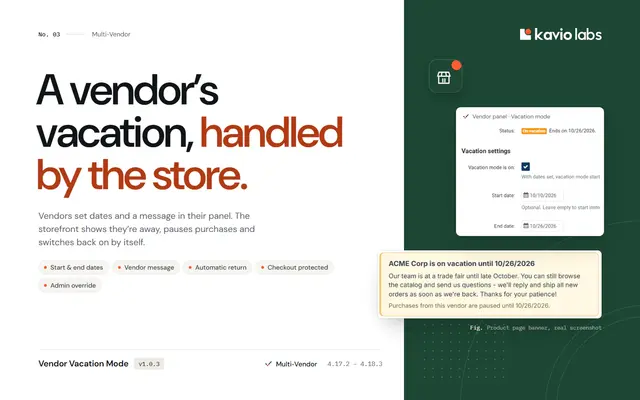
Yes. The vacation banner appears above the profile, and the business hours show "On vacation until …" instead of "Open now".
What does uninstalling remove?
All profiles, plan features, uploaded banners, settings, privileges, e-mail templates and language variables. Vendor logos and descriptions are core data and stay.
Is CS-Cart (not Multi-Vendor) supported?
No. The add-on is built for Multi-Vendor marketplaces; installing it on CS-Cart Standard or Ultimate is refused.
What happens if the license lapses?
Without a valid license (no key after the 14-day start period, an invalid or revoked key, a domain the license does not cover, or no successful check for 14 days), vendor pages show the standard CS-Cart look: no banner, profile sections, announcement or featured products. Vendors and administrators can still edit and review profiles, and all profile data is kept. Once the license is valid again, everything is back.
The admin panel shows a license notice.
Open Add-ons → Manage add-ons → Vendor Storefront Pro → Settings → License. The status line says what is wrong: no key, a key for another add-on, a revoked license, or a domain that the license does not cover. Fix it and click Check now. See License.
Does the add-on work on my staging copy?
Yes. Subdomains of your licensed domain (for example staging.example.com) and local development hosts (localhost, private IP addresses, .local, .test) are covered by the same license.
What happens if your license server is down?
Nothing changes for 14 days: the add-on keeps working and retries every hour. Only if no check succeeds for 14 days is it switched off until the next successful check.
Does the license check slow down my storefront or checkout?
No. The check runs in the admin panel or from cron, once a day. The storefront only reads the stored result.
Add a released add-on to this order and save 15% on it. It uses the same edition and store domain.
Vendor Storefront ProThis add-on
+
Vendor Analytics DashboardGive every vendor real sales, product, conversion and payout analytics, and compare all vendors side by side as the marketplace owner.
$99
+
Vendor Vacation ModeLet vendors pause their store for a vacation with dates, a message and automatic return, without angry customers or cancelled orders.
$59
Also from Kavio Labs
Available now and coming next, tested on the same CS-Cart builds.