

VAT on purchase orders
Since version 1.1.0 every purchase order can show VAT (tax) next to Subtotal, Shipping and Other costs, so the purchase order total matches the invoice of your supplier.
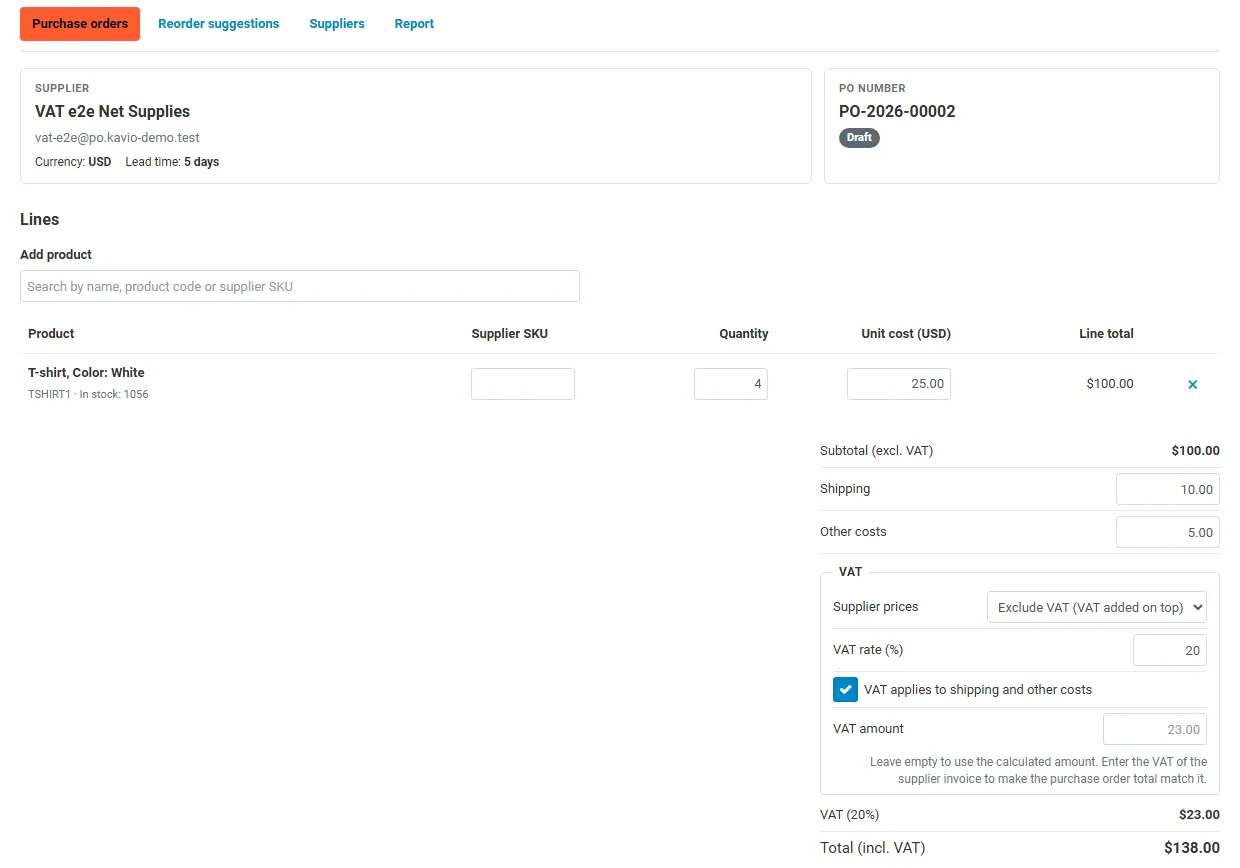
Prices excluding or including VAT
Section titled “Prices excluding or including VAT”| Supplier prices | Meaning | Totals |
|---|---|---|
| Exclude VAT (VAT added on top) | Unit costs, shipping and other costs are net amounts. | Subtotal (excl. VAT), Shipping, Other costs, VAT (rate %), Total (incl. VAT) = net + VAT |
| Include VAT (VAT shown as included) | The amounts you enter already contain VAT. | Subtotal (incl. VAT), Shipping, Other costs, Total (incl. VAT), VAT included (rate %), Total excl. VAT. The total does not change. |
VAT is calculated once on the purchase order, not per line:
- Exclude VAT: VAT = base × rate / 100.
- Include VAT: VAT = base × rate / (100 + rate).
- The base is the subtotal of the lines, plus shipping and other costs when VAT applies to shipping and other costs is ticked (the default). Untick it when your supplier charges shipping or other costs without VAT.
- The VAT amount is rounded once, to the decimals of the purchase order currency (at most 2).
Example (20 %, shipping £10, other costs £5, lines £100): exclude VAT gives VAT £23.00 and a total of £138.00; include VAT with lines £120 and shipping £12 gives VAT included £22.00, total £132.00, total excl. VAT £110.00.
A rate of 0 % shows no VAT line at all: the purchase order looks exactly like in version 1.0.
Where the defaults come from
Section titled “Where the defaults come from”- Add-on settings → VAT on purchase orders: store-wide default supplier prices (exclude or include VAT), default VAT rate and the default of the checkbox “VAT applies to shipping and other costs”. On Ultimate they can differ per storefront.
- Supplier (Products → Purchase orders → Suppliers → supplier): Supplier prices and VAT rate (%). “Store default” and an empty rate use the add-on settings. They are the defaults for the supplier’s new purchase orders, also for drafts created from the reorder suggestions.
- Purchase order: the purchase order editor shows the VAT block under the shipping and other costs. Mode, rate and the shipping checkbox can be changed per purchase order; the totals update while you type and are calculated again by the server on save.
Duplicate copies mode, rate and the shipping checkbox, but not a manual VAT amount.
Matching the supplier invoice (manual VAT)
Section titled “Matching the supplier invoice (manual VAT)”Enter the VAT of the supplier invoice in VAT amount. The purchase order then uses that amount:
- the VAT line gets a Manual badge, and the calculated amount is shown next to it (“Calculated: £23.00”);
- with prices excluding VAT the total becomes net + your VAT amount;
- with prices including VAT the total stays the same; only the VAT shown as included changes (it can not be more than the total);
- Reset to calculated (or an empty field) goes back to the calculated amount.
Lines can be edited until goods are received. The supplier invoice often arrives with or after the delivery, so the purchase order page has Adjust VAT for purchase orders that are sent with receipts, partially received or received: change the mode, the rate, the shipping checkbox or the VAT amount. Lines, quantities and stock do not change, and every change is written to the history (“VAT changed: 20% excl., 22.97 GBP, manual”). Cancelled purchase orders can not be changed.
Stock costs always without VAT
Section titled “Stock costs always without VAT”Receiving books the net unit cost into the product cost (last purchase cost, weighted average cost and the cost price of the Product Cost & Profit add-on):
- prices excluding VAT: the unit cost as entered;
- prices including VAT: unit cost / (1 + rate / 100), rounded to 4 decimals (for example £12.00 at 20 % = £10.00).
Margins on purchase orders and in the product list use the same net cost. The receipt keeps the net cost it was booked with: changing the VAT of a purchase order later does not change costs that were already booked. A manual VAT amount does not change the net unit cost either (it uses the rate). The Report shows the open and received values excluding VAT.
Document, e-mail, supplier link and CSV
Section titled “Document, e-mail, supplier link and CSV”- The printable purchase order, the PDF and the supplier link show the VAT line in the totals (snippet Totals in Design → Documents → Purchase order).
- The e-mail to the supplier lists the VAT next to the total.
- Export to CSV adds these columns after the existing ones (the column order of version 1.0 is unchanged): Subtotal, Shipping cost, Other costs, Supplier prices (
exclude/include), VAT rate (%), VAT on shipping and other costs (Y/N), VAT, VAT entered manually (Y/N), Total excl. VAT, Unit cost excl. VAT.
After upgrading from 1.0
Section titled “After upgrading from 1.0”- Existing purchase orders get Exclude VAT with 0 %: their totals do not change and they show no VAT line. Use Adjust VAT (or the editor of a draft) to add VAT to an open purchase order.
- Existing suppliers use the store default. Set the defaults in the add-on settings first, then the suppliers that differ.
- The upgrade refreshes the default templates of the purchase order document and the e-mail. If you edited the Totals snippet or the e-mail template in Design, your version is kept: open it and click Restore default (then apply your changes again) to get the VAT line.