

Custom add-on forms
Overview · Installation · Configuration · Usage · Custom add-on forms · Developer notes · FAQ
Since version 1.1.0 Captcha Pro also protects forms of other add-ons and of your own templates: a “Send verification code” button, a quote request, a booking form, a custom contact form. No code changes are needed.
Are forms of other add-ons protected automatically?
Section titled “Are forms of other add-ons protected automatically?”Only when the add-on uses CS-Cart’s own spam protection and its form is known to Captcha Pro: the built-in forms (sign-in, registration, checkout, reviews, contact forms and the others on the Spam protection page) and forms that an add-on registers in Settings > Image verification: Use for. A form that posts to its own controller and never asks CS-Cart’s antibot service is not checked by any captcha add-on, including Google reCAPTCHA. Since 1.1.0 you can find such forms with the scan and protect them with one click, or add them by hand.
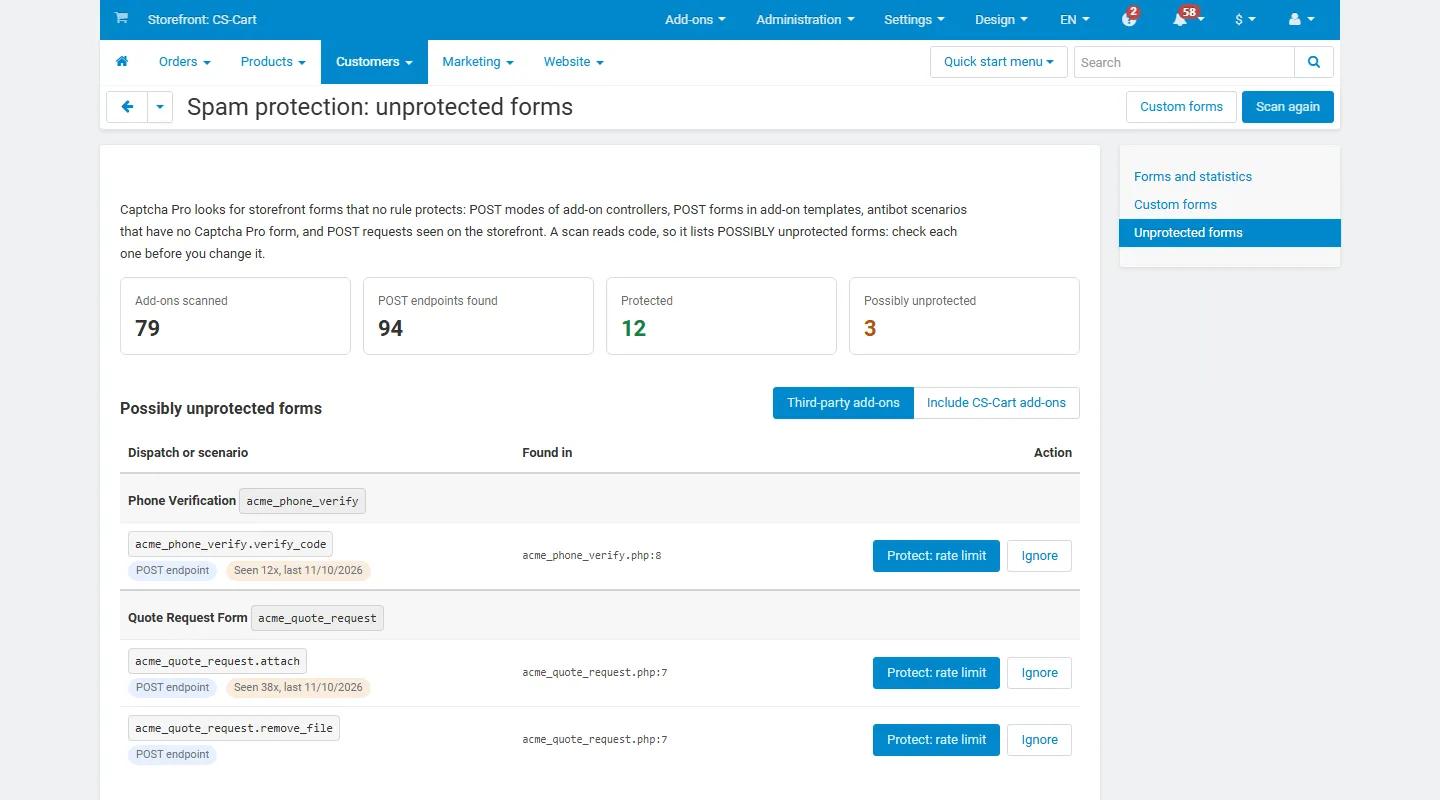
Find unprotected forms
Section titled “Find unprotected forms”Customers > Spam protection > Unprotected forms lists forms that no rule protects:
- POST modes of the storefront controllers of your add-ons (for example
sms_verify.send_code); - POST forms in the storefront templates of your add-ons;
- spam-check scenarios that an add-on uses (its own antibot rule or
common/image_verification.tpl) but that have no Captcha Pro form yet, so they are not checked; - storefront POST requests to add-on controllers seen while Captcha Pro is active (only the dispatch and a counter are recorded, no visitor data).
The scan never lists CS-Cart core pages (cart, checkout, products, sign-in and so on), even when an add-on extends them, and they cannot be added by hand either: limiting them would stop shoppers from buying.
By default the scan shows third-party add-ons; Include CS-Cart add-ons also lists the add-ons that ship with CS-Cart. The scan reads code, so it lists possibly unprotected forms: many entries are harmless (a “remove from list” button, a vote). Choose Ignore for those; ignored entries can be shown again.
Protect adds the entry to the custom forms:
- a POST endpoint with Rate limit only (attempts per IP address and the hidden honeypot field). It needs no change in the form or the browser and covers every form and button that posts to the dispatch. Set the attempts to what a real visitor needs: an endpoint that a page calls by itself (AJAX refresh, polling, quantity steppers) or many shoppers behind one IP address can reach the limit and be refused, so do not use it on such endpoints (use the spam check where a widget is shown, or leave them out);
- a scenario whose template already includes the check with Spam check + rate limit, otherwise with Rate limit only.
Add a form by hand
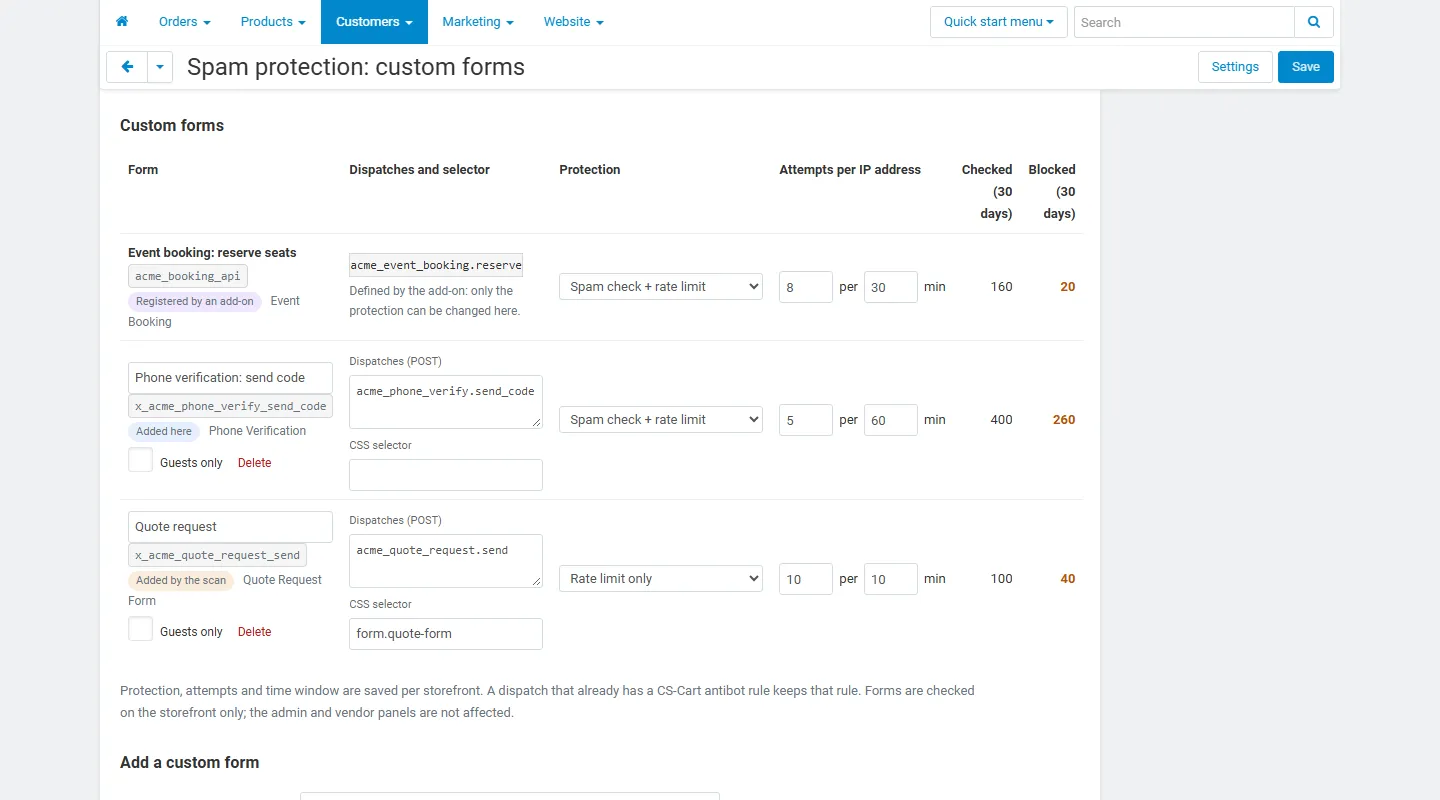
Section titled “Add a form by hand”Customers > Spam protection > Custom forms > Add a custom form:
| Field | What to enter |
|---|---|
| Name | Shown in the forms table and the statistics |
| Dispatches (POST) | One per line: controller.mode of the request the form sends, e.g. sms_verify.send_code, or sms_verify.* for every POST mode of the controller. You find it in the button name (dispatch[sms_verify.send_code]), a hidden dispatch field or the form’s action URL. |
| CSS selector | Optional: forms that match get the check in the browser, e.g. form.sms-form or #quote_form. Forms that post to the dispatches above get it without a selector. A selector without a dispatch only adds the widget in the browser: the server checks the form only when the add-on itself asks CS-Cart’s spam protection (its own rule or fn_image_verification()), so add the dispatch too. |
| Form ID | Optional: the scenario an add-on already uses (in its antibot rule or common/image_verification.tpl). Captcha Pro then switches the check on for it. |
| Protection | Spam check + rate limit, Rate limit only, Off |
| Attempts per IP address | Attempts per time window, as for the built-in forms |
| Guests only | Signed-in customers are never checked on this form |
What happens on the storefront
Section titled “What happens on the storefront”- On the server: every storefront POST request to a registered dispatch is checked before the add-on’s code runs. A failed check shows the usual error and sends the visitor back to the page; the add-on never sees the request. A dispatch that already has an antibot rule keeps it.
- In the browser: for Spam check + rate limit, the Captcha Pro widget (the built-in check, Turnstile or hCaptcha, as set) is added to the matching forms right before their buttons. The form waits for the check and is sent by itself, like the built-in forms.
- Rate limit only needs nothing in the browser.
Which protection to choose
Section titled “Which protection to choose”| Form | Recommended |
|---|---|
| A normal page form (submit button) | Spam check + rate limit |
A form loaded in a popup or sent with AJAX by the theme (cm-ajax) |
Spam check + rate limit (test once) |
| A button that sends data with its own script, without a page form | Rate limit only, or ask the developer to use the JavaScript API below |
After you switch a form to the spam check, send it once on the storefront. If it is refused with “The spam check failed”, the form is sent by a script that ignores the widget: use Rate limit only.
Settings are saved per storefront (CS-Cart Ultimate) and the forms are checked on the storefront only; the admin and vendor panels are not affected (the panel sign-in has its own form on the Forms page).
For developers
Section titled “For developers”Register a form in code
Section titled “Register a form in code”if (function_exists('fn_kv_captcha_pro_register_form')) { fn_kv_captcha_pro_register_form('my_sms_code', 'SMS verification code', [ 'dispatch' => 'my_addon.send_code', // string or array; 'my_addon.*' for every POST mode 'selector' => '', // optional CSS selector for the widget 'status' => 'A', // default protection: A spam check + rate limit, L rate limit only (default), D off 'attempts' => 5, 'window_min' => 60, 'addon' => 'my_addon', // hidden while my_addon is not active 'guests' => false, // true: signed-in customers are never checked ]);}Call it once, for example from your add-on’s install function: the definition is stored and the form appears under Custom forms with its own protection and statistics. Calling it on every request is cheap (it writes only when the definition changes). The protection the administrator chooses is never overwritten. fn_kv_captcha_pro_unregister_form('my_sms_code') removes it (for example from your uninstall function). Form IDs: a-z, 0-9 and _, up to 48 characters; the IDs of the built-in forms are refused.
Add or change custom forms at run time, without storing them:
fn_register_hooks('kv_captcha_pro_get_forms');
// func.phpfunction fn_my_addon_kv_captcha_pro_get_forms(&$forms){    $forms['my_quote'] = ['label' => 'Quote request', 'dispatch' => 'my_addon.quote', 'status' => 'A', 'addon' => 'my_addon'];}
Templates
Section titled “Templates”data-kv-captcha="my_sms_code"on a<form>(or an element inside it) adds the widget of that form without a selector.data-kv-captcha="off"keeps the script away from a form.- Your own antibot scenario keeps working: include
common/image_verification.tplwithoption="my_scenario"and registermy_scenario(or enter it as the Form ID).
JavaScript API (forms sent by your own script)
Section titled “JavaScript API (forms sent by your own script)”// Add the widget to a container that is not a <form>.Tygh.kvCaptchaPro.attach('#sms_box', 'my_sms_code');
// Wait for the check, then send its fields with your request.Tygh.kvCaptchaPro.ready('#sms_box', function (fields) { $.ceAjax('request', fn_url('my_addon.send_code'), {method: 'post', data: $.extend({phone: phone}, fields)});});ready() calls back at once when the check is complete, otherwise when it is. After the request the check is used up; the widget starts a new one at the next interaction (Tygh.kvCaptchaPro.reset('#sms_box') resets it at once).
See Developer notes for the data model and the request flow.